
1. Introduction
This manual provides comprehensive instructions for the safe and efficient use of your Satlink ST-5032 Digital Satellite Signal Finder Meter. Please read this manual thoroughly before operating the device and retain it for future reference.
The Satlink ST-5032 is a compact, lightweight, and intuitive handheld signal finder designed to be fully compliant with DVB-S2/S, ISDB-T, and J83B standards. It offers a rich set of features essential for the installation and verification of digital TV services in various settings, from residential homes to multi-dwelling units.
2. Safety Information
Always observe the following safety precautions to prevent injury or damage to the device:
- Do not expose the device to extreme temperatures, humidity, or direct sunlight.
- Avoid dropping or subjecting the device to strong impacts.
- Use only the provided power adapter for charging.
- Do not attempt to disassemble or repair the device yourself. Refer all servicing to qualified personnel.
- Keep the device away from water and other liquids.
- Ensure proper ventilation during operation and charging.
3. Product Overview
3.1 Package Contents
Upon opening the package, verify that all items are present and in good condition:
- Satlink ST-5032 Digital Satellite Signal Finder Meter
- Power Adapter (UK Plug)
- Shoulder Strap
- User Manual (this document)
- Software CD (for PC connectivity, if applicable)
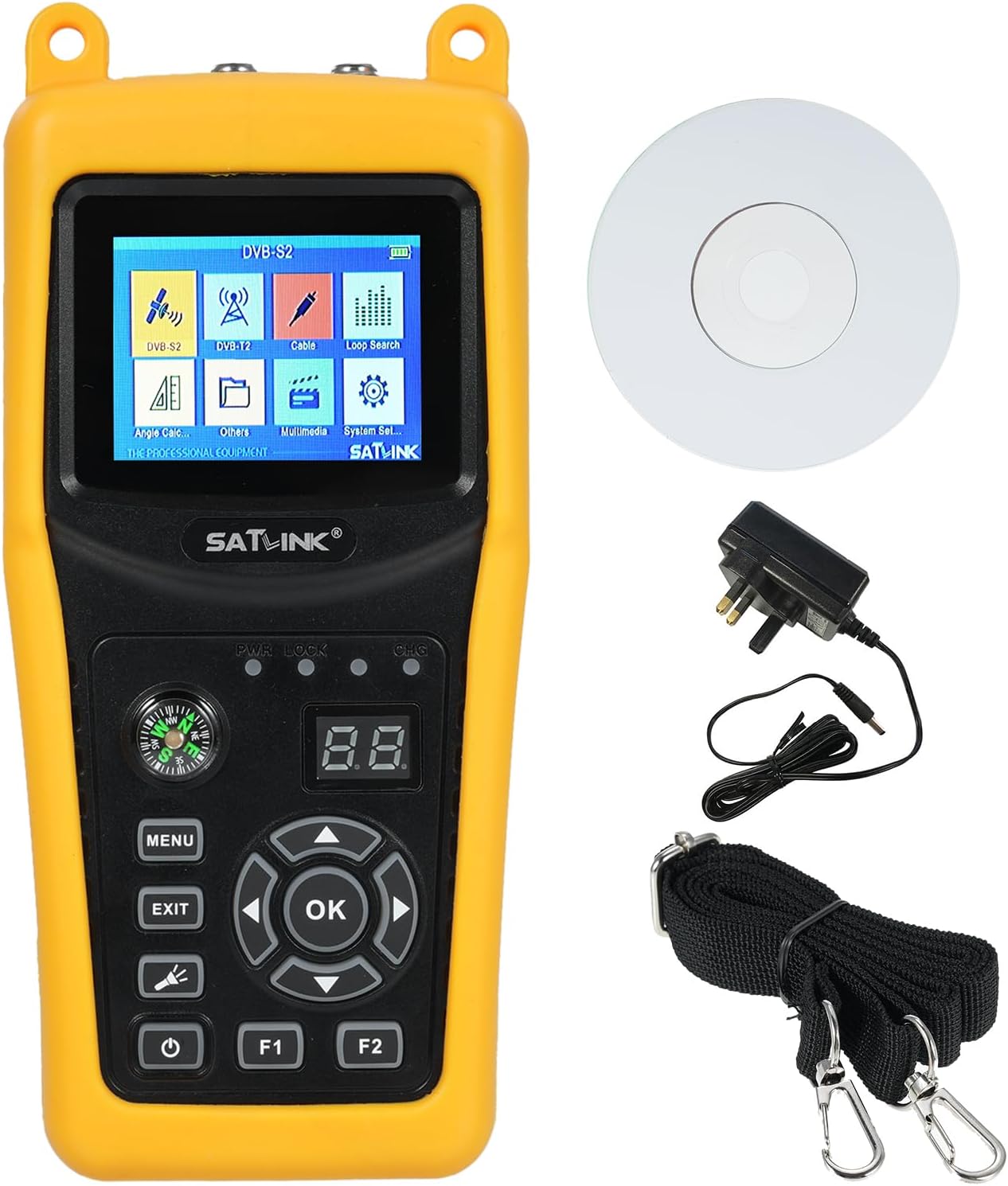
Figure 3.1: The Satlink ST-5032 device shown with its power adapter, shoulder strap, and a software CD.
3.2 Device Features and Components
Familiarize yourself with the various parts and functions of your signal finder.

Figure 3.2: Multiple views of the Satlink ST-5032, highlighting its compact design and various ports.

Figure 3.3: A detailed diagram showing the indicator lights, key buttons, satellite and antenna input ports, USB port, and 12V adapter input on the Satlink ST-5032. It also highlights the 2.4-inch High Definition TFT LCD touch screen, full DVB mode compliance, MPEG-2/MPEG-4 hardware decoding, digital meter for signal strength and quality, and small case design.
- 2.4-inch TFT LCD Screen: Provides clear visual display of signal strength, menu options, and multimedia content.
- Control Buttons: Intuitive buttons for navigation (MENU, EXIT, OK, directional arrows) and function keys (F1, F2).
- Compass: Integrated compass for assisting with satellite dish alignment.
- Satellite Input (F-Type): For connecting to satellite LNB.
- Antenna Input (F-Type): For connecting to terrestrial antenna.
- USB Port: For data transfer and software updates.
- Power Input: For connecting the DC 12V/1A power adapter.
4. Setup
4.1 Charging the Device
Before first use, fully charge the device. Connect the provided UK plug power adapter to the DC 12V/1A input port on the signal finder and plug it into a suitable power outlet. The charging indicator will illuminate. A full charge typically takes several hours.
4.2 Initial Power On
Press and hold the power button (⏻) to turn on the device. The LCD screen will display the main menu.
4.3 Connecting to a Satellite Dish or Antenna
To measure signal strength, connect the coaxial cable from your LNB (for satellite) or antenna (for terrestrial) to the corresponding F-type input port on the top of the device.
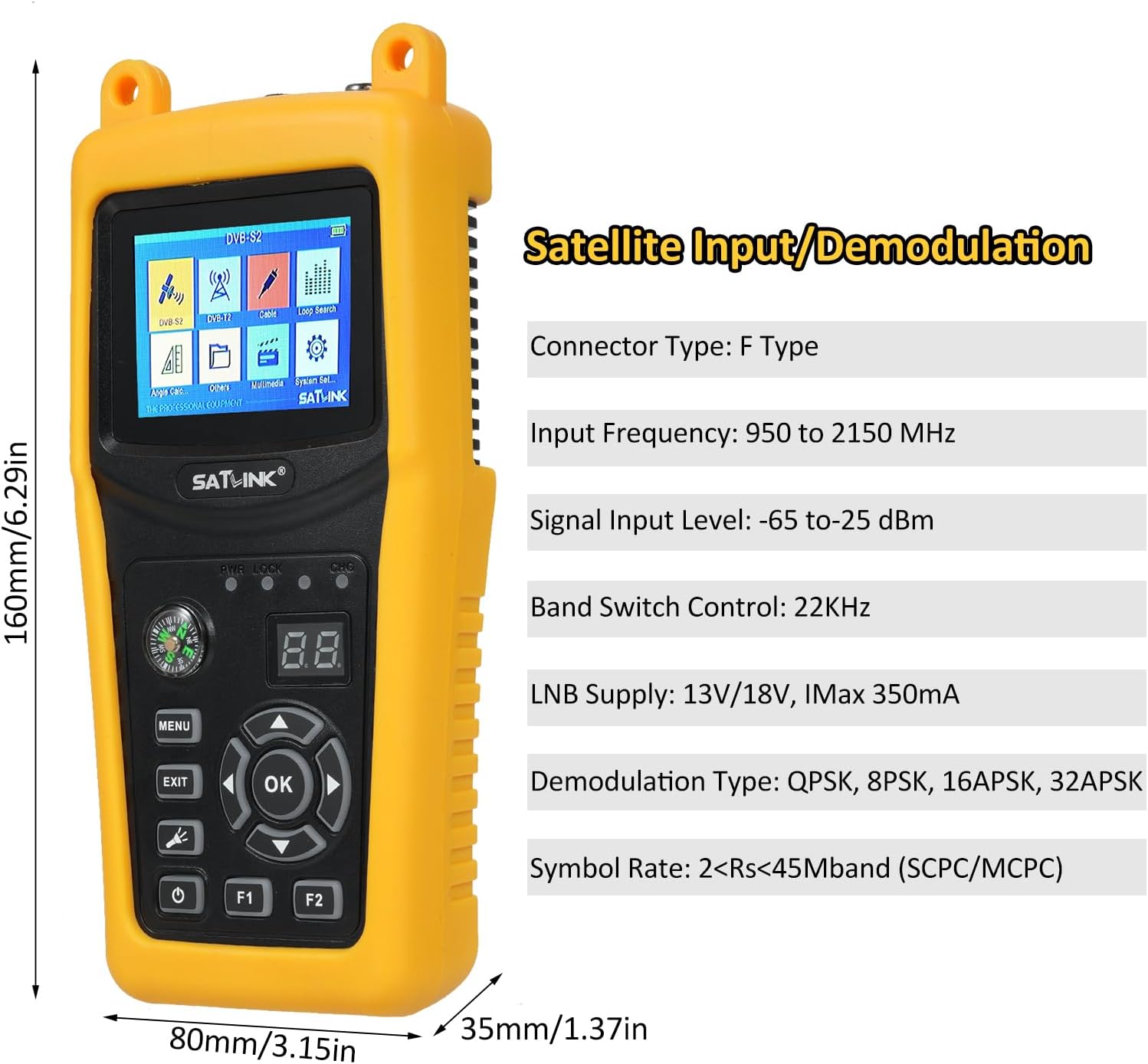
Figure 4.3: The dimensions of the Satlink ST-5032 (160mm height, 80mm width, 35mm depth) are shown, along with a clear indication of the F-type connector for satellite input/demodulation, including input frequency range (950 to 2150 MHz), signal input level (-65 to -25 dBm), band switch control (22KHz), LNB supply (13V/18V, IMax 350mA), demodulation types (QPSK, 8PSK, 16APSK, 32APSK), and symbol rate (2<Rs<45Mband).
5. Operating Instructions
5.1 Navigating the Menu
Use the directional arrow buttons (▲ ▼ ◄ ►) to navigate through menu options. Press the OK button to select an option or confirm a setting. Press MENU to return to the previous screen or the main menu. Press EXIT to exit a function.
5.2 Satellite Signal Finding (DVB-S2/S)
- From the main menu, select the DVB-S2/S option.
- Choose the desired satellite from the list or add a new one.
- Adjust parameters such as LNB frequency, transponder frequency, symbol rate, and polarization as required for your satellite.
- Point your satellite dish towards the satellite. The device's LCD screen will display the signal strength and quality in real-time, allowing for precise adjustment. The integrated compass can assist with initial alignment.
- Optimize the dish position until the signal strength and quality readings are maximized.

Figure 5.2: The Satlink ST-5032 held in hand, illustrating its compact size and user-friendly interface for signal acquisition.
5.3 Terrestrial Signal Finding (ISDB-T, J83B)
- From the main menu, select the ISDB-T or J83B option.
- Select the appropriate channel or frequency range.
- Adjust your terrestrial antenna for optimal signal reception, observing the real-time signal strength and quality on the LCD screen.
5.4 Multimedia Playback
The device supports playback of various multimedia files (mp4, mp3, jpg, bmp) via its USB port. Connect a USB storage device containing your media files to the signal finder. Navigate to the Multimedia section in the main menu to browse and play your files.

Figure 5.4: The Satlink ST-5032 demonstrating its multimedia playback capabilities, showing various image and video content on its display.
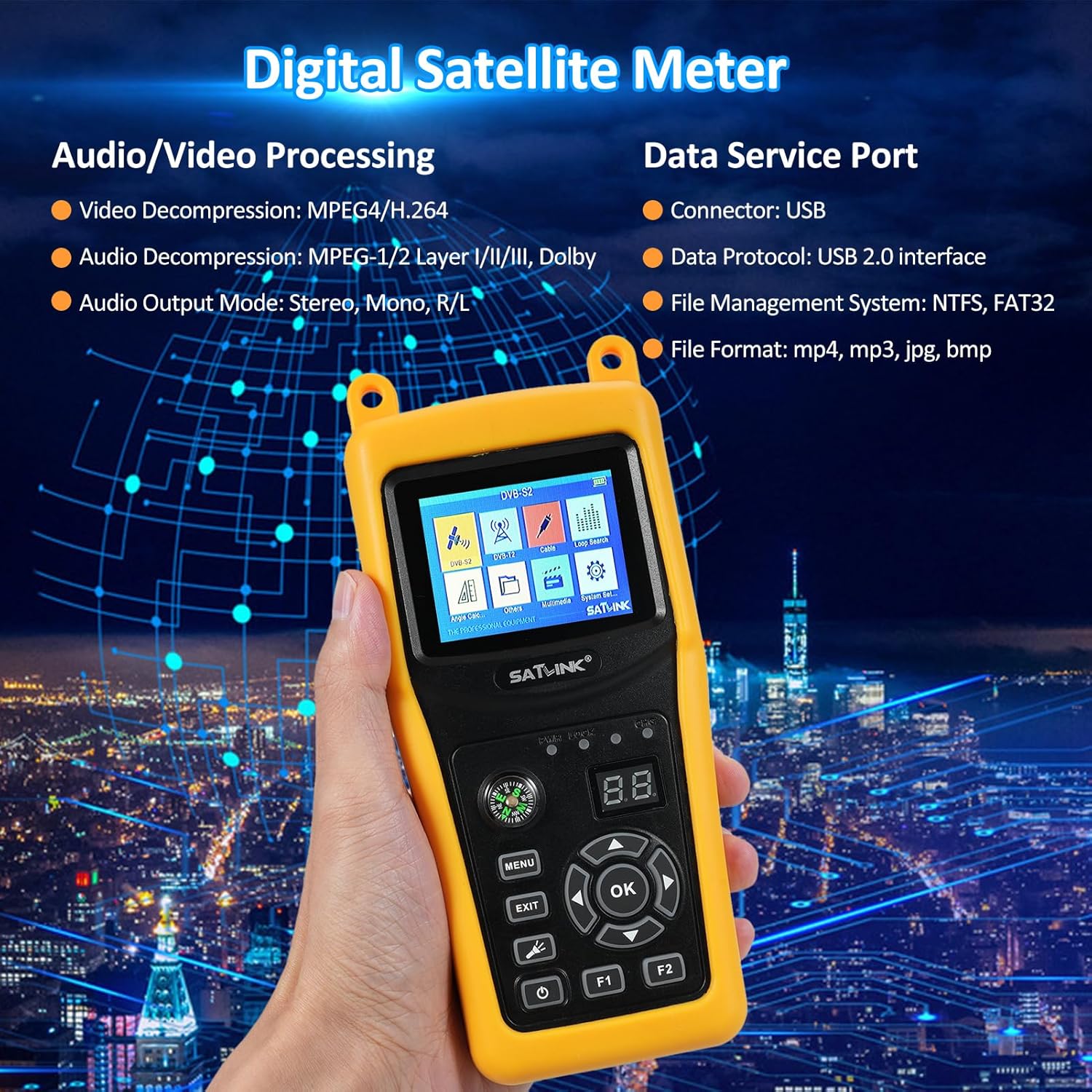
Figure 5.5: An illustration emphasizing the audio/video processing capabilities (MPEG4/H.264 video decompression, MPEG-1/2 Layer I/II/III, Dolby audio decompression, Stereo/Mono/R/L audio output) and the data service port (USB 2.0 interface, NTFS/FAT32 file management, mp4/mp3/jpg/bmp file formats) of the Satlink ST-5032.
6. Maintenance
- Cleaning: Use a soft, dry cloth to clean the device. Do not use liquid cleaners or aerosols.
- Storage: Store the device in a cool, dry place away from direct sunlight when not in use.
- Battery Care: To prolong battery life, avoid fully discharging the battery frequently. Charge the device regularly, even if not in use for extended periods.
- Software Updates: Periodically check the manufacturer's website for firmware updates to ensure optimal performance and compatibility. Updates can typically be installed via the USB port.
7. Troubleshooting
| Problem | Possible Cause | Solution |
|---|---|---|
| Device does not power on. | Battery is depleted. | Connect the power adapter and charge the device. |
| No signal detected. | Incorrect cable connection; Incorrect satellite/transponder settings; Dish/antenna not aligned. | Ensure cables are securely connected. Verify satellite/transponder settings. Adjust dish/antenna alignment. |
| Screen is frozen or unresponsive. | Software glitch. | Press and hold the power button for 10 seconds to force a restart. |
| Cannot play multimedia files. | Unsupported file format; USB device not recognized. | Ensure files are in supported formats (mp4, mp3, jpg, bmp). Check USB connection and format (NTFS, FAT32). |
8. Specifications
| Category | Parameter | Value |
|---|---|---|
| General | Model | ST-5032 |
| Manufacturer | Irfora | |
| Country of Origin | China | |
| Transmission Standards | Supported Standards | DVB-S2/S, ISDB-T, J83B |
| Satellite Input/Demodulation | Connector Type | F Type |
| Input Frequency | 950 to 2150 MHz | |
| Signal Input Level | -65 to -25 dBm | |
| Band Switch Control | 22KHz | |
| LNB Supply | 13V/18V, IMax 350mA | |
| Demodulation Type | QPSK, 8PSK, 16APSK, 32APSK | |
| Symbol Rate | 2<Rs<45Mband(SCPC/MCPC) | |
| ISDB-T/J83B Input/Demodulation | Connector Type | F Type |
| Input Frequency | 48 to 862 MHz | |
| Signal Input Level | -80dbm (ISDB-T), -67dbm(J83B) | |
| Demodulation Type | 64QAM, 256QAM | |
| LCD Features | LCD Type | TFT Transmissive |
| Number of Dots | 320 (RGB) x240 | |
| LCD Screen Size | 2.4" | |
| Audio/Video Processing | Video Decompression | MPEG4/H.264 |
| Audio Decompression | MPEG-1/2 Layer I/II/III, Dolby | |
| Audio Output Mode | Stereo, Mono, R/L | |
| Data Service Port | Connector | USB |
| Data Protocol | USB2.0 interface | |
| File Management System | NTFS, FAT32 | |
| File Format Support | mp4, mp3, jpg, bmp | |
| Power Supply | Li-ion Battery | 7.4V/2600mAh |
| Adapter Input | 100~240VAC 50/60Hz | |
| Adapter Output | DC12V/1A | |
| Physical Characteristics | Dimensions (W x D x H) | 16 x 8 x 3.5 cm (6.3 x 3.15 x 1.38 inches) |
| Net Weight | Approx. 0.7 kg | |
| Plug Type | UK Plug (as per model) |

Figure 8.1: Comprehensive technical specifications of the Satlink ST-5032, including transmission standards, input/demodulation details, LCD features, audio/video processing, data service port, power supply, and physical characteristics.

Figure 8.2: Illustration of the optional plug types for the Satlink ST-5032, specifically showing the US (ST-5030), EU (ST-5032), and UK (ST-5032) plug variants and their respective power adapters.
9. Warranty and Support
For warranty information and technical support, please refer to the contact details provided by your retailer or visit the official Irfora website. Keep your purchase receipt as proof of purchase for warranty claims.
Date First Available: June 26, 2024