
DOOGEE blade 10pro
DOOGEE Blade 10 Pro Rugged Phone User Manual
Model: blade 10pro
1. Product Overview
The DOOGEE Blade 10 Pro is engineered for durability and performance, combining advanced smartphone features with a robust design. It operates on Android 14, offering a smooth and secure user experience. Its rugged construction ensures reliability in various challenging environments.

Image: Front and back view of the DOOGEE Blade 10 Pro Rugged Phone, showcasing its design and camera module.
Key Features:
- Operating System: Android 14 for efficient and secure operation.
- Display: 6.56-inch HD+ screen with a 90Hz adaptive refresh rate for smooth visuals.
- Performance: Octa-Core Processor with 16GB RAM (including 10GB virtual memory) and 256GB ROM, expandable up to 1TB via TF card.
- Camera System: 50MP AI main camera and 8MP front camera for clear photos and videos.
- Battery: Long-lasting 5150mAh battery.
- Durability: IP68/IP69K waterproof and MIL-STD-810H compliant for extreme conditions.
- Connectivity: 4G Dual SIM support, NFC for Google Pay, and comprehensive navigation systems (GPS, Beidou, GLONASS, Galileo).
- Security: Face ID Recognition for convenient unlocking.
2. Getting Started
Package Contents:
Upon opening your DOOGEE Blade 10 Pro package, please verify that all items are present and in good condition:
- 1x DOOGEE Blade 10 Pro Smartphone
- 1x Type-C USB Cable
- 1x Charger
- 1x User Manual
- 1x Tempered Glass Protective Film (Pre-applied)
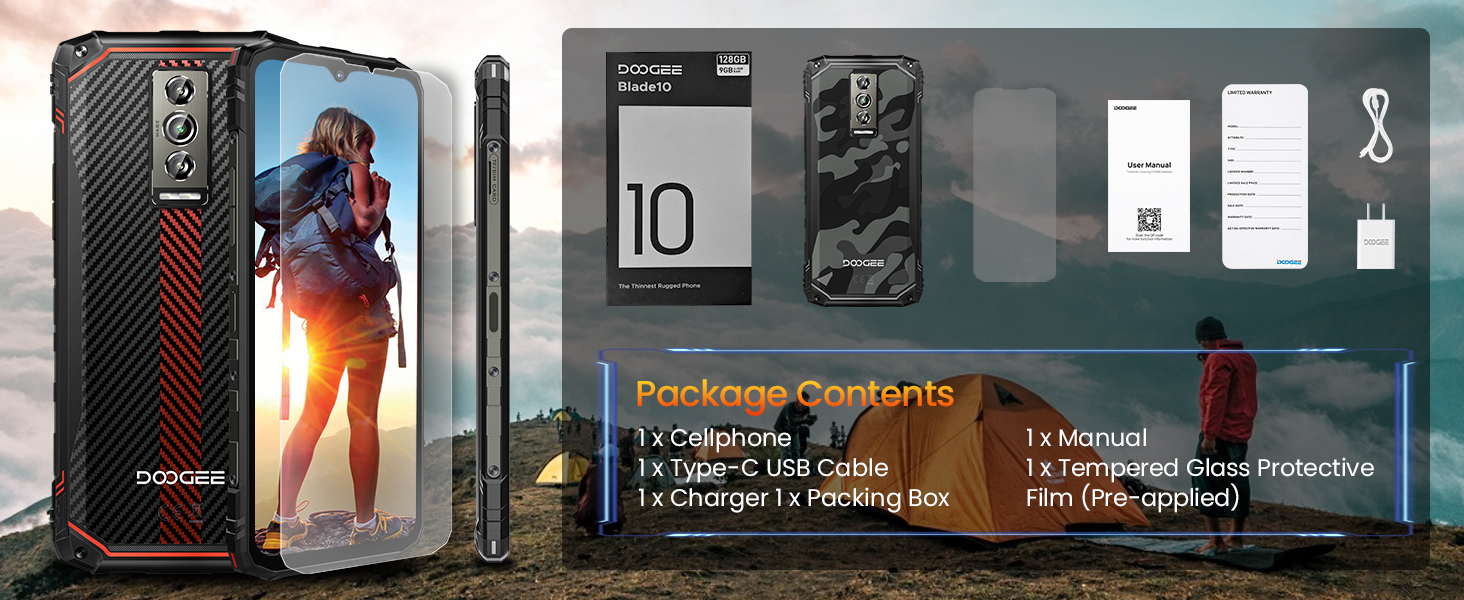
Image: Illustration of the DOOGEE Blade 10 Pro and its included accessories: phone, USB cable, charger, manual, and tempered glass.
SIM Card and TF Card Installation:
The DOOGEE Blade 10 Pro supports dual SIM cards and an expandable TF card for additional storage. Locate the SIM card tray on the side of the device. Use the provided SIM ejector tool to open the tray. Carefully place your Nano-SIM cards and/or TF card into the designated slots, ensuring correct orientation. Gently push the tray back into the phone until it clicks into place.
Initial Power On and Setup:
To power on your device, press and hold the Power button located on the side until the DOOGEE logo appears. Follow the on-screen prompts to complete the initial setup, including language selection, Wi-Fi connection, Google account sign-in, and security settings (Face ID, PIN, pattern, or password).
Charging the Device:
Before first use, it is recommended to fully charge the phone. Connect the Type-C USB cable to the phone's charging port and the other end to the provided charger. Plug the charger into a power outlet. The charging indicator will appear on the screen. Once fully charged, disconnect the charger.
3. Operating Your Device
Display and Navigation:
The 6.56-inch HD+ display offers a vibrant visual experience. Navigate the Android 14 interface using touch gestures. Swipe up from the bottom for the app drawer, swipe down from the top for quick settings and notifications. The 90Hz refresh rate provides smooth scrolling and responsiveness.

Image: Close-up of the DOOGEE Blade 10 Pro's 6.56-inch HD+ Waterdrop Screen, highlighting its 90Hz refresh rate for a smooth visual experience.
Performance and Storage:
Equipped with an Octa-Core Processor and 16GB RAM (4GB physical + 12GB virtual), the Blade 10 Pro handles multitasking and demanding applications with ease. The 256GB internal storage provides ample space for apps, photos, and videos, and can be expanded up to 1TB with a TF card.

Image: Diagram illustrating the DOOGEE Blade 10 Pro's memory configuration, showing 9GB RAM (4GB + 5GB Extended) and 128GB ROM (expandable to 1TB) powered by an Octa-Core Processor.
Camera Functions:
Capture high-quality images and videos with the 50MP AI main camera and 8MP front camera. The camera app includes various modes such as HDR, Panorama, Portrait, Pro Mode, Beauty, Filter, QR code, and Night mode to enhance your photography experience.

Image: Collage showcasing the DOOGEE Blade 10 Pro's 50MP AI Rear Camera and 8MP Front Camera, with example photos demonstrating its capabilities.
Battery Management:
The 5150mAh battery provides extended usage time. To optimize battery life, manage background app usage, adjust screen brightness, and utilize power-saving modes available in the Android settings. The phone's ultra-thin design (10.7mm) does not compromise on battery capacity.

Image: Internal view of the DOOGEE Blade 10 Pro, highlighting the large 5150mAh battery and the phone's slim 10.7mm profile.
Durability Features:
The Blade 10 Pro is built to withstand harsh conditions, complying with IP68 (waterproof), IP69K (dustproof), and MIL-STD-810H (drop-proof) standards. This makes it suitable for outdoor activities and demanding work environments.

Image: Visual representation of the DOOGEE Blade 10 Pro's IP68 waterproof, IP69K dustproof, and MIL-STD-810H drop-proof certifications, showing the phone in water, dirt, and after impact.
4. Maintenance
To ensure the longevity and optimal performance of your DOOGEE Blade 10 Pro, follow these maintenance guidelines:
- Cleaning: Regularly wipe the phone with a soft, damp cloth to remove dust and dirt. For stubborn stains, use a mild soap solution. Ensure all ports are dry before charging or connecting accessories.
- Temperature Exposure: While the phone is designed for extreme temperatures (-30°C to 70°C), prolonged exposure to direct sunlight or excessive heat/cold can affect battery life and internal components.
- Port Protection: Keep the charging port and SIM tray sealed when not in use to maintain water and dust resistance.
- Screen Care: Although a tempered glass protector is pre-applied, avoid placing sharp objects near the screen to prevent scratches.
- Software Updates: Keep your phone's software updated to the latest version to benefit from performance improvements, security patches, and new features.
5. Troubleshooting
This section addresses common issues you might encounter with your DOOGEE Blade 10 Pro.
| Problem | Possible Cause | Solution |
|---|---|---|
| No network signal / Cannot make calls | Incorrect SIM card installation, out of network coverage, or carrier incompatibility. | Ensure SIM card is correctly inserted. Check network coverage in your area. Note: This phone does not support Verizon and AT&T networks. Verify compatibility with your local frequency band before purchasing. |
| Battery drains quickly | Too many background apps, high screen brightness, or frequent use of power-intensive features. | Close unused apps, reduce screen brightness, enable power-saving mode, or restart the device. |
| Camera not working | App glitch, insufficient storage, or software issue. | Restart the camera app or the phone. Clear camera app cache/data. Ensure sufficient storage space. |
| No audio from headphones | The phone does not have a 3.5mm headphone jack. | Use Bluetooth headphones or a USB-C to 3.5mm adapter (not included). |
| Phone is slow or unresponsive | Too many apps running, low storage, or system overload. | Close background apps, clear cache, free up storage, or restart the phone. Consider a factory reset if issues persist (back up data first). |
6. Specifications
Detailed technical specifications for the DOOGEE Blade 10 Pro:
| Feature | Specification |
|---|---|
| Model Name | blade 10pro |
| Operating System | Android 14 |
| Screen Size | 6.56 Inches |
| Resolution | 720*1612 pixels |
| Refresh Rate | 90 Hz |
| RAM Memory Installed Size | 16 GB (4GB physical + 12GB virtual) |
| Memory Storage Capacity | 256 GB (expandable up to 1TB) |
| Battery Capacity | 5150 Milliamp Hours |
| Rear Camera | 50MP AI Camera |
| Front Camera | 8MP |
| Form Factor | Rugged Phone |
| Wireless Carrier | Unlocked (Does not support Verizon and AT&T) |
| Cellular Technology | 4G |
| Connectivity Technologies | Bluetooth, NFC, GPS (Beidou, GLONASS, Galileo) |
| Audio Jack | No headphone jack |
| Product Dimensions | 7.63 x 4.09 x 2.02 inches |
| Item Weight | 15.5 ounces |
| Manufacturer | DOOGEE |
| Country of Origin | China |
| Date First Available | June 26, 2024 |
7. Warranty and Support
DOOGEE is committed to providing excellent customer service for your Blade 10 Pro. For any inquiries or support needs, please refer to the following information:
- Return Policy: DOOGEE offers a 30-day no-reason return policy from the date of purchase.
- Technical Support: Long-term technical support is available for your device.
- Customer Service: 24-hour online customer service is provided to assist you with any issues or questions.
When contacting support, please have your product model (blade 10pro) and purchase details readily available.
Related documentsblade 10pro


Ask a question about this manual
Ask about setup, troubleshooting, compatibility, parts, safety, or missing instructions. Manuals+ will review the question and use this page’s manual context to help answer it.