
1. Introduction
The Xgody S200 is a user-friendly flip phone specifically designed for elderly users. It features large buttons, a clear 2.4-inch color display, and an intuitive operating system for comfortable reading and operation. This phone supports dual SIM cards, an SD card for expanded storage, and includes practical functions such as a flashlight, FM radio, and Bluetooth. The 1300 mAh battery and Type-C charging port ensure reliable, long-lasting use.
2. Package Contents
Please check the package contents upon unboxing. If any items are missing or damaged, contact customer support.
- Xgody S200 Flip Phone
- 1300 mAh Battery
- USB Type-C Charging Cable
- Phone Case
- Screen Protector
- User Manual
3. Device Overview
The Xgody S200 features a robust flip design that protects the screen and enhances portability. Key features include a 2.4-inch display, large physical buttons, and dedicated ports for charging and audio.
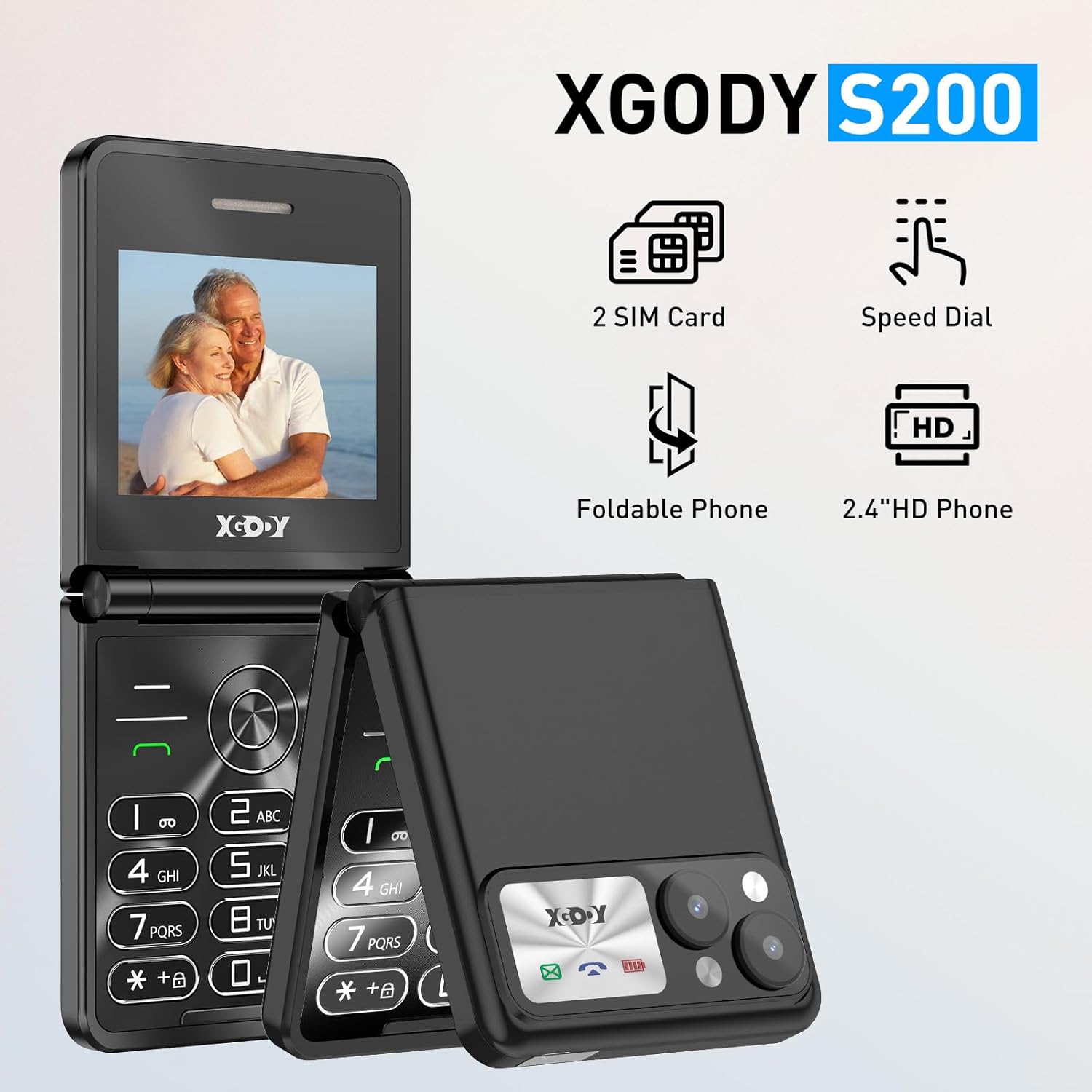
Figure 3.1: Xgody S200 Flip Phone highlighting its main features: Dual SIM support, Speed Dial capability, foldable design, and a 2.4-inch HD display.
The phone is equipped with a high-volume speaker, clear menu icons, and enlarged fonts for improved accessibility for seniors and visually impaired individuals.
4. Setup
4.1. Battery Installation
- Open the back cover of the phone.
- Insert the 1300 mAh battery into the battery compartment, ensuring the gold contacts align with the phone's terminals.
- Replace the back cover until it clicks securely into place.
4.2. Inserting SIM and SD Cards
The Xgody S200 supports dual SIM cards (2G GSM networks) and one MicroSD card for additional storage.
- With the battery removed, locate the SIM card slots and the MicroSD card slot.
- Carefully insert your SIM cards into the designated slots with the gold contacts facing down.
- Insert the MicroSD card (if desired) into its slot.
- Reinstall the battery and back cover.
4.3. Charging the Phone
Before first use, fully charge the phone battery.

Figure 4.1: Xgody S200 Flip Phone highlighting the 1300mAh battery, Type-C charging port, and 3.5mm headphone port.
- Connect the USB Type-C charging cable to the charging port on the phone.
- Connect the other end of the cable to a compatible USB power adapter (not always included) or a computer's USB port.
- The charging indicator on the screen will show the charging status.
- Once fully charged, disconnect the charger.
4.4. Powering On/Off
- To Power On: Press and hold the Power/End Call button (red button) until the screen lights up.
- To Power Off: Press and hold the Power/End Call button until the power-off options appear, then select 'Power Off'.
5. Operating Instructions
5.1. Making and Receiving Calls
- To Make a Call: Enter the phone number using the keypad and press the Call button (green button).
- To Answer a Call: When the phone rings, press the Call button (green button) to answer.
- To End a Call: Press the Power/End Call button (red button).

Figure 5.1: The Xgody S200 provides loud and clear phone volume, making conversations easier to hear for elderly users.
5.2. Contacts
You can save frequently called numbers to your phone's contacts for easy access.
- Navigate to the 'Contacts' menu.
- Select 'Add New Contact' and enter the name and phone number.
- Save the contact.
5.3. SOS Emergency Calls
The S200 features an SOS button for immediate emergency calls to pre-set contacts.

Figure 5.2: The SOS Emergency Call feature supports up to 5 family numbers, a doctor, and first aid contacts, ensuring safety for elderly users.
- Go to the 'SOS Settings' menu.
- Add up to 5 emergency contact numbers.
- In an emergency, press and hold the dedicated SOS button on the back of the phone. The phone will automatically dial the emergency contacts in sequence until one answers.
5.4. Flashlight
The phone includes a built-in flashlight for convenience.

Figure 5.3: The exclusive flashlight feature can be activated by pressing a dedicated button for 3 seconds, providing immediate light.
- To turn on the flashlight, press and hold the dedicated flashlight button (usually on the side or a specific key) for 3 seconds.
- To turn off the flashlight, press and hold the same button again.
5.5. FM Radio
Enjoy your favorite radio stations on the go.
- Plug in a 3.5mm headphone (acts as an antenna).
- Navigate to the 'FM Radio' application from the main menu.
- Use the navigation keys to scan for stations or manually tune to a frequency.
5.6. Bluetooth
Connect to Bluetooth headsets or other devices.
- Go to 'Settings' > 'Bluetooth'.
- Turn Bluetooth 'On'.
- Search for available devices and select the device you wish to pair with.
5.7. Volume Adjustment
Adjust the call volume and ringtone volume using the dedicated volume keys or through the settings menu.
6. Maintenance
6.1. Cleaning
- Use a soft, dry cloth to clean the phone's exterior.
- Avoid using liquid cleaners or aerosols, as they may damage the device.
6.2. Battery Care
- Do not expose the battery to extreme temperatures.
- Avoid fully discharging the battery frequently to prolong its lifespan.
- Use only the provided or approved charging cable.
6.3. Storage
- Store the phone in a cool, dry place away from direct sunlight.
- If storing for an extended period, ensure the battery is partially charged (around 50%).
7. Troubleshooting
7.1. Phone Does Not Power On
- Ensure the battery is correctly installed and charged.
- Connect the charger and try powering on again.
7.2. Cannot Make or Receive Calls
- Check if the SIM card is properly inserted.
- Verify that you have network signal.
- Ensure your SIM card is active and has sufficient credit/plan.
7.3. Poor Audio Quality
- Check the volume settings during a call.
- Ensure the speaker and microphone are not obstructed.
- Move to an area with better network coverage.
7.4. Battery Drains Quickly
- Reduce screen brightness.
- Close unused applications.
- Ensure the phone is not in an area with very weak signal, which can cause the phone to work harder.
8. Specifications
| Brand | Xgody |
| Model Name | S200 |
| Operating System | Nucleus OS |
| Screen Size | 2.4 Inches |
| Display Resolution | 320 x 240 (LCD) |
| Cellular Technology | 2G (GSM) |
| SIM Card Slots | Dual SIM |
| Battery Capacity | 1300 mAh |
| Talk Time | Up to 6 Hours |
| Standby Time | Up to 200 Hours |
| Charging Port | USB Type-C |
| Headphone Jack | 3.5 mm |
| Special Features | Large Buttons, SOS Function, Flashlight, FM Radio, Bluetooth |
| Water Resistance | Not waterproof |
9. Warranty and Support
9.1. Warranty Information
The Xgody S200 flip phone comes with a 6-month warranty from the date of purchase. This warranty covers manufacturing defects and malfunctions under normal use. It does not cover damage caused by misuse, accidents, unauthorized repairs, or normal wear and tear.
9.2. Customer Support
For technical assistance, warranty claims, or any questions regarding your Xgody S200 phone, please contact Xgody customer support. Refer to the contact information provided with your purchase or visit the official Xgody website for support details.
