
1. Introduction
Thank you for choosing the Caline S8G Electric Guitar Amplifier. This compact, battery-powered combo amplifier is designed to provide versatile sound for electric guitarists, featuring built-in effects and Bluetooth connectivity. Please read this manual thoroughly to ensure proper use and to maximize your experience with the S8G amplifier.
The Caline S8G is a desktop mini electric guitar amplifier that combines powerful sound with modern features, designed for guitar enthusiasts who crave versatility and convenience without compromising on quality.
2. Important Safety Instructions
- Do not expose this unit to rain or moisture.
- Do not open the casing; there are no user-serviceable parts inside.
- Use only the specified power adapter for charging.
- Avoid placing the unit near heat sources or in direct sunlight.
- Clean only with a dry cloth.
3. What's in the Box
- Caline S8G Electric Guitar Amplifier
- User Manual
- Power Adapter for charging
4. Key Features
- Built-in delay and distortion effects with independent controls for maximum flexibility.
- Built-in rechargeable battery, providing up to 4 hours of outdoor use.
- 2 x 20-watt premium speakers for ample volume.
- Headphone output for silent practice.
- Bluetooth connectivity for playing along with backing tracks.
5. Product Overview
Familiarize yourself with the various controls and ports on your Caline S8G amplifier.

Figure 1: Front panel of the Caline S8G amplifier, showing input jack, control knobs for volume, gain, tone, delay, mix, repeat, time, and distortion switch, along with power switch and indicator lights.
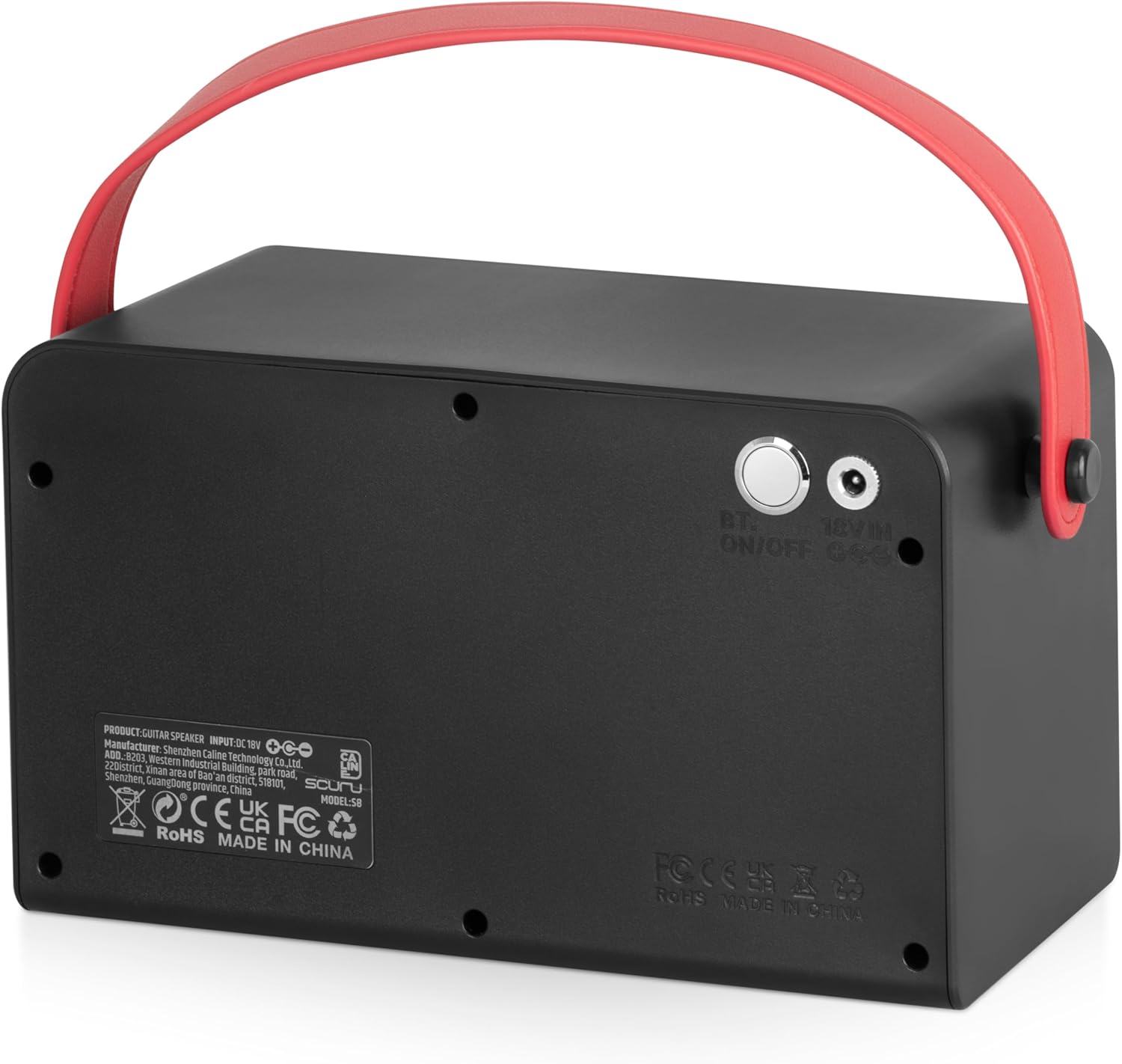
Figure 2: Rear panel of the Caline S8G amplifier, displaying the Bluetooth ON/OFF button and the 18V DC power input.
Front Panel Controls:
- OFF/ON Switch: Powers the amplifier on or off.
- MA VOL (Master Volume): Adjusts the overall output volume of the amplifier.
- MIX (Delay Mix): Controls the wet/dry balance of the delay effect.
- REPEAT (Delay Repeats): Adjusts the number of delay repetitions.
- TIME (Delay Time): Sets the duration between delay repeats.
- DELAY Switch: Engages or disengages the delay effect.
- TONE: Adjusts the tonal characteristics (brightness/darkness) of the sound.
- GAIN: Controls the amount of input signal gain, affecting overdrive and distortion levels.
- DIST. VOL (Distortion Volume): Adjusts the output volume when distortion is active.
- DIST. Switch: Engages or disengages the distortion effect.
- INPUT Jack: 6.35mm input for your electric guitar.
- Headphone Jack: For private practice.
Rear Panel Controls:
- BT ON/OFF (Bluetooth On/Off): Activates or deactivates Bluetooth connectivity.
- 18V IN: Power input for the included adapter to charge the internal battery or power the unit.
6. Setup
6.1 Initial Charging
Before first use, fully charge the internal Lithium Ion battery. Connect the provided 18V power adapter to the "18V IN" port on the rear panel and plug it into a wall outlet. The charging indicator light (if present, refer to specific LED indicators on the unit) will show charging status. A full charge provides approximately 4 hours of use.
6.2 Connecting Your Guitar
- Ensure the amplifier is turned off.
- Connect one end of a standard 6.35mm (1/4 inch) instrument cable to your electric guitar.
- Connect the other end of the instrument cable to the "INPUT" jack on the front panel of the amplifier.
6.3 Bluetooth Pairing
- Turn on the amplifier using the "OFF/ON" switch.
- Press the "BT ON/OFF" button on the rear panel to activate Bluetooth. An indicator light will typically flash, indicating pairing mode.
- On your Bluetooth-enabled device (smartphone, tablet, etc.), search for available devices and select "Caline S8G" (or similar name).
- Once paired, the Bluetooth indicator light will become solid. You can now play audio from your device through the amplifier.
7. Operating Instructions
7.1 Basic Operation
- After connecting your guitar, turn on the amplifier using the "OFF/ON" switch.
- Start with the "MA VOL" knob set to a low level.
- Adjust the "TONE" knob to achieve your desired brightness.
- Slowly increase the "MA VOL" to a comfortable listening level.
7.2 Using Distortion
- Engage the distortion effect by flipping the "DIST." switch.
- Adjust the "GAIN" knob to control the amount of distortion. Higher gain settings will produce more saturated, overdriven sounds.
- Use the "DIST. VOL" knob to balance the volume of the distorted sound with your clean tone.
7.3 Using Delay
- Engage the delay effect by flipping the "DELAY" switch.
- Adjust "TIME" to set the interval between echoes.
- Adjust "REPEAT" to control how many times the echo repeats.
- Adjust "MIX" to blend the delayed signal with your original guitar signal.
7.4 Headphone Use
To practice silently, plug standard 3.5mm (1/8 inch) headphones into the headphone jack on the front panel. The main speakers will automatically mute. Adjust the "MA VOL" for headphone listening.
7.5 Playing Along with Bluetooth Audio
Once your device is paired via Bluetooth, start playing music or backing tracks on your device. The audio will play through the S8G amplifier. You can adjust the volume of the Bluetooth audio from your connected device, and your guitar volume independently using the amplifier's controls.
8. Maintenance
- Cleaning: Use a soft, dry cloth to clean the exterior of the amplifier. Do not use liquid cleaners or abrasive materials.
- Storage: Store the amplifier in a cool, dry place away from direct sunlight and extreme temperatures.
- Battery Care: For optimal battery life, avoid completely draining the battery frequently. Charge the unit regularly, even if not in use for extended periods.
9. Troubleshooting
| Problem | Possible Cause | Solution |
|---|---|---|
| No sound from amplifier. | Amplifier not powered on; volume too low; guitar cable faulty or not connected; headphones plugged in. | Ensure power is on; increase "MA VOL"; check guitar cable connection; unplug headphones. |
| Bluetooth not connecting. | Bluetooth not activated; device too far; already paired with another device. | Press "BT ON/OFF"; move device closer; disconnect from other devices and re-pair. |
| Distortion/Delay not working. | Effect switch off; effect knobs set to minimum. | Ensure "DIST." or "DELAY" switch is engaged; adjust corresponding effect knobs. |
| Short battery life. | Battery not fully charged; aging battery. | Ensure full charge before use; contact support if battery life significantly degrades. |
10. Specifications
| Feature | Detail |
|---|---|
| Model Number | S8G |
| Output Wattage | 2 x 20 Watts |
| Power Source | Battery Powered (Lithium Ion) / 18V DC Adapter |
| Battery Life | Up to 4 hours (approx.) |
| Product Dimensions | 5.3 x 9.5 x 5.5 inches |
| Item Weight | 4.18 pounds |
| Material Type | Metal |
| Connector Type | 6.35mm Jack (Input) |
| Compatible Devices | Electric Guitar, Bluetooth Audio Devices |
11. Warranty and Support
For warranty information and customer support, please refer to the documentation included with your purchase or visit the official Caline website. Keep your proof of purchase for any warranty claims.
You can also visit the Caline Store on Amazon for additional product information and support resources.