1. Introduction
This manual provides detailed instructions for the safe and proper installation, operation, and maintenance of your Perlegear PGMF18-EU TV Wall Mount. Please read all instructions carefully before beginning installation to ensure a secure and optimal viewing experience. Keep this manual for future reference.

Image 1.1: Overview of the Perlegear PGMF18-EU TV Wall Mount and included accessories.
2. Safety Information
WARNING: Failure to read and follow all instructions may result in personal injury, property damage, or voiding of warranty. Improper installation can lead to serious injury or damage.
- Do not install this product on walls that are not structurally sound or that exceed the maximum weight capacity.
- Ensure the mounting surface can safely support the combined weight of the mount and the television.
- Always use appropriate personal protective equipment during installation (e.g., safety glasses).
- If you are unsure about any part of the installation process, consult a qualified professional.
- Keep children and pets away during installation.
- Do not overtighten screws, as this may cause damage.
3. Package Contents
Verify that all components are present and undamaged before installation. If any parts are missing or defective, contact Perlegear customer support.
- Full-Motion TV Wall Mount Assembly
- TV Brackets (2 pcs)
- Mounting Hardware Kit (various screws, anchors, washers)
- Bubble Level
- Cable Ties (5 pcs)
- Instruction Manual
4. Tools Required (Not Included)
- Pencil
- Stud Finder (for wood stud installation)
- Drill
- Drill Bits (specific sizes for wood studs or concrete, refer to installation steps)
- Socket Wrench or Adjustable Wrench
- Phillips Head Screwdriver
- Hammer (for concrete anchors)
5. Compatibility
The Perlegear PGMF18-EU TV Wall Mount is designed for a wide range of televisions. Please confirm your TV's specifications before proceeding.
- TV Size: Fits most 23-65 inch (58-165 cm) TVs.
- Weight Capacity: Supports TVs up to 45 kg (99 lbs).
- VESA Patterns: Compatible with VESA patterns from 200x100 mm to 400x400 mm. Common patterns include:
- 200x100mm
- 200x200mm
- 200x300mm
- 200x400mm
- 300x200mm
- 300x300mm
- 300x400mm
- 400x200mm
- 400x300mm
- 400x400mm
- Wall Types: Suitable for solid concrete walls, brick walls, and wood stud walls (minimum 60 mm thickness for wood studs). Not for drywall only installation.

Image 5.1: Visual guide for wall compatibility (brick, concrete, wood) and supported VESA patterns with maximum load.
6. Setup and Installation
The Perlegear PGMF18-EU mount comes pre-assembled to simplify installation. Follow these steps carefully.
6.1. Attaching TV Brackets to TV
- Carefully place your TV face-down on a soft, clean surface to prevent screen damage.
- Identify the VESA mounting holes on the back of your TV.
- Select the correct diameter and length screws from the hardware kit that fit your TV's mounting holes. Use washers if necessary to prevent overtightening damage.
- Attach the two TV brackets to the back of your TV using the selected screws. Ensure the brackets are level and securely fastened. The hooks on the brackets should face upwards.
6.2. Mounting the Wall Plate
Important: Before drilling, ensure there are no hidden electrical wires or plumbing in the wall.
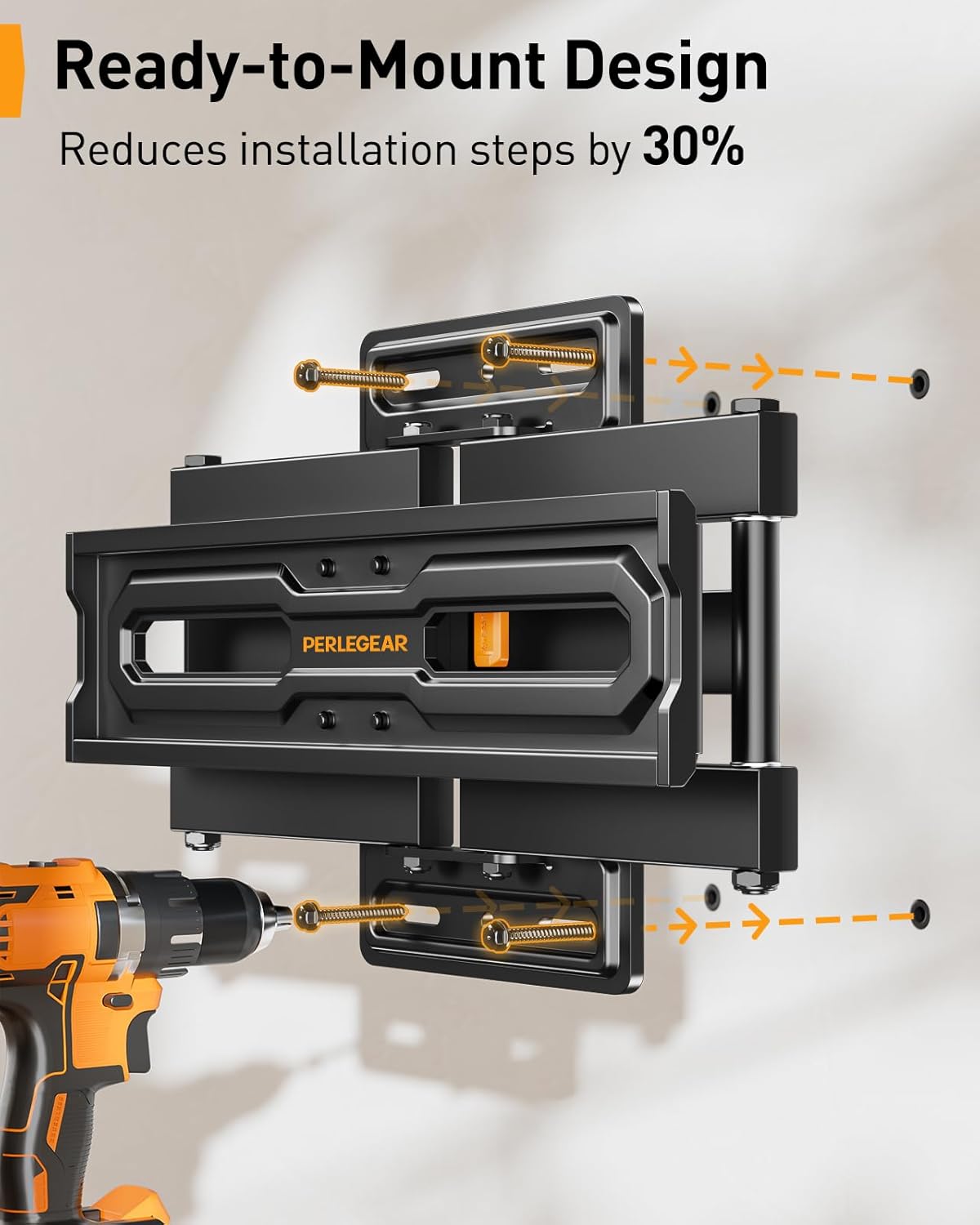
Image 6.1: The pre-assembled wall plate with designated mounting points for easy installation.
For Wood Stud Walls:
- Use a stud finder to locate the edges and center of a wood stud. Mark the center.
- Position the wall plate at your desired height, ensuring it is level using the included bubble level. Mark the drill hole locations through the wall plate onto the stud.
- Drill pilot holes into the wood stud at the marked locations. Refer to the hardware kit for the correct drill bit size (typically 5.5mm / 7/32 inch).
- Attach the wall plate to the wall using the lag bolts and washers. Tighten securely with a socket wrench.
For Solid Concrete / Brick Walls:
- Position the wall plate at your desired height, ensuring it is level using the included bubble level. Mark the drill hole locations through the wall plate onto the concrete/brick.
- Drill pilot holes into the concrete/brick at the marked locations. Refer to the hardware kit for the correct drill bit size (typically 10mm / 3/8 inch).
- Insert the concrete anchors into the drilled holes. Tap gently with a hammer until they are flush with the wall surface.
- Attach the wall plate to the wall using the lag bolts and washers, screwing them into the anchors. Tighten securely with a socket wrench.
6.3. Hanging the TV
- With assistance, carefully lift the TV (with brackets attached) and hook the brackets onto the wall plate.
- Ensure the TV is centered and securely seated on the wall plate.
- Engage the safety latches on the TV brackets to prevent accidental dislodgement.
7. Operating Instructions (Adjustments)
The Perlegear PGMF18-EU mount offers various adjustments for optimal viewing.
7.1. Tilt Adjustment
The mount features a tool-free tilt mechanism. You can adjust the screen from +5° (upwards) to -15° (downwards) to reduce glare and achieve a comfortable viewing angle.
- To adjust the tilt, simply grasp the top or bottom edge of your TV and gently push or pull to the desired angle. The mechanism will hold the position.

Image 7.1: Demonstrates the tool-free tilt function to adjust the TV angle.
7.2. Swivel Adjustment
The articulating arm allows for a wide swivel range of +/-65°.
- Gently push or pull the side of your TV to swivel it left or right to your preferred viewing position.
7.3. Extension and Retraction
The mount can extend up to 460 mm (18.1 inches) from the wall and retract to a minimum distance of 85 mm (3.3 inches).
- To extend, gently pull the TV away from the wall. To retract, push the TV back towards the wall.

Image 7.2: Illustrates the swivel and extension range of the TV wall mount.
7.4. Height Adjustment
The TV brackets offer 3 height levels, allowing you to adjust the screen height after installation.
- To adjust height, remove the TV from the wall plate, reposition the TV brackets on the TV to a different height setting, and re-hang the TV.

Image 7.3: Shows the three available height settings for the TV.
7.5. Post-Installation Leveling
Fine-tune the TV's level by +/-4° after installation.
- Loosen the leveling screws on the TV brackets, adjust the TV to be perfectly level, and then retighten the screws.
8. Maintenance
- Periodically check all screws and connections to ensure they remain tight and secure.
- Clean the mount with a soft, dry cloth. Avoid abrasive cleaners or solvents.
- Ensure the articulating arms move smoothly. If movement becomes stiff, a small amount of silicone-based lubricant can be applied to pivot points (avoiding contact with TV components).
9. Troubleshooting
| Problem | Possible Cause | Solution |
|---|---|---|
| TV is not level after installation. | Post-installation leveling screws are not adjusted. | Loosen leveling screws, adjust TV, then retighten. |
| Mount feels unstable. | Screws are loose; wall not suitable; TV too heavy. | Check all mounting screws for tightness. Verify wall type and TV weight/VESA compatibility. If issues persist, consult a professional. |
| TV cannot be tilted or swiveled. | Movement mechanism is stiff or obstructed. | Ensure no cables are obstructing movement. Apply a small amount of silicone lubricant to pivot points if necessary. |
10. Specifications
- Model: PGMF18-EU
- Material: Alloy Steel
- Color: Black
- Compatible TV Sizes: 23 - 65 inches
- Maximum Load Capacity: 45 kg (99 lbs)
- VESA Compatibility: 200x100mm to 400x400mm
- Tilt Angle: +5° / -15° (Tool-free)
- Swivel Angle: +/-65°
- Wall Distance: 85 mm (retracted) to 460 mm (extended)
- Product Dimensions: 44.6 x 32.7 x 9.2 cm
- Item Weight: 3.8 kg
- Movement Type: Tool-free tilt, swivel, articulating, turning
11. Warranty and Support
Perlegear products are designed for durability and performance. This product is backed by a manufacturer's warranty. For specific warranty details, please refer to the warranty card included with your purchase or visit the official Perlegear website.
If you encounter any issues or have questions regarding the installation or operation of your Perlegear TV Wall Mount, please contact Perlegear customer support:
- Email: support@perlegear.com
- Phone (US/CA): 1-800-456-8231 (Mon-Fri 8am - 8pm CST)
- Phone (UK): 44-808-196-6185 (Mon-Fri 2pm - 10pm UTC)
- Website: www.perlegear.com


