Introduction and Safety Information
This manual provides essential instructions for the safe assembly, operation, and maintenance of your Sapgaks Double Bed Frame 140x200. Please read all instructions carefully before assembly and use. Retain this manual for future reference.
Important Safety Warnings:
- Do not exceed the maximum load capacity of 660 pounds (approximately 300 kg).
- Assemble with caution to prevent injuries. It is recommended that two adults assemble this product.
- Be aware of sharp edges during assembly and handling.
- Ensure all fasteners are securely tightened before use and periodically check for tightness.
- Keep small parts out of reach of children during assembly.
Setup and Assembly
The Sapgaks Double Bed Frame is designed for straightforward assembly. Detailed instructions and all necessary components are included in the packaging. No specialized tools are required beyond standard household items (e.g., screwdriver, hammer).
Before You Begin:
- Unpack all components and verify against the parts list provided in your physical instruction manual.
- Clear a spacious area for assembly.
- Keep all hardware organized and within reach.
Assembly Steps Overview:
Follow the step-by-step diagrams and instructions provided in your product's physical assembly guide. The general process involves:
- Assembling the headboard and footboard sections.
- Attaching the side rails.
- Installing the slatted base.
- Assembling and inserting the storage drawers and cabinet.
- Connecting the USB charging module.

Image: Various components and assembly stages of the bed frame. This image illustrates the different parts that make up the bed, including the headboard, footboard, side rails, and storage units, providing a visual guide for assembly.

Image: Detailed assembly steps for the bed frame. This image provides a visual breakdown of the assembly process, showing how different parts connect and are secured, aiding users in following the instructions.
Operating Instructions
USB Charging Port:
The integrated USB port allows convenient charging of electronic devices directly from your bed. Locate the USB and Type-C ports on the headboard. Connect your device's charging cable to the appropriate port. Ensure the bed is properly connected to a power source for the USB function to operate.

Image: Close-up view of the USB and power outlets integrated into the headboard. This image highlights the charging functionality, showing the USB and Type-C ports, and a standard round plug socket for convenient device charging.
Storage Drawers and Cabinet:
This bed frame features multiple storage options, including drawers at the foot of the bed and a storage cabinet on the side, along with shelving in the headboard. These spaces are designed to help keep your room tidy and organized.
- Drawers: Gently pull the drawers out to access storage. Ensure items are placed evenly to prevent jamming.
- Cabinet: Open the cabinet door to utilize the internal storage space.
- Headboard Shelves: Use the open shelves and small drawers in the headboard for books, small electronics, or decorative items.
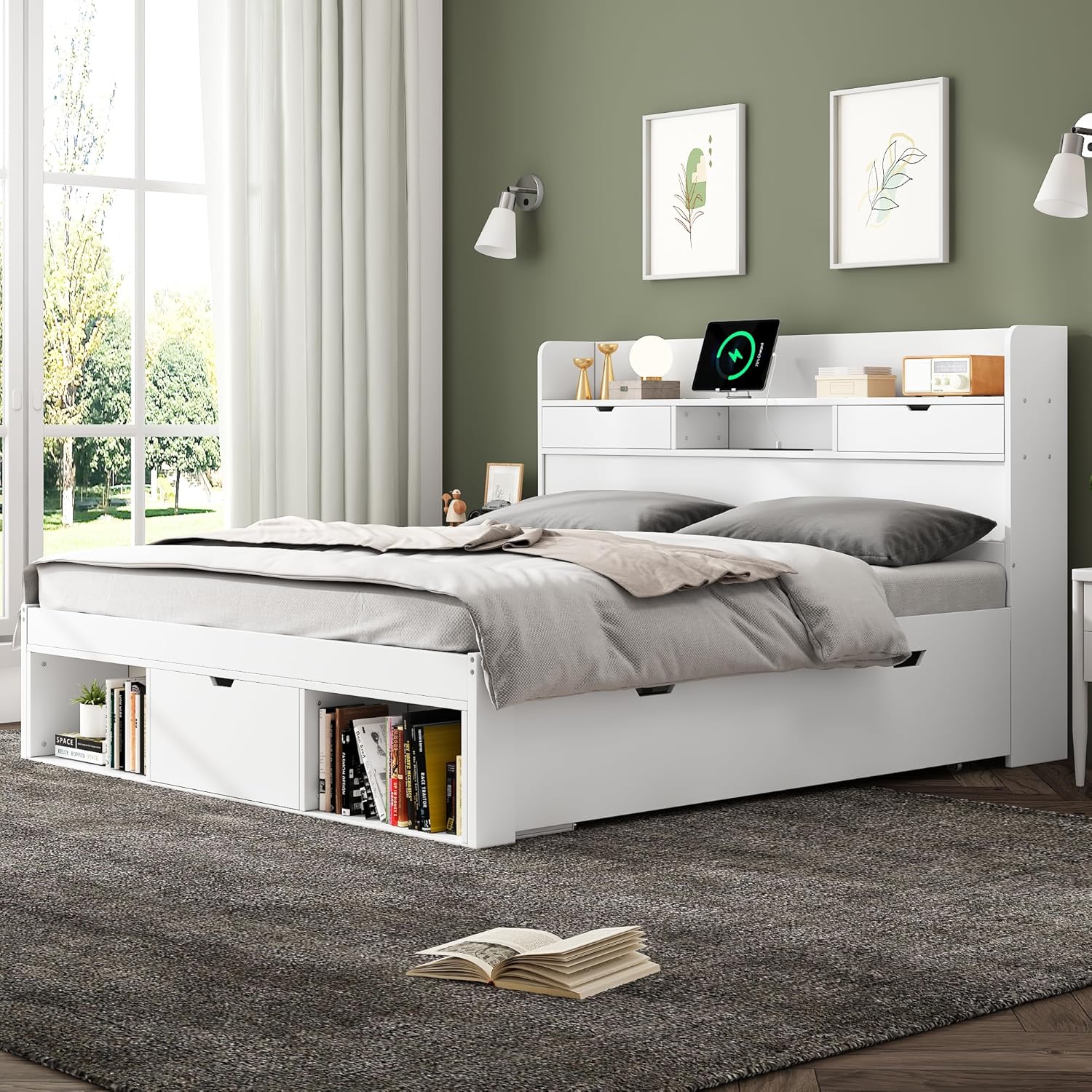
Image: The bed frame with its various storage options. This image displays the pull-out drawers at the foot of the bed, the side storage cabinet, and the integrated shelves and small drawers within the headboard, demonstrating the ample storage capacity.
Maintenance
Regular maintenance will help prolong the life and appearance of your bed frame.
- Cleaning: Wipe surfaces with a soft, damp cloth. Avoid harsh chemicals or abrasive cleaners that may damage the finish.
- Hardware Check: Periodically inspect all screws, bolts, and fasteners to ensure they remain tight. Re-tighten if necessary.
- Slats: Check the wooden slats for any signs of damage or cracking. Replace any broken slats immediately to maintain mattress support.
- USB Port: Keep the USB port free from dust and debris.
Troubleshooting
Common Issues and Solutions:
- Bed feels wobbly: Ensure all assembly hardware is securely tightened. Check that the bed is on a level surface.
- Drawers are difficult to open/close: Check for obstructions in the drawer slides. Ensure the drawers are correctly aligned on their tracks. Do not overload drawers.
- USB port not charging: Verify that the bed's power cable is securely plugged into a working wall outlet. Check the connection of the USB module to the bed frame's internal wiring. Try a different USB cable or device to rule out device-specific issues.
- Squeaking noises: Tighten all bolts and screws. Apply a small amount of lubricant (e.g., silicone spray) to joints if the noise persists, ensuring it does not stain the wood.
Specifications
Detailed product specifications for the Sapgaks Double Bed Frame 140x200:

Image: Technical drawing showing the detailed dimensions of the bed frame in centimeters. This image provides precise measurements for length, width, height, and internal storage compartments, along with recommended mattress thickness and weight capacity.
| Feature | Detail |
|---|---|
| Product Dimensions (L x W x H) | 218.5 x 145.8 x 102.5 cm (86 x 57.4 x 40.4 inches) |
| Weight | 41 kg (90.4 lbs) |
| Material | Pine wood + MDF + Plywood |
| Color | White |
| Applicable Mattress Size | 140x200 cm (Double) |
| Recommended Mattress Thickness | 15 cm (5.9 inches) |
| Maximum Load Capacity | 660 lbs (approx. 300 kg) |
| Special Features | Integrated USB Port, Storage Drawers, Storage Cabinet, Headboard Shelves |
| Assembly Required | Yes (Instructions included) |
| Number of Packages | 2 |
Warranty and Support
For warranty information, please refer to the documentation included with your purchase or contact the retailer. If you encounter any issues or require assistance with your Sapgaks bed frame, please contact Sapgaks customer support through the contact details provided on the product packaging or the retailer's website.


