
CONOPU DH-CS14
CONOPU DH-CS14 Dehumidifier User Manual
Efficient moisture control for a healthier home environment.
1. Introduction
Thank you for choosing the CONOPU DH-CS14 Dehumidifier. This compact and efficient appliance is designed to remove excess moisture from your living spaces, preventing issues like mold, mildew, and unpleasant odors. With its ultra-quiet operation, automatic features, and easy maintenance, the DH-CS14 provides a comfortable and healthy indoor environment.

Figure 1: CONOPU DH-CS14 Dehumidifier
The CONOPU DH-CS14 Dehumidifier features a sleek white design with a transparent water tank visible on the side. The front panel includes a blue indicator light, and the top has a gray grille for air circulation.
2. Safety Instructions
Please read all safety instructions carefully before using the appliance. Failure to follow these instructions may result in electric shock, fire, or serious injury.
- Always place the dehumidifier on a stable, level surface.
- Do not block the air inlet or outlet. Maintain at least 20 cm clearance from walls or furniture.
- Do not immerse the appliance, power cord, or plug in water or other liquids.
- Ensure the power supply voltage matches the rating label on the appliance.
- Unplug the dehumidifier before cleaning, maintenance, or when not in use for extended periods.
- Do not operate the appliance with a damaged cord or plug.
- Keep out of reach of children and pets.
- Do not use in areas with flammable or explosive gases.
- Empty the water tank regularly to prevent overflow.
3. Package Contents
Upon opening the package, please ensure all items are present and in good condition:
- CONOPU DH-CS14 Dehumidifier Unit (with integrated 1100 ml water tank)
- User Manual
4. Product Overview
Familiarize yourself with the components of your CONOPU DH-CS14 Dehumidifier.

Figure 2: Dehumidifier Internal Components and Airflow
This diagram illustrates the internal workings of the dehumidifier, showing the air intake (80% humidity), the Peltier cooling element, the fan, and the water collection in the 1100ml tank, resulting in drier air (45% humidity) being expelled.
Control Panel

Figure 3: Top Control Panel
The top of the dehumidifier features a simple control panel with two buttons: a power button (left) and a light control button (right), allowing for effortless operation.
- Power Button: Turns the unit On/Off.
- Light Button: Toggles the front indicator light On/Off.
- Front Status Light: A 3-color light indicating operational status (e.g., blue for normal operation, red for full tank).
- Air Inlet: Located at the back, where humid air enters.
- Air Outlet: Located at the top, where dry air is expelled.
- Water Tank: Transparent tank at the side for collecting condensed water.
5. Setup
- Unpack: Carefully remove the dehumidifier and all packaging materials from the box.
- Placement: Place the unit on a firm, level surface in the desired room. Ensure there is at least 20 cm (8 inches) of space around the air inlet and outlet for optimal airflow. Avoid placing it in direct sunlight or near heat sources. The compact design allows placement in various small spaces like bedrooms, bathrooms, kitchens, closets, pantries, and baby rooms.
- Power Connection: Plug the power adapter into a suitable electrical outlet.

Figure 4: Compact Design for Versatile Room Placement
The image shows the dehumidifier's compact size (15cm width, 26cm height) making it suitable for various small spaces such as wardrobes, shower rooms, pantries, and baby rooms.
6. Operating Instructions
- Power On: Press the Power Button on the top panel. The front status light will illuminate, indicating the unit is operating.
- Light Control: Press the Light Button to turn the front indicator light On or Off according to your preference, especially useful for undisturbed sleep.
- Automatic Defrost: The dehumidifier is equipped with an automatic defrost function. If the ambient temperature drops below 10°C (50°F), the unit will automatically detect frost and activate the defrost mode to ensure continuous and efficient operation, extending the product's lifespan.
- Automatic Shut-off: The unit will automatically turn off when the 1100 ml water tank is full. The front status light will blink red to alert you that the tank needs to be emptied. This prevents any overflow.
- Energy Efficiency: The CONOPU DH-CS14 is designed for energy efficiency, consuming less than 1 kWh per day, making it economical for continuous use.

Figure 5: Ultra-Quiet Operation
The dehumidifier operates at a noise level below 35 dB, comparable to a quiet library, ensuring minimal disturbance for sleep or daily activities.

Figure 6: Automatic Defrost and Shut-off
The top image shows the dehumidifier with a green light indicating automatic defrost activation below 10°C. The bottom image displays the transparent water tank and a red blinking light, signifying automatic shut-off when the tank is full to prevent overflow.

Figure 7: Ultra Energy Saving
This image highlights the dehumidifier's low power consumption, using only 1 kWh over 24 hours, ensuring cost-effective operation.
7. Maintenance
Emptying the Water Tank
When the water tank is full, the dehumidifier will automatically shut off, and the front status light will blink red. To empty the tank:
- Gently pull out the water tank from the side of the unit.
- Carefully pour out the collected water.
- Rinse the tank with clean water if necessary.
- Slide the empty water tank back into the dehumidifier until it clicks into place. The unit will resume operation automatically.
Cleaning the Air Filter
Regular cleaning of the air filter ensures optimal performance and extends the lifespan of your dehumidifier. The filter is removable and washable.
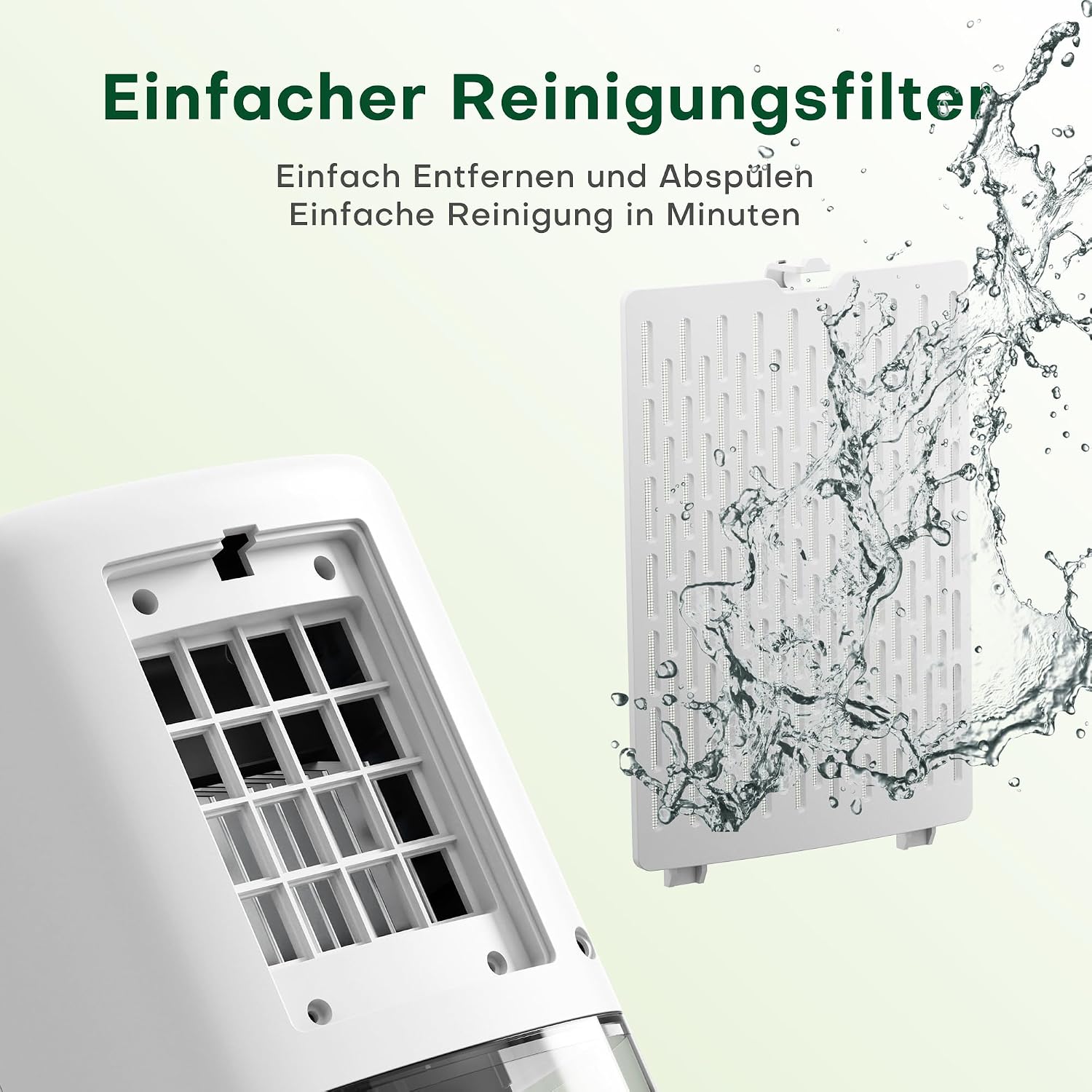
Figure 8: Easy Cleaning Filter
This image shows the removable air inlet filter being detached from the back of the dehumidifier and being rinsed under running water, demonstrating its easy cleaning process.
- Unplug the dehumidifier from the power outlet.
- Locate the air inlet filter at the back of the unit.
- Gently pull out the filter.
- Rinse the filter under running water to remove dust and debris. For stubborn dirt, use a soft brush.
- Allow the filter to air dry completely before reinserting it.
- Slide the dry filter back into its slot.
It is recommended to clean the filter every 2-4 weeks, depending on usage and air quality.
8. Troubleshooting
If you encounter any issues with your dehumidifier, please refer to the following common problems and solutions:
| Problem | Possible Cause | Solution |
|---|---|---|
| Dehumidifier does not turn on. |
|
|
| No water collected or low dehumidification. |
|
|
| Unit is noisy. |
|
|
| Red light blinking. | Water tank is full. | Empty the water tank. |
9. Specifications
| Feature | Specification |
|---|---|
| Brand | CONOPU |
| Model Number | DH-CS14 |
| Color | White |
| Product Dimensions | 28 x 15.5 x 15.5 cm (11 x 6.1 x 6.1 inches) |
| Water Tank Capacity | 1100 Milliliters (1.1 Liters) |
| Dehumidification Capacity | Up to 450 ml/day (at 30°C, 80% RH) |
| Power Consumption | 40 Watts |
| Material | Plastic |
| Noise Level | Below 35 dB |
| Special Features | Automatic Defrost, Ultra-quiet Operation, Automatic Shut-off (full tank) |
| Item Weight | 1.66 Kilograms (3.66 lbs) |
| Recommended Coverage Area | Up to 20 m² (215 sq ft) |
10. Warranty and Support
CONOPU products are designed for reliability and performance. For any questions, technical support, or warranty claims, please contact CONOPU customer service through the retailer where you purchased the product or visit the official CONOPU website for contact information.
Please retain your proof of purchase for warranty purposes.
Ask a question about this manual
Ask about setup, troubleshooting, compatibility, parts, safety, or missing instructions. Manuals+ will review the question and use this page’s manual context to help answer it.