1. Introduction and Overview
The NordicTrack T Series 8 Treadmill is designed to provide an effective and engaging workout experience. This manual provides essential information for setting up, operating, maintaining, and troubleshooting your treadmill, ensuring safe and optimal performance.

Figure 1.1: NordicTrack T Series 8 Treadmill
This treadmill integrates with iFIT (subscription sold separately) to offer personalized workouts, automatically adjusting incline and speed to match your training. Key features include a 0-12% incline range, 0-12 MPH speed range, SelectFlex™ cushioning for adjustable deck firmness, and a built-in fan for comfort. It also features Bluetooth® headphone connectivity and a USB-C port for device charging.
2. Setup and Assembly
The NordicTrack T Series 8 Treadmill requires assembly. Due to its weight and size, it is strongly recommended that two adults are present for the assembly process to ensure safety and ease of installation. The treadmill comes with necessary tools and explicit instructions for assembly.
- Unpack all components carefully, ensuring no parts are missing.
- Follow the step-by-step assembly instructions provided in the packaging.
- Ensure all bolts and fasteners are securely tightened before use.
- Locate the safety key, which is essential for operation.

Figure 2.1: Folding the treadmill for storage
The treadmill features a hydraulic lift system, making it easy to fold and roll for storage, maximizing your room's space when not in use.
3. Operating Instructions
Before operating, ensure the safety key is properly inserted into the console. The treadmill can be used manually or with an iFIT subscription.
3.1 Manual Operation
To begin a manual workout:
- Ensure the treadmill is plugged into a power source.
- Press the power button located at the front base of the treadmill.
- On the main console, press the "Start" button.
- Adjust speed using the speed controls (0-12 MPH) and incline using the incline controls (0-12%).
- To stop, press the "Stop" button. For emergency stop, pull the safety key.
3.2 iFIT Integration (Subscription Required)
For an enhanced experience, connect your device to the treadmill and sign into your iFIT account. iFIT offers:
- Follow Trainer: Your machine automatically matches the intensity of iFIT content and trainer instructions.
- SmartAdjust™: Workout intensity is personalized based on your adjustments.
- ActivePulse™: With a compatible heart rate monitor (sold separately), workout intensity adjusts to keep you in your target heart rate zone.

Figure 3.1: iFIT Features
3.3 Console Features

Figure 3.2: Treadmill Console and Features
- 7" LCD Display: Shows workout metrics and iFIT content.
- Device Shelf: Securely holds your tablet or smartphone.
- Incline Shortcuts: Quick buttons for common incline levels.
- Speed Shortcuts: Quick buttons for common speed levels.
- AutoBreeze™ Fan: Integrated fan for cooling during workouts.
- Cup Holders: Conveniently located for hydration.
- Bluetooth® Headphone Connectivity: Connect your wireless headphones for private audio.
- USB-C Port: Charge your devices during your workout.
4. Maintenance
Regular maintenance ensures the longevity and optimal performance of your NordicTrack T Series 8 Treadmill. Always unplug the treadmill before performing any maintenance.
- Cleaning: Wipe down the console, handrails, and deck with a damp cloth after each use to remove sweat and dust. Avoid abrasive cleaners.
- Deck Lubrication: Refer to your specific product manual for lubrication instructions. Some treadmills require periodic lubrication of the running deck to reduce friction and wear.
- Belt Alignment and Tension: Periodically check the running belt for proper alignment and tension. Adjust as needed according to the detailed instructions in your product manual.
- Motor Cover Cleaning: Occasionally remove the motor cover and vacuum any dust or debris that may have accumulated around the motor and electronics.
- Component Check: Regularly inspect all nuts, bolts, and moving parts to ensure they are secure and functioning correctly.
5. Troubleshooting
If you encounter issues with your treadmill, refer to the following common troubleshooting tips. For more complex problems, contact customer support.
- Treadmill Does Not Power On:
- Ensure the power cord is securely plugged into a grounded outlet and the treadmill.
- Check the circuit breaker in your home.
- Verify the safety key is fully inserted into the console.
- Running Belt Slips or Hesitates:
- Check the belt tension. It may need to be tightened.
- Ensure the belt is properly lubricated (refer to maintenance section or specific manual).
- Unusual Noises:
- Inspect for loose parts or debris under the belt.
- Ensure the treadmill is on a level surface.
- Console Display Issues:
- Try restarting the treadmill by unplugging it for a few minutes and plugging it back in.
- Ensure all cable connections to the console are secure.
If these steps do not resolve the issue, please contact NordicTrack customer support for further assistance.
6. Specifications
Detailed specifications for the NordicTrack T Series 8 Treadmill (Model: NTL10425):
| Feature | Detail |
|---|---|
| Model Number | NTL10425 |
| Product Dimensions (Unfolded) | 190.75 cm (L) x 87.12 cm (W) x 139.19 cm (H) |
| Item Weight | 86.64 kg |
| Colour | Black |
| Style | T Series 8 |
| Display Size | 7 Inches |
| Display Type | LCD |
| Frame Material | Aluminum |
| Running Deck Material | Alloy Steel |
| Horsepower (Peak) | 3 Horsepower |
| Speed Rating | 0-12 MPH |
| Incline Range | 0-12% |
| Number of Programs | 50 (pre-loaded, if not using iFIT) |
| Power Source | AC Adapter |
| Special Features | Auto Incline, Bluetooth, Built-In Speaker, Foldable, Heavy Duty |
| Included Components | Safety Key |
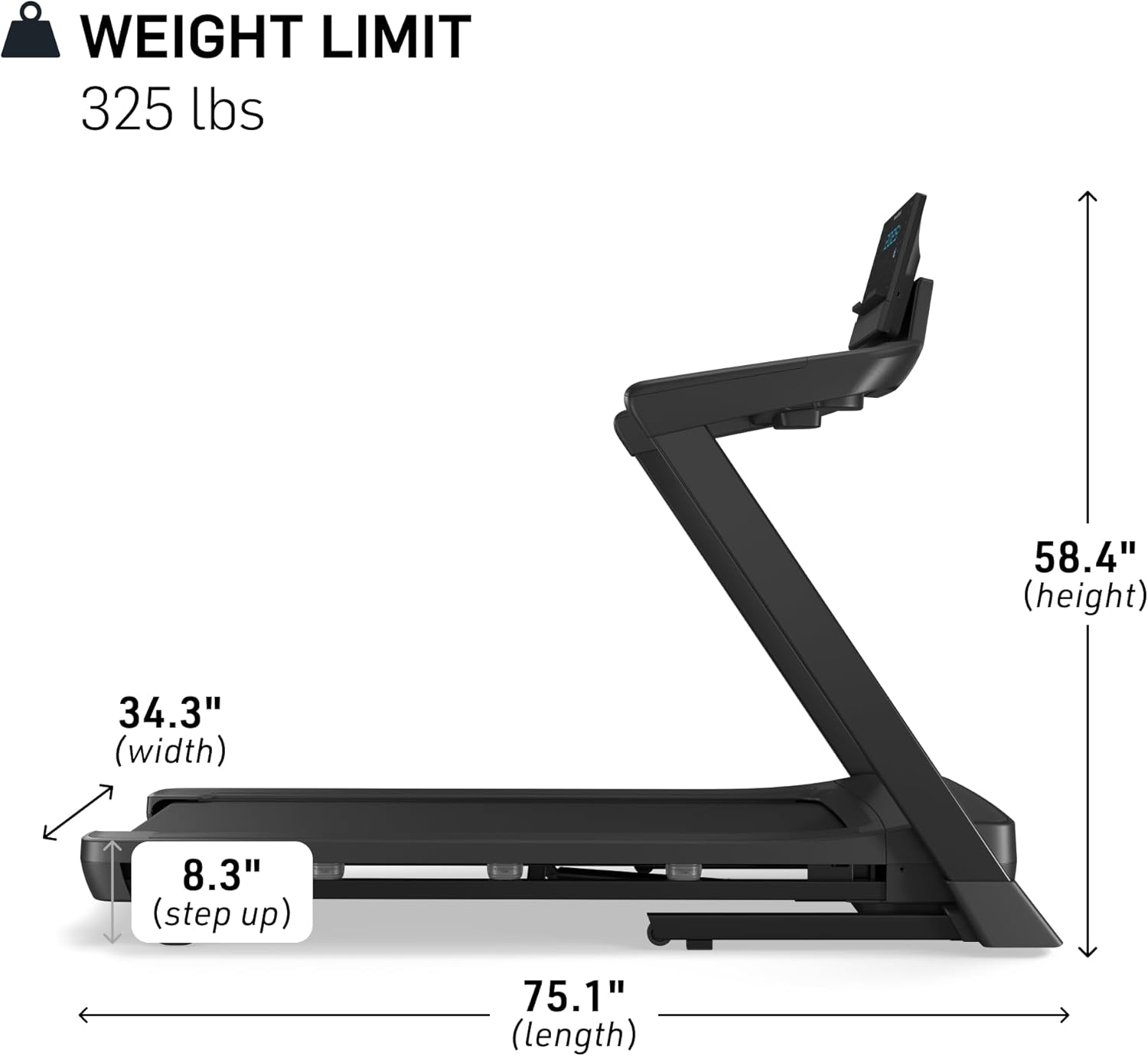
Figure 6.1: Treadmill Dimensions and Weight Limit (Unfolded)

Figure 6.2: Treadmill Dimensions (Folded)
7. Warranty and Support
For warranty information and customer support, please refer to the documentation included with your NordicTrack T Series 8 Treadmill at the time of purchase. You can also visit the official NordicTrack website or contact their customer service department directly for assistance with product registration, warranty claims, or technical support.
Manufacturer: iFit
Brand: NordicTrack
For the most up-to-date support contact information, please visit the NordicTrack Store on Amazon or their official website.


