
1. Introduction
Thank you for purchasing the Core Innovations CPD700PR 7-inch Portable DVD Player. This device is designed to provide portable entertainment, allowing you to enjoy your favorite movies and media on the go. Its adjustable screen can be tilted and rotated 270 degrees for optimal viewing from various angles. The player features built-in stereo speakers for audio playback and a headphone jack for private listening. Please read this manual thoroughly to ensure proper use and maintenance of your device.
2. Safety Information
- Do not expose the device to extreme temperatures, direct sunlight, or high humidity.
- Avoid dropping or subjecting the device to strong impacts.
- Keep the device away from water and other liquids.
- Do not attempt to disassemble or repair the unit yourself. Refer all servicing to qualified personnel.
- Use only the provided power adapter to charge the device.
- Ensure proper ventilation when operating the device to prevent overheating.
- Clean the device with a soft, dry cloth. Do not use liquid cleaners or aerosols.
3. Package Contents
Please check the package for the following items:
- Core Innovations CPD700PR 7-inch Portable DVD Player
- AC Power Adapter
- Car Charger
- Remote Control
- AV Cable
- User Manual (this document)
4. Product Overview
Familiarize yourself with the various parts and controls of your portable DVD player.
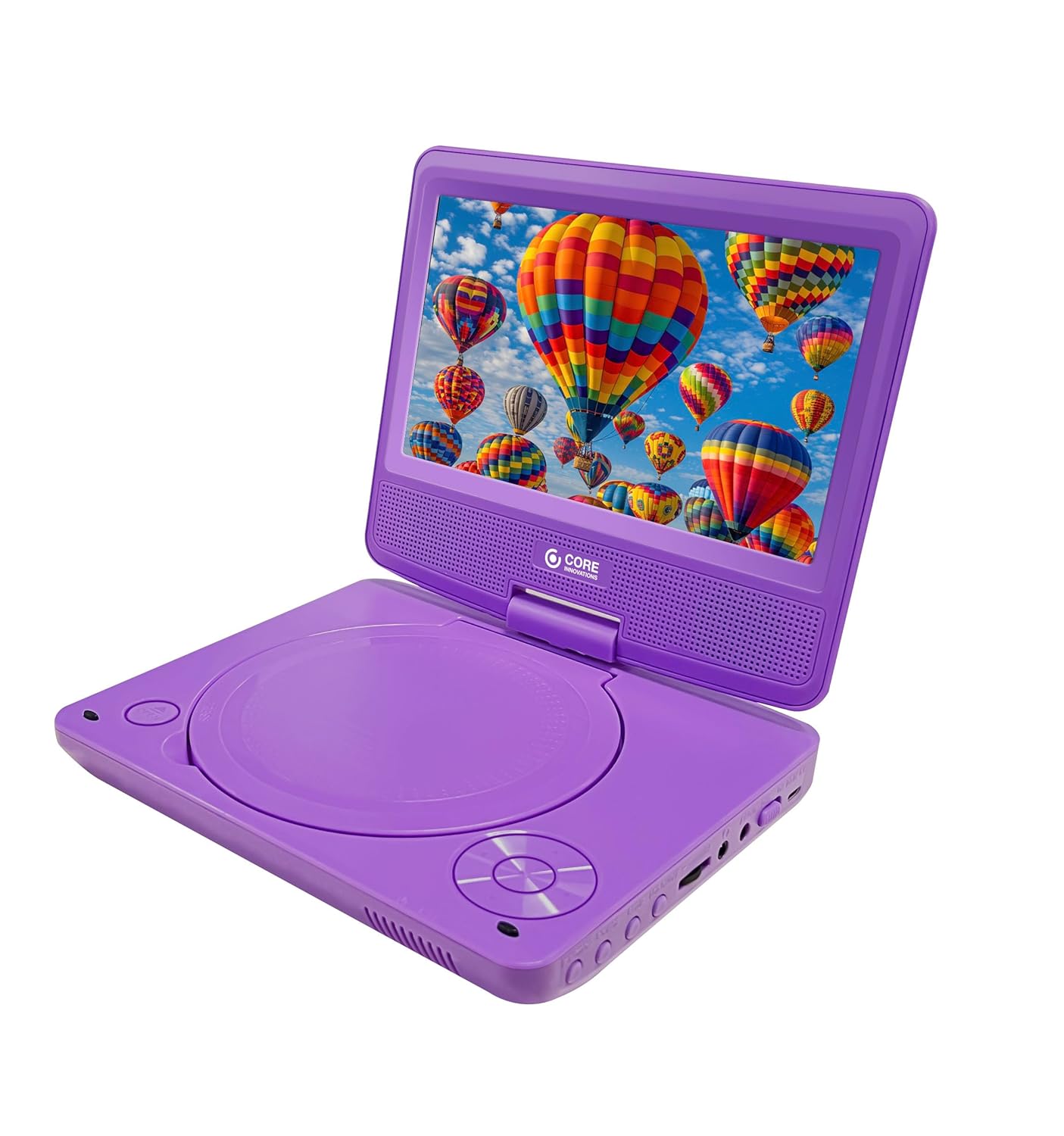
Figure 4.1: Front-top view of the Core Innovations 7-inch Portable DVD Player with the screen open, displaying a colorful image of hot air balloons. The DVD tray is visible on the bottom section, along with control buttons.

Figure 4.2: Side view of the Core Innovations 7-inch Portable DVD Player, highlighting the USB port and SD card slot for external media playback. The screen is open, displaying a field of red poppies.

Figure 4.3: Top-down view of the Core Innovations 7-inch Portable DVD Player with the screen open, showing a vibrant image of ocean waves crashing on a beach. The main controls are visible on the right side of the base.

Figure 4.4: The Core Innovations 7-inch Portable DVD Player in its closed, compact position, ready for transport. The top surface features the Core Innovations logo.
Controls and Ports:
- Power Button: Turns the device on or off.
- DVD Tray: For inserting and removing DVDs.
- Play/Pause Button: Starts or pauses playback.
- Stop Button: Stops playback.
- Skip/Search Buttons: Navigates between tracks or fast-forwards/rewinds.
- Volume Control: Adjusts the audio output level.
- Headphone Jack: For connecting external headphones.
- USB Port: For connecting USB flash drives.
- SD Card Slot: For inserting SD memory cards.
- AV Out Port: For connecting to an external display.
- DC In Port: For connecting the power adapter.
5. Setup
5.1 Charging the Battery
Before initial use, fully charge the internal battery. Connect the provided AC power adapter to the DC In port on the player and plug the other end into a standard wall outlet. The charging indicator light will illuminate. Once fully charged, the light may change color or turn off, depending on the model. A full charge provides up to 120 minutes of playback.
5.2 Powering On/Off
- To power on: Press and hold the Power button until the screen illuminates.
- To power off: Press and hold the Power button until the screen turns off.
6. Operating Instructions
6.1 Inserting and Playing a DVD
- Open the DVD tray cover.
- Carefully place a DVD disc onto the spindle with the label side facing up.
- Gently press the disc until it clicks into place.
- Close the DVD tray cover.
- The player will automatically detect the disc and begin playback. If not, press the Play/Pause button.
6.2 Basic Playback Controls
- Play/Pause: Press once to pause, press again to resume.
- Stop: Press to stop playback.
- Skip: Press the Skip Forward or Skip Backward buttons to jump to the next or previous chapter/track.
- Fast Forward/Rewind: Press and hold the Skip Forward or Skip Backward buttons to fast forward or rewind.
6.3 Adjusting Volume
Use the Volume Up and Volume Down buttons on the player or remote control to adjust the audio level.
6.4 Screen Rotation
The screen can be rotated up to 270 degrees. Gently swivel the screen to your desired viewing angle. This feature allows for versatile placement and shared viewing.
6.5 Connecting Headphones
For private listening, plug standard 3.5mm headphones into the Headphone Jack. The built-in speakers will automatically mute.

Figure 6.1: A child wearing headphones, engrossed in content on the Core Innovations portable DVD player, demonstrating the private listening feature.
6.6 Using USB and SD Card Media
The player supports media playback from USB flash drives and SD memory cards.
- Insert a USB flash drive into the USB Port or an SD card into the SD Card Slot.
- The player should automatically switch to USB/SD mode. If not, use the Source button (if available) or menu options to select the correct input.
- Navigate through your files using the directional buttons and press Play/Pause to select and play media.

Figure 6.2: A woman watching the Core Innovations portable DVD player in a kitchen setting, illustrating its versatility for entertainment in various environments.
7. Maintenance
7.1 Cleaning
- Wipe the exterior of the player with a soft, dry, lint-free cloth.
- For stubborn marks, slightly dampen the cloth with water, then wipe dry immediately.
- Do not use abrasive cleaners, solvents, or alcohol-based products.
- To clean the disc lens, use a specialized DVD lens cleaning disc.
7.2 Storage
When not in use for extended periods, store the player in a cool, dry place, away from direct sunlight and extreme temperatures. Ensure the battery is partially charged (around 50%) before storing to prolong its lifespan.
8. Troubleshooting
| Problem | Possible Cause | Solution |
|---|---|---|
| Player does not turn on. | Battery is depleted or power adapter is not connected. | Connect the AC power adapter and allow the battery to charge. Ensure the power button is pressed and held. |
| No picture on screen. | Disc is dirty or scratched; incorrect input source selected. | Clean the disc. Ensure the disc is inserted correctly. If using external media, verify the correct input source (DVD, USB, SD) is selected. |
| No sound. | Volume is too low or muted; headphones are connected. | Increase the volume. Disconnect headphones if you want sound from the built-in speakers. Check audio settings on the DVD menu. |
| Disc not playing. | Disc is not inserted correctly; disc format is not supported. | Ensure the disc is placed correctly in the tray. Verify the disc format is compatible with the player (e.g., DVD, CD). |
| Remote control not working. | Batteries are dead or inserted incorrectly; obstacle between remote and player. | Replace remote control batteries. Ensure line of sight between remote and player's IR sensor. |
9. Specifications
- Model: CPD700PR
- Screen Size: 7-inch LCD
- Screen Rotation: 270 degrees
- Supported Disc Formats: DVD, DVD-R/RW, CD, CD-R/RW (check product packaging for full list)
- Supported Media Formats: JPEG, MP3, MPEG4 (via USB/SD, check product packaging for full list)
- Audio Output: Built-in stereo speakers, 3.5mm headphone jack
- Inputs: USB port, SD card slot
- Outputs: AV Out
- Battery Life: Up to 120 minutes (approximate, varies with usage)
- Power: AC 100-240V, 50/60Hz (via adapter)
10. Warranty and Support
Core Innovations products are designed for reliability and performance. For warranty information, please refer to the warranty card included with your purchase or visit the official Core Innovations website. If you encounter any issues or require technical assistance, please contact Core Innovations customer support through the contact details provided on their website or in your product documentation.

