
1. Safety Information
Please read and understand all safety instructions before assembly and use. Failure to follow these instructions may result in injury or product damage.
- This TV stand has a load-bearing capacity of up to 230 pounds. Ensure proper mounting by anchoring the unit to a wall, especially when used with heavier TVs, to prevent tipping.
- Be cautious of potential pinch points between tempered glass shelves and the metal frame during assembly and adjustment.
- Always use appropriate safety gear, such as gloves, when assembling or moving the stand.
- Keep small parts and packaging materials away from children.
- The integrated power outlet is ETL certified. Do not overload the outlets.
2. Package Contents
Before beginning assembly, verify that all parts listed below are present and undamaged. If any parts are missing or damaged, please contact customer support.
- 1 x TV Stand components
- 1 x Remote Control (for LED lights)
- 1 x LED Lights strip
- 1 x Power Outlet unit
- 1 x 5V 2A Plug
- 1 x Installation Manual (detailed step-by-step instructions)
- All necessary tools and labeled screws/parts
3. Product Specifications
General Dimensions
- Overall Dimensions (63 inch model): 62.9" (L) x 13.7" (W) x 19.7" (H)
- Item Depth: 14 inches
- Item Weight: 65 Pounds
- Suitable TV Size: 32, 45, 55, 60, 65, 70 inch TVs
Materials & Features
- Material Type: P2 grade particleboard wood, Tempered Glass, Metal
- Finish: High Gloss
- Color: White
- Style: Modern, Rectangular
- Adjustable Shelves: Yes (3 levels)
- Assembly Required: Yes
Power & Lighting
- AC Outlets: 2 (125V/12A)
- USB Ports: 2 (5V/2.1A)
- Power Cord Length: 6.5 FT
- LED Lights: RGB, 4 modes (RGB color, microphone, timing, music), 70000+ colors, 30 flashing modes
- LED Control: Wireless remote control and mobile phone APP

Image: Detailed dimensions of the TV stand, indicating its 63-inch length and suitability for TVs up to 70 inches.
4. Assembly Instructions
This TV stand requires assembly. Please follow the detailed step-by-step instructions provided in the included installation manual. All components, screws, and parts are labeled to facilitate the assembly process.
General Assembly Tips:
- Clear a spacious area for assembly.
- Identify all parts and hardware by matching them with the labels in the manual.
- Do not overtighten screws during initial assembly; tighten fully once the structure is stable.
- A protective plastic film covers the high-gloss surfaces. Remove this film carefully after assembly to prevent scratches.
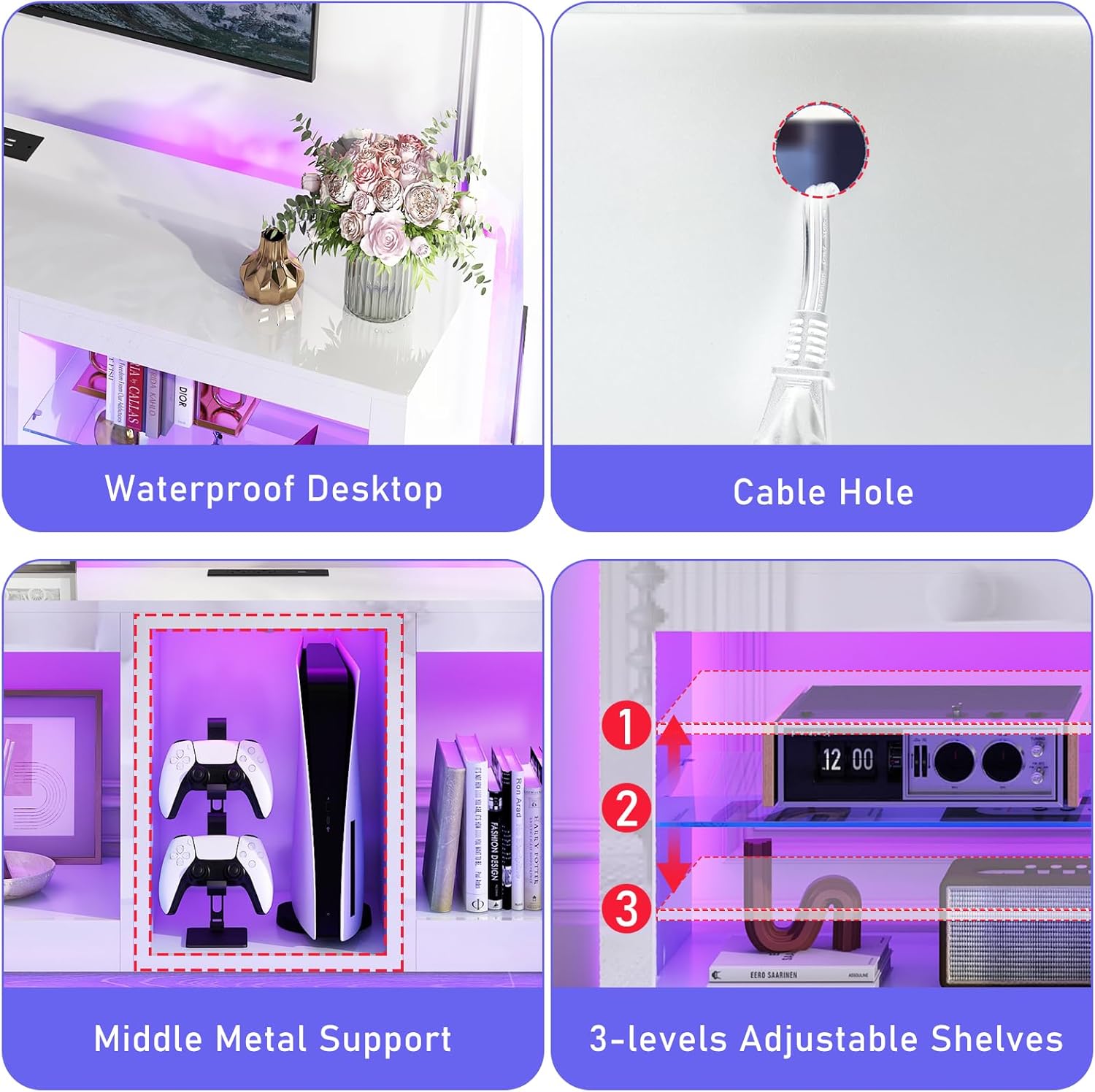
Image: Key structural details for assembly, including the waterproof desktop, cable hole, middle metal support, and adjustable shelf positions.
Adjustable Shelves:
The tempered glass shelves can be adjusted to three different height positions or removed entirely to accommodate larger items. Refer to the manual for specific instructions on adjusting or removing shelves.

Image: Visual guide demonstrating the adjustable shelf heights.

Image: Illustration of removing a glass shelf for increased storage space.
5. Operating Instructions
5.1. LED Lighting System
The integrated LED lighting system offers extensive customization options:
- Control: Use the included wireless remote control or a compatible mobile phone application.
- Color Modes: Choose from over 70,000 colors and 30 flashing modes.
- Music Sync Mode: The LED lights can change color and rhythm in sync with sound and music.
- Microphone Mode: Lights respond to ambient sound.
- Timing Function: Set a timer for the LED lights to automatically turn off.

Image: Examples of the LED light system displaying various colors.

Image: The TV stand with LED lights active, illustrating the various control features.
5.2. Power Outlets
The desktop features integrated power outlets for convenient device charging and power supply:
- AC Outlets: Two 125V/12A AC outlets for standard electronics.
- USB Ports: Two 5V/2.1A USB ports for charging mobile devices and game controllers.
- Cable Management: A cable hole on the back panel helps organize and conceal wires.
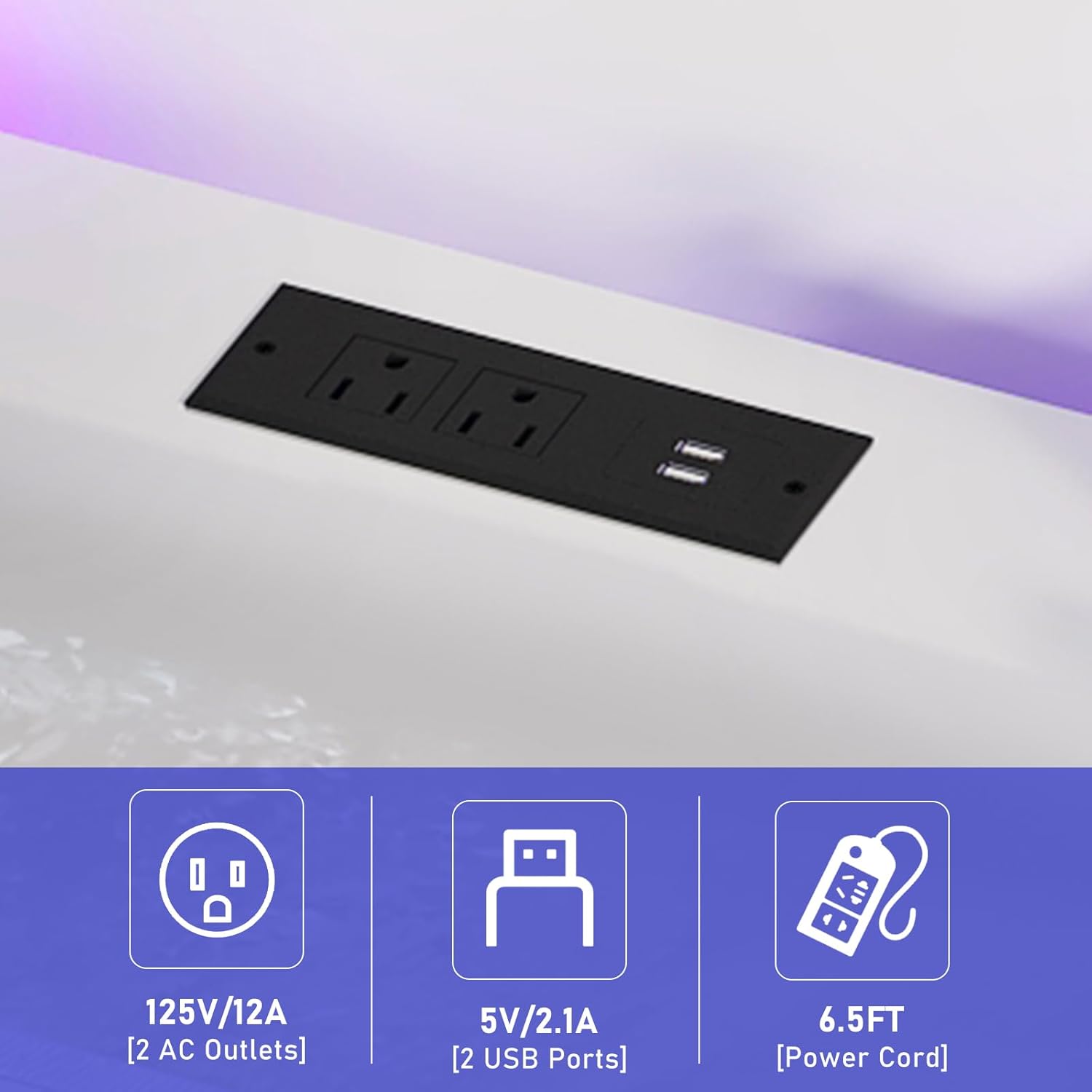
Image: Detail of the integrated power outlets and USB ports.
6. Care and Maintenance
- Cleaning: Wipe surfaces with a soft, damp cloth. Avoid harsh chemicals or abrasive cleaners that may damage the high-gloss finish.
- Spills: Promptly clean any spills to prevent staining or damage to the waterproof desktop.
- Dusting: Regularly dust the unit to maintain its appearance.
- LED Lights: Ensure the LED strip and connections remain dry.
7. Troubleshooting
LED Lights Not Working:
- Check if the LED strip is properly connected to the power adapter and the 5V 2A plug.
- Ensure the power plug is securely inserted into a working wall outlet.
- Verify that the remote control has working batteries and is pointed directly at the LED receiver.
- If using the mobile app, ensure Bluetooth or Wi-Fi connection is active and the app is correctly paired with the LED system.
Power Outlets Not Functioning:
- Confirm the main power cord for the TV stand's outlets is securely plugged into a functional wall outlet.
- Test the wall outlet with another device to ensure it is supplying power.
- Avoid overloading the outlets; ensure the total wattage of connected devices does not exceed the specified limits (125V/12A for AC, 5V/2.1A for USB).
Stand Instability:
- Recheck all screws and connections to ensure they are tightened securely.
- Ensure the stand is placed on a flat, level surface.
- Consider anchoring the TV stand to the wall using appropriate hardware, especially with heavier televisions, to enhance stability and prevent tipping.
8. Warranty and Customer Support
For specific warranty details, please refer to the documentation included with your purchase or contact chartustriable customer support directly. If you encounter any issues or have questions regarding your product, please reach out to our customer service team for assistance.
Contact Information: Refer to your purchase receipt or the official chartustriable website for the most current customer support contact details.