
1. Product Overview
The Eremolz RC73 is a universal IR/RF remote control designed as a replacement for DirecTV systems. It supports both Infrared (IR) and Radio Frequency (RF) modes, offering broad compatibility with various DirecTV receivers and televisions.
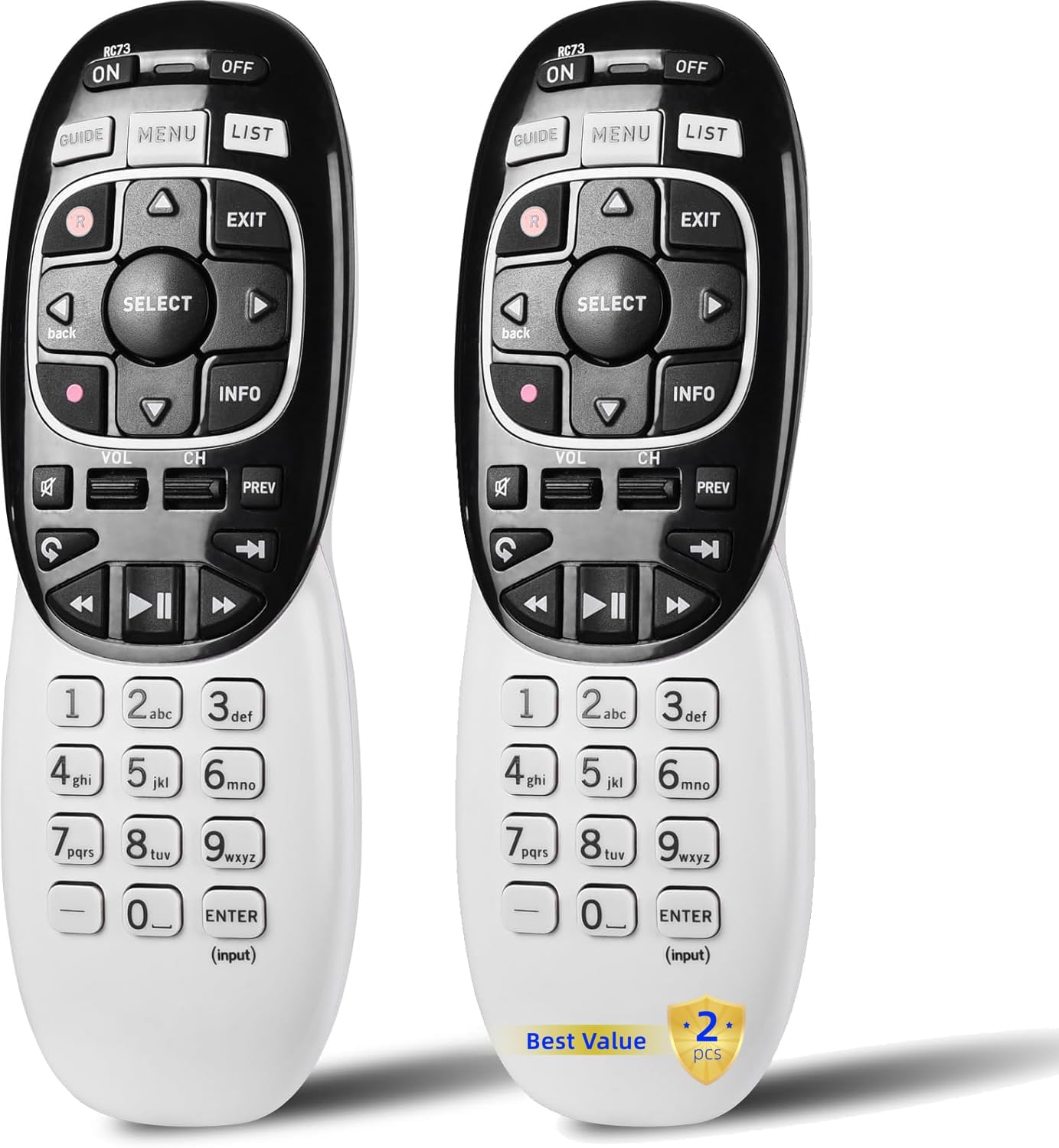
Two Eremolz RC73 universal remote controls, designed for DirecTV systems, featuring a white and black ergonomic design with clearly labeled buttons.

A pair of Eremolz RC73 remote controls, showcasing their sleek design and button layout.
2. Setup and Pairing
2.1 Initial Setup for DirecTV Receivers (RF Mode)
For RF mode operation with Genie (model HR44 or higher), Genie Lite, Genie Mini, 4K Genie Mini, and Wireless Genie Mini (model C41W or higher), follow these steps:
- Point the remote at your DirecTV device (Genie, Genie Mini, or Wireless Genie Mini).
- Press and hold the MUTE and ENTER buttons simultaneously until the screen displays "Applying IR/RF Setup."
- The remote is now synced.
2.2 Controlling Your TV (IR Mode)
To program the remote to control your television via IR mode:
- Turn on the TV.
- Locate the 5-digit code for your brand of TV. (Refer to your TV's manual or online resources for compatible codes).
- Press and hold MUTE and SELECT at the same time until the green light flashes twice.
- Using the number keys, enter the 5-digit code for your TV brand. If performed correctly, the green light under the TV flashes twice.
- Aim the remote at your TV and press VOL or MUTE. Your TV should respond. If it does not, repeat steps 3 and 5, trying each code for your brand until you find the correct one.
2.3 Activating RF Transmitter
To pair the DirecTV remote control to the STB (Set-Top Box) in RF mode, perform the following steps:
- Press and hold MUTE and SELECT at the same time until the green light flashes twice.
- Enter digits 961 followed by CH UP key.
- Using the number keys, enter the last six digits of the RID number located behind the STB.
- Press and release ENTER key (the green light flashes twice).
2.4 Deactivating RF Transmitter
To deactivate the RF Transmitter on the DirecTV remote control, perform the following steps:
- Press and hold MUTE and SELECT at the same time until the green light flashes twice.
- Using the number keys, enter 961.
- Press and release CH Down. (The green LED flashes four times).

This image displays the Eremolz RC73 remote control alongside detailed instructions for controlling a TV, activating and deactivating RF mode, and restoring factory default settings.
3. Operating Instructions
The Eremolz RC73 remote control provides intuitive access to your DirecTV system and connected television. Familiarize yourself with the button layout for optimal use.
- ON/OFF: Power on/off your DirecTV receiver and TV.
- GUIDE: Access the program guide.
- MENU: Open the main menu for your DirecTV receiver.
- LIST: View your recorded programs.
- SELECT: Confirm selections or enter menus.
- EXIT: Exit current menus or screens.
- INFO: Display information about the current program.
- VOL (Volume): Adjust TV volume.
- CH (Channel): Change channels.
- Navigation Arrows: Move through menus and guides.
- Number Keys (0-9): Directly enter channel numbers.

A user holding the Eremolz RC73 remote control, demonstrating its use for interacting with a television display.

The Eremolz RC73 remote control offers easy and sensitive control from various angles, ensuring reliable operation throughout the room.

Experience rapid 0.2-second response times and precise long-distance control with the Eremolz RC73 remote, featuring an upgraded chip and improved stability.
4. Maintenance
4.1 Battery Replacement
When the remote's performance degrades or the indicator light fails to respond, it may be time to replace the batteries. The RC73 remote uses two AA batteries (not included).
- Slide open the battery compartment cover on the back of the remote.
- Remove the old batteries.
- Insert two new AA batteries, ensuring correct polarity (+ and -).
- Close the battery compartment cover.
4.2 Cleaning
To clean your remote control, use a soft, dry cloth. For stubborn dirt, lightly dampen the cloth with water. Avoid using harsh chemicals or abrasive cleaners, as these can damage the remote's surface or internal components.

Detail of the Eremolz RC73 remote control, emphasizing its durable ABS material construction and comfortable, soft silicone buttons for extended use.
5. Troubleshooting
5.1 Remote Not Responding
- Ensure fresh batteries are installed correctly.
- Verify there are no obstructions between the remote and the device (for IR mode).
- Confirm the remote is programmed correctly for your device (refer to Section 2).
5.2 Resetting to Factory Default Settings
If you experience persistent issues or wish to clear all programming, you can reset the remote to its default factory settings:
- Press and hold MUTE and SELECT until the LED blinks to reset the RC73 remote.
- After releasing MUTE and SELECT, type the numbers 9, 8, 1 in that order.
- The light on the remote should blink again, indicating a successful reset.
6. Specifications
| Feature | Detail |
|---|---|
| Brand | Eremolz |
| Model Number | RC73 |
| Product Dimensions | 5 x 2 x 3 inches |
| Item Weight | 5.3 ounces |
| Special Feature | Universal IR/RF |
| Color | White |
| Max Number of Supported Devices | 1 (DirecTV receiver, TV) |
| Compatible Devices | DirecTV HR20, HR21, HR34, HR44, HR54 DVR Satellite Dish Receiver, Televisions |

The Eremolz RC73 remote control features an advanced smart chip, providing strong signal, multi-angle induction, and accurate control for an enhanced user experience.

The Eremolz RC73 remote control is equipped with a strong built-in signal, ensuring consistent and reliable communication with your devices.
7. Warranty and Support
7.1 Warranty Information
This product comes with a 365-day warranty from the date of purchase. This warranty covers manufacturing defects and ensures the product functions as intended under normal use.
7.2 Customer Support
If you encounter any issues during the setup or operation of your Eremolz RC73 remote control, or if you have any questions, please contact our customer support team. We are committed to providing a satisfactory solution.
For support, please refer to the contact information provided with your purchase or visit the Eremolz official website.