
1. Introduction
This manual provides essential information for the safe and effective use of your Greluma DC-DC Step-Down Voltage Converter, model ZL962LUM. This device is designed to efficiently convert a higher DC input voltage (8V-40V) to a stable 5V DC output, making it suitable for a wide range of applications in automotive, marine, solar, and other electronic systems.
The converter features robust protection mechanisms to ensure reliable operation and device safety. Please read this manual thoroughly before installation and operation.

Figure 1: Greluma 25W DC-DC Step-Down Voltage Converter.
2. Specifications
The Greluma DC-DC Step-Down Voltage Converter offers the following technical specifications:
- Input Voltage Range: DC 8V-40V (compatible with DC 12V/24V systems)
- Output Voltage: DC 5V
- Output Current: 5A (maximum)
- Output Power: 25W (maximum)
- Efficiency: High efficiency
- Protection Features: Built-in output overcurrent protection, output short-circuit protection, input undervoltage protection, chip high-temperature protection.
- Environmental Rating: IP68
- Certifications: CE compliant
Dimensions

Figure 2: Physical dimensions of the Greluma DC-DC Converter.
- Length (L): 58.3 mm
- Width (W): 25 mm
- Height (H): 20.5 mm
- Install Hole Distance: 51 mm
- Hole Size: 4 mm
3. Setup and Installation
Proper installation is crucial for the safe and reliable operation of the converter. Follow these steps carefully:
Wiring Connections
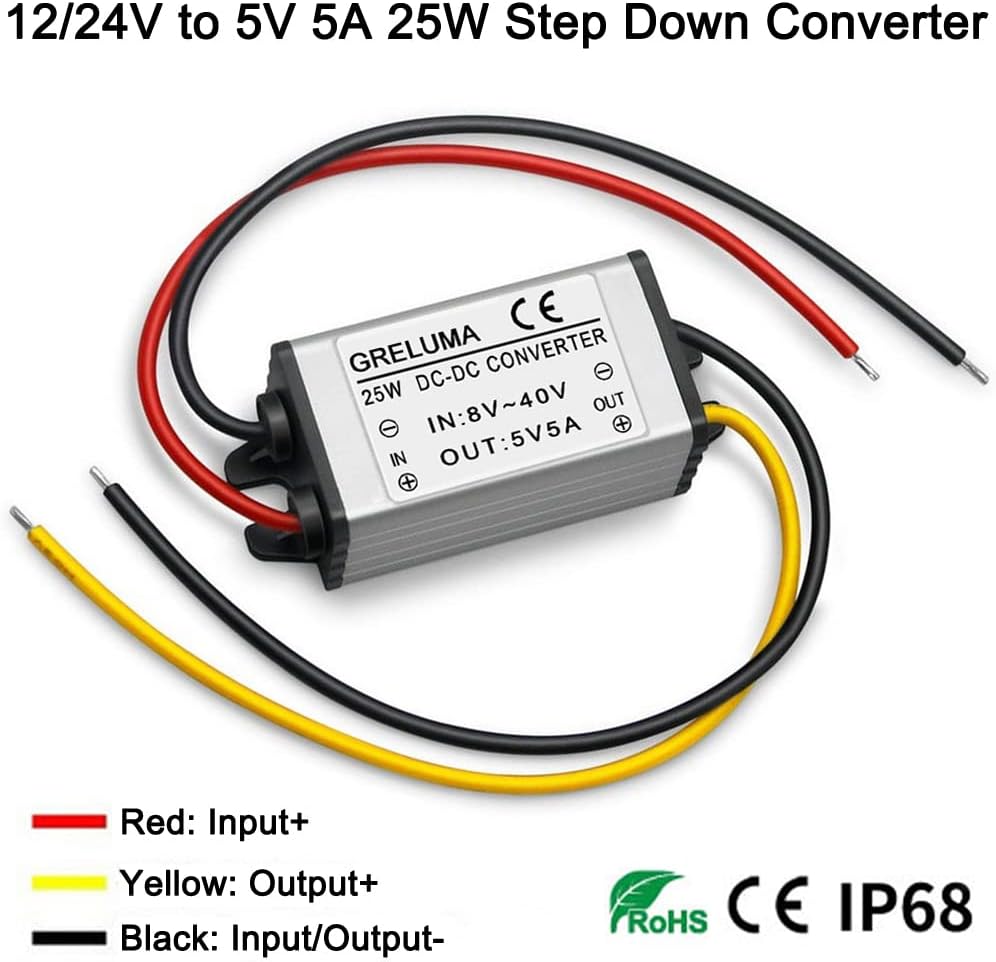
Figure 3: Greluma converter showing input and output wire colors.
- Input Positive (+): Red wire
- Input Negative (-): Black wire (shared with output negative)
- Output Positive (+): Yellow wire
- Output Negative (-): Black wire (shared with input negative)

Figure 4: Schematic wiring diagram for connecting the converter to a power supply and device.
WARNING: The positive and negative poles cannot be connected in reverse. Incorrect wiring will damage the power supply and potentially the connected device.
Recommendations for Enhanced Protection
- Fuse: To prevent short circuits and protect equipment, it is recommended to add an appropriate fuse on the input line.
- Diode: To prevent current backflow and reverse connection damage, consider adding a diode.
- Surge Protection: For protection against direct overvoltage, integrate a surge protection circuit.
4. Operating Instructions
The converter is designed for straightforward operation once correctly installed. Observe the following guidelines for optimal performance:
General Usage
Connect your DC power source (e.g., car battery, solar panel) to the input wires and your 5V DC device to the output wires, ensuring correct polarity. The converter will automatically regulate the input voltage down to a stable 5V output.
Load Considerations
- Inductive Loads: When using inductive loads such as coils, magnetic valves, or speakers, or with motors, ensure the power supply capacity is 3 to 5 times greater than the rated power of the load.
- Single Bulbs: For single bulb loads, a constant current power supply is generally used.
- Charging Applications: For charging applications, use a product specifically designed with a charging function.
- Motor Loads: For motor loads, use a motor-specific power supply.
- Parallel Operation: If operating in parallel, use a product with a parallel current sharing function.
Power Conversion Principle
For all electrical products, the input power must always be greater than the output power for proper function. If input power is insufficient, the converter will not operate correctly.
Applications

Figure 5: Examples of common applications for the Greluma DC-DC converter.
This converter is widely used in various 5V electronic devices, including car audio systems, speakers, car GPS navigators, car DVDs, hard disk players, MP3/MP4 players, car recorders, solar panels, LED strips, LED displays, cameras, lamps, and small vehicles.
5. Safety Precautions
Adhering to safety guidelines is paramount to prevent damage to the converter, connected devices, and ensure user safety.
- Reverse Polarity: Never connect the input or output wires with reverse polarity. This will cause immediate and irreversible damage to the converter.
- Input Voltage Limits: Ensure the input voltage remains within the specified range of DC 8V-40V. Exceeding this limit can damage the unit.
- Output Load: Do not exceed the maximum output current of 5A or maximum output power of 25W. If your device's load is close to the maximum power, consider using a higher-rated converter, as continuous operation at maximum capacity is not recommended for extended periods.
- Long-Term Operation: For prolonged operation and to enhance reliability and lifespan, use the converter at 80% or less of its rated power.
- Non-Isolated Converters: This is a non-isolated step-down converter. A critical risk of non-isolated converters is that a high input voltage can pass directly to the output if the unit fails, potentially damaging sensitive loads. For valuable or critical loads, it is recommended to use isolated power products.
- High Input-to-Output Voltage Ratio: If the input voltage is 3 times or more than the output voltage, using isolated products is recommended to improve product reliability and safety.
- Ventilation: Ensure adequate ventilation around the converter, especially during operation, to prevent overheating.
- Environment: Avoid exposing the converter to extreme temperatures, moisture, or corrosive environments.
6. Maintenance
The Greluma DC-DC converter is designed for minimal maintenance. Follow these simple guidelines to ensure its longevity:
- Cleaning: Keep the converter clean and free from dust and debris. Use a dry, soft cloth for cleaning. Do not use liquid cleaners.
- Environment: Ensure the operating environment remains within specified temperature and humidity ranges.
- Connections: Periodically check all wiring connections to ensure they are secure and free from corrosion.
- Inspection: Inspect the casing for any signs of physical damage. If damage is found, discontinue use and replace the unit.
7. Troubleshooting
If you encounter issues with your Greluma DC-DC converter, refer to the following troubleshooting steps:
No Output Voltage
- Check Input Power: Verify that the input power source is active and providing voltage within the 8V-40V range.
- Inspect Wiring: Ensure all input and output wires are correctly connected and that there are no loose connections or reverse polarity.
- Check Fuse: If an external fuse was installed, check if it has blown.
- Output Load: Disconnect the load to see if the converter provides output voltage without a load. A shorted or overloaded device can prevent output.
Converter Overheating
- Reduce Load: The connected device might be drawing too much current. Reduce the load or consider a higher-rated converter.
- Ventilation: Ensure the converter has adequate airflow and is not enclosed in a confined space.
- Ambient Temperature: Operating in excessively high ambient temperatures can lead to overheating.
Device Damage After Connection
- Reverse Polarity: This is the most common cause of immediate damage. Always double-check wiring before applying power.
- Overvoltage: Ensure the input voltage did not exceed 40V DC.
- Overload: The connected device might have drawn current exceeding 5A, leading to damage.
If problems persist after following these steps, contact Greluma customer support for further assistance.
8. Warranty and Support
Specific warranty details for the Greluma DC-DC Step-Down Voltage Converter (Model ZL962LUM) are not provided in the product information. For warranty claims, technical support, or any product-related inquiries, please contact the seller or manufacturer directly through their official channels.
Always retain your proof of purchase for any warranty or support requests.