
Introduction
This manual provides comprehensive instructions for the PURELL ES10 Automatic Wall-Mounted Hand Soap Dispenser, Model 8330-E1. It covers essential information regarding product features, setup, operation, maintenance, and technical specifications to ensure proper and efficient use of your dispenser.
Product Features
- Model ES10: Designed for quiet and efficient soap dispensing.
- Capacity: 1200 ml: The dispenser holds 1200 ml of soap, providing ample supply for frequent use.
- Touchless Operation: The dispenser's touchless feature promotes hygiene and convenience by minimizing contact.
- Easy Refills: Transparent refills allow easy level checking without opening the dispenser.
- Slim Design: The dispenser's slim profile fits well in tight spaces, making it suitable for various settings.

Image: The PURELL ES10 dispenser in white and blue, showing a hand receiving foam soap, highlighting its touch-free functionality and minimal maintenance design.
Setup and Installation
Mounting the Dispenser
The PURELL ES10 dispenser is designed for wall-mounting. Select a suitable location, ensuring it is at an appropriate height for users and away from direct water spray. Use appropriate fasteners (not included) for your wall type to securely attach the dispenser to the wall.
Installing the Refill and Battery
To install a new soap refill, open the dispenser cover. Insert the new PURELL ES10 soap refill cartridge into the dispenser. The battery required for operation is typically integrated into the refill cartridge, ensuring a fresh battery with every refill change. Close the dispenser cover securely after installation.

Image: A detailed view of the PURELL ES10 dispenser's internal components, illustrating the placement of the battery, which is included with each new soap refill.
Operation
Dispensing Soap
To dispense soap, place your hand directly under the sensor located at the bottom of the dispenser. The touchless sensor will detect your hand and automatically dispense a measured amount of soap. Remove your hand once soap is dispensed.
Video: A demonstration of the PURELL ES10 Automatic Hand Soap Dispenser in use. A hand is placed under the dispenser, and foam soap is dispensed automatically. The video also shows the transparent soap reservoir and the indicator light.
Checking Soap Levels
The PURELL ES10 dispenser features transparent soap refill cartridges. This design allows for easy visual inspection of the soap level without needing to open the dispenser. Monitor the soap level regularly to determine when a refill is needed.
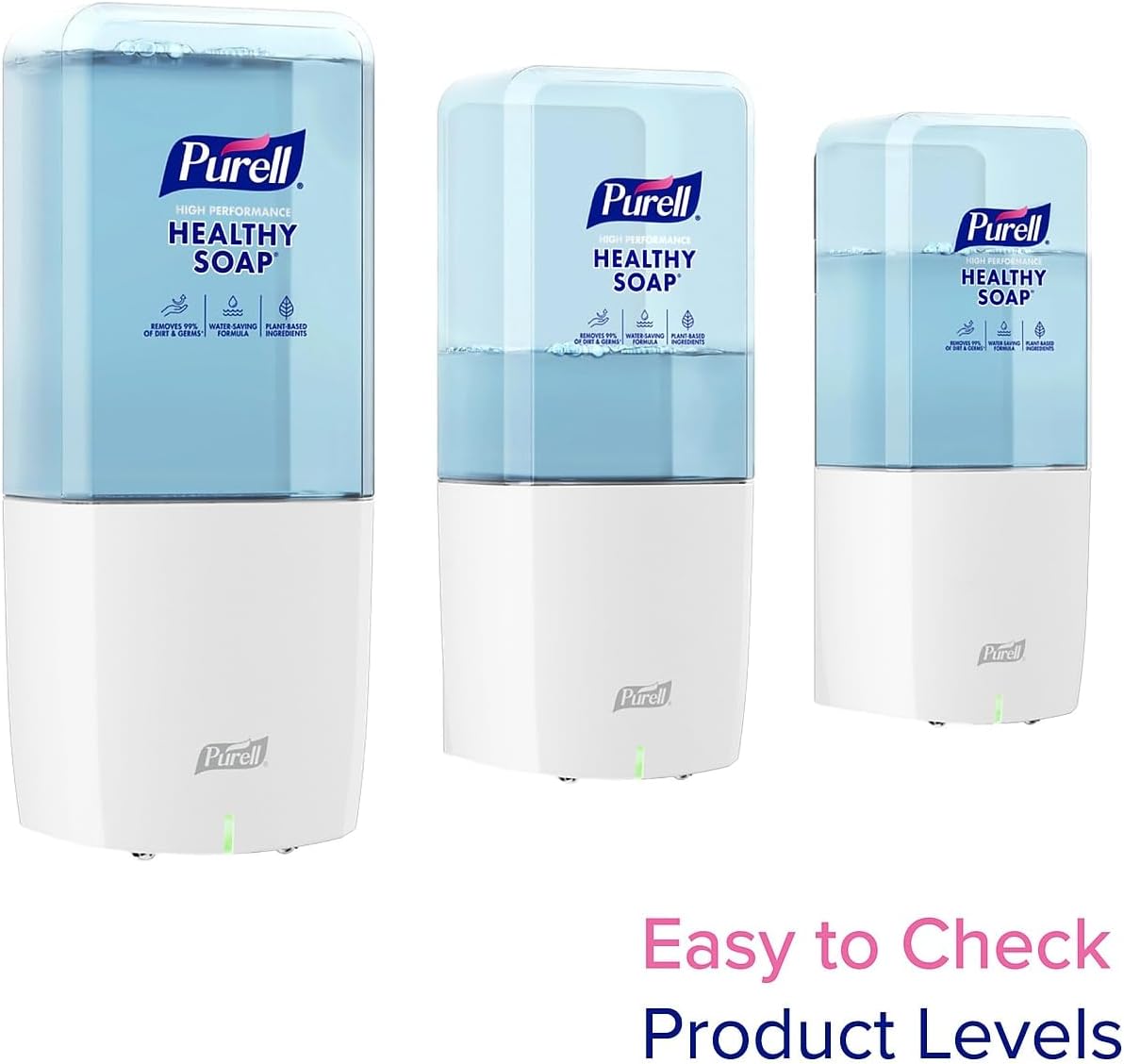
Image: Multiple PURELL ES10 dispensers displayed, illustrating how the transparent soap cartridges make it easy to visually check the remaining product levels.
Maintenance
Refilling the Dispenser
When the soap level is low, replace the empty refill cartridge with a new PURELL ES10 soap refill. Ensure the new cartridge is properly seated and the dispenser cover is closed securely.
Cleaning
To maintain hygiene and appearance, regularly wipe the exterior of the dispenser with a soft, damp cloth. Avoid using abrasive cleaners or solvents that could damage the surface.
Recycling
The PURELL ES10 system is designed with sustainability in mind. Components of the refill cartridge, including the integrated battery, are designed for easy separation and recycling. Please follow local recycling guidelines for proper disposal of empty cartridges and batteries.

Image: An exploded diagram of the PURELL ES10 soap refill, demonstrating how its components, including the battery, can be easily separated for recycling.
Troubleshooting
- Dispenser Not Activating: Ensure there are no obstructions blocking the sensor. Check if the soap refill is properly installed and contains soap. If the battery is low, the dispenser may not activate; replace the refill cartridge.
- No Soap Dispensed: Verify the soap cartridge is not empty. Ensure the dispenser is clean and the nozzle is not clogged.
- Indicator Light Status: Observe the indicator light for any specific patterns that might signal an issue (e.g., blinking rapidly for low battery). Refer to the refill packaging for specific light codes.
Specifications
| Feature | Detail |
|---|---|
| Model Number | 8330-E1 |
| Brand | Purell |
| Material | Plastic |
| Liquid Volume | 1200 Milliliters |
| Shape | Rectangular |
| UPC | 073852298086 |

Image: The PURELL ES10 dispenser showcasing its slim design, with dimensions indicating a depth of 3.9 inches and a width of 4.3 inches, suitable for tight spaces.
Environmental Information and Durability
The PURELL ES10 system is designed to reduce environmental impact. The refill cartridges contribute to 30% less plastic usage and 38% lower greenhouse gas emissions compared to traditional soap systems.

Image: An infographic highlighting the environmental benefits of the PURELL ES10 system, indicating a 30% reduction in plastic and 38% lower greenhouse gas emissions.
Each dispenser is rigorously tested to ensure durability and consistent performance in various settings, providing a reliable hand hygiene solution.
Image: A graphic emphasizing that the PURELL ES10 dispenser has been rigorously tested to ensure its durability and performance.

