
Introduction
Thank you for choosing the Zepter Syncro-Click 24cm cooking pot, model Z-420-24. This innovative cookware combines speed and quality to enhance your cooking experience. Designed for healthy and efficient food preparation, it preserves natural flavors and nutrients. This manual provides essential information for the safe and effective use, maintenance, and care of your new Zepter Syncro-Click pot.
Safety Instructions
- Always read all instructions before using the appliance.
- Do not fill the pot beyond two-thirds capacity to prevent overflow, especially with foods that expand.
- Ensure the lid is properly sealed before cooking under pressure.
- Never force open the lid while the pot is pressurized. Wait until all pressure has been released.
- Use oven mitts or heat-resistant gloves when handling the hot pot.
- Keep out of reach of children.
- Do not use the pot if any part is damaged or malfunctioning. Contact customer support for assistance.
Product Overview
Components
The Zepter Syncro-Click 24cm cooking pot consists of the main pot body, the Syncro-Click lid with its sealing mechanism, and comfortable handles. The lid incorporates a Digital Thermocontrol system for precise cooking.
Key Features
- Healthy Cooking Technology: Designed for cooking without added water, oils, or fats, preserving up to 72% of Vitamin A, 252% of Calcium, and 83% of Iron compared to traditional methods. This approach can reduce calorie intake significantly.
- Durable and Eco-Friendly Materials: Constructed from Zepter 316 L metal, ensuring the pot is indestructible, corrosion-resistant, and environmentally friendly for long-lasting performance.
- Innovative Features: Equipped with a Zepter Accuthermal Compact Bottom (ZAC) for efficient heat distribution, sealing lids to retain nutrients, and comfortable, safe handles. Handles feature interchangeable plates for customization.
- Smart and Economical Design: The Digital Thermocontrol system automates cooking, saving time and energy. It can reduce energy consumption by up to 70% and food costs by up to 30%.
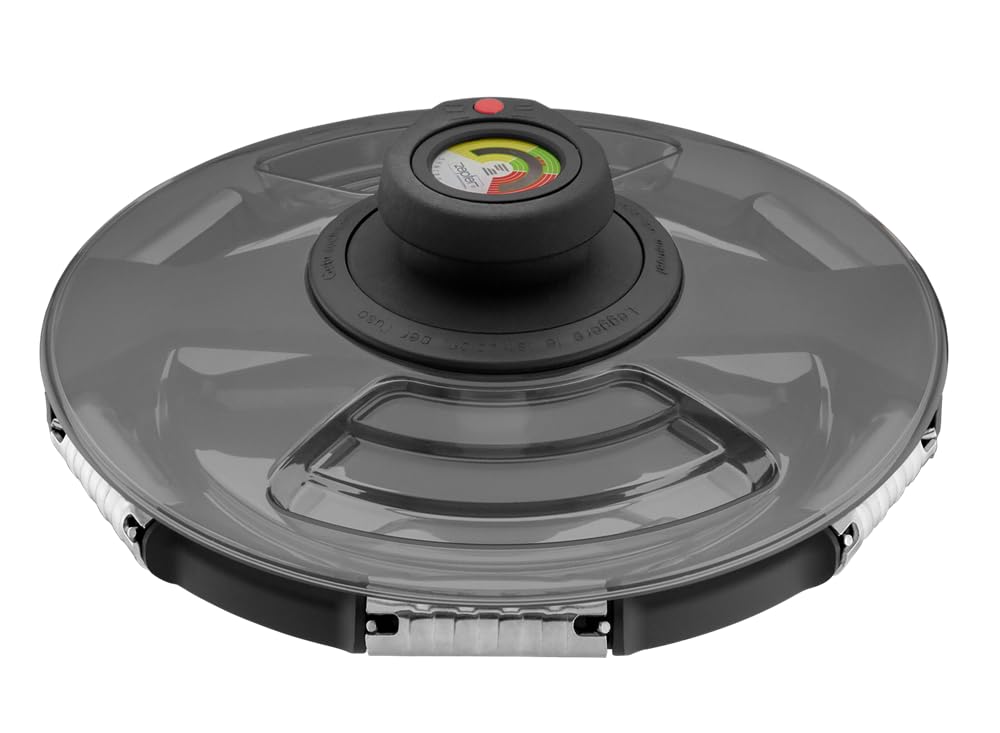
Image: The Zepter Syncro-Click 24cm cooking pot, showcasing its sleek design and robust construction. This image illustrates the main pot body and the lid with its integrated control system.
Setup
- Unpacking: Carefully remove all components from the packaging. Retain packaging for future storage or transport.
- Initial Cleaning: Before first use, wash the pot and lid thoroughly with warm soapy water. Rinse well and dry completely.
- Handle Assembly (if applicable): Ensure handles are securely attached. If interchangeable plates are provided, insert them into the handle slots as desired.
- Lid Inspection: Check the sealing gasket on the lid for proper placement and any signs of damage. A well-seated gasket is crucial for pressure cooking.
Operating Instructions
Using the Syncro-Click Mechanism
- Place food and any necessary liquids into the pot. Do not exceed the maximum fill line (typically 2/3 full).
- Position the lid onto the pot, aligning the arrows or indicators.
- Press down firmly on the Syncro-Click mechanism until you hear an audible 'click', indicating the lid is securely locked and sealed.
- Place the pot on a suitable heat source.
Digital Thermocontrol Operation
- The Digital Thermocontrol system automatically monitors and regulates the temperature inside the pot.
- Follow specific recipe guidelines for desired cooking temperatures and times.
- The display on the Thermocontrol will show the current temperature and may indicate when optimal cooking conditions are reached.
- Adjust heat source as needed to maintain the desired temperature indicated by the Thermocontrol.
Releasing Pressure and Opening the Lid
- Once cooking is complete, remove the pot from the heat source.
- Allow the pressure to release naturally, or use the quick-release method if specified by the recipe and your model's features.
- Wait until the pressure indicator drops completely before attempting to open the lid.
- Unlock the Syncro-Click mechanism and carefully lift the lid away from you to avoid steam burns.
Cleaning and Maintenance
- Daily Cleaning: After each use, wash the pot and lid with warm soapy water. For stubborn food residues, soak the pot before cleaning.
- Dishwasher Safe: The Zepter Syncro-Click pot is dishwasher safe. However, hand washing is recommended for the lid, especially the Digital Thermocontrol unit, to prolong its lifespan.
- Gasket Care: Regularly inspect the sealing gasket for wear and tear. Replace if it appears cracked, stiff, or damaged to ensure proper sealing.
- Storage: Store the pot and lid separately or with the lid inverted to prevent odors and allow air circulation.
- Avoid Abrasives: Do not use abrasive cleaners or steel wool, as these can scratch the stainless steel surface.
Troubleshooting
Lid will not seal:
- Ensure the sealing gasket is correctly positioned and free from food debris.
- Check that the lid is properly aligned with the pot body.
- Verify that the Syncro-Click mechanism is fully engaged.
Steam escaping from under the lid:
- This indicates an improper seal. Turn off the heat, allow pressure to release, and re-seat the lid and gasket.
- Inspect the gasket for damage or wear; replace if necessary.
Digital Thermocontrol not displaying:
- Ensure the unit is properly attached to the lid.
- Check for any battery issues if your model uses a replaceable battery (refer to specific Thermocontrol manual if provided).
For further assistance, please contact Zepter customer support.
Specifications
| Brand Name | Zepter |
| Model Number | Z-420-24 |
| Materials | Stainless Steel |
| Color | Silver |
| Diameter | 24 cm |
| Item Weight | 1.6 kg |
| Special Features | Digital Thermocontrol, Syncro-Click Mechanism, Zepter Accuthermal Compact Bottom, Sealing Lids |
| Control Method | Touch (for Digital Thermocontrol) |
| Operation Mode | Automatic |
| Dishwasher Safe | Yes (Pot body; hand wash lid recommended) |
| Closure Type | Locking Lid |
Warranty and Support
Your Zepter Syncro-Click cooking pot is covered by a manufacturer's warranty. Please refer to the separate warranty card included with your purchase for specific terms and conditions, including warranty period and coverage details. For technical support, spare parts, or any inquiries regarding your product, please contact Zepter customer service through their official website or the contact information provided in your product documentation.
For more information, visit the official Zepter website.


