
1. Introduction
This manual provides comprehensive instructions for the installation, operation, and maintenance of your TUMMASTER J-10 ARGB Fan and PWM Hub Controller. Please read this manual carefully before use to ensure proper functionality and safety.
2. Product Overview
2.1 Package Contents
- TUMMASTER J-10 ARGB Fan and PWM Hub Controller
- RF Remote Control
- SATA Power Cable
- PWM & ARGB 2-in-1 Cable
- Double-sided Tape (for mounting)
- Installation Guide (this manual)
2.2 Key Features
- 10-Port PWM Fan Control: Supports up to 10 4-pin PWM fans for synchronized speed control.
- 10-Port ARGB Lighting: Supports up to 10 5V 3-pin ARGB devices (fans, light bars) for synchronized lighting effects.
- RF Remote Control: Allows for convenient adjustment of lighting modes, colors, and fan speeds.
- Motherboard Synchronization: Compatible with ASUS Aura Sync, Gigabyte Fusion, MSI Mystic Light, and ASRock Polychrome for integrated lighting control.
- Magnetic Mounting: Integrated magnets for easy and secure installation within a PC case.
- SATA Power Input: Provides stable power to connected devices.
2.3 Product Diagram
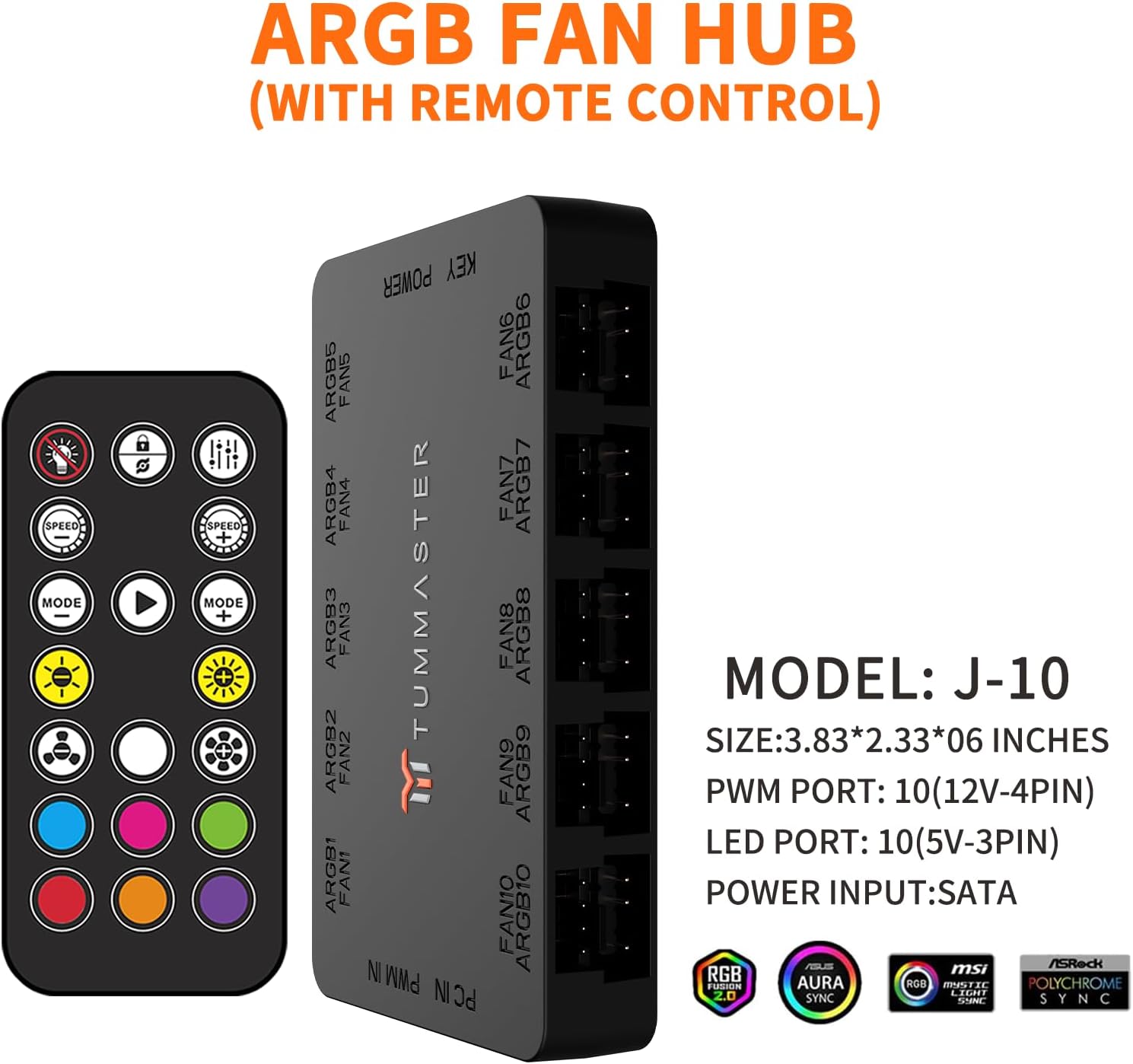
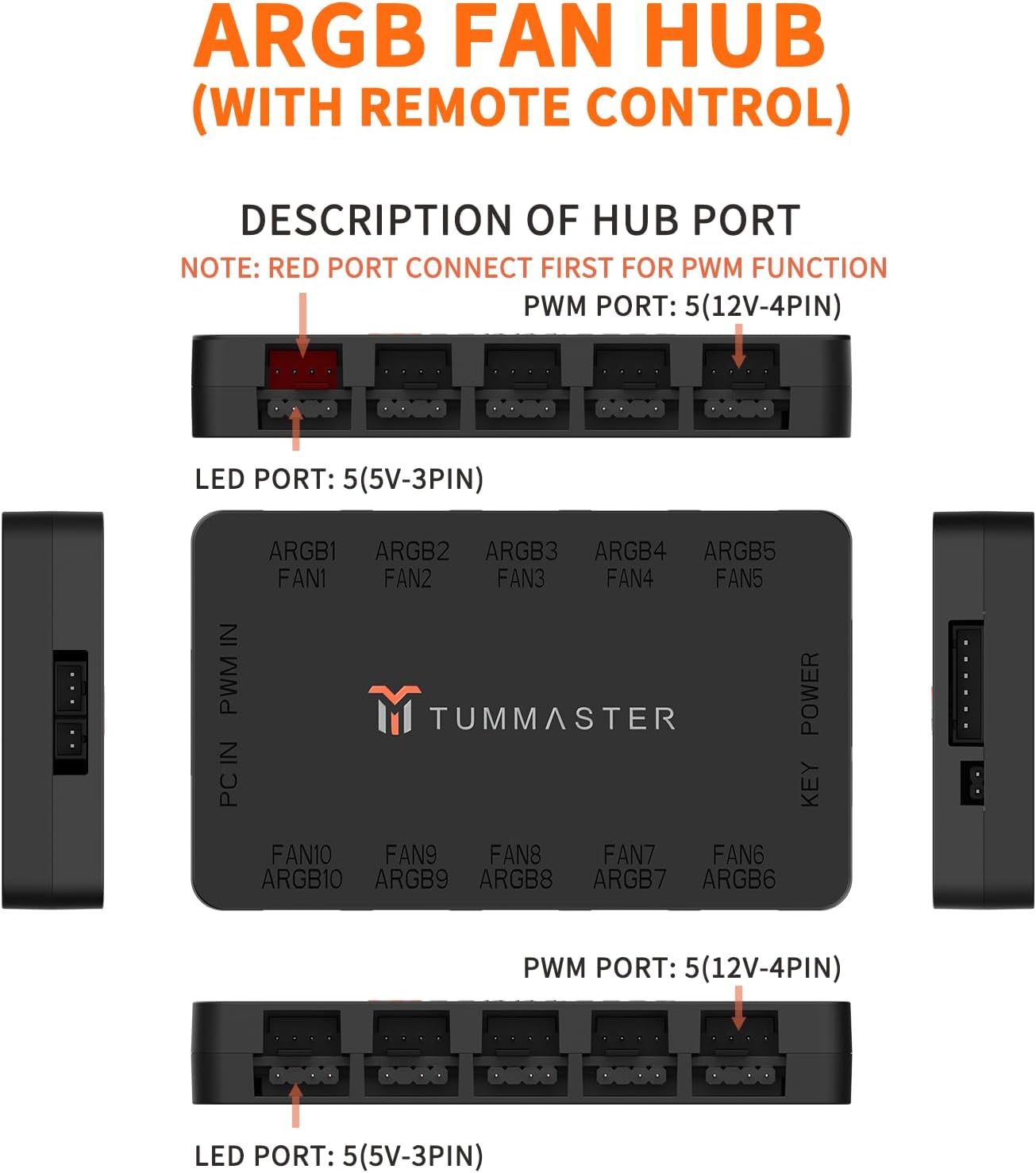
3. Safety Information
- ARGB Lighting Compatibility: This hub supports 5V 3-pin ARGB interface equipment only. Do NOT connect +12V 4-pin RGB devices, as this may damage the equipment.
- Correct Connection: Always pay attention to the arrow marked on the ARGB equipment plug and insert it in the direction of 5V. Incorrect insertion can damage the device.
- Power Supply: Ensure the SATA power cable is connected to a SATA port closest to the Power Supply Unit (PSU) to ensure 100% stable power delivery.
- Installation: Handle components with care during installation to prevent damage.
4. Setup and Installation
Follow these steps to install your TUMMASTER J-10 ARGB Fan and PWM Hub Controller:
4.1 Connecting the Hub to the Motherboard
- Connect one end of the included PWM & ARGB 2-in-1 cable to the corresponding input ports on the hub (PC IN PWM IN and ARGB IN).
- Plug the PWM 4-pin interface of the 2-in-1 cable into your motherboard's CPU fan PWM 4-pin header.
- Plug the ARGB 5V 3-pin interface of the 2-in-1 cable into your motherboard's ARGB 5V 3-pin header.
- Connect the SATA power cable to the hub's "KEY POWER" port and to a SATA power connector from your PSU. Ensure it's the closest SATA port to the PSU for optimal power.

4.2 Connecting Fans and ARGB Devices
- Connect your 4-pin PWM fans to the "FAN1" through "FAN10" ports on the hub.
- Connect your 5V 3-pin ARGB devices to the "ARGB1" through "ARGB10" ports on the hub.
- Important: The PWM 4-pin interface of the CPU cooler should be connected to the red interface of the hub (FAN1) for primary fan control. Other fans can be connected to any other FAN ports.
4.3 Mounting the Hub
The hub features a magnetic design for easy mounting. You can also use the included double-sided tape for additional security.
- Identify a suitable flat metal surface inside your PC case, typically behind the motherboard tray.
- Place the hub on the chosen surface. The magnets will hold it in place.
- For extra stability, peel off one side of the double-sided tape and apply it to the back of the hub. Then, peel off the other side and firmly press the hub onto the PC case surface.

4.4 Installation Video
5. Operating Instructions
5.1 RF Remote Control Functions
The included RF remote control allows you to manage lighting effects and fan speeds directly. Ensure the plastic battery tab is removed from the remote before first use.
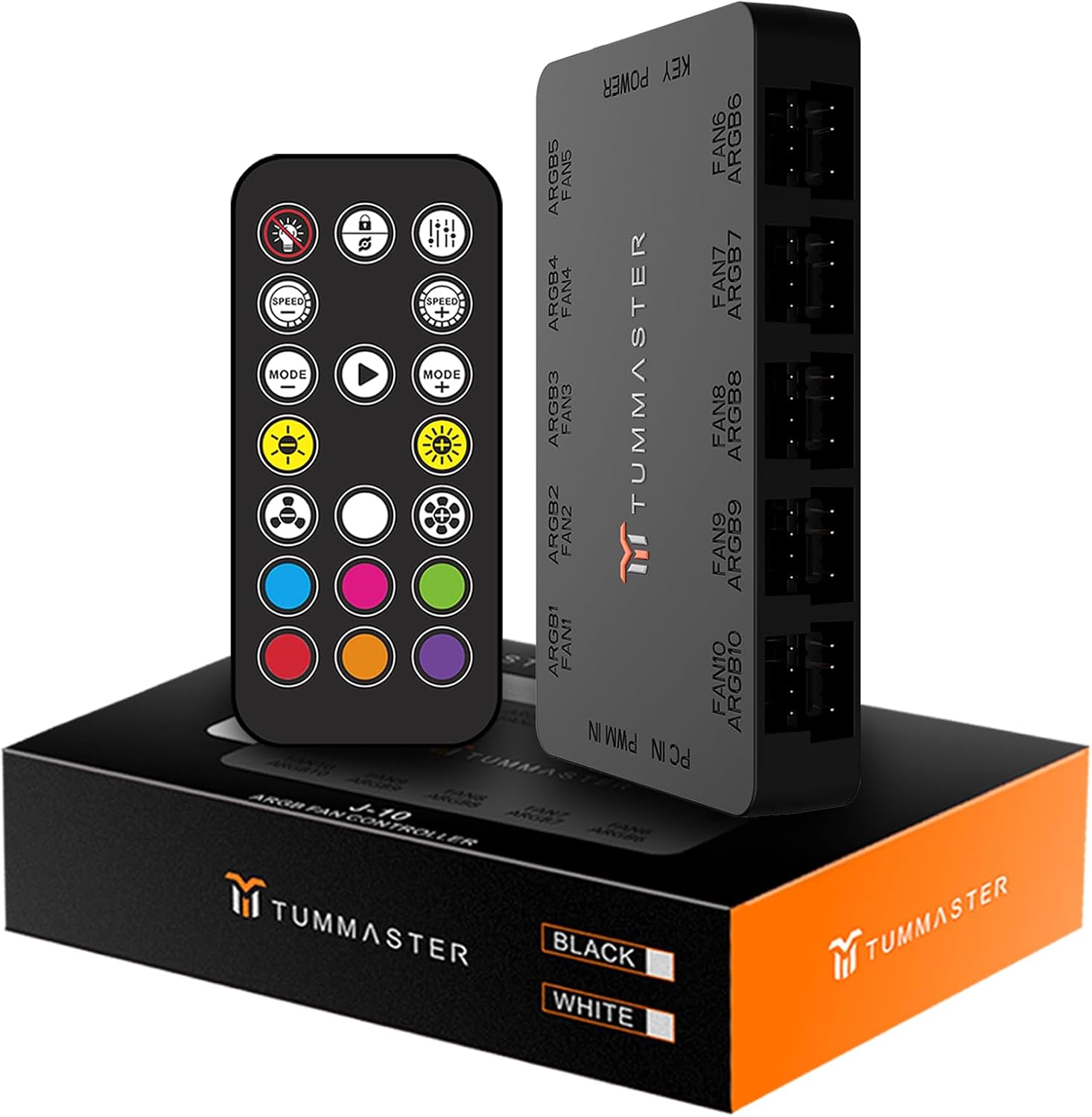
- Power Button: Turn ARGB lighting on/off.
- Speed +/-: Adjust the speed of dynamic lighting effects.
- Mode +/-: Cycle through various pre-programmed lighting modes.
- Color Buttons: Select static colors directly.
- Brightness +/-: Adjust the brightness of the lighting.
- Fan Speed Buttons: Control fan speed (if not controlled by motherboard PWM).
- Lock/Unlock: Lock or unlock the remote control functions.
5.2 Motherboard Synchronization
If connected to a compatible motherboard ARGB header, the hub can synchronize lighting effects with your motherboard's software (e.g., ASUS Aura Sync, Gigabyte Fusion, MSI Mystic Light, ASRock Polychrome).

When in motherboard sync mode, the remote control's lighting functions may be overridden by the motherboard software. Fan speed control will typically remain with the motherboard's PWM settings.
6. Maintenance
- Keep the hub and cables free from dust and debris. Use a soft, dry cloth for cleaning.
- Ensure all connections are secure and not loose.
- Avoid exposing the hub to excessive moisture or extreme temperatures.
7. Troubleshooting
- No Power to Fans/ARGB:
- Check if the SATA power cable is securely connected to both the hub and the PSU.
- Ensure the PSU is powered on.
- ARGB Lights Not Working:
- Verify that 5V 3-pin ARGB devices are connected to the correct ARGB ports on the hub.
- Confirm that the ARGB 2-in-1 cable is properly connected to the motherboard's 5V 3-pin ARGB header.
- Ensure the arrow on the ARGB plug aligns with the 5V pin on the hub/motherboard.
- If using motherboard sync, check your motherboard's ARGB software settings.
- If using the remote, ensure the battery tab is removed and the remote is functioning.
- Fan Speed Not Controlled:
- Ensure 4-pin PWM fans are connected to the fan ports.
- Verify the PWM 2-in-1 cable is connected to the motherboard's CPU fan PWM header.
- Check your motherboard's BIOS or fan control software settings.
- If using the remote, ensure it's not in motherboard sync mode and try adjusting fan speeds directly.
- Remote Control Not Responding:
- Remove and reinsert the battery tab to ensure proper contact.
- Replace the remote control battery if necessary.
- Ensure there are no obstructions between the remote and the hub's IR receiver (if applicable, though this is RF).
8. Specifications
| Brand | TUMMASTER |
| Model | J-10 |
| Product Dimensions | 3.83"L x 2.33"W x 0.6"H (9.73 x 5.92 x 1.52 cm) |
| Item Weight | 3.52 ounces (99.79 grams) |
| PWM Ports | 10 (4-Pin, 12V) |
| ARGB Ports | 10 (3-Pin, 5V) |
| Power Input | SATA |
| Control Method | RF Remote Control, Motherboard Sync (ASUS Aura Sync, Gigabyte Fusion, MSI Mystic Light, ASRock Polychrome) |
| Material | Plastic |
| UPC | 767461103885 |
9. Warranty and Support
For warranty information and technical support, please refer to the product packaging or contact TUMMASTER customer service directly. Keep your purchase receipt for warranty claims.
