
1. Introduction
The LVNOON LB2A Smart Active Balancer Battery Management System (BMS) is designed to provide comprehensive protection and management for various lithium battery types, including Li-ion, NCM, LFP, LiFePo4, and LTO. This manual provides essential information for the proper installation, operation, and maintenance of your LB2A BMS, ensuring optimal performance and longevity of your battery pack.
This specific model supports 7-20 series (7-20S) battery configurations with a continuous charge/discharge current of 200A, and includes integrated heating and CAN communication functions.
2. Product Features
- Wide Compatibility: Supports Li-ion, NCM, LFP, LiFePo4, and LTO battery types.
- Flexible Series Connection: Suitable for 3-8S, 7-20S, and 7-24S battery packs, accommodating voltages from 12V to 84V.
- High Current Rating: Available in 150A, 200A, and 300A continuous charge/discharge current options. This model is 200A.
- Smart APP Control: Real-time monitoring and management of battery status via a smartphone application (compatible with iOS and Android).
- Precise Balancing: Features active balance with 2A balance current and equalization accuracy of ±5mV.
- High-Precision Data Acquisition: Voltage acquisition accuracy ≤20mV and current acquisition accuracy ≤2%@FS.
- Isolated Power Circuit: Enhances safety and reliability.
- Comprehensive Protection: Includes balanced protection, over-charge protection, over-discharge protection, over-current protection, short-circuit protection, temperature protection, PCB protection, and disconnection protection.
- Expandable Communication: Supports additional RS485 module, GPS module, and LCD displays. This model includes CAN and heating functions.

Image: Overview of the LVNOON LB2A Smart Active Balancer BMS.
3. Package Contents
Verify that all items are present in the package:
- Active BMS Protection Board
- Balance Wire Harness
- Temperature Sensor Wire
- Switch
- CAN Wire
- User Manual
- Heat Wire

Image: Contents included in the LVNOON LB2A BMS package.
4. Setup and Installation
Careful wiring is crucial for the correct and safe operation of the BMS. Follow these steps precisely.
4.1. Wiring Diagram Overview
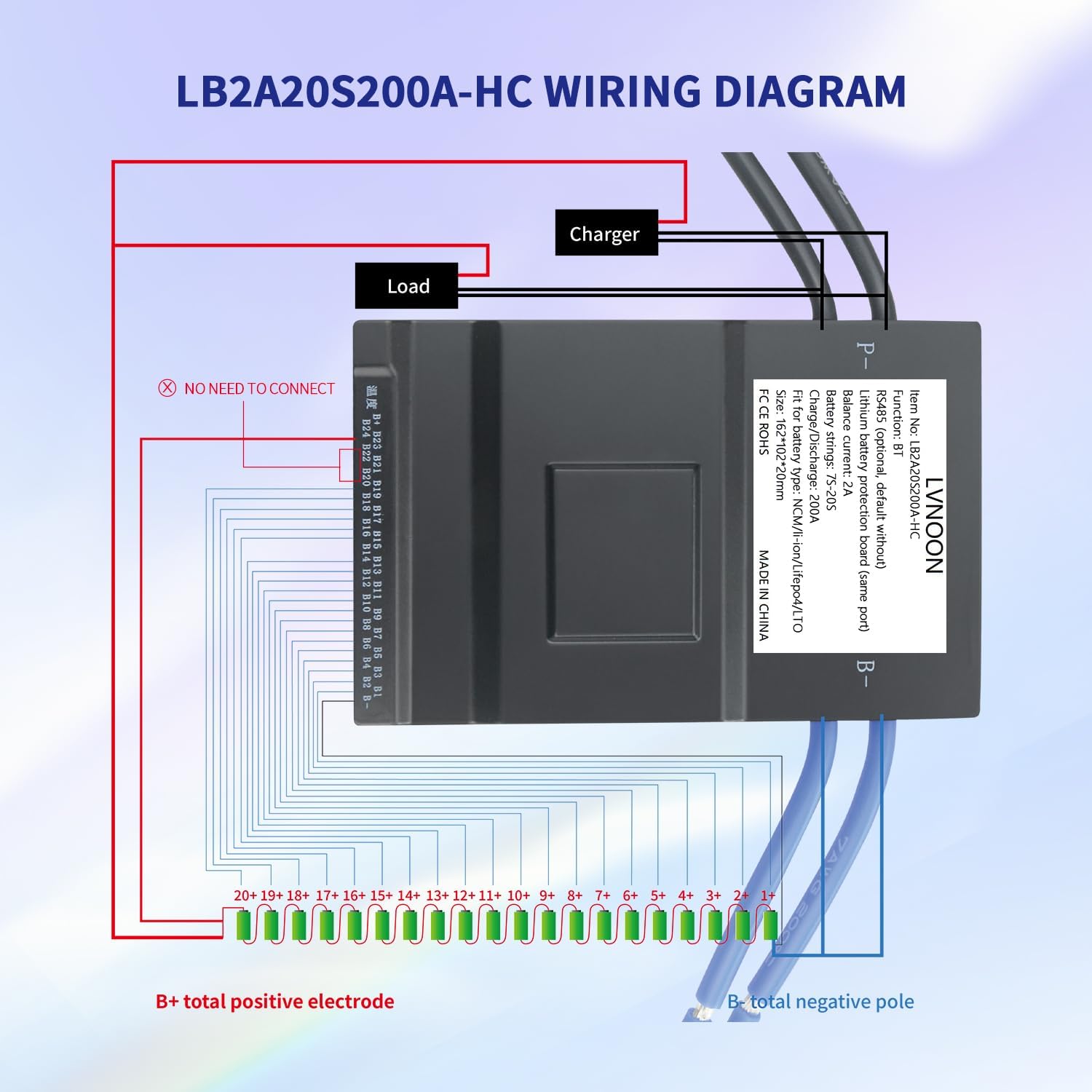
Image: General wiring diagram for the LVNOON LB2A BMS.
4.2. Balance Wire Connection
Connect the balance wires from the BMS to each individual battery cell. Ensure each wire is connected to the correct positive terminal of its corresponding cell, starting from B1 (first cell positive) up to the highest cell count (e.g., B20 for a 20S system). The black wire (B-) connects to the battery pack's total negative pole.
Video: Demonstrates the process of welding balance wires to battery cells for the LVNOON BMS.
4.3. Voltage Verification
After connecting all balance wires, it is critical to verify the voltage readings for each cell and the total pack voltage using a multimeter. This step ensures that all connections are correct and prevents damage to the BMS or battery pack.
Video: Shows how to check battery cell voltages after welding, ensuring correct connections before BMS activation.
4.4. Main Power and Load Connections
- Connect the main negative wire of the battery pack (B-) to the designated B- terminal on the BMS.
- Connect the negative terminal of your charger to the P- terminal on the BMS.
- Connect the positive terminal of your charger to the total positive electrode of the battery pack (B+).
- Connect the negative terminal of your load to the P- terminal on the BMS.
- Connect the positive terminal of your load to the total positive electrode of the battery pack (B+).
4.5. BMS Activation
After all wiring is complete and verified, use the provided switch to activate the BMS. Refer to the specific wiring diagrams for your model (3-8S or 9-24S) for interface details.

Image: Wiring diagrams for different interface configurations (3-8S and 9-24S).
5. Operating Instructions (APP Control)
The LVNOON LB2A BMS features convenient smartphone app control for real-time monitoring and management.
- Download the APP: Search for the official LVNOON BMS app on your smartphone's app store (available for iOS and Android).
- Activate BMS: Ensure the BMS is activated using the physical switch as described in the Setup section.
- Enable Bluetooth: Turn on Bluetooth on your smartphone.
- Connect to BMS: Open the app and search for the relevant serial number of your BMS. Select it to establish a connection.
- Monitor Data: Once connected, you can view various battery data, including individual cell voltages, total voltage, current, temperature, and protection status.

Image: Screenshot of the smartphone app interface for monitoring battery data.
6. Protection Features
The LB2A BMS incorporates multiple protection mechanisms to safeguard your battery pack:
- Balanced Protection: Ensures all cells maintain similar voltage levels, extending battery life.
- Over-Charge Protection: Prevents cells from being charged beyond their safe voltage limit.
- Over-Discharge Protection: Prevents cells from being discharged below their safe voltage limit.
- Over-Current Protection: Safeguards against excessive current during charge or discharge.
- Short-Circuit Protection: Automatically disconnects the battery in case of a short circuit.
- Temperature Protection: Monitors battery temperature and prevents operation outside safe temperature ranges.
- PCB Protection: Protects the circuit board from damage.
- Disconnection Protection: Detects and responds to unexpected disconnections within the battery system.

Image: Visual representation of the comprehensive protection features of the BMS.
7. Applications
The LVNOON LB2A Smart Active Balancer BMS is suitable for a wide range of applications requiring reliable battery management:
- Electric Two-Wheelers
- Electric Bicycles
- Electric Tricycles
- Home Energy Storage Systems
- Electric Wheelchairs
- Automated Guided Vehicles (AGV)
- Outdoor Energy Storage Solutions
- RV Energy Storage
- Lease Battery Swapping Systems

Image: Examples of various applications where the LB2A BMS can be utilized.
8. Specifications

Image: Dimensions of the LVNOON LB2A BMS.
| Feature | Specification |
|---|---|
| Brand | LVNOON |
| Model Number | LB2A |
| Current Rating | 200 Amps |
| Supported Battery Types | Li-ion, NCM, LFP, LiFePo4, LTO |
| Supported Series (S) | 7-20S (with Heat + CAN) |
| Input Voltage | 72 Volts (Nominal, depends on S count) |
| Output Voltage | 72 Volts (Nominal, depends on S count) |
| Product Dimensions (D x W x H) | 0.79" x 4.02" x 6.38" (20mm x 102mm x 162mm) |
| Item Weight | 0.6 Kilograms |
| Single Cell Voltage Range | 1V - 5V |
| Balance Current | 2A (Active Balance) |
| Equalization Accuracy | ±5mV |
| Voltage Acquisition Accuracy | ≤20mV |
| Current Acquisition Accuracy | ≤2%@FS |
| Communication Interfaces | Bluetooth (Standard), CAN (Included), Heat Function (Included), RS485 (Optional), GPS (Optional) |
| Manufacturer | Zhongshan LVNOON electronics co.,ltd |
| UPC | 762206889734 |
9. Troubleshooting
If you encounter issues with your LVNOON LB2A BMS, consider the following troubleshooting steps:
- No Power/No Response: Ensure all power connections are secure and correct. Verify the BMS is activated via its switch.
- Incorrect Voltage Readings: Double-check all balance wire connections to individual cells. Use a multimeter to confirm each cell's voltage and the total pack voltage.
- App Connection Issues: Ensure Bluetooth is enabled on your smartphone and the BMS. Restart the app and try reconnecting. Verify the correct BMS serial number is selected.
- Protection Triggered: If a protection (e.g., over-charge, over-discharge, over-current) is triggered, the BMS will cut off power. Identify the cause of the trigger (e.g., faulty charger, excessive load, unbalanced cells) and rectify it before attempting to reset the BMS. The app can provide details on triggered protections.
- Unusual Behavior: If the BMS exhibits unexpected behavior, disconnect it from the battery pack and re-verify all wiring according to the manual.
If problems persist after following these steps, please contact customer support.
10. Warranty and Support
10.1. Warranty Information
The LVNOON LB2A Smart Active Balancer BMS comes with a 1-Year Warranty from the date of purchase. This warranty covers manufacturing defects and malfunctions under normal use. It does not cover damage caused by improper installation, misuse, accidents, unauthorized modifications, or natural disasters.
10.2. Customer Support
For technical assistance, warranty claims, or any questions regarding your LVNOON LB2A BMS, please contact the seller or manufacturer directly. Have your product model number (LB2A) and purchase details ready when contacting support.