
Introduction
Thank you for purchasing the Sweiko Telescopic Bar Table. This manual provides essential information for the safe and correct assembly, operation, and maintenance of your new furniture. Please read these instructions carefully before beginning assembly and retain them for future reference.
Package Contents
Your purchase is delivered in two separate packages. These packages may arrive on different days. Please allow 2-3 days after receiving the first package for the second package to arrive. If you have any concerns regarding your delivery, please contact customer service.
The packages contain:
- All necessary components for the bar table.
- Assembly instructions.
- Assembly hardware.
Setup and Assembly
Assembly is required for this product. Please follow the included assembly instructions and diagrams carefully. Ensure all parts are present before beginning assembly.
Assembly Steps:
- Unpack all components and verify against the parts list in the separate assembly guide.
- Identify all hardware and tools provided.
- Assemble the main storage unit according to the step-by-step instructions.
- Attach the side shelving unit to the main storage unit.
- Secure the telescopic tabletop mechanism.
- Install the LED light strip as directed in the LED installation guide.
- Ensure all connections are tight and the table is stable before use.
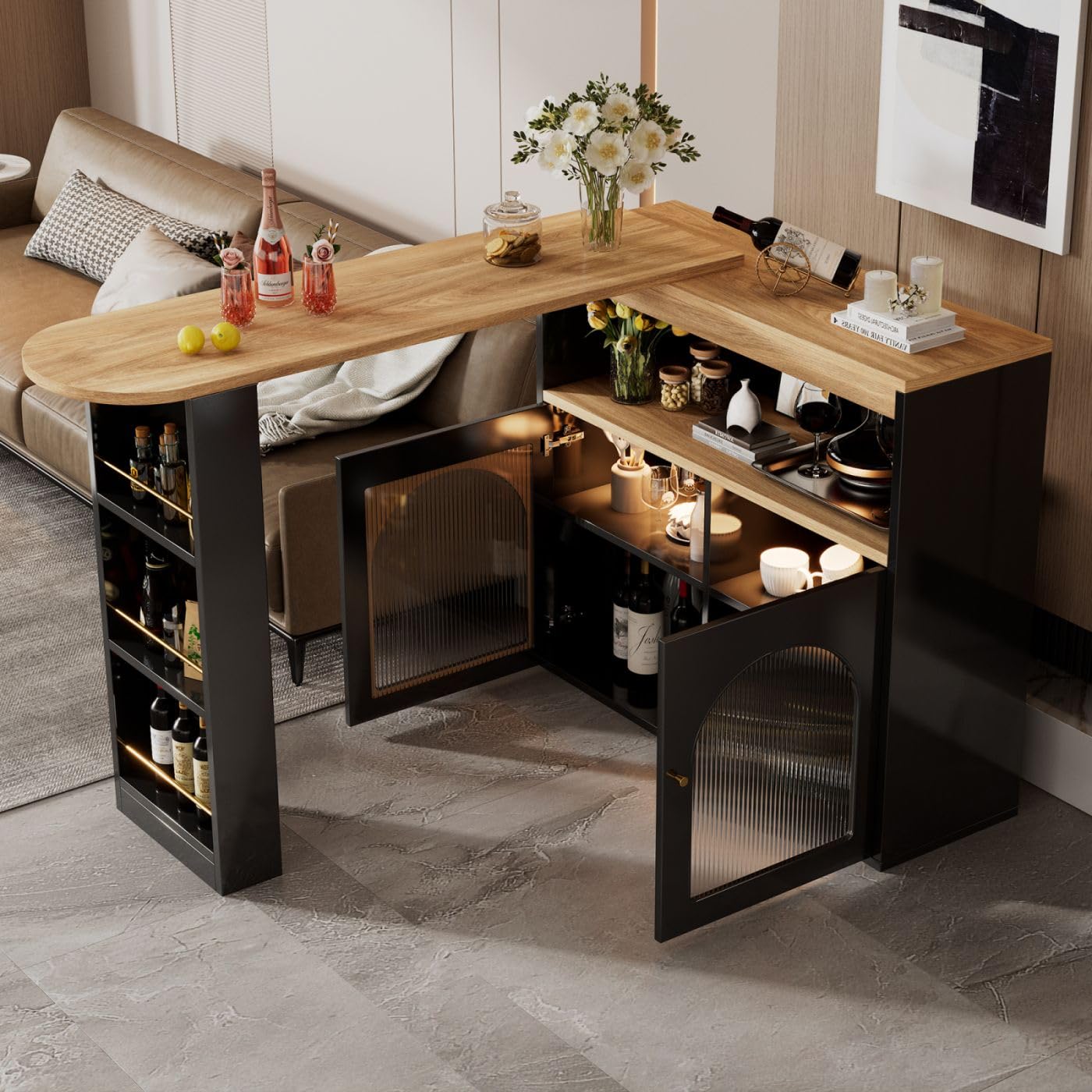
Figure 1: This diagram illustrates the key measurements of the bar table, including its width (138-193cm), depth (39cm), and height (105cm). It also details the dimensions of the storage compartments and the side shelving unit, which are crucial for assembly and placement.

Figure 2: This image displays various possible configurations of the bar table, highlighting its adaptable design for different space requirements. It shows the main unit and the side table in both compact and extended arrangements.
Operating Instructions
Telescopic and Rotation Function:
The bar table features a 360-degree free rotation function and a retractable design. To adjust the table, gently slide the tabletop to extend or retract it to your desired length. The side table unit can be rotated around the main storage unit to achieve various layouts, adapting to different room sizes and functional needs.

Figure 3: This image demonstrates the bar table's ability to rotate 360 degrees, allowing for flexible configuration and space optimization. The main unit and the side table can be adjusted to various angles to suit your needs.
Storage Unit Usage:
The table incorporates multi-tier storage on the side and within the main unit. The main unit features two doors with glass panels, providing enclosed storage. The side unit offers open shelving for easy access. Utilize these compartments to organize items such as bottles, glasses, or other dining accessories.

Figure 4: A view of the bar table with its storage doors open, revealing the multi-tier shelving inside the main unit and the side shelving unit. This illustrates the available space for storing items like bottles, glasses, or other necessities.
LED Strip Operation:
The integrated LED strip can be controlled via a smartphone application. Locate the QR code on the LED switch and scan it with your smartphone to download the control application. Through the app, you can adjust the light color to suit your preference.

Figure 5: This image highlights the built-in colorful LED strip. It shows the location of the LED strip and indicates that scanning a QR code on the switch allows for smartphone control to change light colors.
Care and Maintenance
Cleaning:
To clean the table surfaces, wipe with a damp cloth. Immediately dry with a clean, soft cloth to prevent water marks or damage. Avoid using abrasive cleaners, harsh chemicals, or solvents, as these can damage the finish.
General Care:
- Avoid placing hot items directly on the tabletop; use coasters or protective mats.
- Protect the table from direct sunlight and extreme temperature changes to prevent warping or fading.
- Periodically check and tighten all assembly hardware to ensure stability.
Troubleshooting
LED Light Strip Not Functioning:
- Check Power Connection: Ensure the LED strip is properly connected to its power source and that the power outlet is functional.
- Verify Installation: Confirm that the LED strip was installed correctly according to the provided instructions.
- App Connection: If using the smartphone app, ensure your device is properly paired and the app is updated.
- Missing Component: If the LED strip was not included in your package, please contact customer service.
Table Stability Issues:
- Tighten Hardware: Re-check all screws and bolts and tighten them securely.
- Level Surface: Ensure the table is placed on a flat, level surface.
Rotation Mechanism Stiffness:
- Clear Obstructions: Ensure no objects are obstructing the rotation path.
- Clean Mechanism: Dust or debris might affect smooth movement. Gently clean around the rotating parts.
Specifications
| Brand | Sweiko |
| Model Number | jw3467 |
| Product Dimensions (D x W x H) | 15.35"D x 75.98"W x 41.34"H (Extended) |
| Metric Dimensions (D x W x H) | 39cm D x 138-193cm W x 105cm H |
| Item Weight | 50 Kilograms |
| Maximum Load Capacity | 50 Kilograms |
| Color | Black |
| Top Material | Chipboard (MDF desktop) |
| Frame Material | Particle Board |
| LED Strip | Yes, colorful with smartphone control |
| Assembly Required | Yes |
Customer Support
If you encounter any issues or have questions regarding your Sweiko Telescopic Bar Table that are not covered in this manual, please contact our customer service department for assistance. Please have your model number (jw3467) and purchase details ready when contacting support.