
Introduction
This manual provides essential instructions for setting up, operating, and maintaining your MJDHS I16 Pro Flip Phone. Please read it carefully to ensure proper use and to maximize the phone's features. Keep this manual for future reference.
Product Overview
The MJDHS I16 Pro is a compact flip phone designed for ease of use, featuring a 1.77-inch HD screen, dual SIM support, and essential functions like speed dial and an LED flashlight. Its simple interface makes it suitable for users seeking straightforward mobile communication.
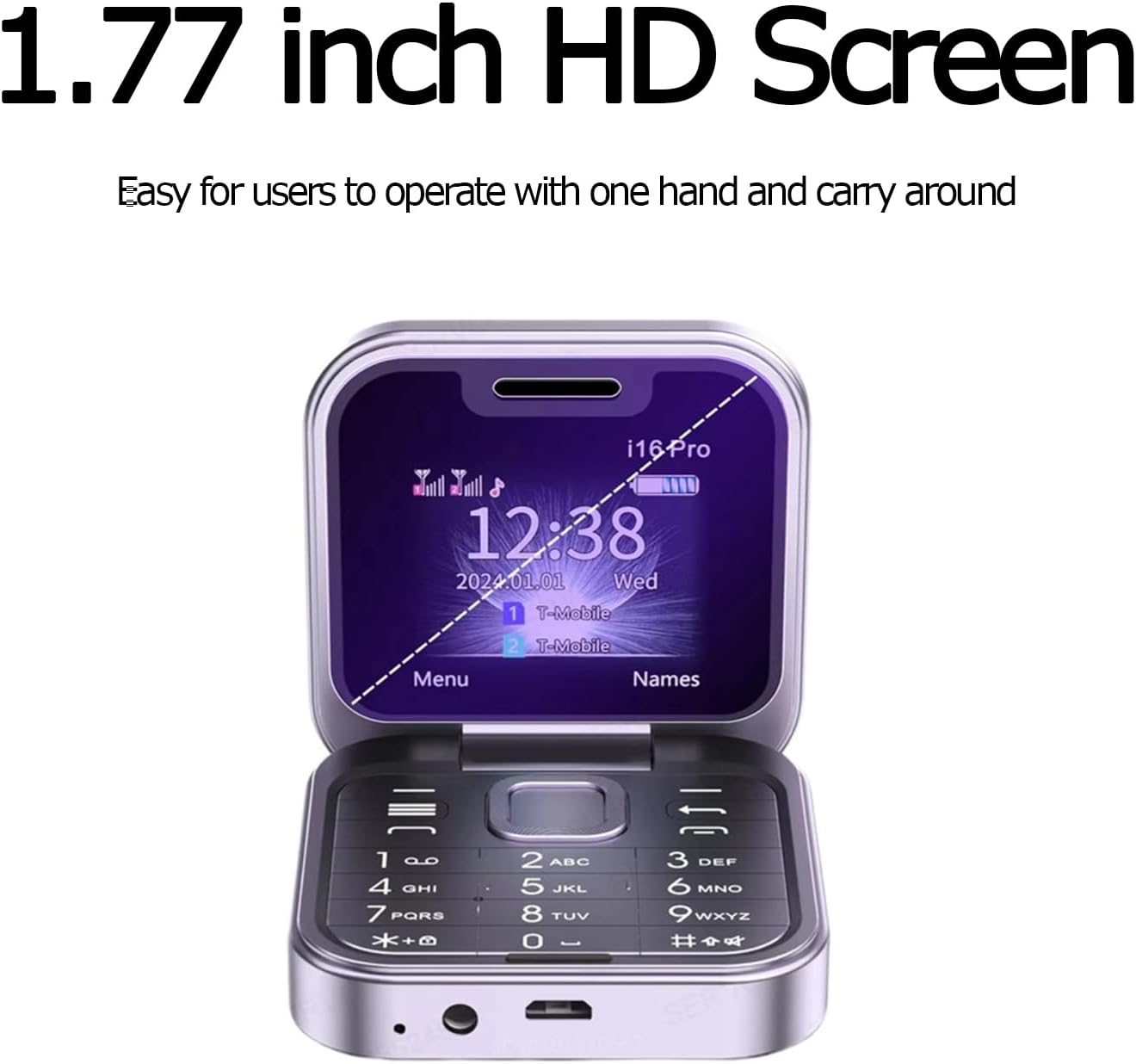
This image shows the MJDHS I16 Pro Flip Phone in its open position, highlighting the clear 1.77-inch HD display and the user-friendly physical keypad. The screen displays the time, date, network status, and battery level.
Package Contents
- 1 x I16 Pro Flip Phone Handset
- 1 x Charger
- 1 x User Manual
- 1 x Hands-free Kit (Earphones)
Setup
1. Inserting SIM Cards and Micro SD Card
The phone supports two Nano SIM cards and one Micro SD card (expandable up to 16GB) for additional storage.
- Open the back cover of the phone by gently prying it from the designated notch.
- Carefully insert the Nano SIM cards into the designated slots. Ensure they are correctly oriented.
- Insert the Micro SD card into its slot if you wish to expand storage for photos, music, or videos.
- Close the back cover securely until it clicks into place.
2. Initial Charging
Before first use, it is recommended to fully charge the phone. Connect the charger to the phone's charging port (Type-C) and plug it into a standard power outlet. The battery indicator on the screen will show the charging status.
Note: If the battery level is below 20% upon receipt, charge the phone immediately to protect battery safety and longevity.
Operating Instructions
1. Power On/Off
To power on the phone, open the flip and press and hold the power button (usually the red 'End Call' button) until the screen lights up. To power off, press and hold the power button, then select 'Power Off' from the options displayed on the screen.

This image illustrates how to power on and power off the MJDHS I16 Pro Flip Phone. The top part shows the phone open, indicating 'Turn on your phone'. The bottom part shows the phone closed, indicating 'Turn off your phone'.
2. Making and Receiving Calls
- Making a Call: Open the flip, dial the desired number using the keypad, and then press the green call button. To end a call, press the red end call button.
- Receiving a Call: When the phone rings, open the flip (if closed) and press the green call button to answer. To reject an incoming call, press the red end call button.
3. Speed Dial
The phone features a one-touch speed dial function for frequently used numbers. You can assign contacts to number keys 2-9.
- Navigate to the phone's settings or contacts menu.
- Select 'Speed Dial' or a similar option.
- Choose a number key (2-9) and assign a contact from your phonebook.
- Once set, simply press and hold the assigned number key to dial the contact quickly.

This image demonstrates the speed dial feature of the MJDHS I16 Pro Flip Phone. It shows the phone's keypad with keys 2, 3, and 4 highlighted and labeled 'Mum', 'Dad', and 'Son' respectively, indicating how quick dialing can be configured.
4. Messaging
To send or receive text messages, navigate to the 'Messages' menu from the main screen. You can compose new messages using the keypad or view existing conversations.
5. Camera
The phone includes a 0.08 MP rear camera. To use the camera, go to the 'Camera' application from the main menu. You can take photos to capture important moments.
6. LED Flashlight
The phone has a built-in LED flashlight for convenience. To quickly activate it, press and hold the middle button on the keypad. Repeat the action to turn it off.

This image highlights the LED flashlight feature of the MJDHS I16 Pro Flip Phone. The phone is shown with its flashlight on, illustrating its utility in low-light conditions, such as camping.
7. Media Player
The phone supports audio and video playback. You can play media files stored on your phone's internal memory or on an inserted Micro SD card without requiring an internet connection.
8. Bluetooth Connectivity
The phone supports Bluetooth for connecting to compatible accessories like hands-free kits or Bluetooth headsets. Access Bluetooth settings from the main menu to enable Bluetooth, search for devices, and pair them.
9. Flashing Reminders
The phone provides visual alerts for important events. Icons will flash on the display to indicate new messages, incoming calls, or low battery status, ensuring you don't miss critical notifications.

This image illustrates the flashing reminder feature of the MJDHS I16 Pro Flip Phone. It shows a close-up of the phone's display area with distinct icons flashing to alert the user about power status, new messages, and incoming phone calls.
Maintenance
1. Battery Care
To prolong battery life, avoid completely draining the battery frequently. Charge the phone when the battery level is low. Use only the provided charger or a compatible charger to prevent damage.
2. Cleaning
Wipe the phone with a soft, dry cloth to remove dust and smudges. Avoid using liquid cleaners, abrasive materials, or harsh chemicals, as these can damage the phone's surface or internal components.
Troubleshooting
Common Issues and Solutions
- Phone does not turn on: Ensure the battery is charged. Connect the charger and try again. If the issue persists, ensure the battery is properly seated (if removable) or contact support.
- Cannot make or receive calls: Check if SIM cards are properly inserted and activated. Verify that there is sufficient network coverage in your area. Ensure your account has credit or an active plan.
- Sound issues: Ensure the volume is not muted or set too low. If using headphones, check their connection to the 3.5mm jack.
- Screen is unresponsive: Try restarting the phone. If the screen remains unresponsive, ensure it is clean and free from moisture.
For further assistance, please refer to the specific product manual included in the package or contact customer support.
Specifications

This image provides a detailed rear view of the MJDHS I16 Pro Flip Phone, labeling key components such as the camera, flash lamp, Type-C charging port, and the 3.5mm headphone jack, offering a hardware overview.
| Feature | Description |
|---|---|
| Product Color | Black |
| Processor Model | MTK6261D |
| RAM | 32 MB |
| Internal Storage | 32 MB |
| Screen Size | 1.77 inches (128 x 160 resolution) |
| Network Type | 2G: GSM 850/900/1800/1900 |
| Front Camera | Not supported |
| Rear Camera | 0.08 MP (Supported) |
| Flash | Supported |
| Headphone Jack | 3.5 mm |
| Audio Type | Class AB |
| Bluetooth | Supported |
| Audio Playback | Yes |
| Battery Capacity | 1000 mAh |
| SIM Type | 2 Nano SIM cards |
| Storage Card | Micro SD card (up to 16 GB) |
| Flashlight | Yes |
| Dimensions | 63 x 63 x 18.8 mm |
| Weight | 80 g |
| Language Support | Multiple languages |
Warranty and Support
Information regarding product warranty and customer support is typically provided in a separate warranty card or contact details included in your product package. Please refer to those documents for specific details on warranty coverage, service procedures, and how to contact customer support for assistance.