1. Product Overview
The Hodozzy 10.26 inch portable car stereo is designed to enhance your driving experience with advanced connectivity and entertainment features. It includes a high-definition IPS touchscreen, wireless CarPlay, wireless Android Auto, Bluetooth, FM transmitter, AUX connectivity, and sound processing capabilities like EQ and DSP. This device is compatible with a wide range of vehicles due to its 7-32V power input.
Key Features:
- 10.26-inch HD IPS Digital Full View Screen (1600x600 pixels)
- Wireless CarPlay and Android Auto
- Wireless Airplay and Android Cast
- Bluetooth for hands-free calls and music streaming
- Multiple sound transmission modes: Built-in speaker, AUX cable, FM transmitter
- EQ and DSP audio processing functions
- Supports YouTube and TF card playback
- Wide voltage compatibility (DC7V-32V)
- Adjustable screen brightness, color, contrast, and saturation
2. Package Contents
Before installation, please verify that all items listed below are present in your package:
- 10.26-inch IPS Color Monitor
- Cigarette Lighter Power Adapter
- Universal Bracket with Adhesive Pad
- AUX Cable
- User Manual
- Bracket Fixing Sticker
- Accessories (e.g., camera adapter, if included)

3. Setup and Installation
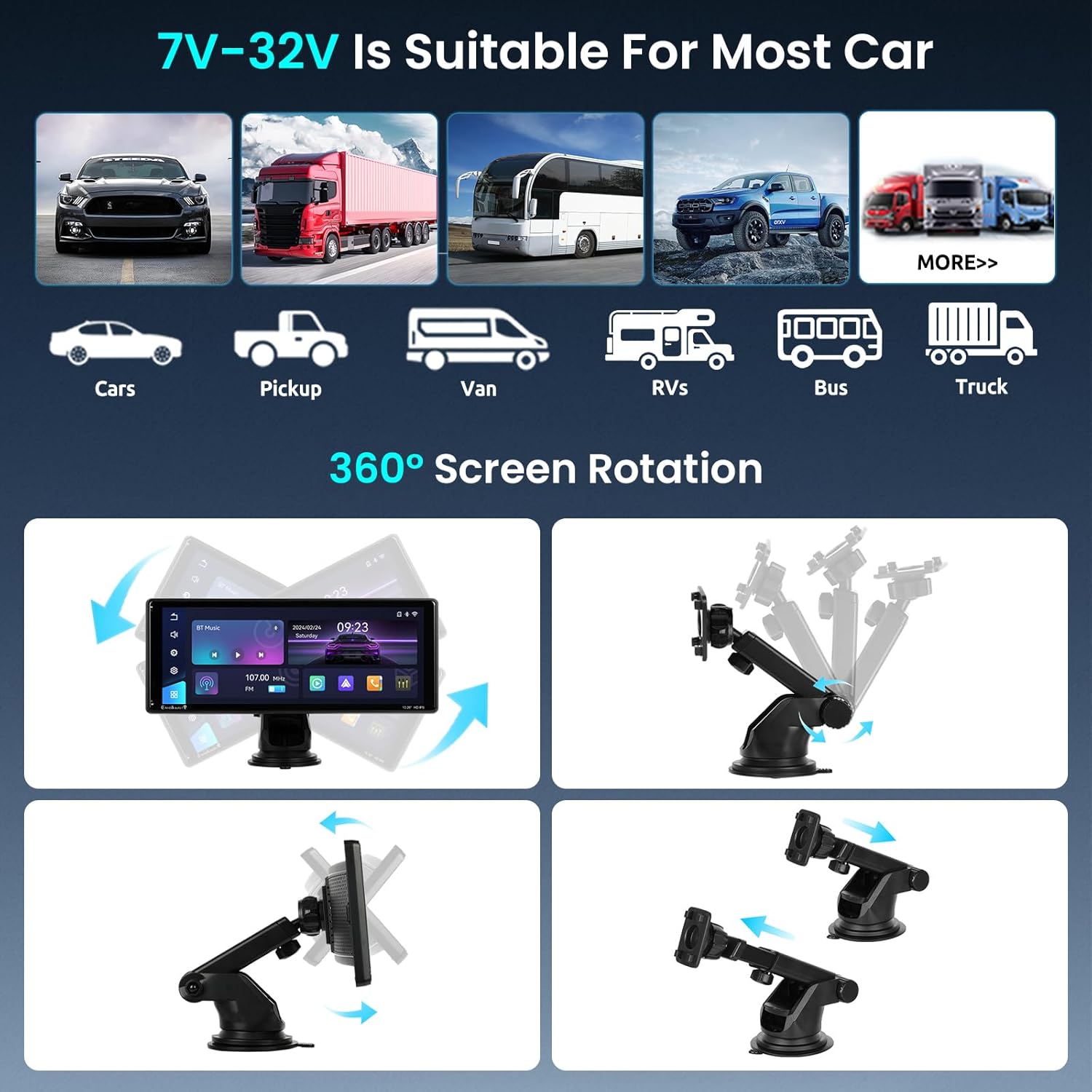
The Hodozzy portable car stereo is designed for easy and quick installation without complex wiring. It is compatible with most vehicles (7-32V).
- Mounting the Device: Attach the universal bracket to a suitable location on your dashboard or windshield using the adhesive pad. Ensure the surface is clean and dry for optimal adhesion.
- Adjusting the Angle: The innovative bracket allows for front-to-back adjustment and 360-degree rotation. Adjust the screen angle to ensure the best possible view while driving, minimizing glare and maximizing visibility.
- Power Connection: Connect the cigarette lighter power adapter to your vehicle's 12V power outlet and to the device. The wide voltage range (7-32V) ensures compatibility with various car models.
- Initial Power On: Once connected, the device should power on automatically or by pressing the power button.
4. Operating Instructions
4.1 Wireless CarPlay and Android Auto
The device supports wireless CarPlay and Android Auto, providing seamless integration with your smartphone for navigation, music, and calls.
- Ensure your phone's Wi-Fi and Bluetooth are enabled.
- On the car stereo, select the CarPlay or Android Auto icon.
- Follow the on-screen instructions to pair your smartphone via Bluetooth and then connect via Wi-Fi for wireless functionality.
- Once connected, you can access compatible apps directly from the car stereo's screen.

4.2 Mirror Link (Airplay & Android Cast)
Project your mobile phone's content onto the car stereo's screen for a richer entertainment experience.
- Select the Airplay (for iOS) or Android Cast (for Android) option on the device.
- Follow the pairing instructions to mirror your phone's screen.
- This feature allows you to watch videos, including YouTube, directly on the car stereo's display.

4.3 Sound Transmission Modes
The device offers multiple ways to transmit audio to your vehicle's sound system:
- Built-in Speaker: For direct audio output from the device.
- Bluetooth: Connect to your vehicle's Bluetooth system for high-quality audio.
- FM Transmitter: Transmit audio to your car's FM radio by tuning both devices to the same FM frequency.
- AUX Connection: Use the provided AUX cable to connect the device to your car's AUX input for direct audio transmission.

4.4 DSP/EQ Settings
Customize your audio experience with the integrated Equalizer (EQ) and Digital Signal Processing (DSP) functions.
- Access the EQ/DSP settings from the main menu.
- Adjust frequency bands, balance, loudness, and other audio parameters to suit your preferences.
- Pre-set EQ modes (Standard, Classic, Electric, etc.) are available for quick selection.

4.5 General Settings
The device offers various settings for customization:
- Screen Brightness: Adjustable.
- Display Color/Contrast/Saturation: Adjustable.
- Time Setting: Supported.
- Software Information: View device software details.
- Factory Settings Reset: Option to restore default settings.
- Reverse Mute: Switch for muting audio when reversing.
- Rearview Mirror: Switch for rearview camera display.
5. Maintenance
To ensure the longevity and optimal performance of your Hodozzy portable car stereo, follow these general maintenance guidelines:
- Cleaning: Use a soft, dry cloth to clean the screen and exterior. Avoid abrasive cleaners or solvents that may damage the surface.
- Temperature: Avoid exposing the device to extreme temperatures (very hot or very cold) for extended periods.
- Moisture: Keep the device dry. Do not expose it to water or excessive humidity.
- Power: Always use the provided power adapter. Disconnect the power when the device is not in use for a long time.
No specific maintenance procedures beyond general cleaning are required for this device.
6. Troubleshooting
This section provides general guidance for common issues. For more complex problems, please refer to the support information.
- Device does not power on: Ensure the cigarette lighter power adapter is securely connected and the vehicle's power outlet is functioning. Check the vehicle's fuse for the power outlet.
- No sound: Verify the selected sound transmission mode (Built-in Speaker, Bluetooth, FM, AUX). Check volume levels on both the car stereo and your vehicle's audio system. If using FM transmitter, ensure the frequencies match and there is no interference.
- CarPlay/Android Auto not connecting: Ensure your phone's Wi-Fi and Bluetooth are active. Try restarting both the phone and the car stereo. Re-pair the devices if necessary.
- Screen unresponsive: Try restarting the device. If the issue persists, a factory reset might be necessary (note: this will erase custom settings).
No specific troubleshooting steps are provided in the product description. If issues persist, contact customer support.
7. Specifications
| Feature | Specification |
|---|---|
| Brand | Hodozzy |
| Model Number | 819f2ebf-c489-4858-9e9e-bc15bf50f3bb |
| Screen Size | 10.26 inches |
| Display Type | IPS Digital HD Full View Screen |
| Effective Pixels | 1600x600 |
| Power Voltage | DC7V-32V |
| Connectivity Technology | Bluetooth, Wi-Fi |
| Wireless Features | CarPlay, Android Auto, Airplay, Android Cast |
| Audio Output | Built-in Speaker, AUX, FM Transmitter, Bluetooth |
| Special Features | Android Auto, Apple CarPlay, EQ, DSP |
| Compatible Devices | Smartphone |
| Connector Type | USB Type A, 3.5 mm Jack |
| Control Method | Touch |
| Supported Internet Services | YouTube |
| Video Encoding | AVC (H.264), VP9 or HEVC (H.265) |
| Number of Channels | 2 |
8. Warranty and Support
Manufacturer Warranty: This product comes with a 2-year manufacturer warranty.
Spare Parts Availability: Information regarding the availability of spare parts is currently not provided.
Software Updates: Information regarding guaranteed software updates is currently not provided.
For warranty claims or technical support, please contact your retailer or the Hodozzy customer service channel.


