
1. Introduction
Welcome to the user manual for your new Pride Mobility Victory 10 4-Wheel Scooter. This manual provides essential information for the safe and effective operation, maintenance, and care of your scooter. Please read this manual thoroughly before using your scooter to ensure proper understanding and to maximize your mobility experience.
The Pride Mobility Victory 10 is designed to provide comfortable and reliable personal mobility for adults, supporting users up to 400 lbs. It features a robust design, powerful battery options, and user-friendly controls.
2. Safety Information
Your safety is paramount. Always adhere to the following guidelines:
- Weight Capacity: Do not exceed the maximum weight capacity of 400 lbs (181 kg). Exceeding this limit can compromise stability and performance.
- FDA Class II Medical Device: This scooter is an FDA Class II Medical Device, designed to assist individuals with mobility impairments. Use it only as intended.
- Pre-Operation Check: Before each use, inspect tires, battery charge, and all controls to ensure they are in proper working order.
- Environmental Conditions: Avoid operating the scooter in extreme weather conditions, on steep inclines, or on uneven terrain that could lead to instability.
- Battery Safety: Use only approved batteries (U1 or 40AH) and charging equipment. Do not expose batteries to extreme temperatures or puncture them.
- Driving Safely: Always drive at a safe speed, especially in crowded areas or indoors. Be aware of your surroundings and use the horn when necessary.
- Maintenance: Regular maintenance is crucial for safe operation. Refer to the Maintenance section for details.
3. Setup and Assembly
The Victory 10 features a Feather-touch Disassembly system for easy transport and reassembly. Follow these steps for initial setup:
- Unpacking: Carefully remove all components from the packaging.
- Base Assembly: Place the main base unit on a flat, stable surface.
- Battery Installation: Install the two U1 or 40AH batteries into their designated compartments. Ensure secure connections.
- Seat Attachment: Attach the 18"x17" black vinyl seat. Ensure it is securely locked into place. The seat is foldable and adjustable for comfort.
- Tiller Assembly: Connect the tiller console to the base. The tiller features easy-grip adjustment knobs and wraparound handles.
- Basket Attachment: Secure the standard front basket to the tiller.
- Initial Charge: Fully charge the batteries before the first use. Refer to the battery charging instructions.

Image: The Pride Mobility Victory 10 scooter, illustrating key features including the 18"x17" pinchless hinge seat, standard front basket, easy-grip tiller adjustment knob, ambient voltmeter, LED headlight, non-scuffing tires, tiller console, and the feather-touch disassembly points.
4. Operating Instructions
Familiarize yourself with the controls before operating your scooter.
4.1. Tiller Controls

Image: Close-up of the Pride Mobility Victory 10 tiller console, showing the control panel with speed adjustment dial, battery gauge, horn buttons, and light switch.
- Power On/Off: Use the key switch to turn the scooter on or off.
- Speed Control: Adjust the speed dial on the tiller to set your desired maximum speed.
- Throttle Lever: Gently press the left lever for forward motion and the right lever for reverse. Release to engage the electromagnetic brakes.
- Battery Gauge: Monitor the battery charge level on the ambient voltmeter display.
- Headlight: Activate the long-lasting, maximum-intensity LED headlight using the dedicated switch for improved visibility.
- Horn: Use the horn button to alert others when necessary.
4.2. Driving
- Starting: Ensure the seat is properly adjusted and locked. Turn the key to the "on" position.
- Steering: Use the delta tiller with wraparound handles to steer the scooter. The scooter has an 18-inch turn radius for maneuverability.
- Braking: The scooter is equipped with electromagnetic brakes that engage automatically when the throttle lever is released.
- Tires: The scooter features exclusive stylish, lightweight, non-scuffing, black, low-profile pneumatic tires for a smooth ride.

Image: Close-up view of the front section of the Pride Mobility Victory 10 scooter, highlighting the integrated LED headlight for enhanced visibility.
5. Maintenance
Regular maintenance ensures the longevity and optimal performance of your Victory 10 scooter.
- Battery Care:
- Always fully charge batteries after each use.
- Do not allow batteries to fully discharge.
- Store the scooter with fully charged batteries if not in use for extended periods.
- Cleaning: Wipe down the scooter regularly with a damp cloth. Avoid using harsh chemicals or abrasive cleaners.
- Tire Pressure: Check the pneumatic tire pressure periodically and inflate to the recommended PSI as indicated on the tire sidewall.
- Connections: Ensure all electrical connections are secure and free from corrosion.
- Professional Service: For any complex repairs or issues, contact an authorized Pride Mobility service technician.
6. Troubleshooting
If you encounter issues with your scooter, try these basic troubleshooting steps:
- Scooter Not Turning On:
- Check if the key is fully inserted and turned to the "on" position.
- Verify that the batteries are properly connected and fully charged.
- Inspect the circuit breaker (if applicable) to ensure it hasn't tripped.
- Loss of Power/Reduced Speed:
- Check the battery gauge; low battery charge is a common cause.
- Ensure the speed control dial is set to the desired speed.
- Verify that the weight on the scooter does not exceed the maximum capacity.
- Unusual Noises:
- Stop the scooter immediately and inspect for any loose parts or obstructions.
- Contact customer support if the noise persists or its source cannot be identified.
If these steps do not resolve the issue, please contact Pride Mobility customer support or an authorized service center.
7. Specifications
| Feature | Specification |
|---|---|
| Model Name | Victory 10 |
| Product Dimensions (D x W x H) | 47" x 22.25" x 35.5" |
| Item Weight | 185 Pounds |
| Maximum Weight Recommendation | 400 Pounds |
| Seat Width | 18 Inches |
| Seat Depth | 17 Inches |
| Turn Radius | 18 Inches |
| Brake Style | Electromagnetic |
| Power Source | Battery Powered (2x U1 or 2x 40AH) |
| Motor | 24-volt DC motor |
| Drive System | Rear-wheel drive sealed transaxle |
| Wheel Type | Pneumatic |
| Frame Material | Alloy Steel |
| Color | Viper Blue |
8. Warranty Information
Pride Mobility is committed to providing high-quality products. Your Victory 10 scooter comes with comprehensive warranty coverage to ensure your peace of mind.
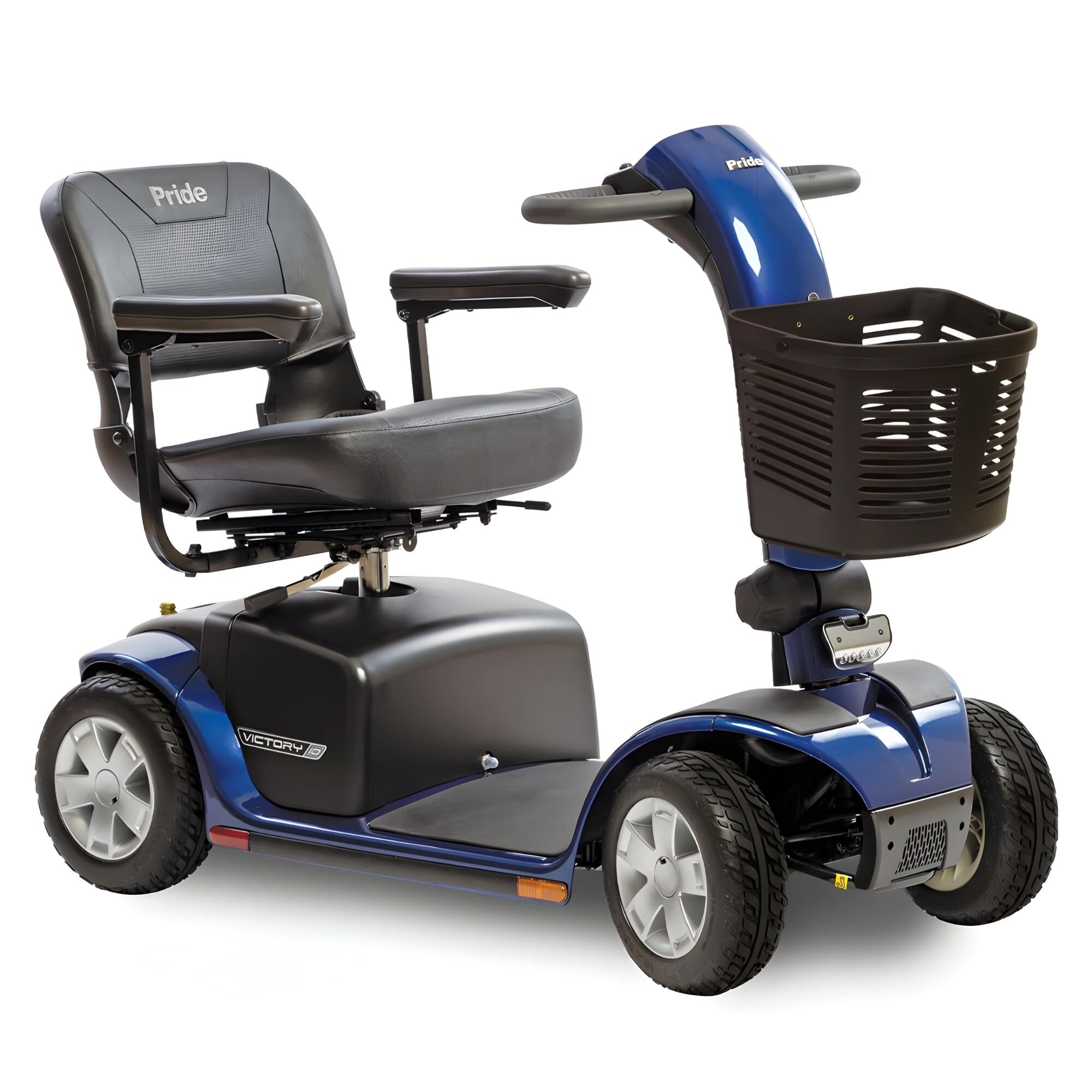
Image: The Pride Mobility Victory 10 4-Wheel Scooter in Viper Blue, featuring a prominent "LIFETIME WARRANTY" seal, indicating extensive coverage for the product.
For detailed information regarding the terms, conditions, and duration of your specific warranty, please refer to the warranty document included with your scooter or visit the official Pride Mobility website. Keep your purchase receipt as proof of purchase for warranty claims.
9. Customer Support
Should you require assistance, have questions, or need to schedule service for your Pride Mobility Victory 10 scooter, please contact Pride Mobility customer support.
- Online: Visit the official Pride Mobility website for FAQs, product registration, and support resources.
- Authorized Dealers: Contact your local authorized Pride Mobility dealer for service and parts.
Please have your scooter's model number (Victory 10) and serial number ready when contacting support.


