
BAOFENG UV-5RM
Contents
BAOFENG UV-5RM 10W Ham Handheld Radio Instruction Manual
Model: UV-5RM | Brand: BAOFENG
1. Introduction
This manual provides detailed instructions for the proper setup, operation, and maintenance of your BAOFENG UV-5RM 10W Ham Handheld Radio. Please read this manual thoroughly before using the device to ensure safe and efficient operation. The BAOFENG UV-5RM is an upgraded multi-band radio designed for long-range communication, featuring a 10W power output, 999 channels, and a 2500mAh Type-C rechargeable battery.
2. Package Contents
Verify that all items listed below are included in your package. If any items are missing or damaged, please contact customer support.
- 2 × BAOFENG UV-5RM Ham Radio
- 2 × Air Duct Earpiece
- 2 × Tactical Antenna (18.5-inch)
- 2 × Original Antenna
- 2 × Charging Stand
- 2 × 2500mAh Battery
- 2 × Waist Clip
- 2 × Hand Strap
- 1 × Programming Cable
- 1 × Instruction Manual

Figure 2.1: Contents of the BAOFENG UV-5RM radio package. The package includes two UV-5RM radios, two 2500mAh batteries, two air duct earpieces, two tactical antennas, two original antennas, two charging stands, two waist clips, two hand straps, one programming cable, and one instruction manual.
3. Setup
3.1 Battery Installation and Charging
The BAOFENG UV-5RM radio is powered by a 2500mAh Lithium Ion battery. Ensure the battery is fully charged before initial use.
- To install the battery, align the battery pack with the back of the radio and slide it upwards until it clicks into place.
- To remove, press the release button at the bottom of the battery and slide it downwards.
- Charging with Charging Stand: Place the radio (with battery installed) into the charging stand. Connect the charging stand to a power outlet. The indicator light on the stand will show charging status.
- Charging via USB-C: The 2500mAh battery features a convenient USB-C port, allowing direct charging without the stand. Connect a USB-C cable to the port on the battery and a compatible power source (e.g., car charger, power bank, PC, wall adapter, solar charger).

Figure 3.1: The 2500mAh battery with Type-C charging capability. This battery provides extended communication time and can be charged directly via USB-C, offering versatile charging options.

Figure 3.2: The BAOFENG UV-5RM radio supports multiple charging methods, including car, power bank, PC, solar, wall, and the included charging dock, ensuring power availability in various scenarios.
Video 3.1: This video demonstrates the unboxing, battery installation, and charging options for the BAOFENG UV-5RM radio, including the convenient USB-C charging feature.
3.2 Antenna Attachment
The UV-5RM comes with two antennas: a standard antenna and an 18.5-inch tactical antenna for extended range.
- Select the desired antenna.
- Screw the antenna clockwise onto the antenna connector at the top of the radio until it is finger-tight. Do not overtighten.

Figure 3.3: The BAOFENG UV-5RM radio package showing both the standard and the longer tactical antennas, along with other accessories.

Figure 3.4: The 18.5-inch foldable tactical antenna significantly enhances signal transmission stability for long-range communication.
3.3 Earpiece and External Microphone Attachment
For hands-free operation or private conversations, attach the air duct earpiece or the external microphone.
- Locate the two-pin jack on the side of the radio, covered by a rubber flap.
- Carefully insert the two-pin plug of the earpiece or external microphone into the jack until it is fully seated.
- Ensure the connection is secure to prevent audio interruptions.

Figure 3.5: The air duct headset offers a lightweight, noise-reducing design with a one-button talkback feature and a comfortable, ergonomic fit for extended wear.
4. Operating Instructions
4.1 Power On/Off and Display
To power on the radio, rotate the volume knob clockwise. To power off, rotate it counter-clockwise until it clicks. The UV-5RM features a larger 1.8-inch color display for improved visibility and ease of operation.
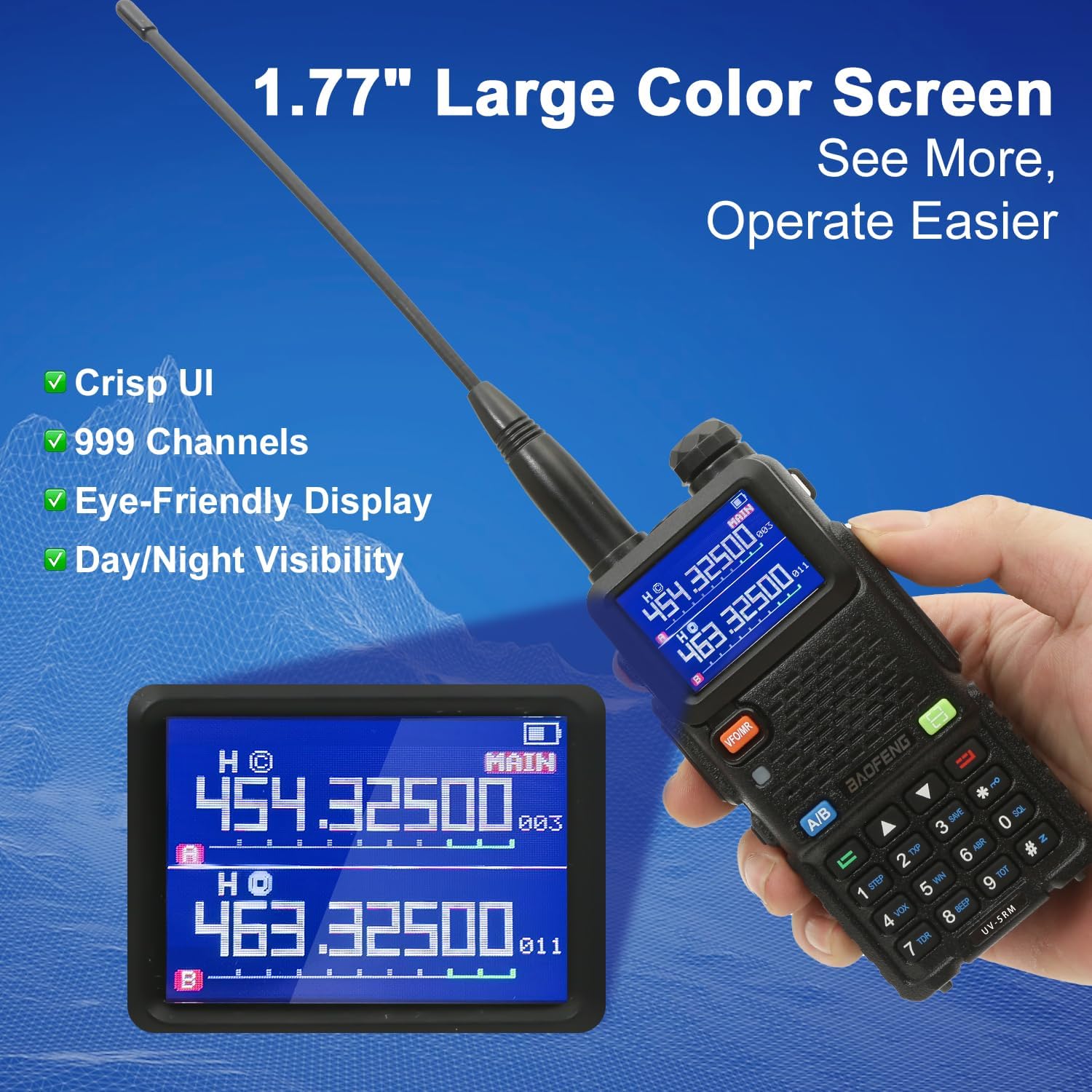
Figure 4.1: The 1.77-inch large color screen provides a crisp user interface and enhanced visibility for day and night operation, making it easier to monitor 999 channels.
4.2 Channel Selection and Frequency Tuning
The radio supports 999 channels and multiple frequency bands (UHF/VHF/FM/AM/NOAA).
- Manual Frequency Input: Use the numeric keypad to directly enter desired frequencies.
- Channel Mode: Switch between channel mode and frequency mode using the VFO/MR button.
- One-Key Frequency Copy: This function allows quick copying of frequency settings from another walkie-talkie.
- PC Programming: The radio supports PC programming via the included programming cable and software (disk provided), allowing for customized channel and feature settings.

Figure 4.2: The one-click frequency copy function simplifies setup by allowing users to quickly transfer frequency settings from another radio, streamlining deployment.
Figure 4.3: The radio supports PC programming, enabling advanced customization of channels and settings via a computer and compatible software like Chirp.
4.3 Transmission (PTT)
To transmit, press and hold the Push-to-Talk (PTT) button located on the side of the radio. Speak clearly into the microphone. Release the PTT button to receive.
4.4 Multi-Band and NOAA Weather Radio
The UV-5RM supports a wide range of frequencies including UHF, VHF, FM, AM, and NOAA weather bands. You can access NOAA weather stations to receive real-time weather alerts and forecasts.

Figure 4.4: The BAOFENG UV-5RM supports a wide array of frequency bands, including NOAA (144-148MHz, 420-450MHz), FM (65-108 MHz RX), AM (108-136MHz RX), VHF (136-174MHz TX&RX, 220-260MHz RX), UHF (350-390MHz RX, 400-520MHz TX&RX), and GMRS frequencies.
Video 4.1: This video demonstrates how to access FM radio and NOAA weather channels on the BAOFENG UV-5RM, showcasing its multi-band reception capabilities.
4.5 Emergency Flashlight
The UV-5RM includes a built-in LED flashlight for convenience in low-light conditions.
- To activate the flashlight, press the dedicated [SK2] button on the side of the radio.
- Press again to cycle through modes (e.g., steady, strobe) or turn off.
Figure 4.5: The 5RM features a built-in emergency flashlight, easily activated by pressing the [SK2] button, providing illumination when needed.
4.6 VOX Hands-Free Operation
The Voice Operated Exchange (VOX) function allows for hands-free transmission without needing to press the PTT button.
- Refer to the radio's menu settings to enable and adjust VOX sensitivity.
- When VOX is active, the radio will automatically transmit when it detects your voice.

Figure 4.6: The VOX hands-free feature enables communication without needing to press buttons, ideal for activities where hands are occupied.
5. Maintenance
Proper maintenance ensures the longevity and optimal performance of your BAOFENG UV-5RM radio.
- Cleaning: Use a soft, damp cloth to clean the radio's exterior. Avoid using harsh chemicals or abrasive cleaners.
- Battery Care: To prolong battery life, avoid overcharging and fully discharging the battery regularly. Store the battery in a cool, dry place when not in use for extended periods.
- Storage: Store the radio in a dry, dust-free environment away from direct sunlight and extreme temperatures. Remove the battery if storing for a long duration.
6. Troubleshooting
If you encounter issues with your BAOFENG UV-5RM radio, refer to the following common problems and solutions:
| Problem | Possible Cause | Solution |
|---|---|---|
| Radio does not power on | Low or discharged battery; improperly installed battery | Charge the battery; ensure battery is correctly installed and fully charged. |
| No signal or poor reception | Antenna not properly attached; out of range; interference | Check antenna connection; move closer to other radios; move away from sources of interference. Consider using the tactical antenna for extended range. |
| Cannot transmit or receive | Incorrect frequency/channel; PTT button malfunction; radio in scan/monitor mode | Verify frequency/channel settings; ensure PTT button is functioning; exit scan/monitor mode. |
| Audio is distorted or too low | Volume too low; earpiece/microphone connection loose; speaker/microphone obstruction | Adjust volume; re-seat earpiece/microphone; clear any obstructions from speaker/microphone. |
If the problem persists after attempting these solutions, please contact customer support for further assistance.
7. Specifications
Detailed technical specifications for the BAOFENG UV-5RM radio:
- Model Number: UV-5RM
- FCC ID: 2AJGM-5RM
- Item Weight: 3.01 pounds
- Package Dimensions: 8.78 x 7.83 x 4.29 inches
- Batteries: 2 Lithium Ion batteries required (included), 2500mAh
- Number of Channels: 999
- Special Features: Emergency Alarm, Lightweight, Long Range, Noise Reduction, Rechargeable, Stopwatch, Power-on password management, DTMF, BCL, TOT functions.
- Frequency Range: AM: 108-136MHz, FM: 65-108 MHz, NOAA: 144-148MHz / 420-450MHz, UHF: 350-390MHz / 400-520MHz, VHF: 136-174MHz / 220-260MHz
- Talking Range Maximum: 10 Mile
- Tuner Technology: UHF
- Voltage: 7.2 Volts
- Water Resistance Level: Not Water Resistant
8. Warranty and Support
8.1 Warranty Information
The BAOFENG UV-5RM radio comes with a 1-year warranty from the date of purchase. This warranty covers manufacturing defects and malfunctions under normal use. Please retain your proof of purchase for warranty claims.
8.2 Customer Support
BAOFENG provides a professional team dedicated to offering support and assistance. If you require help with your product, have questions, or need to make a warranty claim, please contact our customer service team. We offer 24-hour support to ensure your communication needs are met.
For more information or to contact support, please visit the official BAOFENG Store: BAOFENG Store on Amazon
Documents and downloads
Ask a question about this manual
Ask about setup, troubleshooting, compatibility, parts, safety, or missing instructions. Manuals+ will review the question and use this page’s manual context to help answer it.