1. Introduction
The PEAKMETER PM8250 is a professional handheld digital multimeter designed for accurate and reliable electrical measurements, particularly in photovoltaic (PV) systems. It features a high DC voltage measurement capability up to 1700V, auto and manual ranging, and various functions including AC/DC voltage, current, resistance, capacitance, frequency, temperature, and specialized functions like LPF, MAX/MIN/PEAK, Continuity, Diode, and NCV detection. This manual provides essential information for the safe and effective operation of your PM8250 multimeter.

Figure 1: Front view of the PEAKMETER PM8250 Multimeter, showing the display, rotary switch, and function buttons.
2. Safety Information
To ensure safe operation and service of the multimeter, follow these safety precautions:
- Always adhere to local and national safety codes.
- Do not use the meter if it appears damaged or if the case is open.
- Verify the meter's operation by measuring a known voltage or current before use.
- Observe the input limits for each measurement range. The maximum DC voltage is 1700V.
- Use caution when working with voltages above 60V DC or 30V AC RMS, as these pose a shock hazard.
- Ensure the test leads are in good condition and properly connected.
- Replace batteries as soon as the low battery indicator appears to avoid incorrect readings.
- The device complies with safety ratings EN61010-1, EN61010-2-030, EN61326, and CAT III 1000V.
3. Product Features
The PM8250 multimeter offers a range of features for versatile measurement:
- Display: 6000 counts digital display.
- Ranging: Automatic and Manual range selection.
- High Voltage DC: Measures DC voltage up to 1700V, suitable for photovoltaic panels.
- Relative Measurement: Measures the difference between a stored value and the current reading.
- MAX/MIN/PEAK: Records maximum, minimum, and peak values during a measurement session.
- LPF (Low Pass Filter): Filters out high-frequency interference for accurate AC voltage measurements in variable frequency drive (VFD) environments.
- Continuity Test: Audible indication for circuit continuity.
- Diode Test: Checks diode functionality.
- NCV (Non-Contact Voltage) Detection: Detects AC voltage without direct contact.
- Temperature Measurement: Measures temperature using a K-type probe.
- Auto Power Off: Automatically powers off after approximately 10 minutes of inactivity to conserve battery life.
- Backlight: Illuminates the display for use in low-light conditions.
- Data Hold: Freezes the current reading on the display.
4. Setup
4.1 Battery Installation
The PM8250 requires four 1.5V AA batteries for operation. To install or replace batteries:
- Ensure the multimeter is powered off and test leads are disconnected.
- Locate the battery compartment cover on the back of the meter.
- Unscrew the retaining screw(s) and remove the cover.
- Insert four 1.5V AA batteries, observing the correct polarity (+/-) as indicated inside the compartment.
- Replace the battery compartment cover and secure it with the screw(s).
4.2 Connecting Test Leads
Connect the test leads to the appropriate input jacks for your desired measurement:
- Insert the black test lead into the COM (Common) jack.
- For voltage, resistance, capacitance, frequency, diode, continuity, and temperature measurements, insert the red test lead into the VΩHzTemp jack.
- For current measurements up to 600mA, insert the red test lead into the mA jack.
- For current measurements up to 10A, insert the red test lead into the 10A jack (if applicable, refer to meter markings).

Figure 2: Back view of the multimeter showing the battery compartment and test lead connections.
5. Operating Instructions
To operate the multimeter, turn the rotary switch to the desired function. The meter will typically default to auto-ranging. Press the 'RANGE' button to switch between auto and manual ranging if needed.
5.1 DC Voltage Measurement (V–)
To measure DC voltage, including high voltage PV systems:
- Set the rotary switch to the V– position (1700V range).
- Connect the test leads in parallel to the circuit or component under test.
- Read the voltage value on the display.

Figure 3: Measuring DC voltage of a battery using the multimeter.
5.2 AC Voltage Measurement (V∼)
To measure AC voltage:
- Set the rotary switch to the V∼ position.
- Connect the test leads in parallel to the AC source.
- Read the voltage value on the display.
- Press the LPF button to activate the Low Pass Filter for measurements in noisy environments (e.g., VFD outputs).
5.3 Resistance Measurement (Ω)
To measure resistance:
- Set the rotary switch to the Ω position.
- Ensure the circuit is de-energized before connecting the test leads across the component.
- Read the resistance value on the display.

Figure 4: Measuring resistance using the multimeter.
5.4 Current Measurement (mA/A)
To measure DC or AC current:
- Set the rotary switch to the mA or A position. Use the FUNC button to select AC or DC current.
- Connect the test leads in series with the circuit. Ensure the correct input jack (mA or 10A) is used.
- Read the current value on the display.
- Caution: Never connect the meter in parallel when measuring current, as this can blow the fuse or damage the meter.
5.5 Temperature Measurement (Temp)
To measure temperature:
- Set the rotary switch to the Temp position.
- Insert the K-type thermocouple probe into the VΩHzTemp and COM jacks.
- Place the thermocouple tip on the object to be measured.
- Press the ℃/℉ button to switch between Celsius and Fahrenheit units.
5.6 Other Functions
- Continuity/Diode: Set the rotary switch to the continuity/diode position. Use the FUNC button to toggle between modes.
- NCV: Set the rotary switch to the NCV position. Bring the top of the meter near an AC voltage source to detect its presence.
- MAX/MIN/PEAK: Press the MAX/MIN/PEAK button to cycle through maximum, minimum, and peak hold readings.
- Relative: Press the REL button to store the current reading as a reference and display subsequent measurements relative to it.
- Data Hold: Press the HOLD button to freeze the current display reading. Press again to release.
- Backlight: Press the backlight button (often combined with another function) to turn the display backlight on/off.
6. Maintenance
6.1 Cleaning
Wipe the case with a damp cloth and mild detergent. Do not use abrasives or solvents. Ensure the meter is dry before use.
6.2 Battery Replacement
Replace batteries when the low battery indicator appears on the display. Refer to Section 4.1 for instructions.
6.3 Fuse Replacement
If the current measurement function fails, the fuse may need replacement. The meter uses a 600mA FUSED input for mA ranges and a 10A MAX input for higher current ranges. Fuse replacement should only be performed by qualified personnel. Use only fuses of the specified type and rating.
6.4 Storage
If the meter is not used for an extended period, remove the batteries to prevent leakage and damage.
7. Troubleshooting
- No Display: Check battery installation and charge. Replace batteries if necessary.
- Incorrect Readings: Ensure test leads are properly connected and not damaged. Verify the correct function and range are selected. Check for blown fuses in current modes.
- Auto Power Off: This is a normal function. Press any button or turn the rotary switch to reactivate the meter.
8. Specifications
| Measurement | Range | Accuracy |
|---|---|---|
| DC Voltage | 600mV/6V/60V/600V/1700V | ±(0.8%+3) |
| AC Voltage | 600mV/6V/60V/600V/1000V | ±(1.0%+3) |
| DC Current | 60mA/600mA | ±(1.2%+3) |
| AC Current | 60mA/600mA | ±(1.5%+3) |
| Resistance | 600Ω/6kΩ/60kΩ/600kΩ/6MΩ | ±(1.2%+5) |
| 60MΩ | ±(2.0%+5) | |
| Capacitance | 10nF/100nF/1µF/10µF/100µF | ±(3.0%+5) |
| 1mF/10mF | ±(4.0%+5) | |
| 100mF | ±(5.0%+5) | |
| Frequency | 10Hz to 10MHz | ±(1.0%+5) |
| Duty Cycle | 5%~95% | ±(3.0%+5) |
| Temperature | -20℃~1000℃ (-4℉~1832℉) | ±(2.0%+2) |
General Specifications:
- Display: 6000 counts
- Power Supply: 4 x 1.5V AA Battery
- Size: 204mm x 94mm x 57mm
- Weight: Approx. 410g
- Safety Rating: EN61010-1, EN61010-2-030, EN61326, CAT III 1000V
- Auto Power Off: After about 10 minutes of no operation
- Maximum Operating Voltage: 1700 Volts (DC)
- Upper Temperature Rating: 60 Degrees Celsius
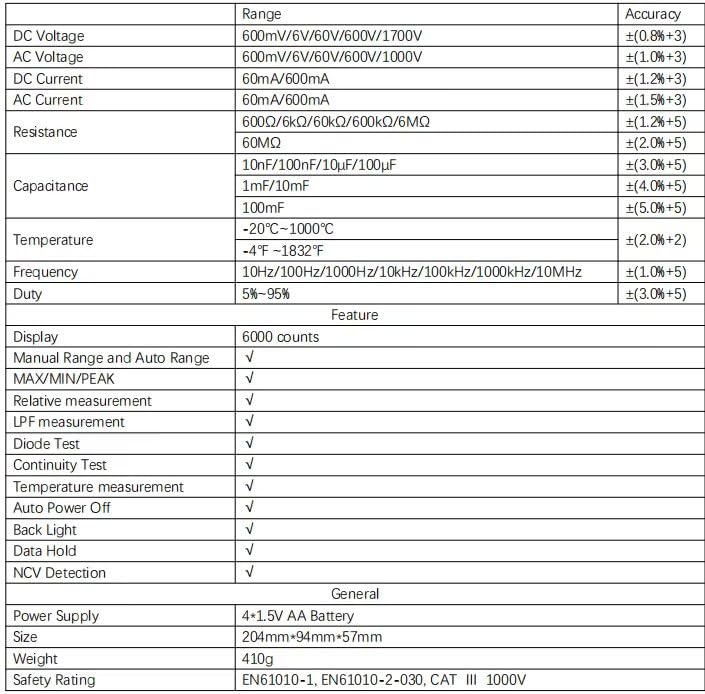
Figure 5: Detailed specifications table for the PM8250 multimeter.
9. Warranty and Support
The PEAKMETER PM8250 multimeter comes with an EU Spare Part Availability Duration of 1 year. For warranty claims, technical support, or service inquiries, please contact your original point of purchase or the manufacturer directly. Keep your purchase receipt as proof of purchase.


