1. Introduction
This manual provides essential information for the safe and efficient operation of your MIRASTON 6.5QT Smart Digital Air Fryer. Please read all instructions carefully before first use and retain this manual for future reference.
2. Important Safety Instructions
When using electrical appliances, basic safety precautions should always be followed to reduce the risk of fire, electric shock, and injury to persons, including the following:
- Read all instructions.
- Do not touch hot surfaces. Use handles or knobs.
- To protect against electric shock, do not immerse cord, plugs, or the main unit in water or other liquid.
- Close supervision is necessary when any appliance is used by or near children.
- Unplug from outlet when not in use and before cleaning. Allow to cool before putting on or taking off parts.
- Do not operate any appliance with a damaged cord or plug or after the appliance malfunctions or has been damaged in any manner.
- The use of accessory attachments not recommended by the appliance manufacturer may cause injuries.
- Do not use outdoors.
- Do not let cord hang over edge of table or counter, or touch hot surfaces.
- Do not place on or near a hot gas or electric burner, or in a heated oven.
- Extreme caution must be used when moving an appliance containing hot oil or other hot liquids.
- Always attach plug to appliance first, then plug cord into the wall outlet. To disconnect, turn any control to "off", then remove plug from wall outlet.
- Do not use appliance for other than intended use.
- Ensure the appliance is placed on a stable, level, heat-resistant surface.
- Do not block any ventilation openings.
3. Product Overview
The MIRASTON 6.5QT Smart Digital Air Fryer utilizes 360° hot air technology for efficient and healthier cooking. It features a digital touch screen with preset functions and a visual window to monitor cooking progress.
Components:
- Main Unit with Digital Control Panel
- 6.5QT Square Fry Basket (Nonstick, BPA-free)
- Removable Crisper Tray
- Visual Window

Image: The MIRASTON 6.5QT Smart Digital Air Fryer, showcasing its main unit with a digital display and the pull-out basket containing food.

Image: A close-up view of the digital touch screen control panel, highlighting the temperature, menu, and time controls.
4. Setup and First Use
- Unpacking: Carefully remove all packaging materials and promotional labels from the air fryer.
- Cleaning: Wash the fry basket and crisper tray with hot water, dish soap, and a non-abrasive sponge. Wipe the inside and outside of the main unit with a damp cloth. Ensure all parts are completely dry before use.
- Placement: Place the air fryer on a stable, level, heat-resistant surface, ensuring adequate air circulation around the unit. Do not place it directly against a wall or under cabinets.
- Pre-heating (Optional but Recommended): For the first use, it is recommended to run the air fryer empty for about 10-15 minutes at 350°F (175°C) to eliminate any manufacturing odors. A slight odor may be present during this initial use; this is normal.
5. Operating Instructions
Digital Touch Screen Controls:
The air fryer features an intuitive digital touch screen for easy operation.

Image: A hand interacting with the smart touch control panel, showing the various icons for presets and temperature/time adjustments.
- Power Button: Press to turn the unit on/off.
- Temperature Controls (Temp +/-): Adjust temperature in 5-degree increments from 180°F to 400°F.
- Time Controls (Time +/-): Adjust cooking time from 0 to 60 minutes.
- Menu Button: Cycle through 8 preset cooking functions.
Using Preset Functions:
The air fryer includes 8 preset recipes for common foods:
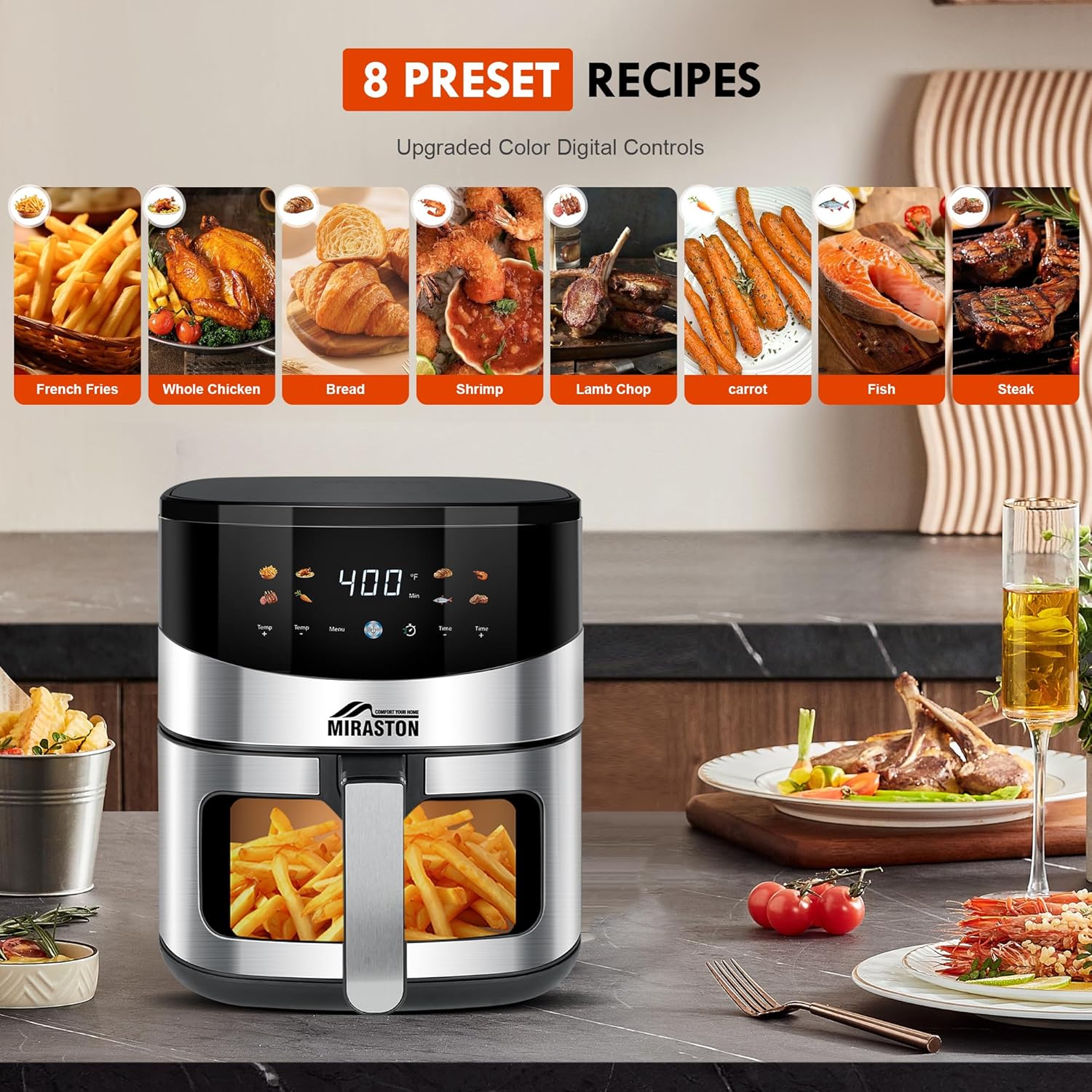
Image: The air fryer's digital display showing icons for 8 preset recipes, including French fries, whole chicken, bread, shrimp, lamb chop, carrot, fish, and steak.
- Place food in the fry basket.
- Press the Power button to turn on the air fryer.
- Press the Menu button repeatedly to select the desired preset. The corresponding icon will illuminate.
- The air fryer will automatically set the recommended time and temperature for the selected preset. You can adjust these manually using the Temp +/- and Time +/- buttons if needed.
- Press the Power button again to start cooking.
Manual Operation:
- Place food in the fry basket.
- Press the Power button.
- Use the Temp +/- buttons to set your desired cooking temperature.
- Use the Time +/- buttons to set your desired cooking time.
- Press the Power button again to start cooking.
Smart Functions:
- Shake Notifications: For certain recipes, the air fryer will emit an audible alarm halfway through cooking to remind you to shake the basket for even crisping.
- Automatic Shutoff: The air fryer will automatically turn off when the cooking cycle is complete or if the basket is removed during operation.
6. Cooking Guide and Tips
- Oil Usage: While air frying requires little to no oil, a light spray of oil can enhance crispiness and flavor for some foods.
- Temperature Adjustment: As a general guideline, reduce conventional oven temperatures by approximately 25°F and cooking time by 20-25% when using the air fryer. For example, if a recipe calls for 350°F for 25 minutes in an oven, try 325°F for 20 minutes in the air fryer.
- Batch Cooking: For best results, avoid overcrowding the basket. Cook in smaller batches if necessary to ensure even cooking and crisping.
- Shaking/Tossing: Shake or toss the contents of the basket halfway through cooking for most foods to ensure even browning.
- Visual Monitoring: Utilize the visual window to check cooking progress without opening the basket, which helps maintain internal temperature.

Image: A hand holding the air fryer basket filled with crispy fried chicken, demonstrating the results of air frying.

Image: The MIRASTON air fryer on a kitchen counter, with plates of French fries and chicken wings, illustrating its capacity and output.
7. Maintenance and Cleaning
Regular cleaning ensures optimal performance and extends the lifespan of your air fryer.
- Unplug and Cool: Always unplug the air fryer and allow it to cool completely before cleaning.
- Basket and Tray: The nonstick-coated fry basket and crisper tray are dishwasher-safe. Alternatively, wash them with hot water, dish soap, and a non-abrasive sponge. Avoid metal utensils or abrasive cleaning materials that can damage the nonstick coating.
- Main Unit: Wipe the exterior of the air fryer with a damp cloth. Do not immerse the main unit in water or any other liquid. Clean the interior with a damp cloth and mild detergent if necessary, ensuring it is dry before next use.
- Heating Element: If food residue is stuck to the heating element, gently remove it with a soft brush after the unit has cooled.

Image: A split image showing the air fryer basket being cleaned by hand with a sponge and being placed in a dishwasher, demonstrating its easy cleanup features.
8. Troubleshooting
| Problem | Possible Cause | Solution |
|---|---|---|
| Air fryer does not turn on. | Not plugged in; power outlet malfunction; basket not fully inserted. | Ensure the power cord is securely plugged into a working outlet. Push the basket firmly into the main unit until it clicks into place. |
| Food is not cooked evenly. | Basket overcrowded; food not shaken/tossed. | Cook food in smaller batches. Shake or toss the food in the basket halfway through cooking. |
| Food is not crispy. | Not enough oil (for some foods); temperature too low; cooking time too short. | Lightly spray food with oil. Increase temperature or cooking time slightly. Ensure basket is not overcrowded. |
| White smoke coming from the appliance. | Grease residue from previous use; high-fat food cooking. | Clean the basket and crisper tray thoroughly after each use. For high-fat foods, drain excess fat from the basket during cooking. |
9. Specifications
- Model: MS-1805-BLT
- Capacity: 6.5 Quarts
- Power: 1500 Watts
- Voltage: 120 Volts
- Temperature Range: 180°F - 400°F
- Timer: 0-60 minutes
- Dimensions: 15"D x 12"W x 13"H
- Material: Stainless Steel
- Special Feature: Programmable, Digital Touch Control, Visual Window, Dishwasher Safe Basket/Tray
10. Warranty and Support
MIRASTON is committed to providing high-quality products. For any questions, concerns, or assistance with your product, please contact our customer support team. Refer to your purchase documentation for specific warranty details.
Customer Support: Please visit the MIRASTON Store on Amazon or contact the seller directly for support.


