
1. Introduction
The PEAKMETER PM8232A is a portable digital multimeter designed for accurate electrical measurements. It features stable performance, high precision, and low power consumption, making it a reliable instrument for various users. This device can measure DC Voltage, AC Voltage, Resistance, 1.5V/9V/12V Battery voltage, diode, and continuity, and includes Non-Contact Voltage (NCV) detection.
1.1 Safety Information
WARNING: To avoid electrical shock, remove test leads before opening the case. Always adhere to safety guidelines when operating electrical testing equipment.
- The maximum voltage allowed between the measuring terminal and ground is 600V DC or AC RMS.
- This device conforms to safety standards EN61010-1, EN61010-2-033, EN61326, and is rated CAT III 600V.
- Do not use the device if it appears damaged or if the insulation is compromised.
- Ensure the correct function and range are selected before making measurements.
2. Package Contents
Verify that all items are present and undamaged upon opening the package:
- PEAKMETER PM8232A Digital Multimeter
- Test Leads (Red and Black)
- User Manual
3. Product Overview
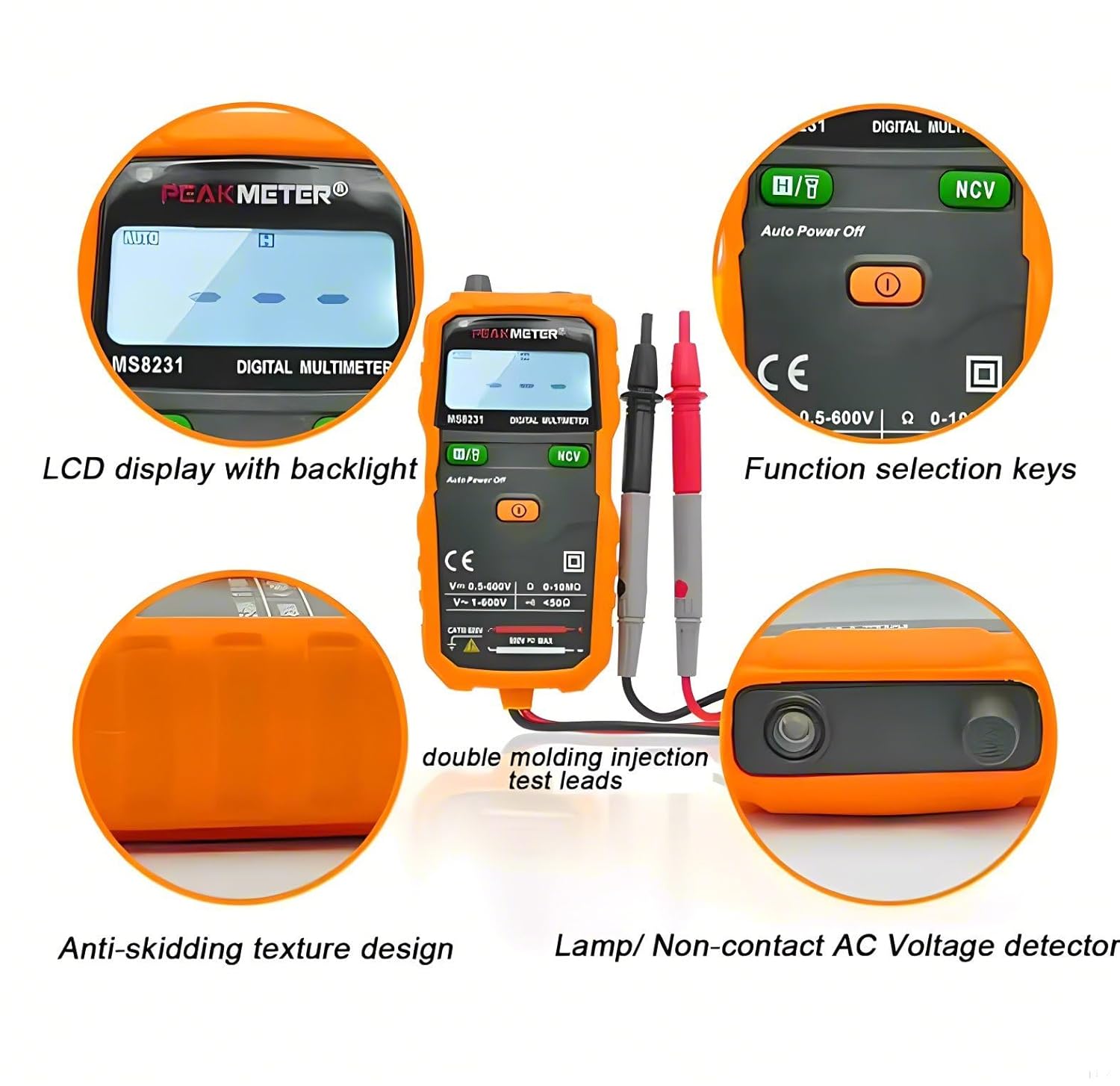
The PM8232A multimeter features a compact design with an easy-to-read LCD display and intuitive controls.

Key features include:
- LCD Display with Backlight: Provides clear readings in various lighting conditions.
- Function Selection Keys: Buttons for 'FUNC', 'RANGE', and 'HOLD/☀' (flashlight/backlight).
- Rotary Dial: Used to select measurement modes (e.g., DCV, ACV, Resistance, Battery, NCV, OFF).
- Test Lead Ports: Standard input jacks for red and black test leads.
- Non-Contact AC Voltage Detector (NCV): Integrated sensor for detecting live AC voltage without direct contact.
- Flashlight: Built-in light for illuminating work areas.
- Anti-Skidding Texture Design: Ergonomic design for a secure grip.

4. Setup
4.1 Battery Installation
The PM8232A multimeter requires two 1.5V AAA batteries for operation.
- Ensure the multimeter is powered off and disconnect all test leads from the device and any circuits.
- Locate the battery compartment cover on the back of the multimeter.
- Use a screwdriver to open the battery compartment.
- Insert two 1.5V AAA batteries, observing the correct polarity (+/-) as indicated inside the compartment.
- Replace the battery compartment cover and secure it with the screw.

5. Operating Instructions
5.1 Power On/Off
Rotate the central dial to any measurement function to power on the multimeter. To power off, rotate the dial to the 'OFF' position. The device features an automatic power-off function to conserve battery life after a period of inactivity.
5.2 Basic Measurements
Connect the black test lead to the 'COM' jack and the red test lead to the 'VΩmA' jack for most measurements.
- DC Voltage Measurement: Rotate the dial to the 'V—' position. The multimeter will automatically select the appropriate range.
- AC Voltage Measurement: Rotate the dial to the 'V~' position. The multimeter will automatically select the appropriate range.
- Resistance Measurement: Rotate the dial to the 'Ω' position.
- Diode Test: Rotate the dial to the 'Ω' position and press the 'FUNC' button until the diode symbol appears on the display.
- Continuity Test: Rotate the dial to the 'Ω' position and press the 'FUNC' button until the continuity symbol (buzzer) appears. A continuous beep indicates continuity.
5.3 Battery Measurement
The PM8232A can measure 1.5V, 9V, and 12V batteries.
- Rotate the dial to the '1.5V/9V/12V' battery measurement position.
- Connect the red test lead to the positive terminal of the battery and the black test lead to the negative terminal.
- Read the voltage displayed on the screen.
5.4 Non-Contact Voltage (NCV) Detection
The NCV function allows for detection of AC voltage without direct contact with conductors.
- Rotate the dial to the 'NCV' position.
- Move the top end of the multimeter near the conductor or outlet you wish to test.
- The device will emit an audible beep and the NCV indicator light will flash if AC voltage is detected.

5.5 Special Functions
- Data Hold: Press the 'HOLD' button to freeze the current reading on the display. Press again to release.
- Backlight/Work Light: Press and hold the 'HOLD/☀' button to activate the display backlight. A short press of the same button will toggle the work light (flashlight) on or off.

6. Maintenance
Proper maintenance ensures the longevity and accuracy of your multimeter.
- Cleaning: Wipe the device with a dry, soft cloth. Do not use abrasive cleaners or solvents.
- Storage: Store the multimeter in a cool, dry place away from direct sunlight and extreme temperatures. Remove batteries if the device will not be used for an extended period.
- Battery Replacement: Replace batteries promptly when the low battery indicator appears on the display.
7. Troubleshooting
If you encounter issues with your multimeter, refer to the following common problems and solutions:
- No Display/Device Not Powering On: Check battery installation and ensure batteries are not depleted. Replace if necessary.
- "OL" Indication: This indicates an over-range condition. The measured value exceeds the selected range. If in auto-range, the value is beyond the device's maximum capability for that function.
- Inaccurate Readings: Ensure test leads are properly connected and not damaged. Verify the correct function and range are selected. Clean the test lead tips if corroded.
8. Specifications
| Measurement | Range | Accuracy |
|---|---|---|
| DC Voltage | 200mV/2V/20V 200V/600V | ±(0.8%+5) ±(1.0%+5) |
| AC Voltage | 2V/20V/200V/600V | ±(1.2%+5) |
| Resistance | 200Ω/2kΩ/20kΩ/200kΩ/2MΩ/20MΩ | ±(0.8%+3) |
| Battery Measurement | 1.5V/2V 9V/20V 12V/20V | ±(0.8%+5) |
| Feature | Details |
|---|---|
| Display | 2000 counts |
| Auto Range | Yes |
| Data Hold | Yes |
| Backlight | Yes |
| Work Light (Flashlight) | Yes |
| NCV Detection | Yes |
| Diode Test | Yes |
| Continuity Test | Yes |
| Auto Power Off | Yes |
| Power Supply | 2 x 1.5V AAA Batteries |
| Size | 128mm x 61mm x 25mm |
| Weight | Approx. 150g |
| Safety Rating | EN61010-1, EN61010-2-033, EN61326, CAT III 600V |
| Operating Temperature | Up to 60°C |
| Compliant Specifications | CE, RoHS, UL |
9. Warranty and Support
This product comes with a 1-year availability for spare parts, ensuring support for potential repairs or replacements of components.
For technical assistance or warranty inquiries, please contact your retailer or the manufacturer directly. Keep your purchase receipt as proof of purchase.