1. Introduction
This manual provides essential information for the safe and efficient use of the LRILLMAING 6ED1052-1MD08-0BA2 Programmable Logic Control (PLC) Product. Please read this manual thoroughly before installation, operation, or maintenance to ensure proper functionality and to prevent damage or injury. Keep this manual for future reference.
2. Product Overview
The LRILLMAING 6ED1052-1MD08-0BA2 is a Programmable Logic Control (PLC) product designed for industrial automation applications. It is engineered for reliable performance and integration into various control systems.
Key Features:
- Product Number: 6ED1052-1MD08-0BA2
- Type: Programmable Logic Control Product
- Designed for industrial automation environments
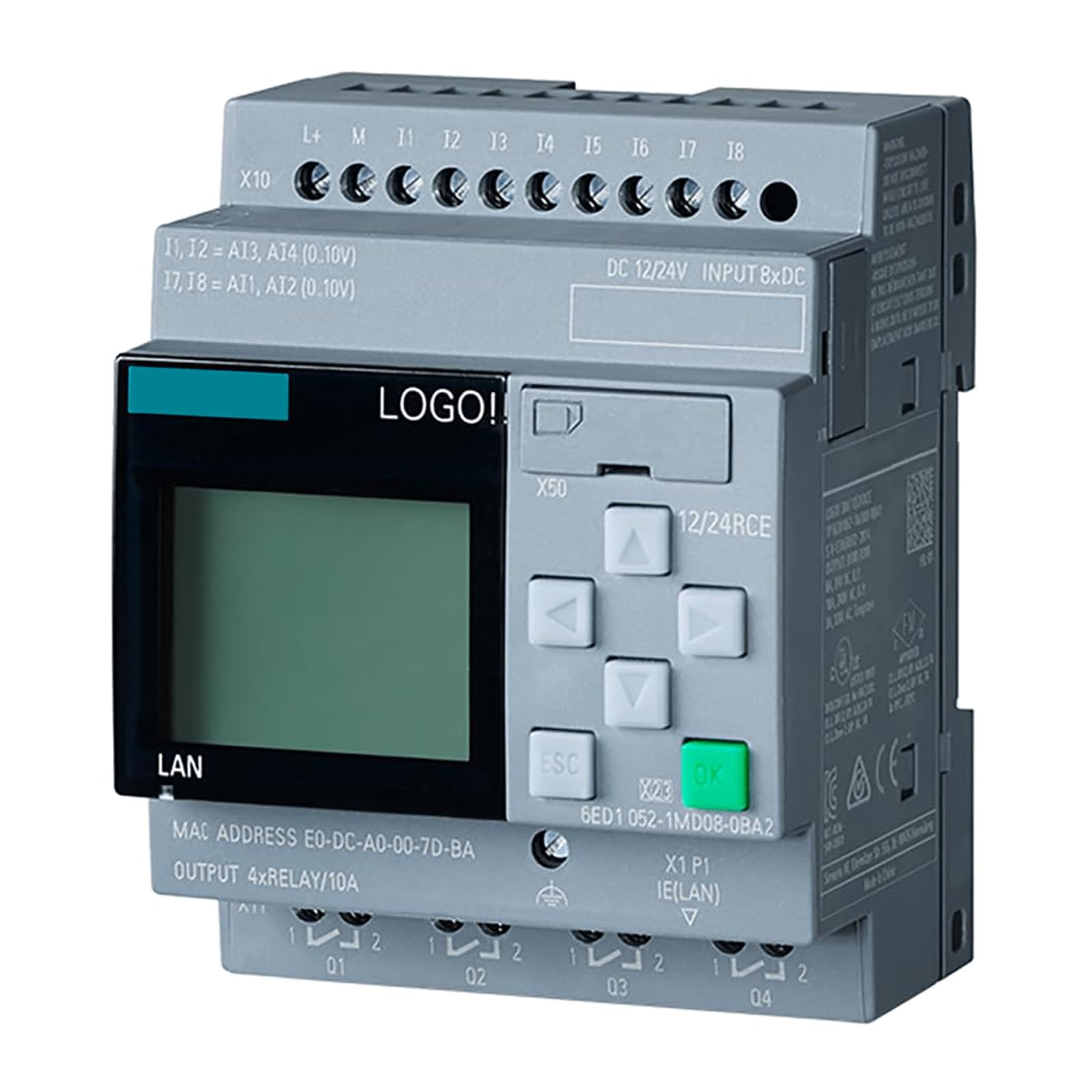
Figure 2.1: Front view of the LRILLMAING 6ED1052-1MD08-0BA2 Programmable Logic Control Product, showing its compact design and connection ports.
3. Safety Information
Observe the following safety precautions to prevent electric shock, fire, or damage to the product and connected equipment. Only qualified personnel should perform installation and maintenance.
- Power Disconnection: Always disconnect power before installing, wiring, or servicing the device.
- Proper Grounding: Ensure the device is properly grounded according to local electrical codes.
- Environmental Conditions: Operate the device within specified temperature and humidity ranges. Avoid exposure to moisture, dust, and corrosive substances.
- Wiring: Use appropriate wire gauges and insulation for all connections. Ensure all connections are secure.
- Authorized Personnel: Only trained and authorized personnel should access and operate this equipment.
4. Setup
Follow these general steps for the initial setup of your LRILLMAING 6ED1052-1MD08-0BA2 PLC.
- Mounting: Securely mount the PLC in a suitable industrial enclosure, ensuring adequate ventilation and clearance for wiring.
- Power Supply Connection: Connect the appropriate DC power supply to the designated power terminals. Verify voltage and polarity before applying power.
- Input/Output Wiring: Connect input devices (sensors, switches) to the input terminals and output devices (actuators, relays) to the output terminals as per your application's design.
- Communication Setup: Connect any necessary communication cables (e.g., Ethernet, serial) to the appropriate ports for programming or network integration.
- Initial Power-Up: After verifying all connections, apply power to the PLC. Observe indicator lights for proper operation.
5. Operating Instructions
The LRILLMAING 6ED1052-1MD08-0BA2 PLC operates based on the program loaded into its memory. Operation typically involves programming, monitoring, and executing control logic.
Programming:
- Use compatible programming software on a computer to develop your control logic.
- Connect the computer to the PLC via the designated programming port.
- Download the compiled program to the PLC's memory.
Run Mode:
- Once the program is downloaded, switch the PLC to RUN mode.
- The PLC will execute the control logic, reading inputs and controlling outputs according to the program.
- Monitor the status indicators on the PLC for operational status.
Stop Mode:
- Switch the PLC to STOP mode to halt program execution for modifications or troubleshooting.
6. Maintenance
Regular maintenance ensures the longevity and reliable operation of your PLC.
- Visual Inspection: Periodically inspect the PLC and its wiring for any signs of damage, loose connections, or overheating.
- Cleaning: Keep the PLC free from dust and debris. Use a soft, dry cloth or compressed air for cleaning. Do not use liquid cleaners.
- Environmental Control: Ensure the operating environment remains within specified temperature and humidity limits.
- Firmware Updates: Check the manufacturer's website for any available firmware updates that may improve performance or address issues.
- Backup Programs: Regularly back up your PLC programs to prevent data loss.
7. Troubleshooting
This section provides solutions to common issues you might encounter with the LRILLMAING 6ED1052-1MD08-0BA2 PLC.
| Problem | Possible Cause | Solution |
|---|---|---|
| PLC does not power on | No power supply, incorrect wiring, faulty power supply | Check power connections, verify power supply voltage, test power supply unit. |
| Inputs not responding | Sensor fault, wiring error, incorrect program logic | Verify sensor operation, check input wiring, review PLC program logic. |
| Outputs not activating | Actuator fault, wiring error, incorrect program logic, overloaded output | Verify actuator operation, check output wiring, review PLC program logic, ensure output current limits are not exceeded. |
| Communication error | Incorrect cable, wrong communication settings, software issue | Check communication cable, verify baud rates and protocols, restart programming software. |
If the problem persists after attempting these solutions, please contact technical support.
8. Specifications
The following are key specifications for the LRILLMAING 6ED1052-1MD08-0BA2 PLC.
| Attribute | Value |
|---|---|
| Manufacturer | LRILLMAING |
| Model Number | 6ED1052-1MD08-0BA2 |
| Product Type | Programmable Logic Control Product |
| Condition | 100% NEW, sealed in box |
| Date First Available | June 21, 2024 |
9. Warranty and Support
This LRILLMAING 6ED1052-1MD08-0BA2 PLC comes with a One-Year Warranty from the date of purchase, covering manufacturing defects. Please retain your proof of purchase for warranty claims.
For technical support, troubleshooting assistance, or warranty inquiries, please contact your vendor or the manufacturer directly. The seller, Transnew-PLC, is devoted to providing excellent customer service and can be reached through their official channels.


