
Important Safety Instructions
Read and understand all safety warnings and instructions before operating this product. Failure to follow the warnings and instructions may result in electric shock, fire, and/or serious injury.
- Always wear eye protection and hearing protection when operating the tool.
- Do not operate power tools in explosive atmospheres, such as in the presence of flammable liquids, gases, or dust.
- Keep children and bystanders away while operating a power tool. Distractions can cause you to lose control.
- Avoid accidental starting. Ensure the switch is in the off-position before connecting to battery pack, picking up or carrying the tool.
- Use the correct tool for your application. Do not force the tool.
- Maintain tools with care. Check for misalignment or binding of moving parts, breakage of parts, and any other condition that may affect the tool’s operation.
- Disconnect the battery pack from the tool before making any adjustments, changing accessories, or storing power tools.
- Use only with specified battery packs and chargers.
Package Contents
Verify that all items listed below are included in your package. If any parts are missing or damaged, contact customer service.
- CUSHYBITE RY404150 Cordless Leaf Blower/Mulcher/Vacuum Unit
- Blower Tube
- Vacuum Tube (if applicable)
- Collection Bag (for mulching/vacuum function)
- (2) 4.0 Ah 40V Batteries
- Battery Charger
- Instruction Manual

Image: The CUSHYBITE RY404150 unit configured for mulching/vacuum, showing the attached collection bag and two 40V batteries and charger separately.
Assembly and Setup
1. Attaching the Blower Tube
- Align the grooves on the blower tube with the corresponding slots on the blower housing.
- Push the tube firmly onto the housing until it clicks into place. Ensure it is securely fastened.
2. Installing the Battery
- Ensure the tool's power switch is in the OFF position.
- Slide a fully charged 40V battery pack into the battery port on the tool until it locks securely.
- To remove, press the battery release button and slide the battery out.
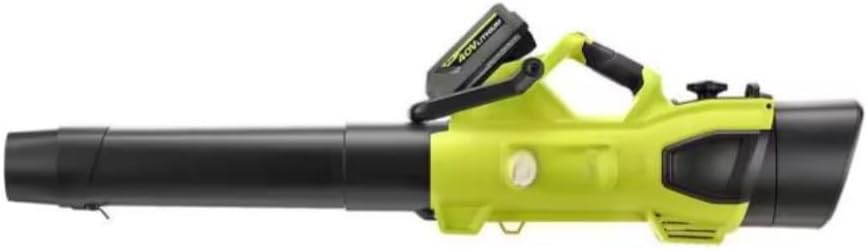
Image: The CUSHYBITE RY404150 leaf blower with a 40V battery pack inserted into its designated slot on the top of the unit.
3. Converting to Vacuum/Mulcher (if applicable)
- Remove the blower tube.
- Attach the vacuum tube to the intake port and the collection bag to the exhaust port, following the alignment and locking mechanisms.
- Ensure all components are securely attached before operation.
Operation
1. Starting the Blower
- Ensure a charged battery is installed.
- Grip the handle firmly.
- Press the power button or pull the trigger to start the unit.
2. Variable Speed Control
- The tool features variable speed control. Adjust the speed dial or trigger pressure to increase or decrease airflow as needed for different tasks.
- Lower speeds are suitable for delicate areas, while higher speeds provide maximum clearing power.
3. Using as a Mulcher/Vacuum
- With the vacuum tube and collection bag attached, position the vacuum tube over the debris.
- Turn on the unit. The mulching impeller will shred leaves and other light debris as they are drawn into the collection bag.
- Empty the collection bag regularly to maintain optimal performance.
4. Operating Tips
- Work in a sweeping motion to move debris efficiently.
- Avoid directing airflow towards people or pets.
- For mulching, ensure debris is dry for best results.

Image: A side view of the CUSHYBITE RY404150 cordless leaf blower, ready for operation, showcasing its ergonomic design.
Maintenance
1. Cleaning
- Always remove the battery pack before cleaning.
- Wipe the exterior of the tool with a clean, damp cloth. Do not use strong detergents or solvents.
- Clear any debris from the air vents to prevent overheating.
- For mulcher/vacuum mode, regularly empty and clean the collection bag.
2. Storage
- Store the tool in a dry, secure location out of reach of children.
- Remove the battery pack from the tool before storing for extended periods.
- Avoid storing in direct sunlight or areas with extreme temperatures.
3. Battery Care
- Charge batteries fully before first use.
- Do not store batteries in a discharged state. Recharge them periodically if not in use.
- Protect batteries from moisture and extreme temperatures.
Troubleshooting
| Problem | Possible Cause | Solution |
|---|---|---|
| Tool does not start | Battery not charged or improperly installed. | Ensure battery is fully charged and correctly seated. |
| Reduced airflow/suction | Blower tube or vacuum tube/collection bag clogged. | Remove battery, clear any obstructions from tubes or bag. |
| Tool stops during operation | Battery is depleted or tool is overheating. | Recharge battery. Allow tool to cool down if overheating. |
| Excessive vibration | Loose components or damaged impeller (mulcher mode). | Check all connections. If vibration persists, discontinue use and contact customer service. |
Specifications
| Feature | Detail |
|---|---|
| Model Number | RY404150 |
| Brand | CUSHYBITE |
| Power Source | Battery Powered |
| Voltage | 40 Volts |
| Motor Type | HP Brushless |
| Max Air Speed | 100 Miles per Hour (MPH) |
| Max Air Volume | 600 Cubic Feet Per Minute (CFM) |
| Functions | Blower, Mulcher, Vacuum |
| Included Batteries | (2) 4.0 Ah |
| Item Weight | 15 Pounds |
| Dimensions (L x W x H) | 48"L x 8"W x 9"H |
| Material | Plastic |
Warranty and Support
This CUSHYBITE product is covered by a manufacturer's warranty. Please refer to the warranty card included in your package for specific terms and conditions, including warranty duration and coverage details.
For technical assistance, replacement parts, or warranty claims, please contact CUSHYBITE customer support. Contact information can typically be found on the product packaging or the official CUSHYBITE website.
When contacting support, please have your product model number (RY404150) and purchase date available to expedite service.