
Ninco NH93196
Ninco EV-Sky Remote Control Car User Manual
Model: NH93196
1. Safety Information
Please read all safety warnings and instructions carefully before using the Ninco EV-Sky Remote Control Car. Failure to follow these instructions may result in injury or damage to the product.
- Age Recommendation: This product is suitable for children aged 6 years and older.
- Small Parts: Contains small parts. Not suitable for children under 3 years due to choking hazard.
- Cord Hazard: Features a long cord. Risk of strangulation. Adult supervision is recommended.
- Battery Replacement: Batteries must be replaced by an adult.
- Flashing Lights: This toy produces flashing lights which may trigger epileptic seizures in sensitive individuals.
- Battery Safety: Do not mix old and new batteries. Do not mix alkaline, standard (carbon-zinc), or rechargeable (nickel-cadmium) batteries. Dispose of used batteries properly.
2. Package Contents
Ensure all items are present in the package:
- Ninco EV-Sky Remote Control Car
- Functional Charging Station (EV-Sky C-Power)
- 3.7V 1200mAh Lithium-Ion Battery (for Charging Station)
- 3.7V 500mAh Lithium-Ion Battery (for RC Vehicle)
- 2.4 GHz Remote Control
- USB-C Charging Cable (for charging station)
Note: 2 x LR03 (AAA) batteries for the remote control are not included.
3. Components Overview

3.1. EV-Sky Remote Control Car
The EV-Sky car is a modern concept vehicle featuring integrated front and rear lights. It is powered by a 3.7V 500mAh Lithium-Ion battery.
3.2. Functional Charging Station
The charging station acts as a power bank for the car's battery. It contains a 3.7V 1200mAh Lithium-Ion battery and features a USB-C connector for its own charging. The station also requires 2 x LR03 (AAA) batteries for operation (not included).
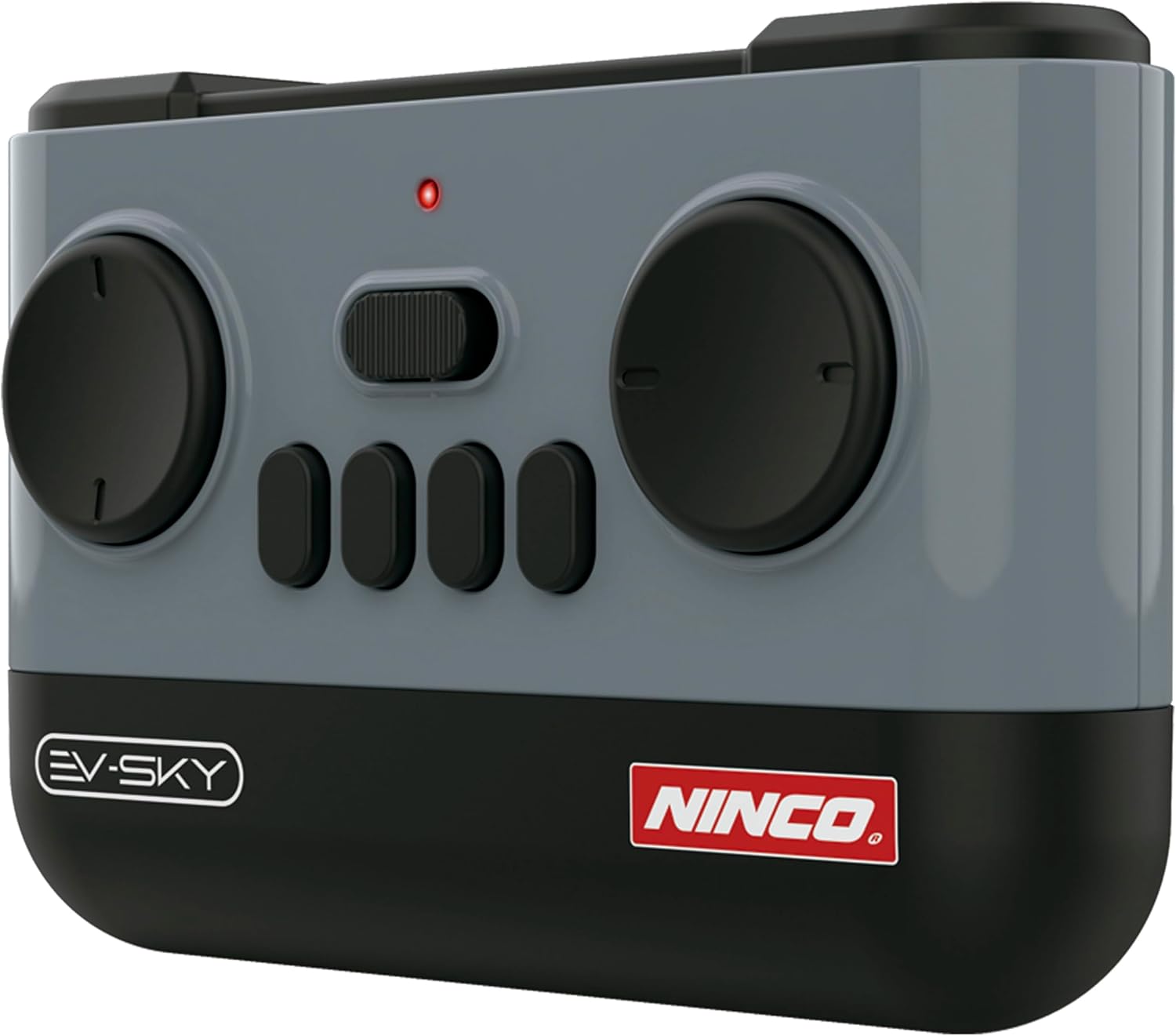
3.3. 2.4 GHz Remote Control
The remote control operates on a 2.4 GHz frequency, allowing multiple users to play simultaneously without interference. It features joysticks for movement and buttons for special functions like lights and auto-parking.
4. Setup
Follow these steps to prepare your Ninco EV-Sky for operation:

4.1. Install Remote Control Batteries
- Locate the battery compartment on the back of the remote control.
- Open the battery compartment cover.
- Insert 2 x LR03 (AAA) batteries, ensuring correct polarity (+/-).
- Close the battery compartment cover securely.
4.2. Charge the Charging Station Battery
The charging station's internal 1200mAh battery needs to be charged before it can charge the car.
- Connect the provided USB-C charging cable to the charging station's USB-C port.
- Connect the other end of the USB-C cable to a compatible USB power adapter (not included).
- The charging indicator on the station will show its charging status. Charge until fully indicated.
4.3. Charge the Vehicle Battery
The car's 500mAh battery can be charged using the functional charging station.
- Ensure the charging station's internal battery is sufficiently charged.
- Locate the charging port on the Ninco EV-Sky car.
- Connect the charging cable from the functional charging station to the car's charging port.
- The car's lights or an indicator on the charging station will show the charging status.
- Disconnect once fully charged.
5. Operation
5.1. Power On/Off
- Car: Turn on the power switch located on the underside of the car.
- Remote Control: Slide the power switch on the remote control to the 'ON' position. The indicator light will illuminate.
5.2. Pairing the Remote Control
The car and remote control should automatically pair when both are turned on. If pairing fails:
- Turn off both the car and the remote control.
- Turn on the car first, then immediately turn on the remote control.
- The remote control's indicator light should stop flashing and remain solid, indicating a successful connection.
5.3. Driving Controls
Use the joysticks on the remote control to maneuver the vehicle:
- Forward/Backward: Push the left joystick forward to move the car forward, pull it backward to reverse.
- Turn Left/Right: Push the right joystick left to turn left, push it right to turn right.
- Combined Movement: Use both joysticks simultaneously for complex turns and maneuvers.
5.4. Special Functions
- Lights: The car features integrated front and rear lights. Refer to the remote control diagram for the specific button to activate/deactivate or change light modes.
- Auto-Parking Function: The EV-Sky includes a button that simulates an automatic parking system. Press this button to activate the feature. The car will attempt to park itself.
6. Charging
Proper charging ensures optimal performance and battery longevity.

6.1. Charging the EV-Sky Car
- Connect the car to the functional charging station using the station's integrated cable.
- The charging station's 1200mAh battery can charge the car's 500mAh battery more than twice.
- Monitor the charging indicators. Disconnect once charging is complete to prevent overcharging.
6.2. Charging the Functional Charging Station
- Use the provided USB-C cable to connect the charging station to a USB power source.
- The station's battery level indicator will show charging progress.
- A full charge of the station's battery ensures maximum recharges for the car.
7. Maintenance
Regular maintenance helps extend the life of your Ninco EV-Sky.
- Cleaning: Use a soft, dry cloth to clean the car and remote control. Do not use water or chemical cleaners.
- Storage: Store the product in a cool, dry place away from direct sunlight when not in use.
- Battery Care: For long-term storage, remove batteries from the remote control. Charge the Lithium-Ion batteries periodically (every 3-6 months) to maintain their health.
- Avoid Impact: Do not subject the car to severe impacts or drops, as this can damage internal components.
8. Troubleshooting
If you encounter issues with your Ninco EV-Sky, refer to the following common problems and solutions:
| Problem | Possible Cause | Solution |
|---|---|---|
| Car does not respond to remote control. | Low batteries in car or remote; Not paired; Out of range. | Charge car battery; Replace remote batteries; Re-pair car and remote; Operate within recommended range. |
| Car moves slowly or inconsistently. | Low car battery; Obstruction in wheels. | Charge car battery fully; Check wheels for debris and clear them. |
| Charging station not charging car. | Charging station battery low; Loose connection. | Charge the charging station; Ensure secure connection between station and car. |
| Lights not working. | Car battery low; Light function not activated. | Charge car battery; Press the light activation button on the remote. |
If the problem persists after trying these solutions, please contact Ninco customer support.
9. Specifications
| Feature | Detail |
|---|---|
| Model Number | NH93196 |
| Product Dimensions | 34 x 18 x 18 cm |
| Product Weight | 700 grams |
| Recommended Age | 6 years and up |
| Car Battery | 3.7V 500mAh Lithium-Ion |
| Charging Station Battery | 3.7V 1200mAh Lithium-Ion |
| Remote Control Frequency | 2.4 GHz |
| Remote Control Batteries | 2 x LR03 (AAA) (not included) |
| Main Material | Plastic |
| Color | White |
10. Warranty and Support
Ninco products are manufactured to high-quality standards. For information regarding warranty coverage, please refer to the warranty card included with your product or visit the official Ninco website.
For technical support, spare parts, or any questions not covered in this manual, please contact Ninco customer service through their official channels. Contact information can typically be found on the product packaging or the Ninco website.
Ask a question about this manual
Ask about setup, troubleshooting, compatibility, parts, safety, or missing instructions. Manuals+ will review the question and use this page’s manual context to help answer it.