
1. Introduction
This manual provides detailed instructions for the safe and efficient operation of your AIRPLUS 20-30 Pints Dehumidifier, Model AP08-2005EE. This appliance is designed to reduce humidity levels in residential spaces such as homes, basements, bedrooms, and RVs, contributing to a more comfortable and healthier environment. Please read this manual thoroughly before initial use and retain it for future reference.

Image 1.1: The AIRPLUS Dehumidifier, Model AP08-2005EE, shown in a typical room environment. This compact unit is designed for effective moisture removal.
2. Safety Instructions
To prevent injury to the user or others and property damage, the following instructions must be followed. Incorrect operation due to ignoring instructions may cause harm or damage.
- Always plug the unit into a grounded electrical outlet. Do not remove the grounding prong.
- Do not operate the unit with a damaged power cord or plug. If the supply cord is damaged, it must be replaced by the manufacturer or a qualified service agent.
- Do not place the dehumidifier near heat-generating appliances or in direct sunlight.
- Ensure the unit is placed on a stable, level surface to prevent water spillage.
- Do not block the air inlet or outlet. Maintain at least 8 inches (20 cm) of clearance around the unit for proper airflow.
- Unplug the unit before cleaning, moving, or performing any maintenance.
- Do not use the appliance in areas where flammable gases or combustible materials are present.
- This appliance is not intended for use by persons (including children) with reduced physical, sensory or mental capabilities, or lack of experience and knowledge, unless they have been given supervision or instruction concerning use of the appliance by a person responsible for their safety.
- The child lock feature is designed to prevent accidental touching by children.
3. Product Components and Dimensions
Familiarize yourself with the main parts of your dehumidifier.

Image 3.1: The AIRPLUS Dehumidifier showing its approximate dimensions: 12.98 inches (33.0 cm) height, 13.38 inches (34.0 cm) depth, and 7.48 inches (19.0 cm) width.
The unit features a compact design, making it suitable for various room sizes. Key components include the air inlet, air outlet, control panel, and water tank.
4. Setup
- Unpacking: Carefully remove the dehumidifier from its packaging. Retain packaging materials for future storage or transport.
- Placement: Place the dehumidifier on a firm, level surface in the area where dehumidification is desired. Ensure there is at least 8 inches (20 cm) of space around the unit for proper air circulation. Avoid placing it against walls or furniture that could obstruct airflow.
- Power Connection: Plug the power cord into a grounded electrical outlet. Ensure the voltage matches the specifications of the unit.
- Initial Operation: Allow the unit to stand upright for at least 2 hours before plugging it in and turning it on, especially if it was transported on its side. This allows the refrigerant to settle.
5. Operating Instructions
The dehumidifier features a touch control panel for easy operation.

Image 5.1: Close-up of the digital control panel, illustrating the touch-sensitive buttons for various functions including Mode, Timer, Humidity, Child Lock, Anion, and Power On/Off.
5.1 Control Panel Functions
- ON/OFF Button: Press to turn the unit on or off.
- MODE Button: Press to cycle through the operating modes:
- Standard Mode: Normal dehumidification operation.
- Rainy Mode: Optimized for high humidity conditions.
- Drying Mode: Designed for drying clothes.
- Sleep Mode: Operates at a lower fan speed and dims the display for quiet operation.
- TIMER Button: Set a 24-hour timer for automatic power on or off.
- HUMIDIFY Button: Adjust the target humidity level. The unit will operate until the set humidity is reached, then cycle on/off to maintain it.
- CHILD LOCK Button: Press and hold to activate or deactivate the child lock, preventing accidental changes to settings.
- ANION Button: Activates the anion function for air purification.
5.2 Sleep Mode Operation
When Sleep Mode is activated, the dehumidifier operates at a reduced noise level (30-40 dB) and the display light dims, making it suitable for use in bedrooms or other quiet environments.
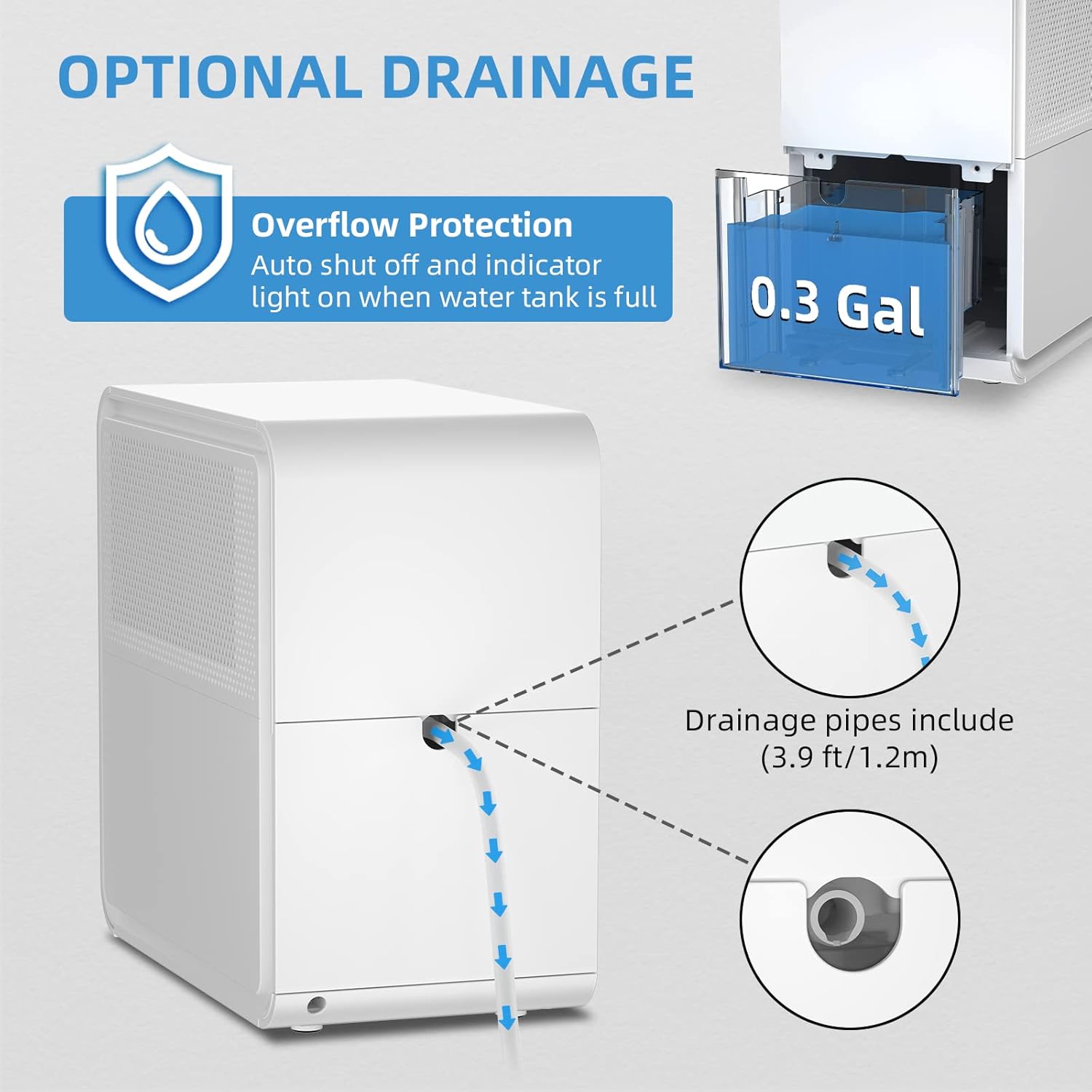
Image 5.2: The dehumidifier operating in Sleep Mode, indicating low noise levels suitable for nighttime use.
6. Drainage Options
Your dehumidifier offers two methods for water removal: manual drainage via the water tank or continuous drainage using a hose.

Image 6.1: Diagram illustrating both the internal water tank and the continuous drainage port with an attached hose.
6.1 Water Tank Drainage (Manual)
- The dehumidifier has a 0.3-gallon (approximately 1.1 liters) water tank.
- When the water tank is full, the unit will automatically shut off, and an indicator light will illuminate. The unit will also beep to alert you.
- Carefully pull out the water tank from the front of the unit.
- Empty the collected water.
- Slide the empty water tank back into its position until it clicks securely. The unit will resume operation.
6.2 Continuous Drainage (Hose)
- For continuous operation without needing to empty the water tank, use the included 3.9 ft (1.2 m) drainage hose.
- Locate the continuous drainage port on the back of the unit.
- Connect one end of the drainage hose to this port. Ensure a secure connection to prevent leaks.
- Direct the other end of the hose to a suitable drain, such as a floor drain, sink, or large bucket. Ensure the hose is sloped downwards to allow gravity to drain the water effectively.
- Note: If the hose is not properly sloped, water may accumulate in the tank and trigger the full tank shut-off.
7. Maintenance
Regular maintenance ensures optimal performance and extends the lifespan of your dehumidifier.
7.1 Cleaning the Water Tank
- Empty the water tank as described in Section 6.1.
- Clean the tank with warm water and a mild detergent. Rinse thoroughly to remove any residue.
- Dry the tank completely before reinserting it into the unit.
- Clean the water tank regularly to prevent mold and mildew growth.
7.2 Cleaning the Air Filter
- The air filter helps remove dust and particles from the air. A dirty filter can reduce efficiency.
- Locate the air filter (typically behind the air inlet grille).
- Remove the filter and clean it with a vacuum cleaner or wash it with warm, soapy water.
- Ensure the filter is completely dry before reinstalling it.
- Clean the filter every two weeks or more frequently depending on usage and air quality.
7.3 Defrost Function
The unit is equipped with an automatic defrost function. If the room temperature drops below 45°F (7°C), the unit will intelligently detect frost buildup on the evaporator coils and automatically enter defrost mode to melt the ice. During defrosting, the dehumidification function will temporarily pause.

Image 7.1: Internal diagram highlighting the compressor, defrost mechanism, and protection features. The unit intelligently detects low temperatures to activate defrost mode.
8. Troubleshooting
Before contacting customer service, please refer to the following troubleshooting guide for common issues.
| Problem | Possible Cause | Solution |
|---|---|---|
| Unit does not turn on. |
|
|
| Unit is running but not collecting water. |
|
|
| Unit is noisy. |
|
|
| Continuous drainage not working, tank fills up. |
|
|
9. Specifications
| Feature | Detail |
|---|---|
| Brand | AIRPLUS |
| Model Name | AP08-2005EE |
| Dehumidification Capacity | 30 Pints per Day (equivalent to 20 Pints 2012 DOE standard) |
| Tank Volume | 0.3 Gallons (approx. 1.1 Liters) |
| Product Dimensions (D x W x H) | 12"D x 7"W x 12"H (30.5cm D x 17.8cm W x 30.5cm H) |
| Color | White |
| Material | Plastic |
| Number of Speeds | 4 (Modes) |
| Special Features | Adjustable Humidity Control, Automatic Defrost, Automatic Shutoff, Continuous Draining, Child Lock, Anion Function |
| Included Components | Dehumidifier Unit, Drainage Hose (3.9 ft / 1.2m) |
| Recommended Use | Residential (Small to Medium Rooms) |
Note: The dehumidification capacity is often listed using both current (2019 DOE) and older (2012 DOE) standards. This unit is rated for 30 Pints per Day (2019 DOE) which is equivalent to 20 Pints per Day (2012 DOE).
10. Warranty and Support
This AIRPLUS dehumidifier is covered by a manufacturer's warranty. Please refer to the warranty card included with your product for specific terms and conditions, including warranty duration and coverage details.
For technical assistance, troubleshooting beyond this manual, or warranty claims, please contact AIRPLUS customer support. Contact information can typically be found on the product packaging, the official AIRPLUS website, or your purchase documentation.
When contacting support, please have your model number (AP08-2005EE) and purchase date readily available.