1. Overview
The AsiaHorse Pegasus Micro ATX PC Case is designed for enthusiasts seeking a blend of aesthetic appeal and functional performance. It features a unique 270° panoramic tempered glass design, providing an unobstructed view of your internal components. Engineered for optimal airflow, this case supports various cooling configurations to maintain stable system performance. Its spacious interior accommodates diverse DIY needs, simplifying component installation and cable management.

Figure 1: AsiaHorse Pegasus Micro ATX PC Case showcasing its panoramic view and internal lighting.
Key Features:
- 270° Curved Panoramic Glass Design: Offers an immersive, unobstructed view of internal components and RGB lighting effects.
- Optimized Airflow System: Features 9 strategically placed fan mounts for efficient cooling and stable performance.
- Spacious Customizable Interior: 50% larger than standard Micro ATX cases, providing ample room for wire management, component installation, and water cooling solutions.
- Rich I/O Ports: Includes 1x USB 3.0, 1x USB 2.0, and 1x Type-C 3.2 port for fast data transfer and broad compatibility.
- Durable Construction: Made of high-quality SPCC steel and thickened tempered glass for stability and protection of valuable PC components.

Figure 2: The 270° curved tempered glass panel provides a seamless view.

Figure 3: Optimized airflow design for efficient cooling.
2. Setup & Installation
This section provides a general guide for assembling your PC components within the AsiaHorse Pegasus case. For detailed visual instructions, please refer to the official assembly video below.
2.1 Component Installation Steps
- Prepare the Case: Carefully remove the tempered glass side panels. The case features a mortise and tenon structure for tool-free removal and installation of side panels.
- Install Motherboard and CPU: Secure your Micro ATX or ITX motherboard into the case. Install the CPU and RAM onto the motherboard before mounting it in the case.
- Install CPU Cooler: Apply thermal paste to the CPU. If using an AIO liquid cooler, attach the fans to the radiator and then mount the radiator to the designated top or side fan mounts. Ensure the combined thickness of the water cooling unit and fan does not exceed 52mm when installing at the top. If it exceeds, install the motherboard and CPU power cable first, then the water cooling.
- Install Fans: Mount additional case fans in the designated positions (Top, Bottom, Side, Rear) as per your cooling strategy.
- Install Power Supply (PSU): Slide the PSU into its bottom-mounted compartment and secure it with screws.
- Install Storage Drives: Mount 2.5" SSDs and 3.5" HDDs in their respective drive bays.
- Install Graphics Card (GPU): Insert your GPU into the appropriate PCIe slot and secure it. The case supports GPUs up to 400mm in length and 180mm in height.
- Cable Management: Utilize the ultra-sized rear cavity for easy cable management, ensuring a clean build and improved airflow. Use cable ties or the provided cable combs for a tidy setup.
- Connect Cables: Connect all necessary power and data cables to your components.
- Reassemble Case: Reattach the side panels and ensure all connections are secure.
Video 1: Official AsiaHorse Pegasus PC Case Assembly Video Demo. This video provides a step-by-step visual guide for installing components into the case.

Figure 4: Powerful space layout illustrating component compatibility and dimensions.

Figure 5: Mortise and tenon structure for swift assembly and disassembly.
3. Operating Your PC Case
Once your PC is assembled, the AsiaHorse Pegasus case facilitates optimal operation through its design features.
3.1 Airflow and Cooling
The case is engineered with an optimized airflow system to ensure excellent cooling efficiency. The strategic placement of fan mounts (Top, Bottom, Side, Rear) allows for efficient intake of cool air and expulsion of hot air, crucial for stable performance during demanding tasks. Ensure fans are installed in the correct orientation for optimal airflow (intake vs. exhaust).

Figure 6: Airflow diagram illustrating the case's cooling capabilities.
3.2 Front I/O Ports
The front I/O panel provides convenient access to essential ports for your peripherals:
- 1x USB 3.0: For fast data transfer with compatible devices.
- 1x USB 2.0: Suitable for connecting mice, keyboards, and other standard peripherals.
- 1x Type-C 3.2: Offers faster transfer speeds and stronger compatibility with modern Type-C devices.
- HD Audio: For headphone and microphone connections.
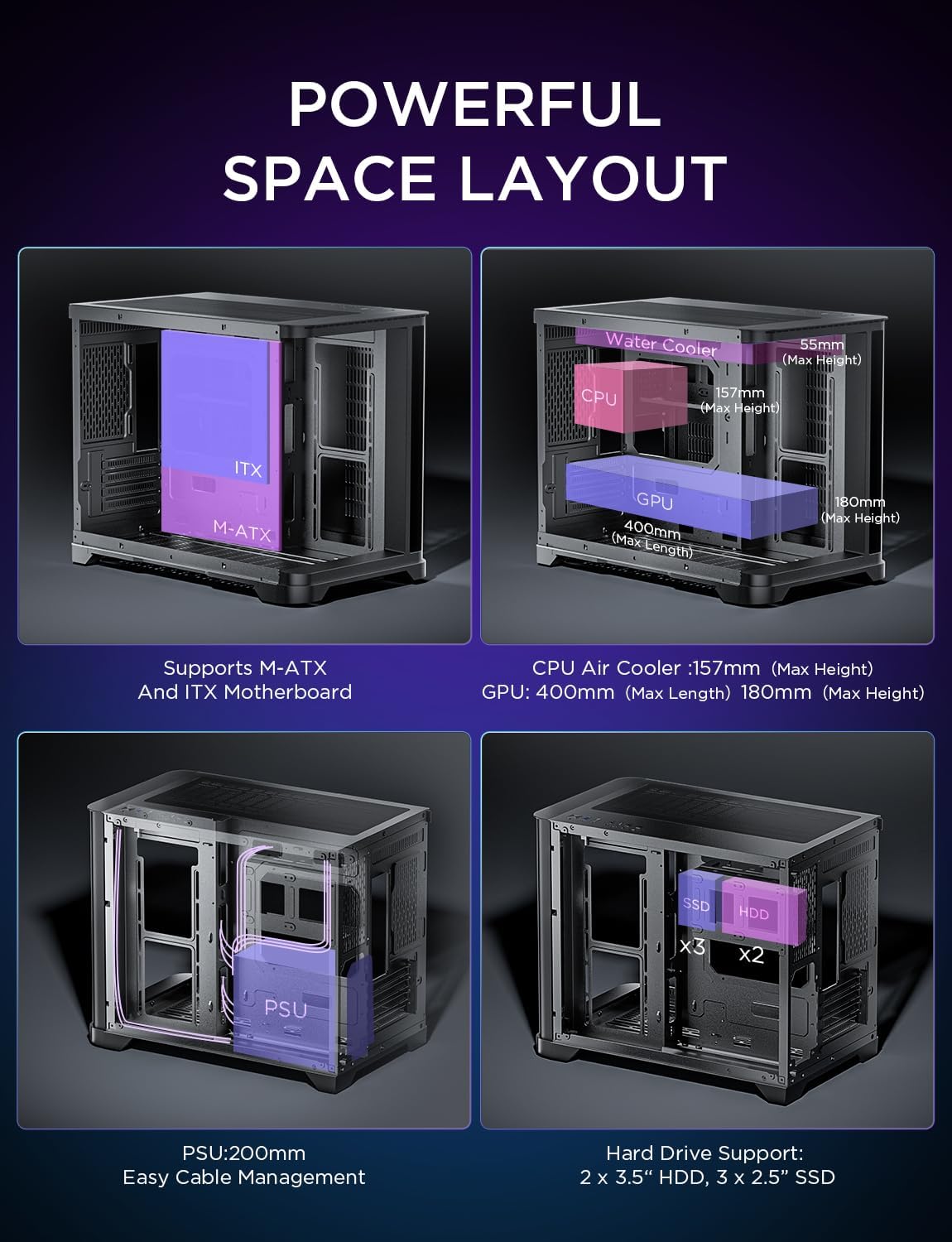
Figure 7: Front I/O panel with USB 3.0, USB 2.0, and Type-C ports.
4. Maintenance
Regular maintenance ensures the longevity and optimal performance of your PC and case.
4.1 Dust Filter Cleaning
The AsiaHorse Pegasus case incorporates multiple dust-proof designs, including magnetic dust filters and a pull-out bottom dust filter, to keep your PC case spotless. Regularly clean these filters to prevent dust buildup, which can impede airflow and lead to overheating.
- Magnetic Dust Filters: Easily remove the magnetic filters located on the top and other intake areas.
- Pull-Out Bottom Dust Filter: The bottom filter can be conveniently pulled out for cleaning without disassembling the entire case.
Gently clean the filters with a soft brush or rinse them with water (ensure they are completely dry before reinstallation). This simple routine will help maintain optimal cooling performance.

Figure 8: Multiple dust-proof designs for easy maintenance.
5. Troubleshooting
This section addresses common issues you might encounter. For more complex problems, please refer to the manuals of individual components or contact customer support.
5.1 No Power / System Not Starting
- Check Power Connections: Ensure the power supply unit (PSU) is properly connected to the wall outlet and the power switch on the PSU is in the 'ON' position. Verify all internal power cables (24-pin motherboard, CPU, GPU, etc.) are securely seated.
- Front Panel Connectors: Double-check that the front panel power switch connector is correctly attached to the motherboard's header pins.
- Component Seating: Reseat the RAM modules, graphics card, and any other expansion cards to ensure they are properly installed.
5.2 Overheating Issues
- Verify Fan Operation: Ensure all case fans and CPU cooler fans are spinning correctly.
- Clean Dust Filters: Refer to the Maintenance section (4.1) for cleaning dust filters.
- Check Thermal Paste: Ensure the CPU cooler has adequate thermal paste applied and is making proper contact with the CPU.
- Fan Orientation: Confirm that intake and exhaust fans are oriented correctly to create effective airflow.
5.3 Front I/O Ports Not Functioning
- Check Motherboard Connections: Ensure the USB and audio cables from the front I/O panel are correctly connected to the corresponding headers on your motherboard.
- Driver Installation: Verify that the necessary motherboard drivers, especially for USB and audio, are installed.
6. Specifications
| Feature | Specification |
|---|---|
| Dimensions (L×W×H) | 453mm × 280mm × 377mm (17.83 x 11.02 x 14.84 inches) |
| Motherboard Compatibility | Micro ATX, ITX |
| Case Type | Mid Tower |
| Material | SPCC Steel, Tempered Glass |
| Max GPU Length | 400mm |
| Max GPU Height | 180mm (with 4 horizontal PCIe slots) |
| Max CPU Cooler Height | 157mm |
| Max PSU Length | 200mm |
| Radiator Support (Top) | 360mm / 240mm |
| Radiator Support (Side) | 240mm / 120mm |
| Fan Support | Top (3x 120mm), Bottom (3x 120mm), Side (2x 120mm), Back (1x 120mm) |
| Drive Bays | 2x 3.5" HDD + 3x 2.5" SSD |
| Front I/O Ports | 1x USB 3.0, 1x USB 2.0, 1x Type-C 3.2, HD Audio |
| Item Weight | 3 pounds |
Video 2: AsiaHorse MATX PC Case showcasing its dimensions and features.
7. Warranty & Support
AsiaHorse is committed to providing high-quality products. For specific warranty details, please refer to the warranty card included with your product or visit the official AsiaHorse website. If you encounter any issues or require technical assistance, please contact AsiaHorse customer support through their official channels.
For further information and support, please visit the AsiaHorse Store on Amazon.


