
1. Product Overview
The DownyPaws Wireless Cat Water Fountain (Model: DPWFP6FSS) is a battery-operated, stainless steel pet water dispenser designed to provide fresh, filtered water for cats and small to medium-sized dogs. Its cordless design allows for flexible placement throughout your home, ensuring your pets have access to water wherever they are.
Key features include:
- Wireless and Portable Design: Offers ultimate convenience for placement in any room without power cord limitations.
- Dual Water Modes: Features a motion-sensing mode that dispenses water when a pet approaches, and a time mode that releases water every 15 minutes for 20 seconds.
- Long-lasting Battery: Equipped with a 4,000mAh rechargeable battery, providing up to a week of operation on a single charge with a 3-liter water tank. The detachable design simplifies charging.
- Food-Grade Stainless Steel: Constructed from durable, easy-to-clean, and dishwasher-safe stainless steel for pet health.
- Quiet Operation: Engineered with multiple noise reduction designs, including a super-quiet pump and optimized water flow, to minimize sound.
- 5-Level Filtration System: Ensures water purity by removing odors, heavy metals, hair, and impurities through activated carbon, ion exchange resin, medical stone, non-woven fabric, and a high-density sponge.

Figure 1: Main view of the DownyPaws Wireless Cat Water Fountain.
2. Setup Instructions
Follow these steps to set up your DownyPaws Wireless Cat Water Fountain:
- Unpack Components: Carefully remove all components from the packaging. Ensure you have the stainless steel water tank, pump unit with battery, filter, sponge, USB Type-C cable, and cleaning brush.
- Clean Components: Wash the stainless steel water tank and tray thoroughly with soap and water. Rinse well. The stainless steel parts are dishwasher safe. Note: Do not immerse the battery unit in water or place plastic parts in the dishwasher.
- Install Filter: Insert the filter and sponge into their designated slots within the pump assembly. Ensure they are seated correctly.
- Assemble Pump Unit: Place the assembled pump unit into the water tank. Ensure it is securely positioned.
- Fill Water Tank: Fill the stainless steel water tank with clean water up to the maximum fill line. The fountain has a 3-liter capacity.
- Charge Battery: Before first use, fully charge the detachable battery unit using the provided USB Type-C cable. The battery indicator will show charging status.
- Place Fountain: Position the assembled and filled fountain in your desired location. Its wireless design allows for flexible placement.

Figure 2: The food-grade stainless steel water bowl and tray for pet health.
3. Operating Instructions
The DownyPaws Wireless Cat Water Fountain offers two operating modes:
- Motion-Sensing Mode: In this mode, the fountain automatically dispenses water when your pet approaches within its detection range. This encourages pets to drink more by simulating a fresh water source.
- Time Mode: In this mode, the fountain dispenses water for 20 seconds at 15-minute intervals. This ensures a regular supply of fresh water, reminding pets to stay hydrated throughout the day.
Refer to the controls on the pump unit to switch between modes. The battery level indicator will help you monitor the charge status.

Figure 3: Illustration of the motion-sensing and time-based water dispensing modes.

Figure 4: The detachable battery unit being charged via USB Type-C.
4. Maintenance
Regular maintenance ensures the longevity and hygienic operation of your pet water fountain.
4.1. Cleaning
- Daily: Check water level and refill as needed.
- Weekly: Disassemble the fountain (approximately 10 seconds for disassembly). Wash the stainless steel water tank and tray with mild soap and water. The stainless steel components are dishwasher safe.
- Monthly: Clean the pump thoroughly. Remove any hair or debris that may have accumulated around the impeller. Use the provided cleaning brush for hard-to-reach areas.
- Important: The battery unit should never be immersed in water. Plastic parts of the pump assembly should be hand-washed and not placed in a dishwasher.

Figure 5: The stainless steel tank and tray are dishwasher safe for easy cleaning.
4.2. Filter Replacement
The 5-level filtration system requires regular filter replacement to maintain water quality. It is recommended to replace the filter and sponge every 2-4 weeks, depending on the number of pets and water hardness.
- Remove the old filter and sponge from the pump assembly.
- Rinse the new filter and sponge under running water before installation.
- Insert the new filter and sponge into their respective slots.
- Replacement filters can be purchased by searching for "B0CJDQSD89".

Figure 6: Diagram illustrating the 5-layer filtration system components.
5. Troubleshooting
If you encounter issues with your DownyPaws Wireless Cat Water Fountain, please refer to the following common problems and solutions:
| Problem | Possible Cause | Solution |
|---|---|---|
| Fountain not dispensing water. |
|
|
| Water flow is weak or inconsistent. |
|
|
| Excessive noise from the fountain. |
|
|
| Battery not holding charge or charging slowly. |
|
|
6. Product Specifications
| Feature | Detail |
|---|---|
| Model Number | DPWFP6FSS |
| Capacity | 3 Liters (101 oz) |
| Material | Food-Grade Stainless Steel |
| Product Dimensions (L x W x H) | 22.3L x 19.8W x 17H Centimetres |
| Power Source | Battery Powered (4,000mAh Lithium Ion battery included) |
| Battery Life | Up to 30 days (based on 1 cat household in motion-sensing mode) |
| Filtration System | 5-level (Activated Carbon, Ion Exchange Resin, Medical Stone, Non-woven Fabric, High-density Sponge) |
| Special Features | Two Water Modes (Motion Detector, Timer), Cordless Design, Quiet Operation |
| Included Components | 1 x Fountain Unit, 1 x Cleaning Brush, 1 x Filter & Sponge, 1 x Manual, 1 x USB Type-C Cable |
| Target Species | Cat, Dog (Small to Medium) |
| Manufacturer | DownyPaws |
| Country of Origin | China |
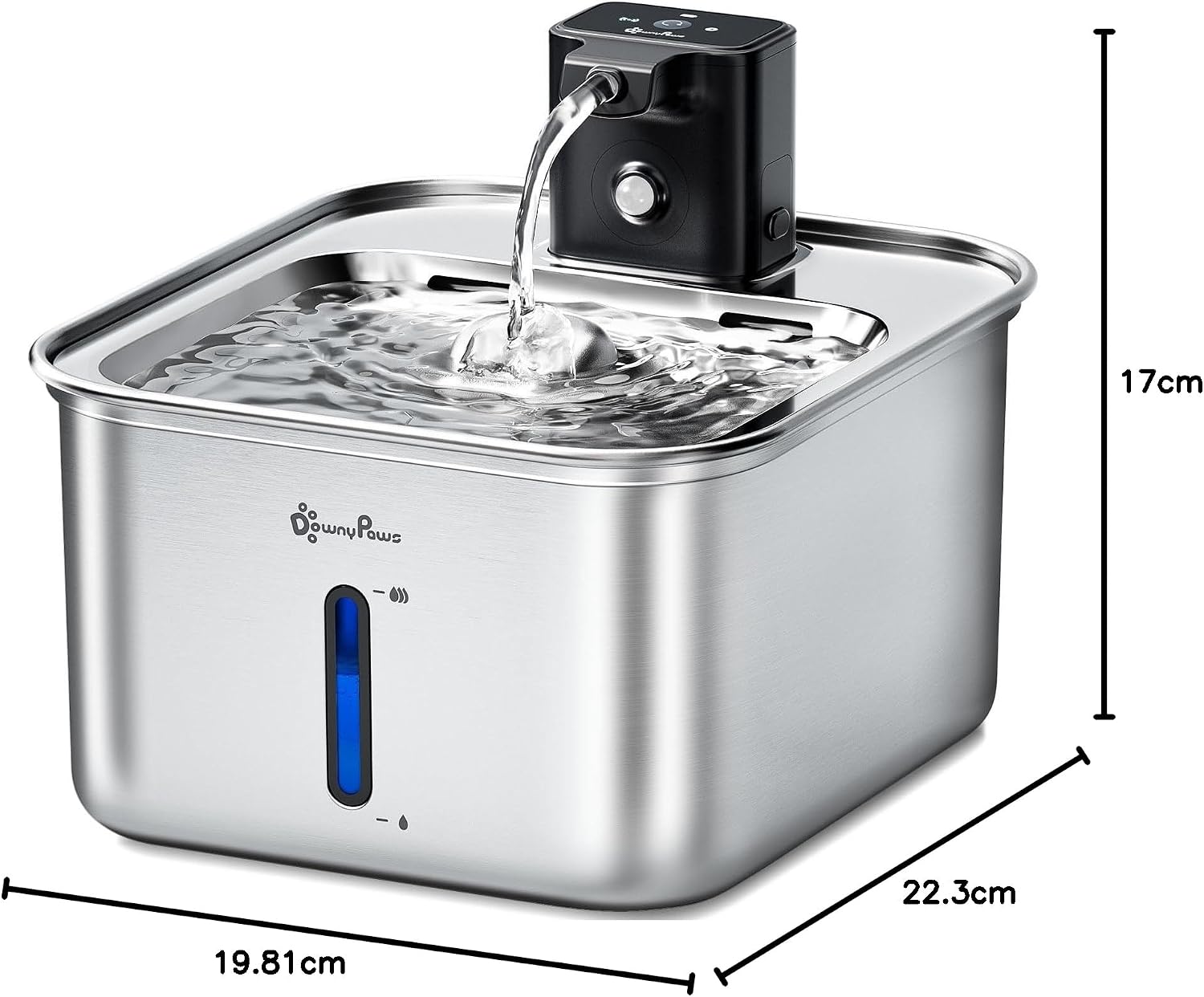
Figure 7: Product dimensions of the DownyPaws Wireless Cat Water Fountain.
7. Warranty and Support
The DownyPaws Wireless Cat Water Fountain (Model: DPWFP6FSS) comes with a 1-year warranty from the date of purchase.
This warranty covers manufacturing defects and malfunctions under normal use. It does not cover damage caused by misuse, accidents, unauthorized modifications, or failure to follow the instructions in this manual.
For warranty claims, technical support, or any questions regarding your product, please contact DownyPaws customer service. Refer to the contact information provided with your purchase or visit the official DownyPaws website for support details.
When contacting support, please have your product model number (DPWFP6FSS) and proof of purchase readily available.

