1. Introduction
Thank you for choosing the Tempest Glare RGB Gaming Chair. This manual provides essential information for the safe assembly, operation, and maintenance of your new gaming chair. Please read these instructions carefully before assembly and retain them for future reference.
Safety Information
- Ensure all components are present and undamaged before assembly. Do not use if any parts are missing or faulty.
- Assemble the chair on a soft, clean surface to prevent damage to the chair or your floor.
- Follow the assembly steps in the order provided. Do not overtighten screws.
- Keep children and pets away from the assembly area. Small parts can be a choking hazard.
- Do not stand on the chair or use it as a step stool.
- The maximum weight capacity for this chair is approximately 120 kg (265 lbs). Do not exceed this limit.
2. Package Contents
Carefully unpack all components and verify them against the list below. If any parts are missing or damaged, please contact customer support.
- Backrest
- Seat Base
- Armrests (2)
- Star Base
- Casters (5)
- Gas Lift Cylinder
- Gas Lift Cover
- Mechanism Plate
- Side Covers (2)
- Lumbar Support Pillow
- Headrest Pillow
- RGB Remote Control
- Hardware Pack (screws, Allen key)

Image 2.1: All components included in the Tempest Glare RGB Gaming Chair package. This image displays the backrest, seat base, armrests, star base, casters, gas lift cylinder, gas lift cover, mechanism plate, side covers, lumbar support pillow, headrest pillow, and RGB remote control, along with the hardware pack.
3. Assembly Instructions
Follow these steps to assemble your Tempest Glare RGB Gaming Chair.
- Attach Casters to Star Base: Insert each of the five casters into the holes at the end of the star base legs. Push firmly until they click into place.
- Insert Gas Lift: Place the gas lift cylinder into the central hole of the assembled star base. Cover the gas lift cylinder with the gas lift cover.
- Attach Mechanism Plate to Seat Base: Align the mechanism plate with the pre-drilled holes on the underside of the seat base. Ensure the front of the mechanism plate faces the front of the seat. Secure with screws using the provided Allen key.
- Attach Armrests to Seat Base: Attach the armrests to the underside of the seat base using the designated screws. Ensure they are securely fastened.
- Connect Backrest to Seat Base: Align the backrest with the metal brackets on the seat base. Secure the backrest to the brackets using screws.
- Install Side Covers: Once the backrest is secured, attach the plastic side covers over the metal brackets to conceal the screws.
- Place Seat Assembly onto Gas Lift: Carefully place the assembled seat and backrest onto the gas lift cylinder, ensuring the central hole of the mechanism plate aligns with the top of the gas lift. Apply gentle downward pressure to secure.
- Attach Cushions: Place the headrest pillow onto the top of the backrest and the lumbar support pillow onto the lower backrest. These are typically secured with elastic straps.

Image 3.1: The fully assembled Tempest Glare RGB Gaming Chair, featuring the headrest and lumbar support pillows in place. This image shows the grey fabric upholstery with black accents and the integrated RGB lighting strips along the edges.
4. Operating Instructions
Your Tempest Glare RGB Gaming Chair offers several adjustment options for personalized comfort and an integrated RGB lighting system.
Chair Adjustments
- Height Adjustment: Pull the lever located on the right side of the seat upwards to raise or lower the chair. Release the lever at your desired height.
- Recline Function: Pull the lever on the left side of the seat upwards to adjust the backrest angle. Lean back to recline or lean forward to bring the backrest upright. Release the lever to lock the backrest in position.
- Armrest Adjustment: The armrests can be adjusted vertically by pressing the button located on the side of each armrest and moving them up or down. Release the button to lock them.
- Tilt Lock/Tension: The mechanism plate under the seat may have a knob to adjust tilt tension and a lever to lock the tilt function. Refer to the mechanism for specific controls.

Image 4.1: This image illustrates the recline capability of the Tempest Glare RGB Gaming Chair, showing the backrest adjusting through various angles for user comfort.
RGB Lighting Control
The RGB lighting strips integrated into the chair are controlled by the included remote control.
- Ensure the chair's RGB system is connected to a power source (e.g., a USB power bank or adapter, not included).
- Use the remote control to power on/off the lights, change colors, adjust brightness, and select various lighting modes (e.g., static, flashing, fading).
- Refer to the remote control's specific button functions for detailed operation.
5. Maintenance
Regular maintenance will prolong the life and appearance of your gaming chair.
- Cleaning: For fabric parts, use a soft cloth dampened with mild soap and water. For plastic or metal parts, wipe with a clean, dry cloth. Avoid harsh chemicals or abrasive cleaners.
- Casters: Periodically check casters for hair or debris and clean as needed to ensure smooth rolling.
- Hardware: Every few months, check all screws and bolts to ensure they are tight. Retighten if necessary, but do not overtighten.
- RGB System: Keep the RGB lighting strips clean and free from dust. Avoid bending or damaging the strips.
6. Troubleshooting
If you encounter issues with your chair, refer to the following common problems and solutions.
- Chair does not adjust height: Ensure the gas lift lever is fully engaged. Check if the gas lift cylinder is properly seated in the base and mechanism.
- Chair wobbles: Verify that all screws are securely tightened, especially those connecting the backrest to the seat and the mechanism to the seat.
- Casters not rolling smoothly: Inspect casters for trapped debris (hair, lint) and clean them. Ensure they are fully inserted into the star base.
- RGB lights not working: Check if the RGB system is properly connected to a power source. Ensure the remote control has working batteries and is pointed correctly at the receiver.
- Backrest does not recline or lock: Check the recline lever and ensure it is fully engaged or disengaged. Inspect the recline mechanism for any obstructions.
7. Specifications
Key specifications for the Tempest Glare RGB Gaming Chair:
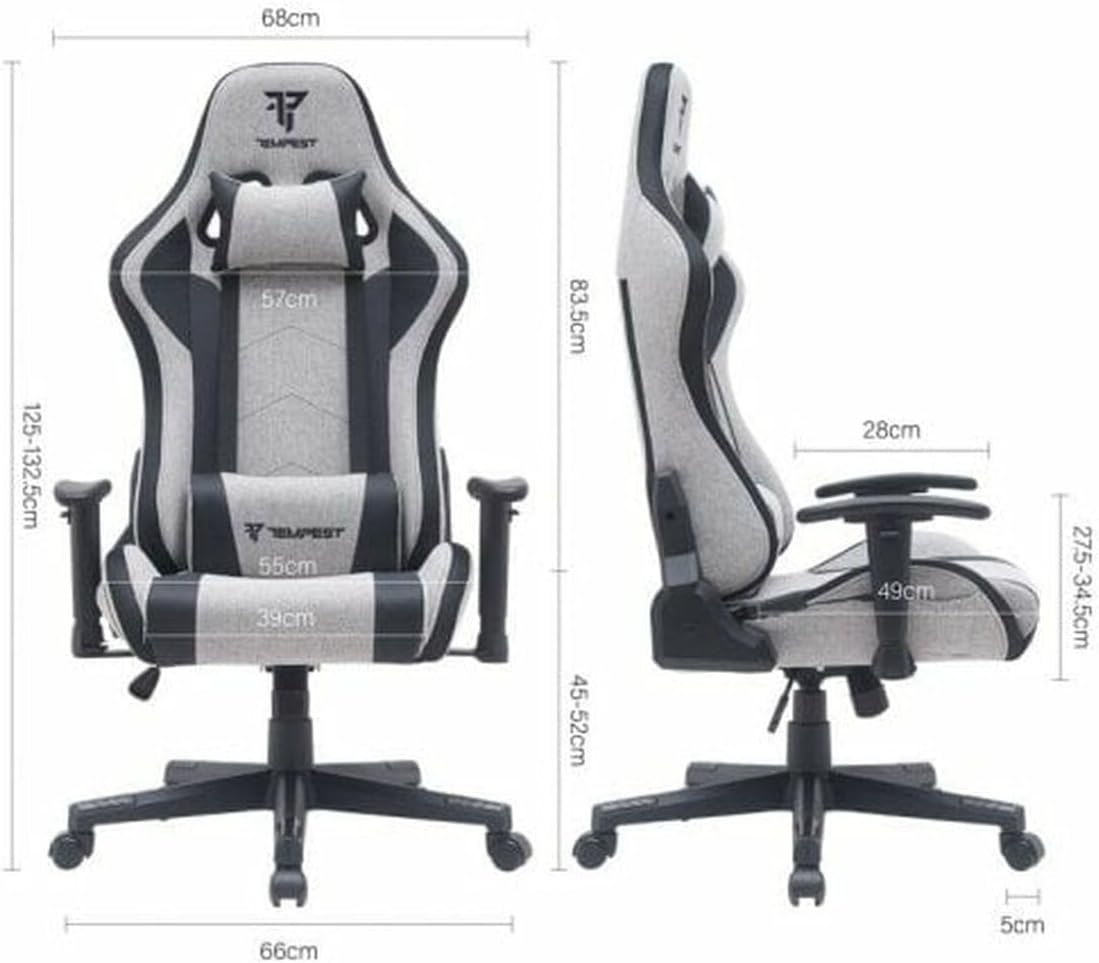
Image 7.1: This diagram provides detailed measurements of the Tempest Glare RGB Gaming Chair, including overall height, seat width, seat depth, backrest height, and armrest height range.
| Feature | Detail |
|---|---|
| Model | Glare |
| Color | Grey with Black Accents |
| Material | Fabric / Durable Plastic (Base) |
| Overall Dimensions (approx.) | 66 cm (W) x 68 cm (D) x 125-132.5 cm (H) |
| Seat Dimensions (approx.) | 39 cm (W) x 49 cm (D) |
| Seat Height Range (approx.) | 45-52 cm |
| Backrest Height (approx.) | 83.5 cm |
| Armrest Height Range (approx.) | 27.5-34.5 cm (from seat) |
| Weight Capacity | Up to 120 kg (265 lbs) |
| Product Weight | 20.5 kg |
| Lighting | Integrated RGB (Remote Controlled) |
8. Warranty and Support
The Tempest Glare RGB Gaming Chair comes with a standard manufacturer's warranty. Please refer to your purchase documentation for specific warranty terms and conditions.
For technical support, missing parts, or warranty claims, please contact your retailer or the manufacturer's customer service department. Keep your proof of purchase for warranty validation.


