
Introduction
Thank you for choosing the Backnets Shower System. This system is designed to provide a luxurious and customizable showering experience with its multi-function capabilities and advanced temperature control. Constructed from high-quality solid brass, this system ensures durability and a premium aesthetic. This manual provides essential information for the proper installation, operation, maintenance, and troubleshooting of your new shower system.

Figure 1: Overview of the Backnets Shower System components.
Setup and Installation
Proper installation is crucial for the optimal performance and longevity of your shower system. It is highly recommended that installation be performed by a qualified professional plumber.
Key Components and Connections
- Thermostatic Mixing Valve: This is the central control unit for water flow and temperature. It features NPT1/2 (inlet) and NPT1/2 (outlet) connections.
- Rainfall Shower Head: Connects to Outlet 1 of the mixing valve.
- Handheld Shower: Connects to Outlet 2 of the mixing valve.
- Body Jets: Connect to Outlet 3 of the mixing valve.

Figure 2: Shower valve connections for hot water, cold water, and outlets.
Video 1: Demonstration of the 3-function shower valve for bathroom installation and operation.
Pre-Installation Checklist:
- Ensure all components are present and undamaged.
- Verify water supply lines are shut off.
- Confirm wall cavity dimensions are adequate for concealed valve installation.
- Prepare NPT1/2 connections for hot and cold water inlets and all outlets.
Operating Instructions
Your Backnets Shower System offers a versatile and intuitive user experience.
Temperature Control:
- The central knob on the diverter valve controls the water temperature. Turn it left for colder water and right for hotter water.
- The integrated LED display shows the current water temperature in real-time. The display is hydro-powered and does not require batteries.
- Temperature indicator lights change color to reflect water temperature (e.g., blue for cold, orange for hot).

Figure 3: Digital LED temperature display and control knob.
Function Selection:
The system features three distinct shower functions:
- Rainfall Shower: Provides a wide, gentle rain-like spray from the overhead shower head.
- Massage Lumbar Spray (Body Jets): Delivers targeted, invigorating streams from the wall-mounted body jets.
- Handheld Shower: Offers flexible, directed water flow for rinsing specific areas.
You can activate one, two, or all three functions simultaneously by pressing the corresponding buttons on the diverter valve.
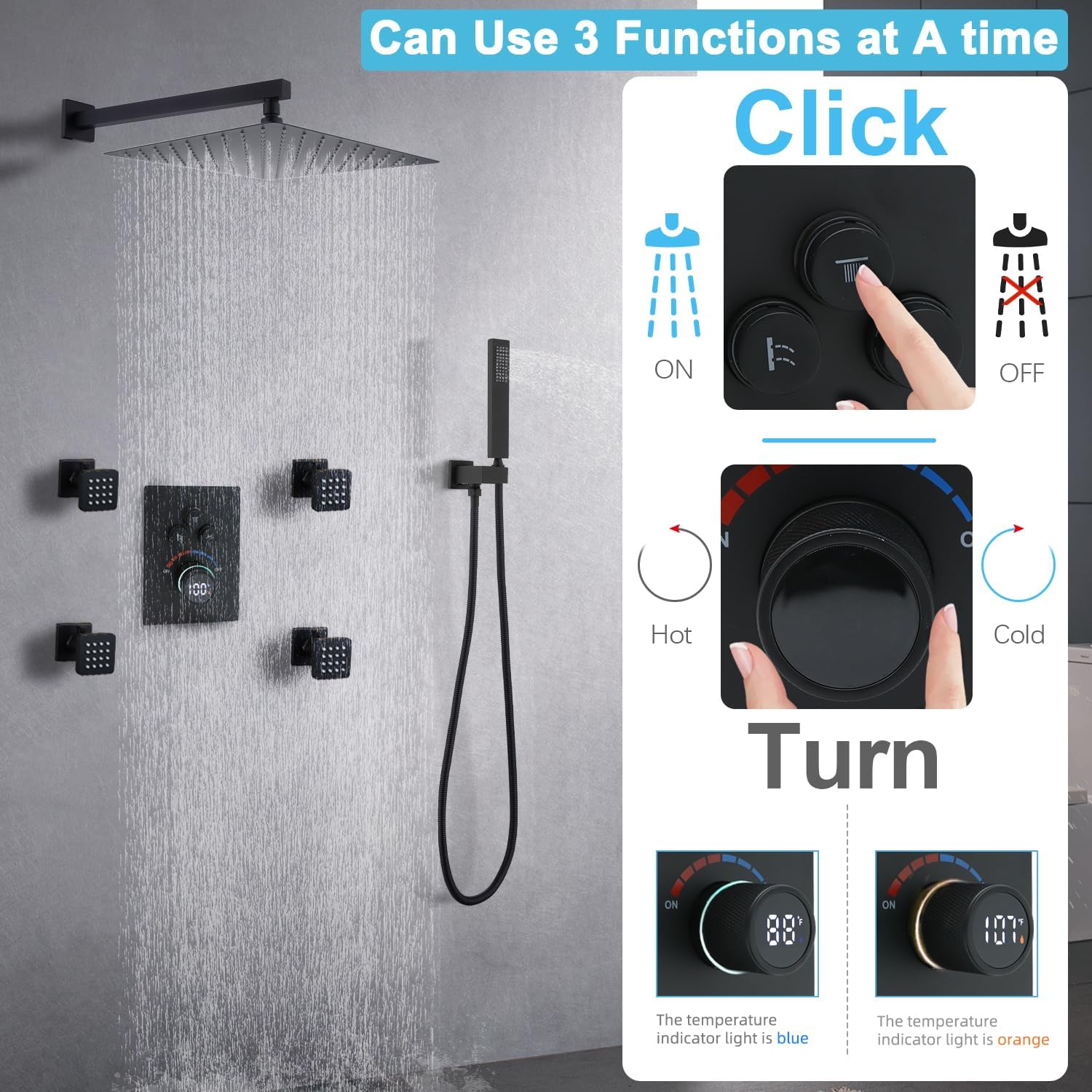
Figure 4: Operating the 3-in-1 diverter for function selection and temperature adjustment.
Video 2: Demonstration of the shower system with handheld shower and valve, showcasing various functions.
Maintenance
Regular maintenance will help preserve the finish and functionality of your Backnets Shower System.
Cleaning the Finish:
- For the Matte Black finish, use a soft, damp cloth and mild soap.
- Avoid abrasive cleaners, harsh chemicals, or scouring pads, as these can damage the finish.
- Wipe dry with a clean cloth to prevent water spots.
Cleaning Nozzles:
The rainfall shower head and body jets feature silicone nozzles designed for easy cleaning.
- To remove mineral buildup, gently rub the silicone nozzles with your finger or a soft brush.
- This should dislodge any deposits and restore full water flow.

Figure 5: Easy-clean nozzles on the 12-inch rain shower head.

Figure 6: Cleaning the silicone nozzles of a body jet.
Troubleshooting
If you encounter issues with your shower system, refer to the following common problems and solutions:
| Problem | Possible Cause | Solution |
|---|---|---|
| Low Water Pressure | Clogged nozzles, partially closed shut-off valves, low household water pressure. | Clean silicone nozzles (see Maintenance). Ensure main water supply valves are fully open. Consult a plumber if household pressure is consistently low. |
| Inconsistent Water Temperature | Thermostatic valve malfunction, imbalanced hot/cold water supply pressure. | Verify hot and cold water supply pressures are balanced. If issues persist, contact customer support or a qualified plumber. |
| Water Leaks | Loose connections, damaged seals, faulty components. | Check all visible connections for tightness. If leaks persist or are from concealed components, immediately shut off water supply and contact a professional plumber. |
| LED Display Not Working | Insufficient water flow for hydro-power, internal fault. | Ensure adequate water flow. If the display remains off with sufficient flow, contact customer support. |
Specifications
- Brand: Backnets
- Model Number: SXSGN4YP
- Color: Matte Black
- Material: Brass
- Finish Type: Matte
- Number of Handles: 1
- Mounting Type: Wall Mounted (for this specific variant)
- Item Weight: Approximately 16 Pounds
- Head Size: 12 inch (Rain Shower Head)
- Inlet/Outlet Connections: NPT1/2
- Included Components: Shower systems with rain shower, handheld, and body jets.
Warranty and Support
Backnets is committed to providing high-quality products and excellent customer service.
Warranty Information:
For detailed warranty terms and conditions, please refer to the warranty card included with your product or contact Backnets customer support directly. Keep your proof of purchase for warranty claims.
Customer Support:
If you have any questions, require assistance with installation, operation, or encounter any problems not covered in this manual, please do not hesitate to contact our customer support team. We are happy to help you.
Contact Information: Please refer to the contact details provided on the product packaging or the official Backnets website.

Figure 7: Backnets customer support is available to assist you.


