
1. Introduction
Thank you for choosing the PayLessHere Electric Power Lift Recliner Chair. This manual provides essential information for the safe and efficient operation, assembly, and maintenance of your new recliner. Please read this manual thoroughly before use and retain it for future reference.

Figure 1.1: The PayLessHere Electric Power Lift Recliner Chair, a comfortable brown recliner designed for relaxation and assistance.
2. Safety Information
Refer to the instruction manual for safety warnings and precautions.
- Always ensure the power cord is not pinched or damaged.
- Keep children and pets away from the moving parts of the chair.
- Do not operate the chair if any part is damaged or missing.
- Do not exceed the maximum weight recommendation of 250 pounds.
- Unplug the chair from the power outlet before cleaning or maintenance.
- Avoid placing liquids directly on the control panel or power mechanisms.
3. Package Contents
Before assembly, verify that all components are present and undamaged. If any parts are missing or damaged, contact customer support immediately.
- Recliner Base
- Backrest Section
- Seat Cushion
- Armrests (Left and Right)
- Power Adapter
- Remote Control
- Instruction Manual (this document)
4. Assembly
Assembly of the PayLessHere Electric Power Lift Recliner Chair is designed to be straightforward. Follow these steps carefully:
- Unpack Components: Carefully remove all parts from the packaging. Place them on a soft, clean surface to prevent scratches.
- Attach Backrest: Align the metal brackets on the backrest with the corresponding slots on the recliner base. Slide the backrest down firmly until it clicks securely into place.
- Connect Wires: Locate the power cables extending from the backrest and the base. Connect them securely. Ensure all connections are snug.
- Connect Power Adapter: Plug the power adapter into the chair's power input, then plug the adapter into a standard wall outlet.
- Test Functionality: Use the remote control to test the lift and recline functions to ensure proper operation.

Figure 4.1: Detail display of chair components, including the side storage bag and the sturdy metal base.
5. Operating Instructions
Your PayLessHere Electric Power Lift Recliner Chair offers multiple functions for enhanced comfort and assistance. All functions are controlled via the included remote.
5.1 Power Lift and Recline
The chair features an electric motor mechanism for smooth transitions between sitting, reclining, and standing positions.
- To Recline: Press and hold the "Recline" button on the remote. The backrest will smoothly lower, and the footrest will extend. Release the button when you reach your desired position.
- To Return to Upright Position: Press and hold the "Upright" button. The chair will return to the standard sitting position.
- To Lift for Standing Assistance: From the upright position, press and hold the "Lift" button. The chair will gently tilt forward and lift, assisting you in standing up. Release the button when you are ready to stand independently.
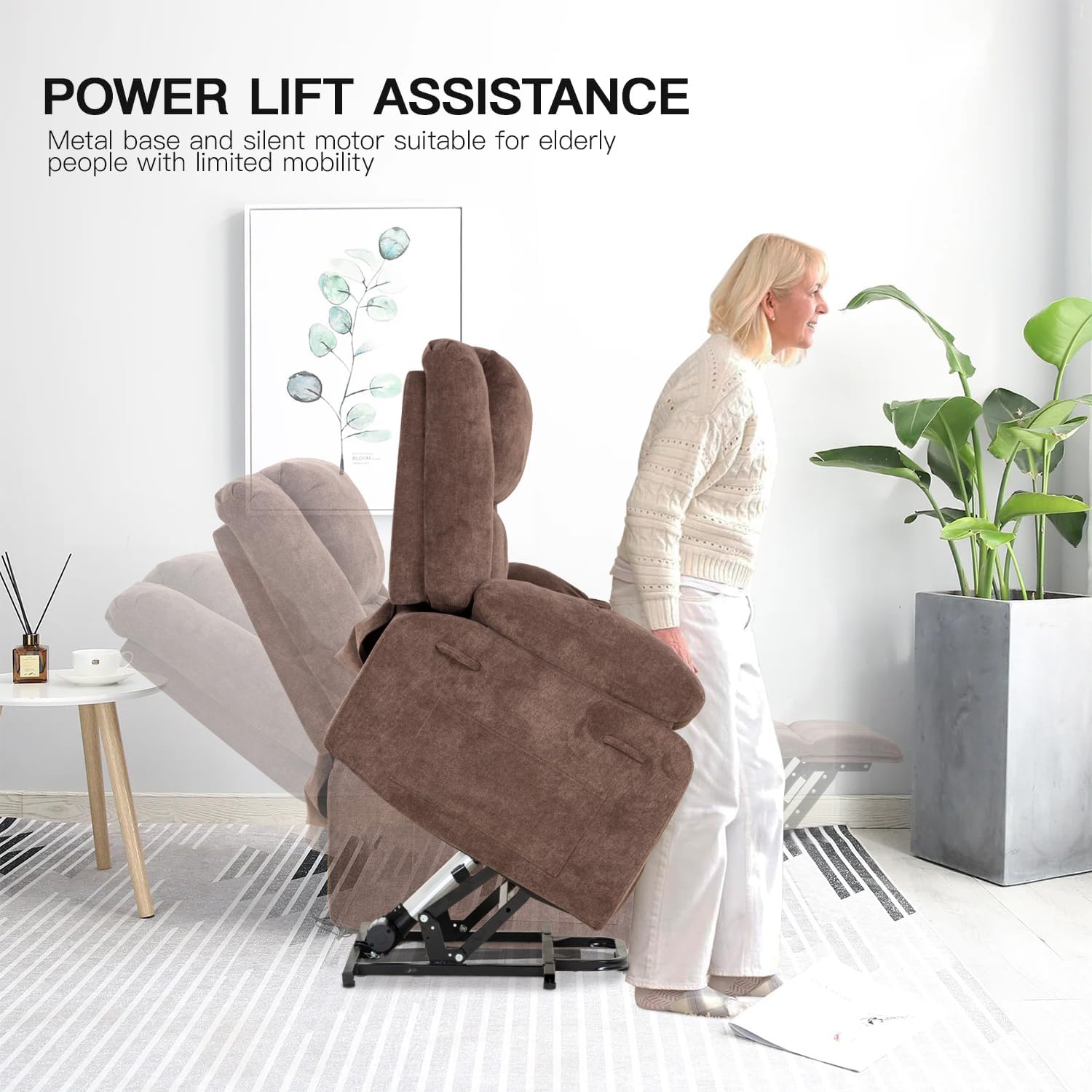
Figure 5.1: Power lift assistance in action, demonstrating how the chair aids users in standing.

Figure 5.2: One-click adjustment for quickly lying flat and reducing waiting time.
5.2 Massage and Heat Functions
The recliner is equipped with 8 vibrating nodes and a lumbar heating function for relaxation.
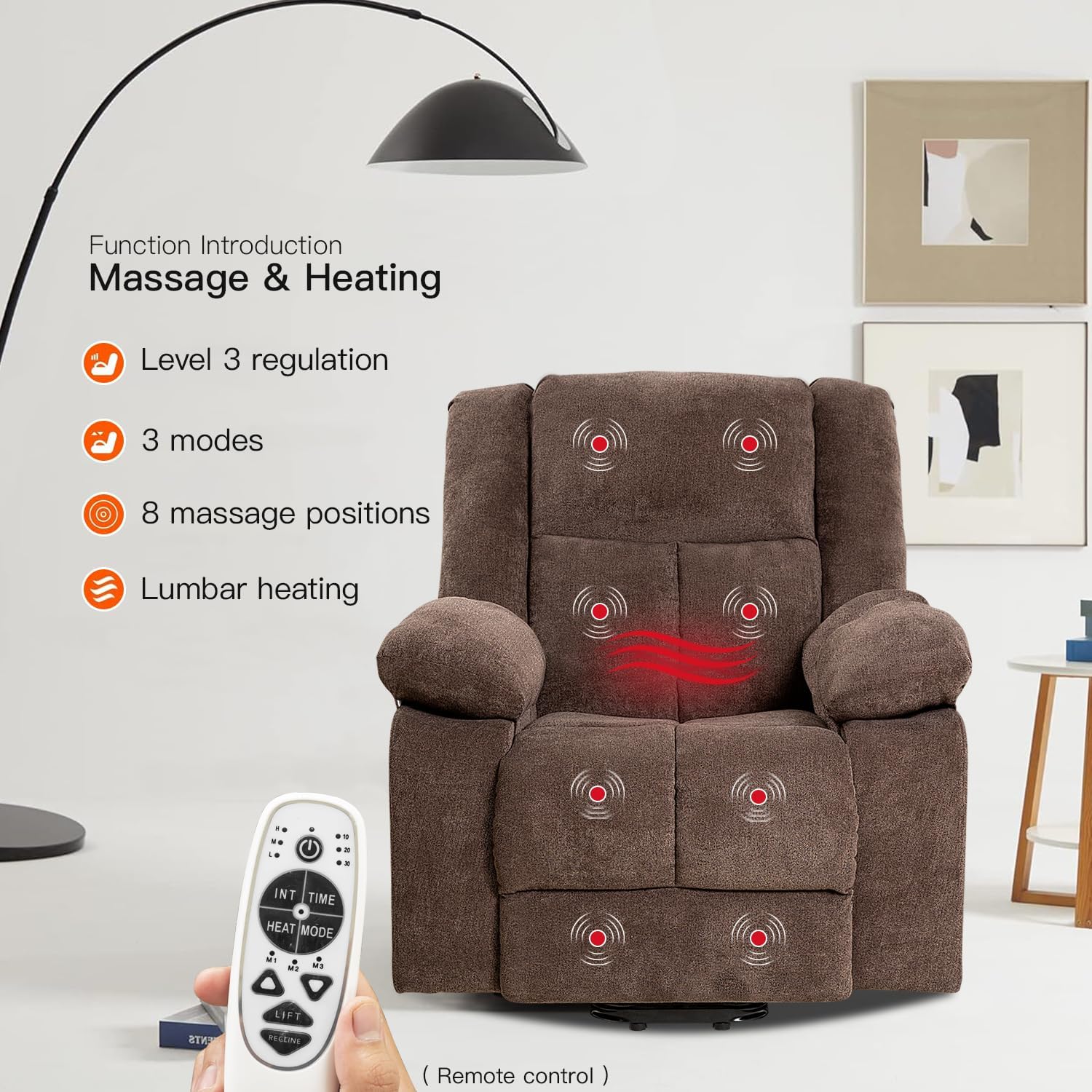
Figure 5.3: Function introduction for massage and heating, highlighting the remote control.
- Massage Nodes: There are 8 vibrating nodes located in the back (2), waist (2), upper leg (2), and lower leg (2).
- Massage Modes: Select from 3 different massage modes using the remote.
- Vibration Intensities: Adjust the vibration intensity to your preference.
- Targeted Massage: Each massage point can be operated individually. Refer to the remote control diagram for specific button functions.
- Timer Function: Set the massage duration for 10, 20, or 30 minutes using the timer button on the remote.
- Lumbar Heat: Activate the lumbar heat function to promote blood circulation and provide warmth to the lower back area.
6. Maintenance
Proper care and maintenance will extend the life of your recliner chair.
- Cleaning:
- For general cleaning, use a soft, damp cloth with mild soap.
- Avoid harsh chemicals or abrasive cleaners, as they may damage the fabric.
- Spot clean spills immediately to prevent staining.
- Mechanism Care:
- Periodically check all bolts and screws to ensure they are tight.
- Do not lubricate the moving parts unless specifically instructed by customer support.
- Power Cord: Regularly inspect the power cord for any signs of damage. If damaged, discontinue use and contact customer support for a replacement.
7. Troubleshooting
If you encounter any issues with your recliner, refer to the following troubleshooting guide before contacting customer support.
| Problem | Possible Cause | Solution |
|---|---|---|
| Chair does not recline/lift. | Power cord unplugged; loose connection; remote control battery low/dead; motor malfunction. | Ensure power cord is securely plugged into both the chair and the wall outlet. Check all cable connections. Replace remote control batteries. If problem persists, contact customer support. |
| Massage/Heat function not working. | Power issue; function not activated; internal wiring issue. | Verify the chair is powered on. Ensure the specific massage/heat button on the remote is pressed. Check for any visible damage to the remote or chair wiring. |
| Unusual noises during operation. | Loose components; obstruction in mechanism. | Inspect for any loose bolts or screws and tighten them. Check for any objects obstructing the reclining mechanism. |
8. Specifications
| Feature | Detail |
|---|---|
| Brand | PayLessHere |
| Model Name | Electric Power Lift Recliner Chair with Massage and Heat, Standing Assistance for Elderly People |
| Color | Brown |
| Product Dimensions (Upright) | 28.1"D x 37.8"W x 42.1"H |
| Product Dimensions (Fully Reclined) | 35.4"H x 37.8"W x 61"L |
| Maximum Weight Recommendation | 250 Pounds |
| Massage Features | 8 Vibrating Nodes (Back, Waist, Upper Leg, Lower Leg), 3 Massage Modes, Adjustable Intensity |
| Heat Function | Lumbar Heating |
| Timer Function | 10/20/30 Minutes |
| Material | Snowflake Fabric, Sponge, Spring Pockets, Doll Cotton (Backrest) |
| Frame Material | Premium Metal |
| Item Weight | 108 pounds |
| UPC | 195030109813 |

Figure 8.1: Size information and dimensions of the recliner chair.
9. Warranty and Support
PayLessHere products are designed for quality and durability. For warranty information or technical support, please contact the retailer or manufacturer directly. Keep your purchase receipt as proof of purchase.
For common inquiries, please refer to the troubleshooting section of this manual or visit the official PayLessHere website for additional resources.
Customer Support: Refer to your purchase documentation for contact details.