
1. Introduction
This manual provides essential instructions for the safe and effective use of your ROTAI Jimny Massage Chair A36. Please read this manual thoroughly before operating the chair and retain it for future reference. Proper use and maintenance will ensure the longevity and optimal performance of your massage chair.

Image 1.1: The ROTAI Jimny Massage Chair A36, showcasing its design and integrated control panel.
2. Safety Information
To prevent injury or damage to the product, always adhere to the following safety guidelines:
- Always read and follow the assembly instructions carefully.
- Exercise caution when using the reclining, armrest, and footrest features to avoid pinching or entrapment.
- Use the hot compress feature with caution to prevent burns. If you experience discomfort, discontinue use immediately.
- Do not exceed the maximum weight capacity of the chair. Consult the specifications section for details.
- Keep children and pets away from the chair, especially during operation.
- Do not attempt to disassemble or repair the chair yourself. Contact qualified service personnel for assistance.
- Ensure the power cord is not damaged or placed under the chair.
3. Product Overview and Features
The ROTAI Jimny Massage Chair A36 is designed to provide a comprehensive massage experience. Key features include:
- Individual Pedicure: Features calf independent foot massage with airbags, heel pinch, sole roller scraping, and sole convex point acupressure for a 4-fold combined massage.
- Magnetic Movement: Enhanced massage effect through integrated magnets. The chair mechanism includes three sets of movement combinations covering the neck, shoulders, waist, back, and buttocks.
- Automatic Programs: 12 pre-set automatic programs, including 3 Classic Programs, 3 Home Care programs, 3 Air Pressure Massage programs, and 3 Pain Point Improvement programs.
- Combination Programs: 7 customizable combination programs to target specific areas such as shoulders, neck, waist, back, and buttocks. Intensity and air pressure are adjustable.
- Pedicure Procedures: 3 automatic programs specifically for foot and leg massage.
- One-Click Swing: Initiates a gentle rocking motion.
- Hot Compress: Carbon fiber heating elements provide warmth to the waist and back areas.
- Touch Control: A sleek integrated tab allows for easy control of all massage functions.
- Zero Gravity: Features a 3-stage zero gravity recline function, designed to reduce pressure on the spine.

Image 3.1: Detailed view of the chair's components, highlighting airbags, speakers, and magnetic massage points.
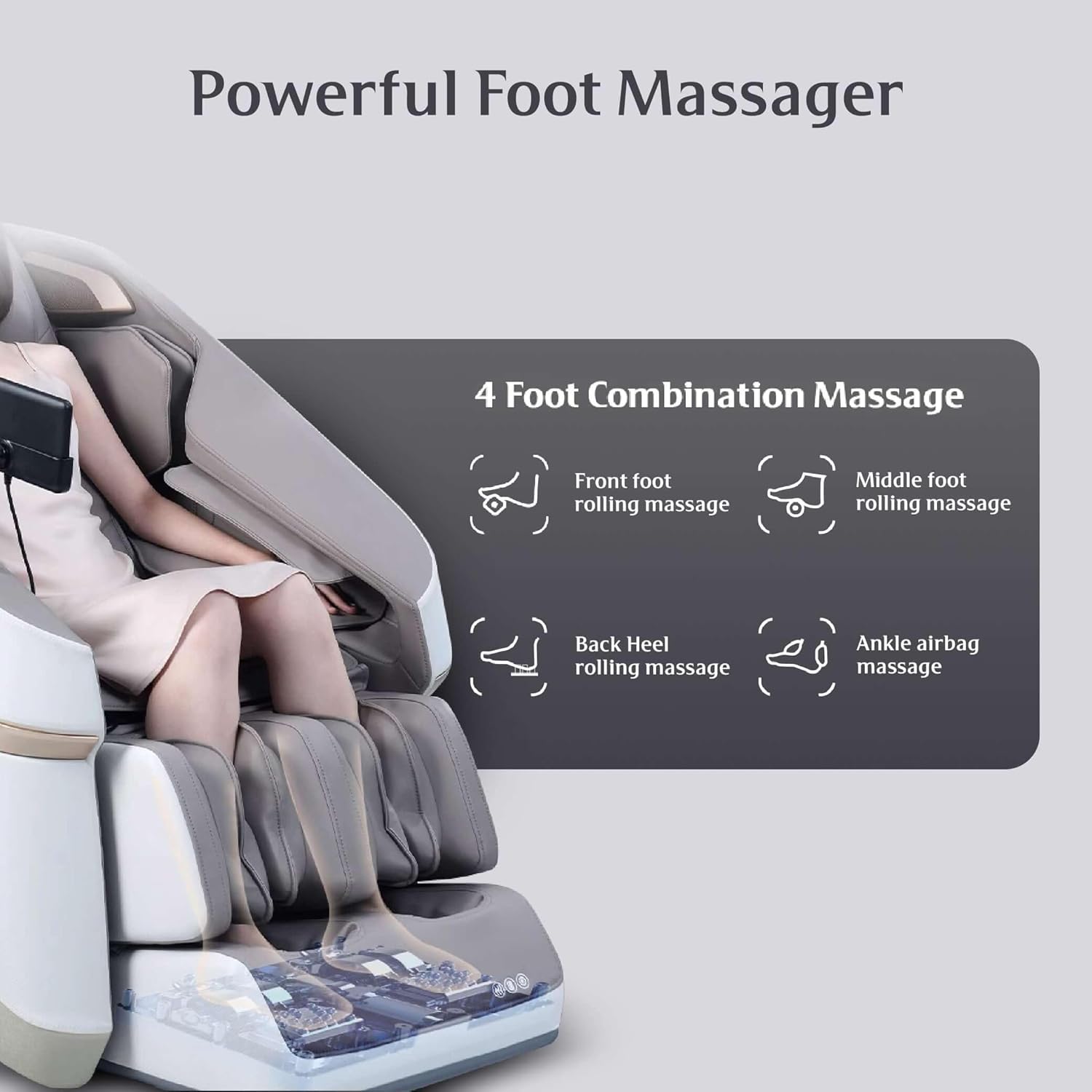
Image 3.2: The foot massage mechanism, illustrating the four combination massage techniques.

Image 3.3: The chair's ability to provide 3-stage kneading massage across 6 key body areas.
4. Setup
Follow these steps to set up your massage chair:
- Unpacking: Carefully remove all packaging materials. Inspect the chair for any signs of damage.
- Assembly: Refer to the separate assembly guide included with your purchase for detailed instructions on attaching components such as the footrest or armrests, if required.
- Placement: Position the chair on a flat, stable surface. Ensure there is sufficient space around the chair for reclining and footrest extension (approximately 10-15 cm from a wall for zero gravity function).
- Power Connection: Connect the power cord to the chair's power inlet, then plug it into a grounded electrical outlet. Ensure the voltage matches the chair's requirements.
- Initial Check: Before first use, ensure all connections are secure and the chair is stable.
5. Operation
Operating your ROTAI Jimny Massage Chair A36 is intuitive with its touch control system.
5.1. Basic Controls
- Power On/Off: Press the power button on the touch control panel to turn the chair on or off.
- Program Selection: Use the touch screen to navigate through the 12 automatic programs or 7 combination programs. Select the desired program by tapping its icon.
- Zero Gravity: Activate the 3-stage zero gravity recline with a dedicated button on the control panel. Adjust through the stages as desired.
- Heat Function: Turn on the lumbar and back heating function via the control panel.
- Manual Adjustments: Adjust massage intensity, air pressure, roller speed, and recline angle using the manual control options on the touch screen.

Image 5.1: The touch control interface for selecting various automatic wellness programs.
5.2. Specific Program Types
- Automatic Programs: Choose from Classic, Home Care, Air Pressure, or Pain Point Improvement categories for a full-body massage tailored to general needs.
- Combination Programs: These programs allow for focused massage on specific body parts like shoulders, neck, waist, or hips, with adjustable intensity.
- Pedicure Programs: Select one of the three dedicated pedicure programs for a specialized foot and calf massage.
6. Maintenance
Regular maintenance ensures the longevity and hygiene of your massage chair.
- Cleaning: Wipe clean the chair's surfaces with a soft, damp cloth. Do not use abrasive cleaners, solvents, or harsh chemicals, as these can damage the material.
- Power Disconnection: Always unplug the chair from the power outlet before cleaning or performing any maintenance.
- Storage: If storing the chair for an extended period, ensure it is clean, dry, and covered to protect it from dust.
- Inspection: Periodically check the power cord and plug for any damage. Ensure all moving parts operate smoothly.
7. Troubleshooting
If you encounter issues with your massage chair, refer to the following common solutions:
| Problem | Possible Cause | Solution |
|---|---|---|
| Chair does not power on. | Power cord not properly connected; power outlet not working; main power switch off. | Ensure power cord is securely plugged in. Test the outlet with another device. Check if the main power switch (if present) is on. |
| Massage function is weak or inconsistent. | Incorrect program selected; intensity setting too low; user position incorrect. | Select a different program or increase intensity via the control panel. Adjust your seating position. |
| Abnormal noise during operation. | Loose component; obstruction; normal operational sound. | Check for any loose parts or obstructions. Some mechanical sounds are normal. If the noise is loud or unusual, discontinue use and contact support. |
| Heat function not working. | Heat function not activated; internal fault. | Ensure the heat function is turned on via the control panel. Allow a few minutes for the heating elements to warm up. |
If the problem persists after attempting these solutions, please contact ROTAI customer support for further assistance.
8. Specifications
| Feature | Detail |
|---|---|
| Brand | ROTAI |
| Model Number | RO-36 Grey |
| Color | Grey |
| Product Dimensions (L x W x H) | 110 x 70 x 102 cm (43.3" x 27.6" x 40.2") |
| Item Weight | 69 Kilograms |
| Material | Carbon Fiber |
| Special Features | Adjustable Backrest, Arm Rest, Foot Rest, Heated, Reclining |
| Back Style | Cushion Back |
| Product Care Instructions | Wipe Clean |
9. Warranty and Support
ROTAI offers a 10-year warranty on this Massage Chair. For warranty claims, technical support, or service inquiries, please refer to the contact information provided with your purchase documentation or visit the official ROTAI website.
For additional information or to explore other ROTAI products, you may visit the ROTAI Store on Amazon.


