
1. Introduction
This manual provides detailed instructions for the safe and effective operation of your BAOFENG UV25M Tri-Band Ham Radio. Please read this manual thoroughly before using the device to ensure proper functionality and to prevent damage.
The BAOFENG UV25M is a robust tri-band handheld radio designed for amateur radio enthusiasts, offering extensive features including frequency matching, NOAA weather channels, USB-C charging, and a high-capacity 5200mAh battery.
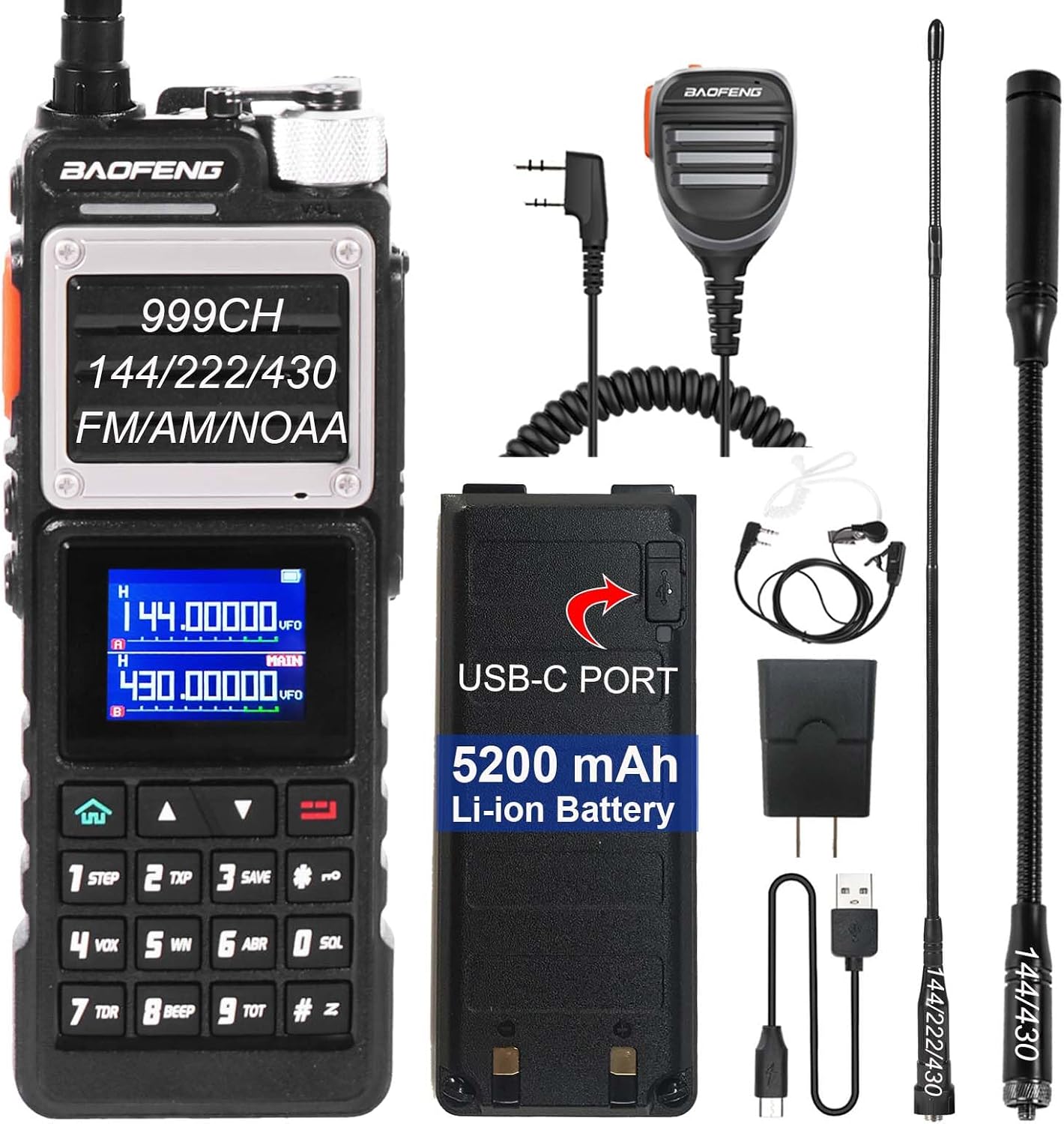
Image 1.1: BAOFENG UV25M Tri-Band Ham Radio and included accessories. This image displays the radio unit, a speaker microphone, two antennas (one long flexible, one shorter gooseneck), a 5200mAh Li-ion battery with USB-C port, a USB-C charging cable, a power adapter, an air tube headphone, a belt clip, and a hand strap.
2. Package Contents
Upon unpacking, please verify that all items listed below are present and in good condition:
- BAOFENG UV25M Ham Radio (x1)
- Tri-band Antenna (x1)
- Gooseneck Antenna (x1)
- BAOFENG High Quality Mic (x1)
- Air Tube Headphone (x1)
- 5200mAh Li-ion Battery (x1)
- USB-C Charging Cable (x1)
- Power Adapter (x1)
- Belt Clip (x1)
- Hand Strap (x1)
- User Manual (x1)

Image 2.1: Visual representation of all components included in the BAOFENG UV25M product box. This image shows the radio, the long tri-band antenna, the gooseneck antenna, the speaker microphone, the air tube headphone, the 5200mAh battery, the USB-C cable, and the power adapter.
3. Product Overview
The BAOFENG UV25M is a high-performance tri-band handheld radio with a robust design and a comprehensive set of features for reliable communication.
Key Features:
- Tri-Band Operation: Supports 144-148MHz, 220-260MHz, and 420-450MHz frequency ranges for versatile communication.
- High Power Output: Provides strong signal transmission for extended range.
- 5200mAh Li-ion Battery: High-capacity battery for extended operating time.
- USB-C Direct Charge: Convenient charging via USB-C port.
- 999 Channels: Ample storage for various frequencies and settings.
- One Key Frequency Match: Simplifies frequency synchronization with other radios.
- NOAA Weather Channels: Access to 10 NOAA weather channels for emergency alerts.
- AM/FM Radio: Built-in receiver for broadcast radio.
- CTCSS/DCS: Tone squelch functions for private communication.
- VOX/Hands-free: Voice-activated transmission for hands-free operation.
- Compatible with CHIRP: Allows for easy programming via software.
- 1.77-inch Large Screen: Clear display for channel and frequency information.
- LED Flashlight: Integrated light for utility in low-light conditions.

Image 3.1: Detailed diagram of the BAOFENG UV25M radio, highlighting its various components and controls. Labels include Tri-Band Antenna, LED flashlight, Power switch/volume knob, Standard K style program and earpiece port, Speaker/microphone, Color LCD screen, Menu and VFO/MR mode keys, SK1 (Weather forecast/frequency sweep key), PTT (Push-To-Talk), SK2 (FM radio switch/monitoring key), and SK3 (LED flashlight switch/emergency alarm button). Dimensions are also indicated: 180mm (7.08 inches) height, 70mm (2.75 inches) width, and 45mm (1.77 inches) depth.

Image 3.2: Illustration of the BAOFENG UV25M's multi-band receiver capabilities, showing supported frequency ranges: 88-108MHz (FM broadcast), 108-136MHz (AM airband receive), 136-174MHz (VHF), 144-148MHz (VHF amateur band), 220-260MHz (1.25m amateur band), 350-390MHz (UHF), and 400-520MHz (UHF amateur band).
4. Setup
4.1 Battery Installation
- Align the 5200mAh Li-ion battery with the battery compartment on the back of the radio.
- Slide the battery into place until it clicks securely. Ensure the battery release latch is engaged.
4.2 Charging the Battery
The UV25M features a 5200mAh battery with a convenient USB-C charging port.
- Connect the provided USB-C charging cable to the USB-C port on the battery.
- Connect the other end of the USB-C cable to the power adapter, a computer USB port, or a power bank.
- The battery indicator on the radio or the battery itself will show charging status. A full charge typically takes several hours.

Image 4.1: The 5200mAh Li-ion battery for the BAOFENG UV25M, featuring a USB-C charging port. The image also illustrates various charging methods, including connecting to a laptop, a power bank, or a wall adapter.
4.3 Antenna Attachment
The radio comes with two antennas: a tri-band antenna and a gooseneck antenna. Choose the appropriate antenna for your needs.
- Screw the desired antenna clockwise onto the antenna connector on top of the radio until it is finger-tight. Do not overtighten.
- Ensure a secure connection for optimal performance.

Image 4.2: The BAOFENG UV25M radio equipped with its 35cm (13.77 inches) soft and flexible tri-band antenna, designed for long-range communication. A smaller gooseneck antenna is also shown for comparison.
5. Operating Instructions
5.1 Power On/Off and Volume Control
- To power on the radio, rotate the power switch/volume knob (located on top of the radio) clockwise.
- Continue rotating clockwise to increase the volume. Rotate counter-clockwise to decrease volume.
- To power off, rotate the knob counter-clockwise until it clicks.
5.2 Channel and Frequency Selection
The UV25M supports both VFO (Variable Frequency Oscillator) mode for direct frequency input and MR (Memory Recall) mode for stored channels.
- Use the Menu and VFO/MR keys on the keypad to switch between modes.
- In VFO mode, enter frequencies directly using the numeric keypad.
- In MR mode, use the up/down arrow keys to scroll through stored channels.
5.3 One Key Frequency Match
This feature allows for quick synchronization of frequencies with another radio.
- Place the UV25M near the radio you wish to match.
- Long press the [SK1] button (located on the side of the radio, below the PTT button) to activate the frequency match function.
- The radio will scan and attempt to match the frequency of the other device.

Image 5.1: Demonstration of the "One Key Frequency Match" feature. The image shows a user long-pressing the SK1 button on the BAOFENG UV25M to initiate frequency copying from another radio.
5.4 NOAA Weather Channels
The UV25M can receive 10 NOAA weather channels to provide emergency weather alerts.
- Short press the [SK1] button to activate the NOAA Weather Alert system.
- The radio will tune into NOAA weather frequencies to receive warnings.

Image 5.2: The BAOFENG UV25M displaying a NOAA weather channel (162.50000 MHz). The image highlights the ability to activate the NOAA Weather Alert system by short-pressing the SK1 button, providing access to emergency warnings from 10 weather satellites.
5.5 VOX (Voice Operated Exchange)
VOX allows for hands-free transmission when enabled.
- Access the menu and navigate to the VOX setting.
- Adjust the VOX sensitivity level as needed. A higher sensitivity means the radio will transmit with softer voice input.
5.6 PTT (Push-To-Talk) Button
- Press and hold the PTT button (large orange button on the left side) to transmit.
- Release the PTT button to stop transmitting and return to receive mode.
5.7 LED Flashlight
- Short press the [SK3] button to turn the LED flashlight on or off.
6. Maintenance
6.1 General Care
- Keep the radio clean by wiping it with a soft, damp cloth. Do not use harsh chemicals or solvents.
- Avoid exposing the radio to extreme temperatures, direct sunlight, or excessive moisture. The radio is not water resistant.
- Do not drop or subject the radio to severe impacts.
6.2 Battery Care
- To prolong battery life, avoid fully discharging the battery frequently.
- Store the battery in a cool, dry place if not used for extended periods.
- Use only the original or approved charging accessories.
7. Troubleshooting
| Problem | Possible Cause | Solution |
|---|---|---|
| Radio does not power on. | Battery is not installed correctly or is discharged. | Ensure battery is securely installed. Charge the battery fully. |
| Cannot transmit or receive. | Incorrect frequency/channel, antenna not connected, low battery, or squelch level too high. | Verify frequency/channel settings. Check antenna connection. Recharge battery. Adjust squelch level. |
| Poor audio quality. | Weak signal, antenna issue, or volume too low/high. | Move to an area with better signal. Check antenna connection. Adjust volume. |
| Battery does not charge. | Faulty cable/adapter, or battery not properly connected. | Ensure USB-C cable and adapter are working. Reconnect battery. |
8. Specifications
| Feature | Detail |
|---|---|
| Model Number | UV25M |
| Brand | BAOFENG |
| Frequency Range | 144-148MHz / 220-260MHz / 420-450MHz (Tri-Band) |
| Number of Channels | 999 |
| Battery | 5200mAh Lithium Ion (included) |
| Charging | USB-C Direct Charge |
| Dimensions (H x W x D) | 8.07 x 9.05 x 2.04 inches (approx. 20.5 x 23 x 5.2 cm) |
| Item Weight | 2.33 pounds (approx. 1.06 kg) |
| Talking Range Maximum | 5 Kilometers (under optimal conditions) |
| Voltage | 3.7 Volts |
| Water Resistance Level | Not Water Resistant |
| Special Features | Frequency Match, High Power, High Capacity, Long Range, Tri-Band, NOAA Weather Channels, AM/FM Radio, CTCSS/DCS, VOX/Hands-free, CHIRP Compatible, 1.77" Large Screen, LED Flashlight |

Image 8.1: A summary of key features for the BAOFENG UV25M, including 999 Channels, VOX Function, USB-C Charging, 1.77" Large Screen, High Gain Antenna, and LED Flashlight.
8.1 Antenna SWR Performance
The included tri-band antenna is designed for optimal performance across the supported frequency bands. Below are typical VSWR (Voltage Standing Wave Ratio) measurements:
- 145 MHz: VSWR < 1.5
- 220 MHz: VSWR < 1.5
- 435 MHz: VSWR < 1.5

Image 8.2: VSWR measurement graph showing performance around 145 MHz, indicating a low VSWR of approximately 1.4669.

Image 8.3: VSWR measurement graph showing performance around 220 MHz, indicating a low VSWR of approximately 1.1133.

Image 8.4: VSWR measurement graph showing performance around 435 MHz, indicating a low VSWR of approximately 1.2366.
9. Warranty Information
The BAOFENG UV25M radio typically comes with a limited warranty. Based on available information, a warranty period of 90 days is provided from the date of purchase. This warranty covers manufacturing defects under normal use.
Please retain your proof of purchase for warranty claims. The warranty does not cover damage caused by misuse, accidents, unauthorized modifications, or natural disasters.
For specific warranty terms and conditions, please refer to the documentation included with your product or contact the seller.
10. Support
If you encounter any issues or have questions regarding your BAOFENG UV25M radio that are not addressed in this manual, please contact the seller or manufacturer for assistance.
When contacting support, please have your product model (UV25M) and purchase information readily available.