Product Overview
The DOQAUS Upgraded Digital Hygrometer Room Thermometer is an essential tool for monitoring indoor environmental conditions. This device provides highly accurate temperature and humidity readings with a fast 5-second refresh rate, ensuring you have up-to-date information about your living space. Its large, easy-to-read LCD display makes checking conditions effortless from any angle.
Key features include:
- High Accuracy & Fast Refresh: Built-in smart temperature humidity sensor provides readings with ±2%~3% RH and ±2°F accuracy, refreshing every 5 seconds.
- 3.4in Easy-to-Read LCD Display: Large bold numbers for clear visibility from any distance.
- Air Comfort Indicator: Three face icons (DRY/COMFORT/WET) to visually indicate air conditions, helping you adjust humidifiers or dehumidifiers.
- Easy to Use: Simple °F/°C switchable button. Powered by 2 AAA batteries (included) with 18-24 months battery life.
- Multiple Mounting Options: Features a hanging hole, tabletop stand, and magnet for versatile placement in various rooms like baby rooms, kitchens, bedrooms, greenhouses, etc.

Figure 1: The DOQAUS Digital Hygrometer Room Thermometer displaying temperature and humidity.
Video 1: Official product video demonstrating the features and usage of the DOQAUS Digital Hygrometer.
Setup Guide
1. Battery Installation
The DOQAUS Digital Hygrometer requires 2 AAA batteries (included). To install:
- Locate the battery compartment on the back of the device.
- Open the battery cover.
- Insert the 2 AAA batteries, ensuring correct polarity (+/-).
- Close the battery cover securely.

Figure 2: Rear view of the device showing the battery compartment and placement options.
2. Placement Options
The hygrometer offers multiple convenient placement options:
- Tabletop Stand: Use the integrated foldable stand to place the device on any flat surface, such as a desk, nightstand, or shelf.
- Hanging Hole: Utilize the hanging hole on the back to mount the device on a wall using a nail or hook.
- Magnet Attaching: The strong magnet on the back allows for attachment to metallic surfaces like refrigerators or magnetic boards.

Figure 3: Examples of the hygrometer's versatile placement options.
Operating Instructions
1. Reading the Display
The large LCD display shows the current temperature and humidity. It also provides 24-hour and all-time high/low records for both temperature and humidity.
- The top large number indicates the current temperature.
- The bottom large number indicates the current humidity percentage.
- Below the current readings, you will find the maximum (High) and minimum (Low) recorded values for the last 24 hours or all-time, depending on the selected mode.
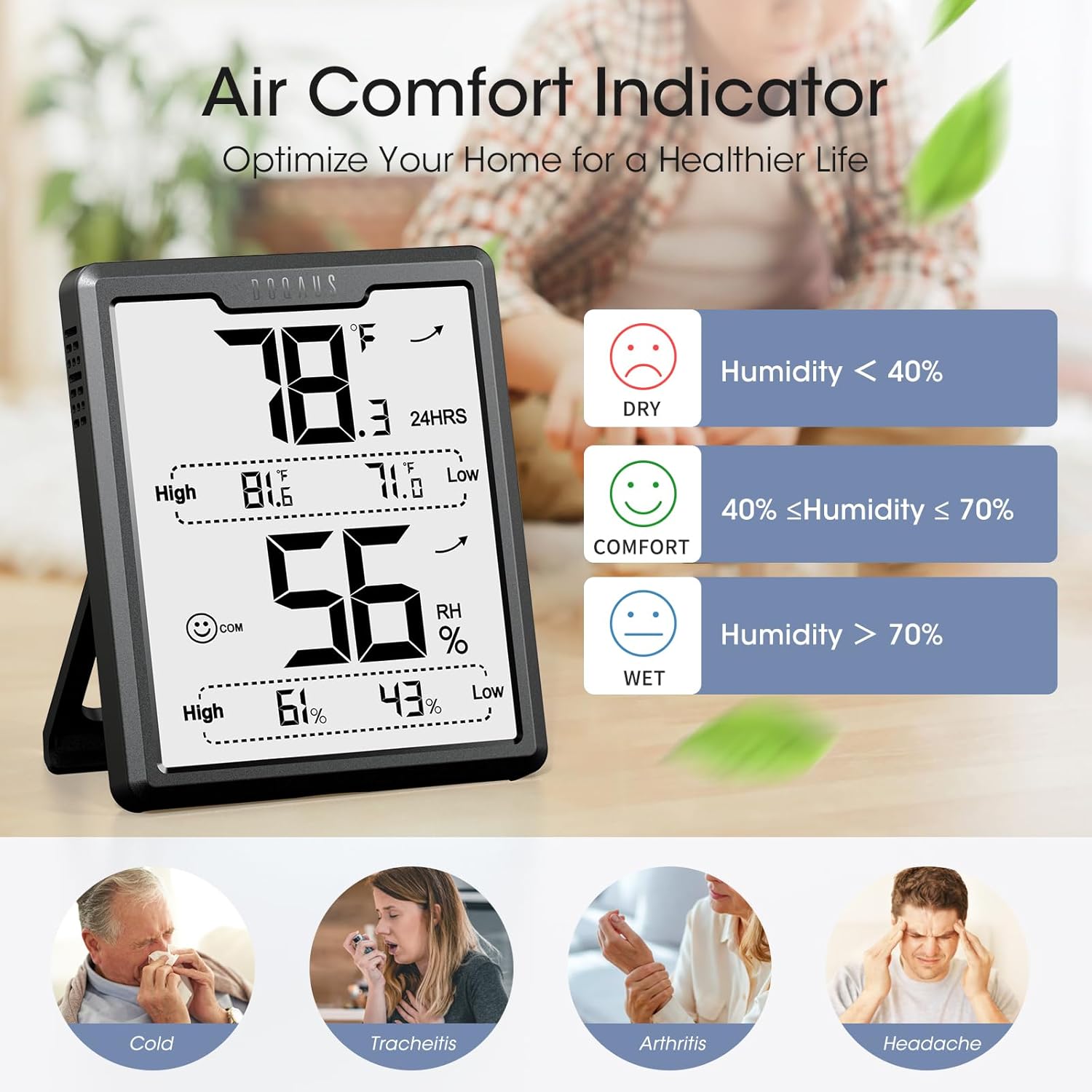
Figure 4: Detailed view of the LCD display showing current and record values.
2. Switching Temperature Units (°F/°C)
To switch between Fahrenheit (°F) and Celsius (°C):
- Locate the °F/°C button on the back of the device.
- Press the button once to toggle between the two temperature units.
3. Air Comfort Indicator
The device features three distinct face icons to indicate the air comfort level:
| Icon | Condition | Humidity Range |
|---|---|---|
| 😟 (Sad Face) | DRY | Humidity < 40% RH |
| 🙂 (Smiling Face) | COMFORT | 40% ≤ Humidity ≤ 70% RH |
| 😔 (Neutral Face) | WET | Humidity > 70% RH |
This indicator helps you determine if adjustments to your humidifier or dehumidifier are needed to maintain a comfortable environment.
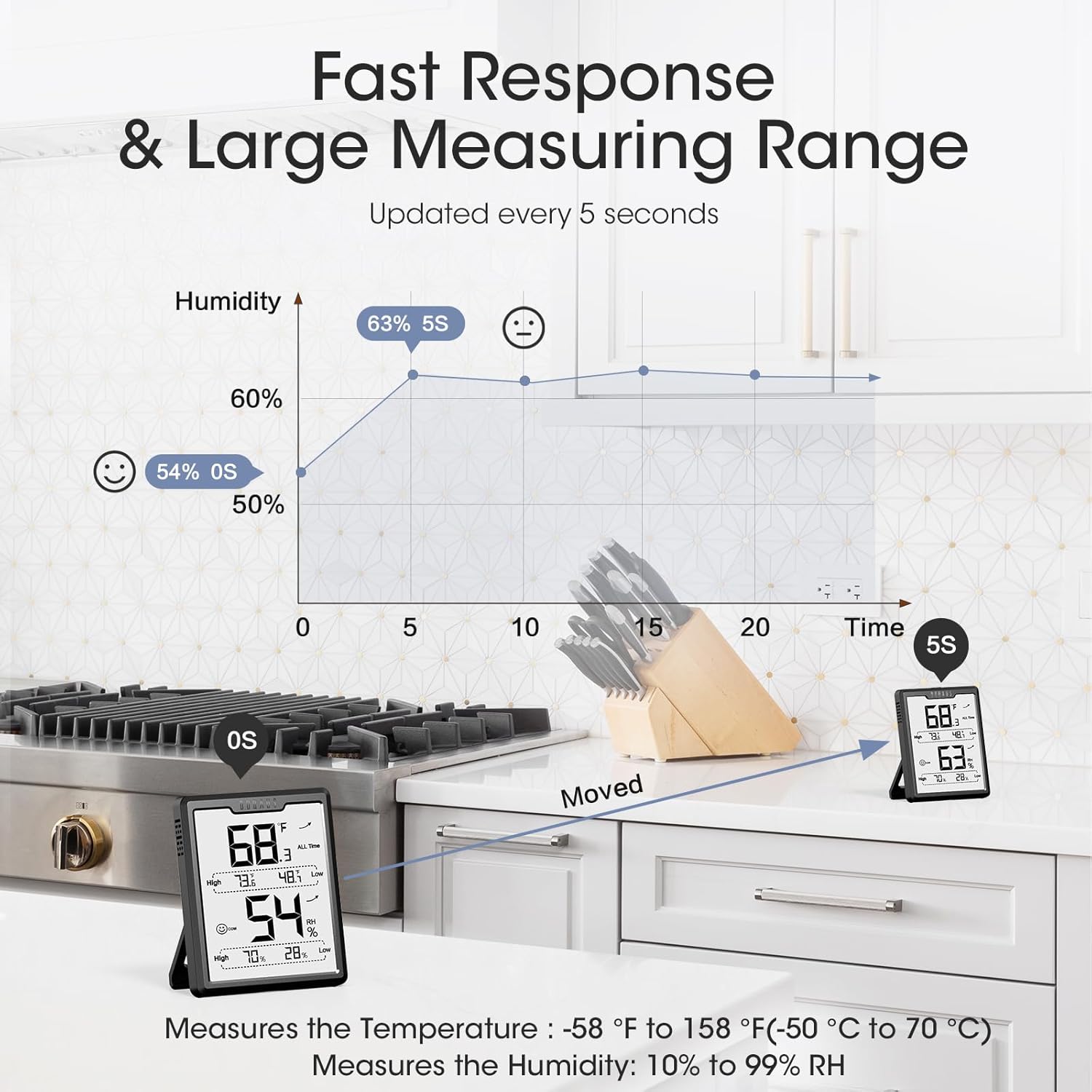
Figure 5: Visual guide to the air comfort indicator icons and their corresponding humidity levels.
4. Max/Min Records
The device automatically records the highest and lowest temperature and humidity values over a 24-hour period or all-time. These records are displayed on the screen below the current readings.
- The display shows the current temperature and humidity.
- The "High" and "Low" values for both temperature and humidity are visible, representing the maximum and minimum recorded values.
- The "24HRS" indicator signifies that the records are for the past 24 hours. Some models may also offer an "ALL Time" record option, typically toggled by a dedicated button on the back.

Figure 6: Understanding the high and low record display.
Maintenance
Cleaning
To ensure accurate readings and prolong the life of your hygrometer, keep it clean:
- Wipe the device with a soft, dry cloth.
- Do not use abrasive cleaners, solvents, or immerse the device in water.
- Keep the ventilation openings on the device clear of dust and debris.
Battery Replacement
When the display dims or the device stops functioning, it's time to replace the batteries. The device is powered by 2 AAA batteries.
- Open the battery compartment on the back of the device.
- Remove the old batteries.
- Insert two new AAA batteries, observing the correct polarity.
- Close the battery compartment.
Figure 7: Battery replacement procedure.
Troubleshooting
Common Issues and Solutions
| Problem | Possible Cause | Solution |
|---|---|---|
| Display is blank or dim. | Low or dead batteries. | Replace with new AAA batteries. Ensure correct polarity. |
| Inaccurate readings. | Device placed near heat/cold sources or in direct sunlight/drafts. Sensor obstructed. | Relocate the device to a stable environment away from extreme temperature fluctuations. Ensure sensor openings are clear. Allow 30 minutes for readings to stabilize after relocation. |
| Readings not changing. | Environment is stable, or device is stuck. | If the environment is stable, readings may not change significantly. If suspected stuck, remove and reinsert batteries to reset. |
| °F/°C button not working. | Button malfunction or temporary glitch. | Press firmly. If issue persists, try removing and reinserting batteries to reset the device. |
Product Specifications
| Feature | Detail |
|---|---|
| Brand | DOQAUS |
| Model Number | US-HM1-PRO-A |
| Color | Black |
| Product Dimensions | 2.7"W x 3.2"H |
| Battery Type | 2 AAA batteries (included) |
| Battery Life | 18-24 months (approx.) |
| Mounting Options | Hanging Hole, Tabletop Stand, Magnet Attaching |
| Operating Humidity Range | 1% - 99% RH |
| Temperature Accuracy | ±2°F |
| Humidity Accuracy | ±2%~3% RH |
| Refresh Rate | Every 5 seconds |
| Included Components | Temperature and Humidity Gauge x1, AAA Battery x2, User Manual x1 |
Warranty and Support
Warranty Information
DOQAUS products are designed for reliability and performance. For specific warranty details regarding your Digital Hygrometer Room Thermometer, please refer to the warranty card included in your product packaging or visit the official DOQAUS website.
Customer Support
If you encounter any issues or have questions about your DOQAUS Digital Hygrometer, please contact our customer support team. You can typically find contact information (email, phone, or support portal) on the DOQAUS official website or within the product packaging.
When contacting support, please have your product model number (US-HM1-PRO-A) and purchase details ready to assist us in providing efficient service.
For more information, visit the DOQAUS Store on Amazon.


