
LDARC X43
LDARC X43 1:43 Scale Mini RC Crawler Instruction Manual
Model: X43 | Brand: LDARC
Introduction
This manual provides essential information for the safe and efficient operation, setup, and maintenance of your LDARC X43 1:43 Scale Mini RC Crawler. Please read this manual thoroughly before operating the vehicle to ensure proper use and to maximize your enjoyment of the product.

Image: The LDARC X43 Mini RC Crawler in tan, its remote control, the product box, and an additional white DIY body shell.
Package Contents
Verify that all items listed below are included in your package:
- 1x LDARC X43 RC Car (color as purchased)
- 1x CT01 Transmitter (Remote Control)
- 1x White DIY Body Shell
- 1x USB Charging Cable
- 1x Screwdriver
- 1x Nut Sleeve
- 4x M1.6 Nuts
- 1x Instruction Manual
- 1x Car Sticker Sheet
- 1x Brand Sticker Sheet

Image: A visual representation of the package contents, including the car, remote, extra shell, and tools.
Product Overview
Vehicle Features
- Scale: 1:43 mini desktop crawler design.
- Drive System: Full-time 4-wheel drive with simulation structure.
- Suspension: Straight axle design with large twisting stroke for enhanced climbing.
- Motor: 716 Motor.
- Servo: S17E Servo for accurate steering.
- Gearbox: High reduction ratio gearbox with high transmission efficiency metal gears.
- Bearings: 10 bearings for smooth rotation.
- Wheels: Low center of gravity metal wheels.
- Lighting: Simulated lighting system including high/low beams, turn signals, brake/reverse lights, and dual flashing lights.
- Body Shell: Replaceable body shell, includes a white shell for DIY customization.
- Battery: Built-in 3.7V 230mAh Lipo battery, providing up to 80 minutes of operation.
- Safety: Low voltage status alarm with flashing headlights.

Image: Top image shows the underside chassis with full-time 4-wheel drive. Bottom image shows the vehicle demonstrating large twisting stroke suspension on an obstacle.
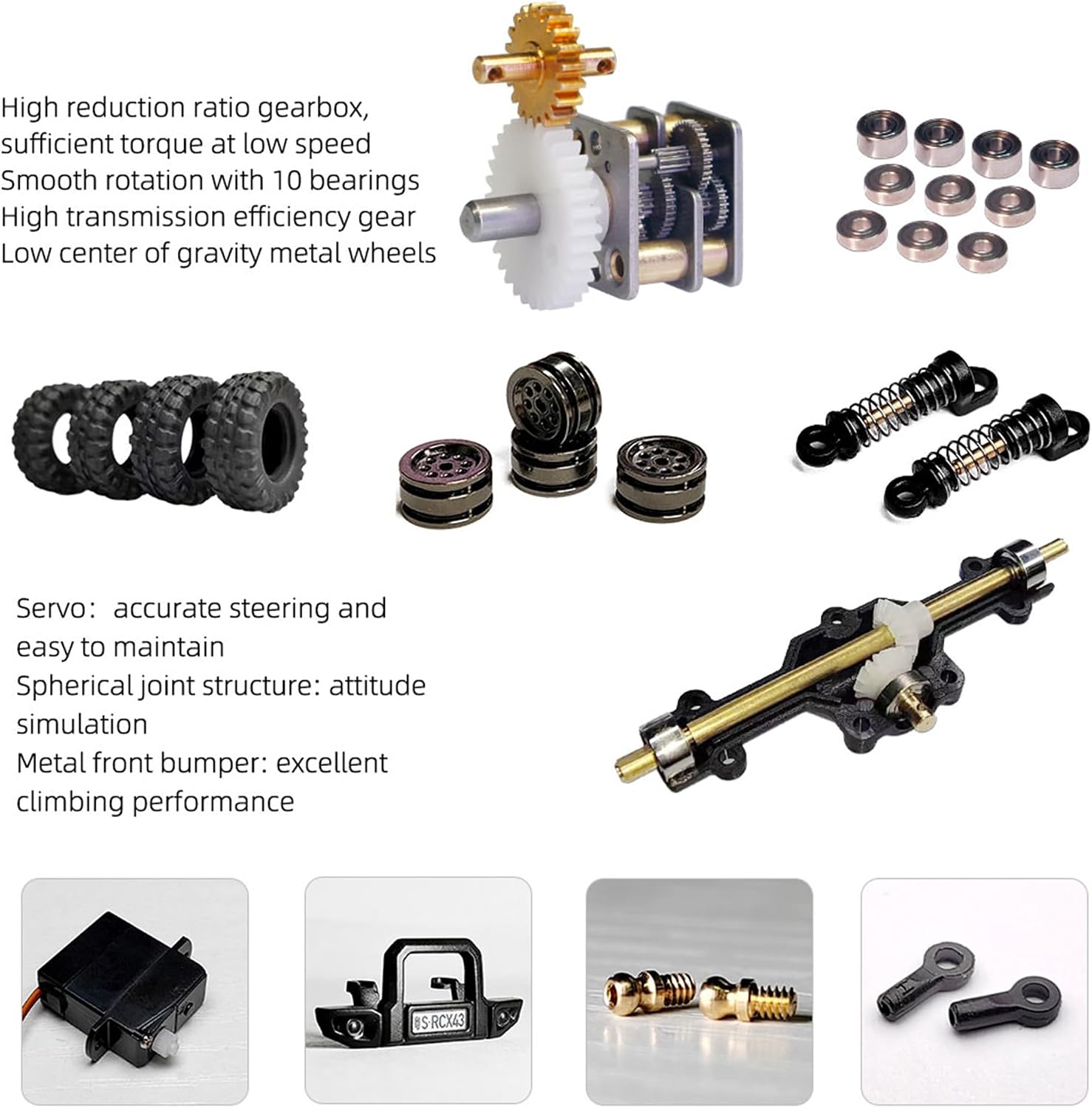
Image: Various internal and external components of the crawler, such as the gearbox, metal wheels, tires, shock absorbers, servo, and metal front bumper.
CT01 Remote Control Transmitter Features
- Channels: 8-channel control.
- Display: 128*64 LCD screen with menu in English and Chinese.
- Feedback: Bidirectional data, real-time signal strength, and power voltage feedback.
- Battery: Detachable 18650 battery.
- Charging: USB charging support.
- Alarms: Low voltage alarm, sound vibration alarm.
- Memory: 5 sets of model data storable.
- Functions: Fail-safe, lock mode, joystick calibration, restore factory settings, single and bidirectional mode switching.
- Ergonomics: Lightweight and comfortable design for long-term operation.

Image: The CT01 remote control, highlighting its 8-channel capability, LCD screen, and various functions.

Image: A close-up of the remote control's LCD screen, displaying battery level and signal strength indicators.
Setup
1. Charging the Vehicle Battery
- Locate the USB charging cable.
- Connect the charging cable to the vehicle's charging port.
- Plug the USB end into a compatible USB power source (e.g., computer, USB wall adapter).
- The charging indicator will show the charging status. Ensure the battery is fully charged before first use (approximately 80 minutes of run time per charge).
2. Installing Transmitter Batteries
- Open the battery compartment on the back of the CT01 transmitter.
- Insert the required 18650 battery, observing correct polarity (+/-).
- Close the battery compartment securely.
3. Powering On and Pairing
- Turn on the vehicle by sliding the power switch.
- Turn on the CT01 transmitter.
- The vehicle and transmitter should automatically pair. If pairing fails, refer to the troubleshooting section or the specific pairing instructions in the included manual.
Operating Instructions
Basic Controls
- Steering Wheel: Rotate left or right to steer the vehicle.
- Throttle Trigger: Pull to move forward, push to brake/reverse.
- Trim Adjustments: Use the trim buttons on the transmitter to fine-tune steering and throttle for straight tracking.
- Light Control: Utilize the designated buttons on the transmitter to control the vehicle's simulated lighting (headlights, turn signals, etc.).
Driving Tips
- Start in an open area to familiarize yourself with the controls.
- Practice smooth throttle and steering inputs for better control, especially on challenging terrain.
- The X43 is designed for crawling; approach obstacles slowly and deliberately.
- Monitor the transmitter's LCD for real-time signal strength and battery voltage to avoid unexpected power loss.

Image: A collage showing the LDARC X43 RC Crawler in different operational scenarios, including climbing obstacles and on a desktop.

Image: Six examples of how the RC crawler can be used, such as for desktop decompression, club entertainment, RC competitions, parent-child interaction, display collection, and educational settings.
Maintenance
Cleaning
- After each use, especially in dusty or dirty conditions, gently clean the vehicle.
- Use a soft brush or compressed air to remove dirt and debris from the chassis, wheels, and suspension components.
- Wipe the body shell with a soft, damp cloth. Avoid harsh chemicals.
Storage
- Store the vehicle and transmitter in a cool, dry place away from direct sunlight and extreme temperatures.
- For long-term storage, ensure the vehicle's battery is charged to approximately 50% to prolong its lifespan. Remove the 18650 battery from the transmitter.
DIY Body Shell
The included white body shell allows for customization. You can paint it using model-specific paints. Ensure the paint is compatible with plastic and allow adequate drying time before reattaching to the chassis.

Image: The white DIY body shell, indicating its purpose for user customization.
Troubleshooting
| Problem | Possible Cause | Solution |
|---|---|---|
| Vehicle does not respond to transmitter. |
|
|
| Vehicle moves erratically or not straight. |
|
|
| Lights are flashing rapidly. | Vehicle battery is low. | Charge the vehicle battery immediately. |
| Short operating time. |
|
|
Specifications
| Feature | Detail |
|---|---|
| Brand | LDARC |
| Model Name | X43 Crawler Car |
| Scale | 1:43 |
| Weight | 93g (Vehicle) / 1.72 pounds (Item Weight, likely packaged) |
| Vehicle Size (L*W*H) | 100mm * 52.8mm * 53mm (approx. 3.94 x 2.08 x 2.09 inches) |
| Wheelbase | 56mm |
| Min Ground Clearance | 5.75mm |
| Vehicle Battery | 3.7V 230mAh Lipo (included) |
| Operating Time | Up to 80 minutes |
| Servo | S17E Servo |
| Motor | 716 Motor |
| Tire Diameter | 21.5mm |
| Transmitter | CT01 8CH (RTR version only) |
| Recommended Age | 15 years and up |
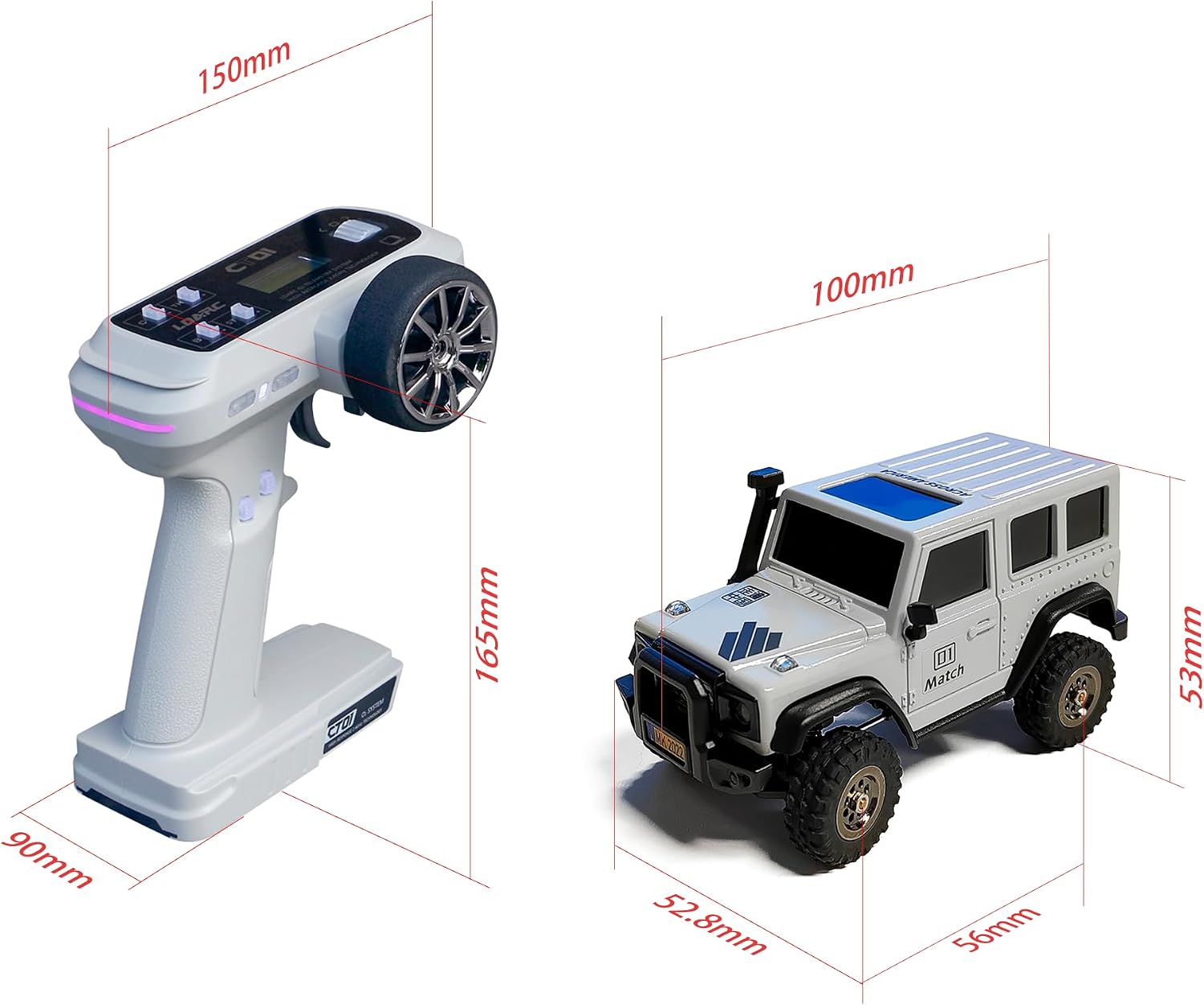
Image: A diagram illustrating the physical dimensions of both the LDARC X43 RC Crawler and its CT01 remote control.
Warranty and Support
For warranty information, technical support, or service inquiries, please refer to the contact details provided in the original product packaging or visit the official LDARC website. Keep your purchase receipt as proof of purchase.
Related documentsX43

Ask a question about this manual
Ask about setup, troubleshooting, compatibility, parts, safety, or missing instructions. Manuals+ will review the question and use this page’s manual context to help answer it.