
1. Product Overview
The CHEBIO V18 Cordless Vacuum Cleaner is a powerful and versatile cleaning solution designed for various surfaces. Featuring a 550W brushless motor, it delivers up to 45Kpa of strong suction, effectively capturing dust, pet hair, and debris from carpets, hardwood floors, and tiles. Its intelligent design includes an auto-adjustment mode, a V-shaped anti-tangle roller brush, and a smart LED touch screen for an optimized cleaning experience.

Figure 1: CHEBIO V18 Cordless Vacuum Cleaner and its components.
2. What's Included
Your CHEBIO V18 Cordless Vacuum Cleaner package includes the following items:
- V18 Cordless Vacuum Cleaner Main Unit
- Floor Brush with LED Headlight
- Telescopic Pole
- Long Crevice Nozzle
- 2-in-1 Upholstery Brush
- Battery Pack (Pre-installed or separate)
- Wall Mount Plate
- 2-in-1 Roller Brush (Pre-installed in floor brush)
- Stainless Steel Filter (Pre-installed)
- Filter Replacement (HEPA*2)
- Hair Cleaning Tool
- Charger
- Manual Instructions

Figure 2: All components included in the package.
3. Setup
Follow these steps for initial assembly and setup:
- Attach the Telescopic Pole: Insert the telescopic pole into the main unit until it clicks securely into place.
- Connect the Floor Brush: Attach the floor brush to the other end of the telescopic pole, ensuring it clicks firmly.
- Install the Battery: If the battery is not pre-installed, slide the battery pack into the designated slot on the main unit until it locks.
- Initial Charge: Fully charge the vacuum cleaner before first use. Connect the charger to the battery pack or the wall mount station and plug it into a power outlet. The LED display will indicate charging status.
- Wall Mount Installation (Optional): Choose a suitable location near a power outlet. Use the provided hardware to securely mount the wall plate to the wall. You can then hang the vacuum cleaner on the mount for convenient storage and charging.

Figure 3: Assembling the main unit and telescopic pole.

Figure 4: Wall-mounted charging setup.
4. Operating Instructions
4.1 Power On/Off and Suction Modes
Press the power button on the main unit to turn the vacuum cleaner on or off. Use the smart touch screen to select from three adjustable suction levels: Eco, Med, and Max. The screen displays real-time suction mode, remaining battery power, and filter clogging alerts.
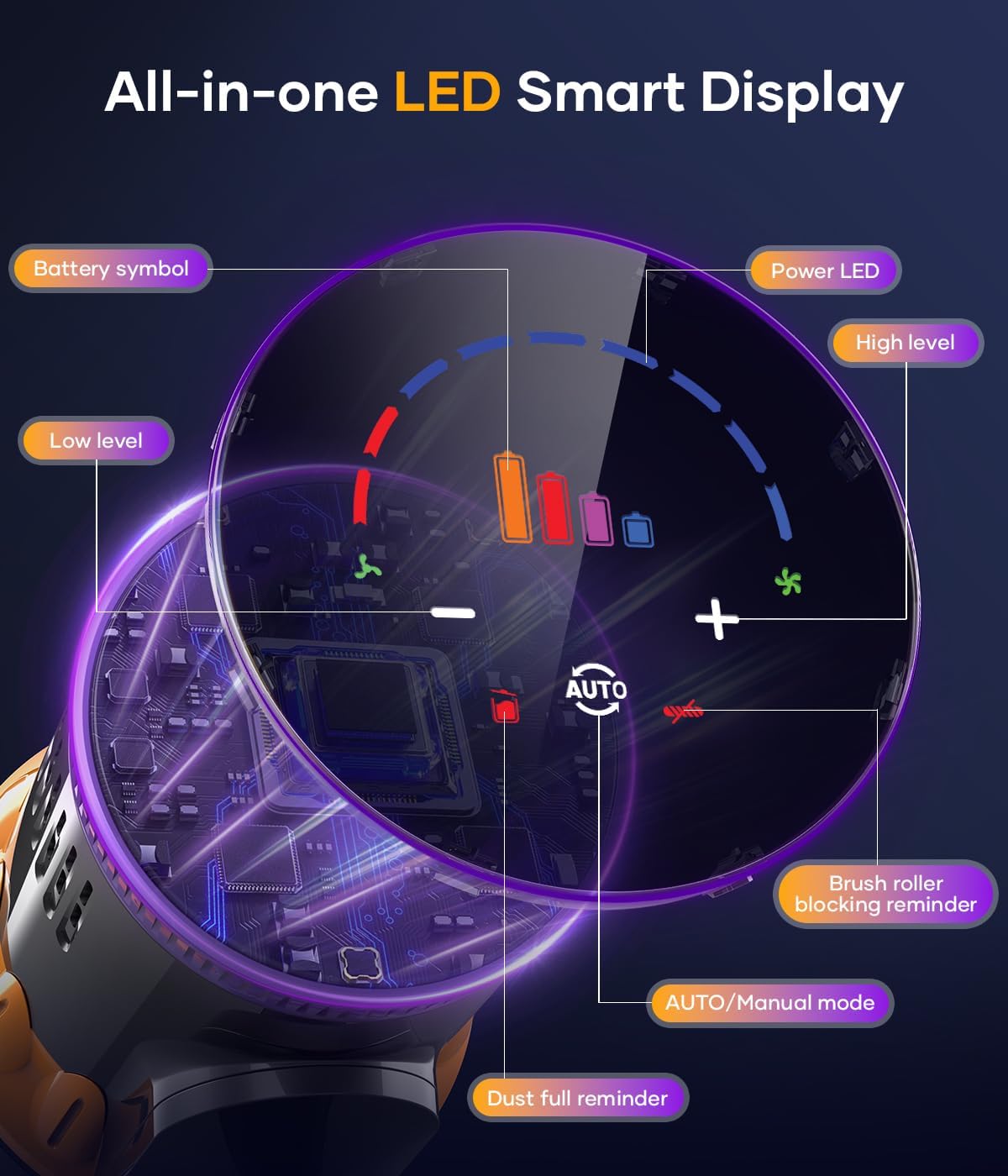
Figure 5: Smart LED Touch Screen Interface.
4.2 Auto Adjustment Mode
In Auto Mode, the vacuum cleaner's intelligent dust detection sensor system automatically adjusts the suction power based on the amount of debris and dust detected. This optimizes cleaning performance and maximizes battery runtime.
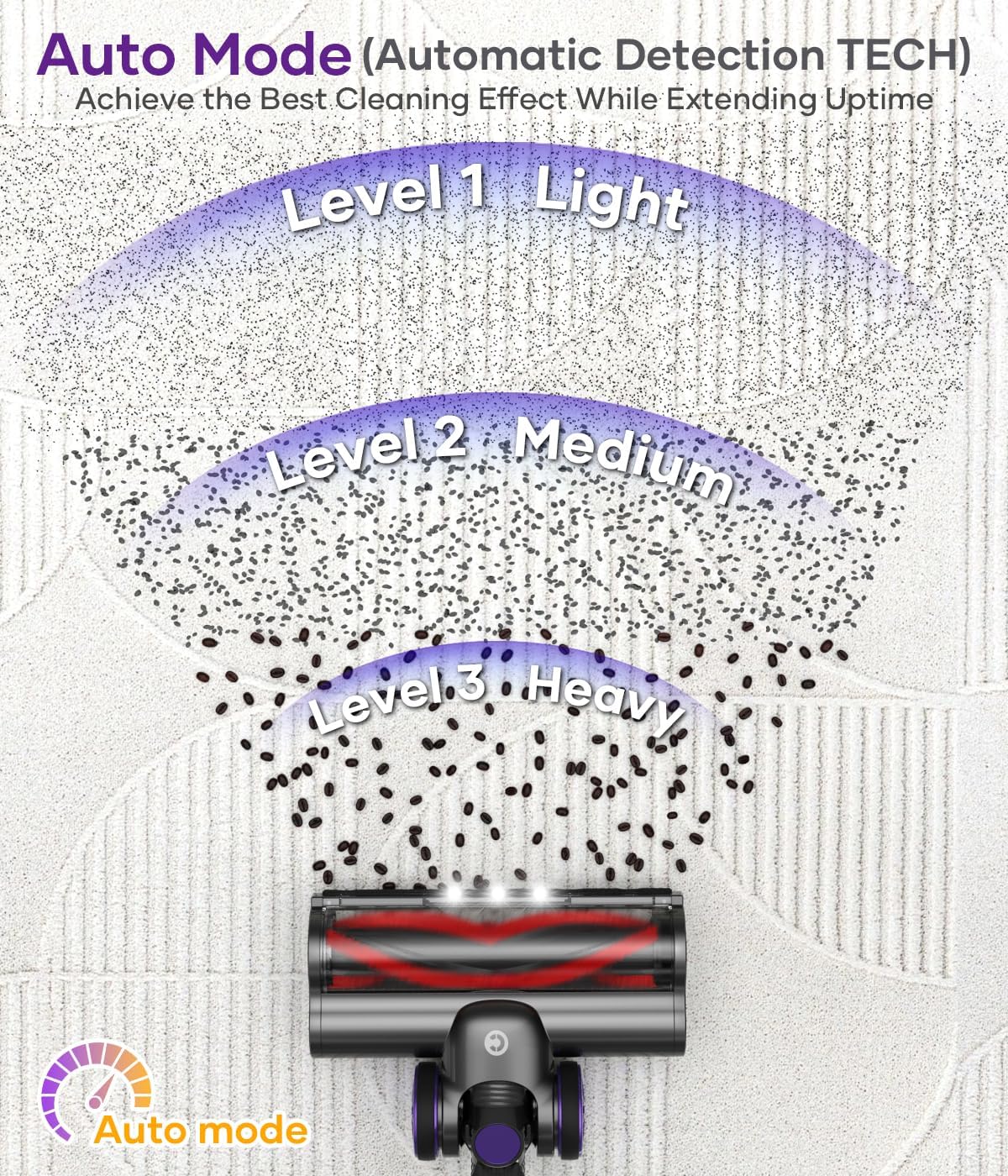
Figure 6: Suction Power Auto Adjustment Mode.
4.3 Cleaning Performance
The 2-in-1 brush roll features both hard and soft bristles, suitable for deep cleaning on various floor types including hardwood, marble, tile, and low-pile carpets. The upgraded V-shaped roller brush design effectively reduces hair tangling. The integrated LED headlight illuminates dark areas, ensuring no dirt is missed.

Figure 7: Deep Cleaning with V-Shape Anti-tangle Brush.
4.4 Runtime
Equipped with ABMS intelligent power-saving technology and an 8*2500mAh battery pack, the vacuum can run for up to 65 minutes on minimum suction power, providing ample time for whole-house cleaning. The battery has no memory effect.
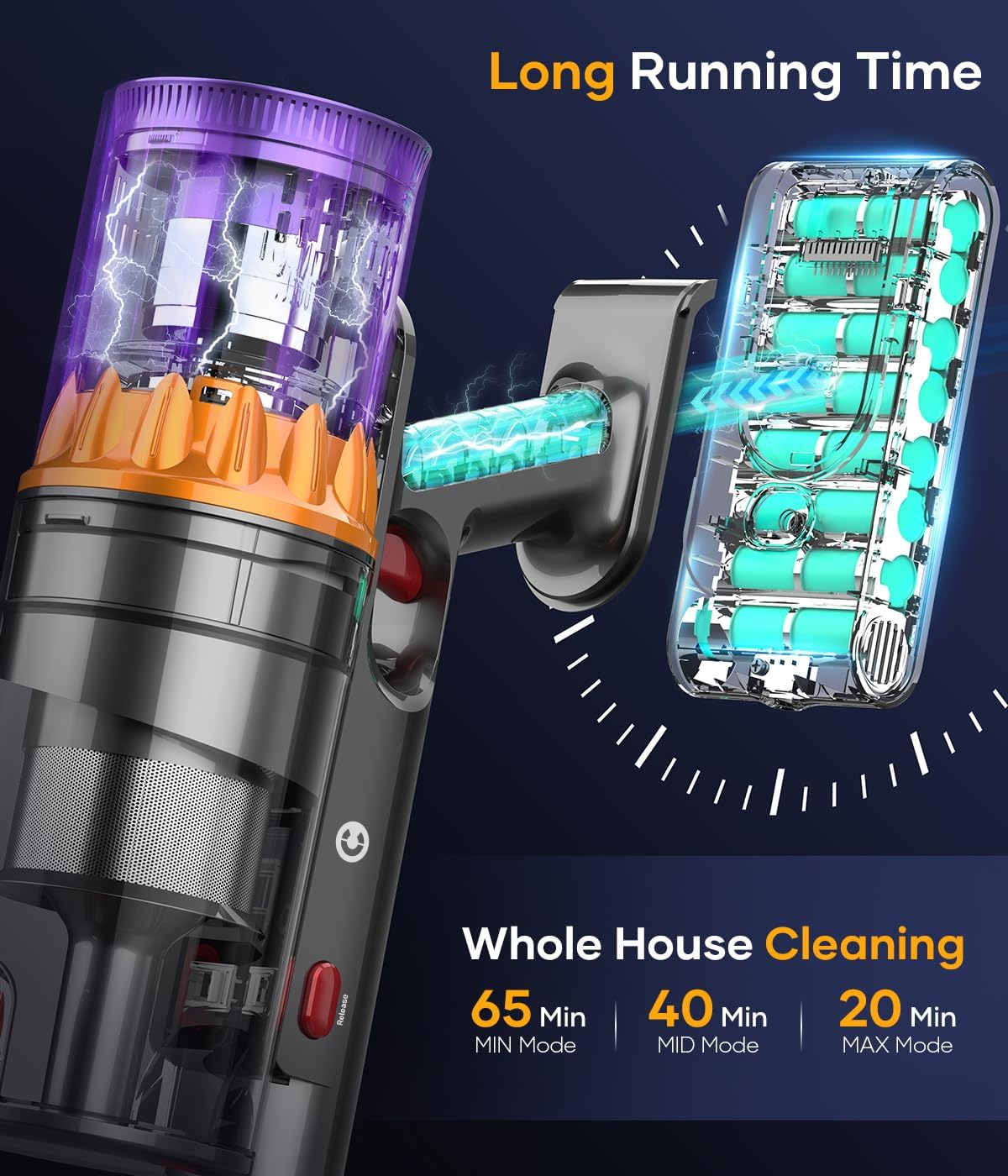
Figure 8: Extended Running Time for Comprehensive Cleaning.
4.5 Handheld Use
The main unit can be detached and combined with various accessories (Long Crevice Nozzle, 2-in-1 Upholstery Brush) to transform into a multifunctional handheld vacuum. This is ideal for cleaning furniture, car interiors, tight spaces, and elevated surfaces.

Figure 9: Multifunctional Handheld Vacuum Configurations.
5. Maintenance
Regular maintenance ensures optimal performance and extends the lifespan of your vacuum cleaner.
5.1 Emptying the Dust Cup
The 1.5L dust cup can be emptied with a single button press, allowing for convenient and fast disposal of collected debris without frequent interruptions.

Figure 10: One-touch Dust Cup Emptying.
5.2 Filter Cleaning and Replacement
The 5-stage high-efficiency filtration system, including a HEPA filter, captures 99.9% of fine dust. Regularly clean the stainless steel filter and other washable components. Ensure all parts are completely dry before reassembling. Replace HEPA filters as needed (two spare HEPA filters are included).
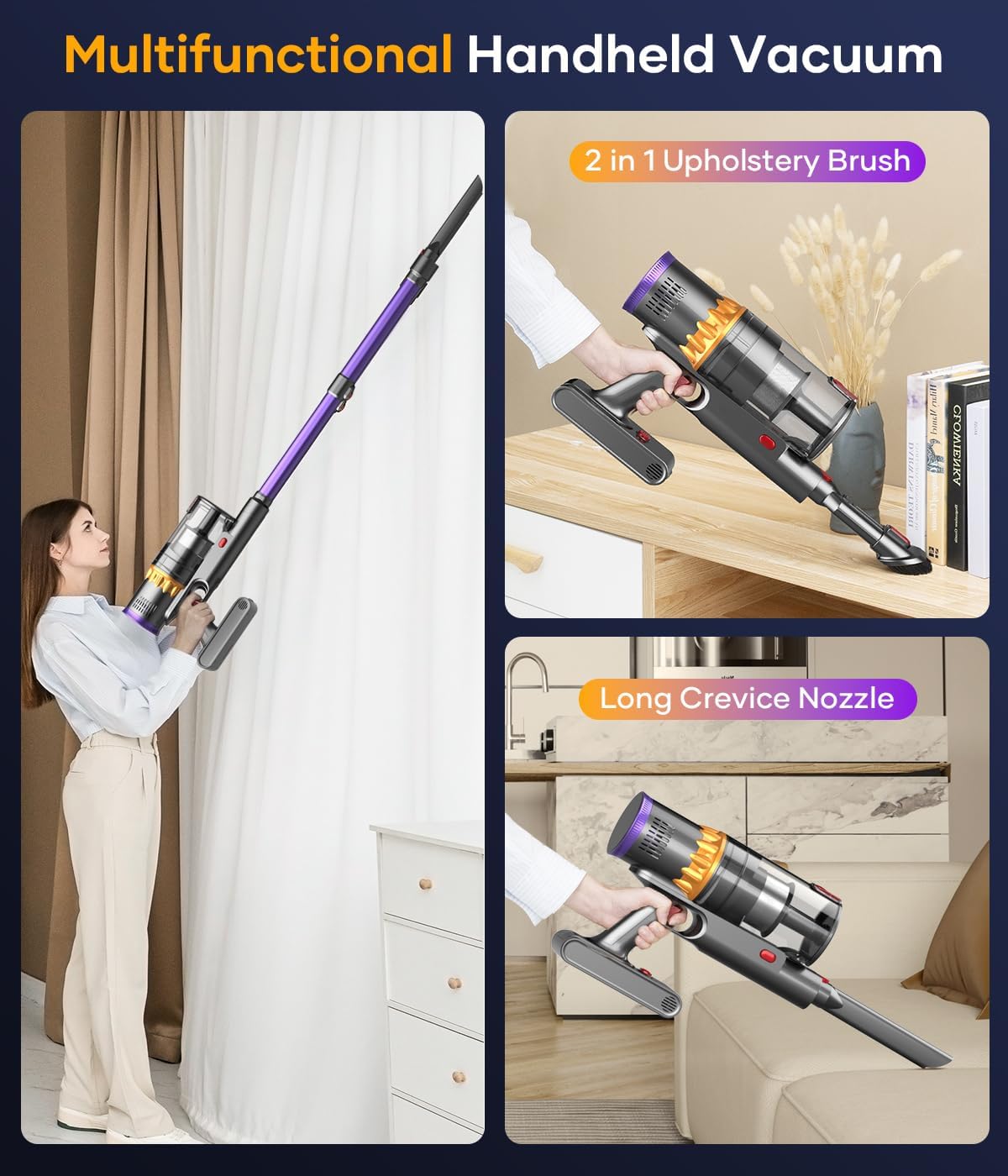
Figure 11: 5-Stage Efficiency Filtration System.
5.3 Roller Brush Maintenance
Use the provided hair cleaning tool to remove any tangled hair or fibers from the V-shaped roller brush. This maintains optimal performance and prevents blockages.
6. Troubleshooting
If you encounter any issues with your CHEBIO V18 Cordless Vacuum Cleaner, please refer to the following common troubleshooting tips:
| Problem | Possible Cause | Solution |
|---|---|---|
| Reduced Suction Power | Clogged filter, full dust cup, blocked hose/brush. | Empty dust cup. Clean or replace filters. Check and clear any blockages in the brush head or telescopic pole. |
| Short Runtime | Battery not fully charged, high suction mode used continuously. | Ensure battery is fully charged. Use Eco or Med mode for longer cleaning sessions. |
| Vacuum Not Turning On | Battery depleted, battery not properly installed. | Charge the battery. Reinstall the battery pack securely. |
| Roller Brush Not Spinning | Hair or debris tangled in the brush, brush head not properly attached. | Remove tangled hair using the cleaning tool. Ensure the brush head is securely attached to the pole. |
7. Specifications
| Feature | Detail |
|---|---|
| Brand | CHEBIO |
| Model Name | VAC-V18 |
| Motor Power | 550W Brushless Motor |
| Suction Power | Up to 45Kpa |
| Runtime | Up to 65 minutes (Eco Mode) |
| Dust Cup Capacity | 1.5 Liters |
| Filter Type | HEPA Filter (5-Stage Filtration) |
| Control Method | Touch Screen / Push Button |
| Special Features | Auto Suction Adjustment, V-Shape Anti-tangle Brush, LED Headlight, Wall-mounted Charging |
| Item Weight | 5.5 pounds |
| Product Dimensions | 11"L x 7"W x 16.8"H |
8. Warranty & Support
CHEBIO is committed to providing excellent customer service and product support.
- Warranty: The CHEBIO V18 Cordless Vacuum Cleaner comes with an up to 18-month warranty. Please refer to the included warranty card for specific terms and conditions.
- Returns: Enjoy a 30-day free return policy.
- Customer Service: For any inquiries or support needs, please contact our 7*24-hour service team. Contact details can be found in the Manual Instructions or on the official CHEBIO website.

Figure 12: Customer Service and Warranty Information.


