
1. Introduction
Welcome to the FUNYET NY-02 16-inch Laptop user manual. This guide provides essential information for setting up, operating, maintaining, and troubleshooting your new laptop. Please read this manual thoroughly to ensure proper usage and to maximize your device's performance and longevity.
2. Package Contents
Before you begin, please verify that all items are present in your package:
- FUNYET NY-02 Laptop
- AC Adapter
- Warranty Card
- Instruction Manual (this document)
3. Product Overview
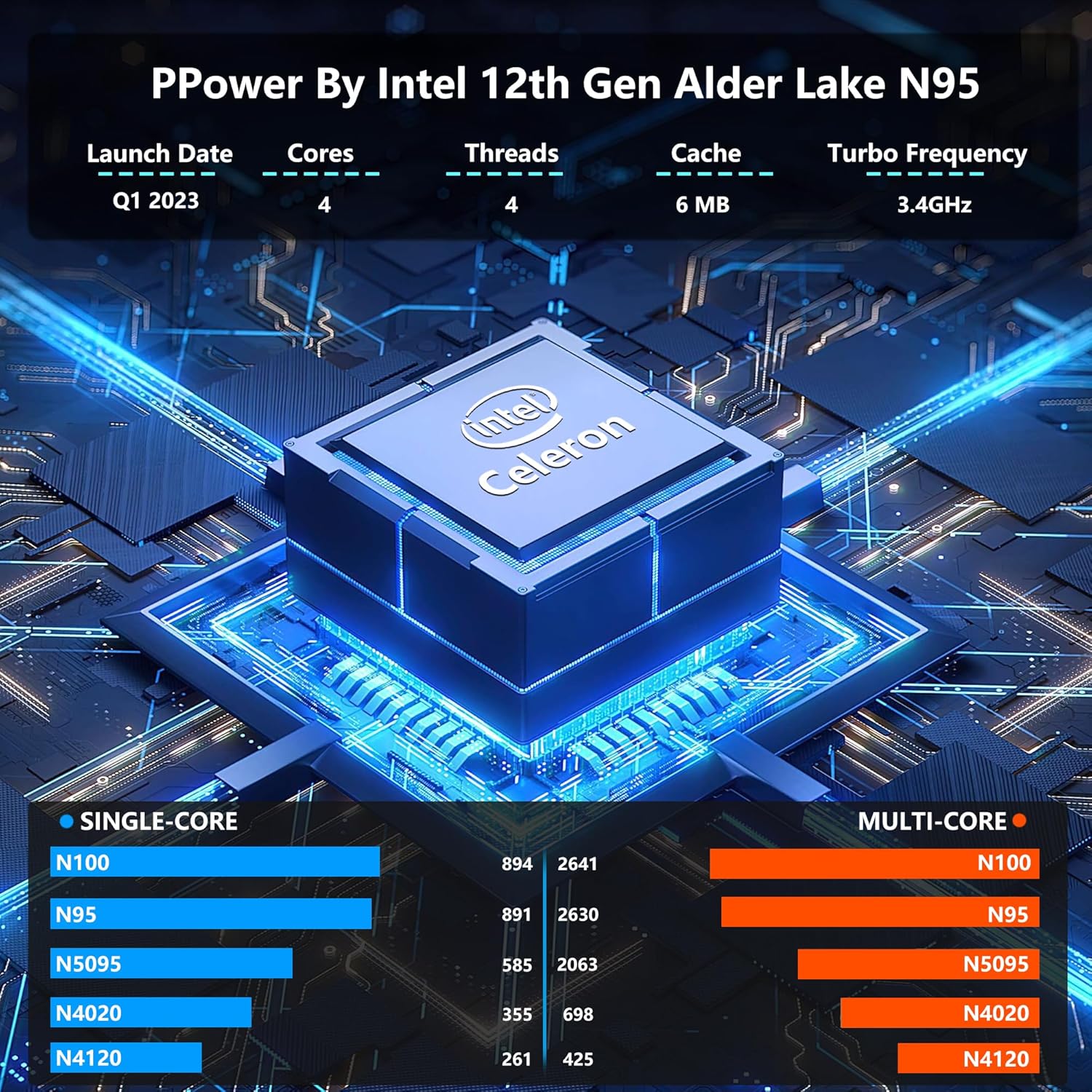
The FUNYET NY-02 is a high-performance 16-inch laptop designed for various computing needs, from daily tasks to more demanding applications. It features a powerful Intel 12th Gen Celeron N100 processor, ample memory, and a vibrant display.
3.1 Key Features
- Processor: 12th Generation Intel Celeron N100 with 4 cores and 4 threads, up to 3.4 GHz.
- Display: 16-inch Full HD IPS display with 1920x1200 resolution, narrow bezels, and eye protection.
- Memory & Storage: 16GB LPDDR4 RAM and 512GB high-speed SSD, with support for M.2 or SATA SSD expansion up to 2TB.
- Operating System: Pre-installed Windows 11 Pro for enhanced speed and security.
- Keyboard: Ergonomic backlit keyboard with numeric keypad.
- Security: Integrated fingerprint reader for quick and secure unlocking.
- Portability: Ultra-portable design, weighing 3.5 pounds with a 0.8-inch thickness.
- Battery: Upgraded 6000mAh battery providing up to 6 hours of usage.
- Connectivity: Multiple USB ports (1x USB 2.0, 2x USB 3.0), Mini HDMI, and a headphone jack.
3.2 Visual Guide




3.3 Product Videos
4. Setup Instructions
4.1 Initial Power-On
- Unpack the laptop and AC adapter from the box.
- Connect the AC adapter to the laptop's DC input port and then to a power outlet.
- Open the laptop lid. The laptop may power on automatically, or you may need to press the power button.
- Follow the on-screen instructions to complete the initial Windows 11 Pro setup, including language, region, and user account creation.
4.2 Connecting to Wi-Fi
- During the Windows setup or after booting to the desktop, click the Wi-Fi icon in the taskbar.
- Select your desired Wi-Fi network from the list.
- Enter the network password if prompted and click 'Connect'.
4.3 Fingerprint Unlock Setup
- Navigate to Settings > Accounts > Sign-in options.
- Under 'Windows Hello Fingerprint', click 'Set up'.
- Follow the on-screen prompts to register your fingerprint. You may need to scan your finger multiple times for accurate recognition.
5. Operating Instructions
5.1 Using the Keyboard and Touchpad
- The laptop features a full-size backlit keyboard with a numeric keypad. To toggle the keyboard backlight, use the designated function key (often Fn + F5 or similar, refer to keyboard icons).
- The large touchpad supports multi-touch gestures for navigation. Refer to Windows settings for customizing touchpad gestures.
- The integrated fingerprint reader is located on the touchpad for quick and secure login.
5.2 Windows 11 Pro Features
- Start Menu: Access applications, settings, and power options from the centered Start menu.
- Snap Layouts: Easily organize your open windows by hovering over the maximize button and selecting a snap layout.
- Widgets: Access personalized information like news, weather, and calendar events from the Widgets panel.
- Microsoft Store: Download and install applications from the Microsoft Store.
6. Maintenance
6.1 Cleaning Your Laptop
- Use a soft, lint-free cloth dampened with a small amount of water or a specialized screen cleaner to clean the display.
- For the keyboard and chassis, use a soft cloth. Avoid harsh chemicals or abrasive materials.
- Regularly clean the ventilation grilles to prevent dust buildup, which can affect performance.
6.2 Battery Care
- To prolong battery life, avoid fully discharging the battery frequently.
- Store the laptop in a cool, dry place when not in use for extended periods.
- If the laptop will not be used for a long time, charge the battery to about 50-60% before storage.
6.3 Software Updates
- Ensure your Windows 11 Pro operating system is always up to date. Go to Settings > Windows Update to check for and install updates.
- Keep your drivers updated for optimal hardware performance.
7. Troubleshooting
7.1 Common Issues and Solutions
| Issue | Possible Cause | Solution |
|---|---|---|
| Laptop does not power on | Low battery, power adapter issue | Connect the AC adapter and ensure it's properly plugged into a working outlet. Allow it to charge for a few minutes before attempting to power on again. |
| No display on screen | Screen brightness too low, external display connected | Increase screen brightness using function keys. Disconnect any external monitors. If the issue persists, restart the laptop. |
| Wi-Fi connectivity problems | Incorrect password, router issue, Wi-Fi adapter disabled | Verify Wi-Fi password. Restart your router. Check Windows settings to ensure Wi-Fi is enabled. |
| Slow performance | Too many applications running, low disk space, outdated drivers | Close unnecessary applications. Free up disk space. Update Windows and device drivers. |
8. Specifications
| Feature | Detail |
|---|---|
| Model Name | NY-02 |
| Screen Size | 16 Inches |
| Screen Resolution | 1920 x 1200 Pixels |
| Processor | Intel Celeron N100 (up to 3.4 GHz) |
| RAM | 16 GB LPDDR4 |
| Hard Drive | 512 GB SSD (PCIE x 4 interface) |
| Graphics Coprocessor | Intel UHD Graphics (Integrated) |
| Operating System | Windows 11 Pro |
| Wireless Type | 802.11a/b/g/n/ac |
| USB 2.0 Ports | 1 |
| USB 3.0 Ports | 2 |
| Average Battery Life | 6 Hours |
| Item Weight | 3.5 pounds |
| Product Dimensions | 14.06 x 9.06 x 0.82 inches |
| Special Features | Backlit Keyboard, Fingerprint Reader, HD Audio, Lightweight, Numeric Keypad |
9. Warranty and Support
Your FUNYET NY-02 laptop comes with a 2-year warranty and a 180-day free return policy. For any questions or assistance, please contact FUNYET support. Our team is available for 24/7 instant online support and English phone support on weekdays.
Contact Information:
- Phone Support: +1 800-986-9631 (Weekdays)
- Online Support: Expect a reply within 24 hours.