
1. Introduction
Thank you for choosing the K&F Concept KF13.134 Hardshell Camera Backpack. This manual provides essential information for the proper setup, operation, and maintenance of your new camera bag. Designed for photographers and camera enthusiasts, this multi-functional backpack offers robust protection and versatile storage for your DSLR/SLR/Mirrorless cameras, lenses, drones, and accessories.
2. Product Features
- Hardshell Exterior: Constructed with an EVA hard shell for comprehensive protection against shocks and drops, safeguarding your valuable equipment.
- Spacious Capacity: Offers 22L capacity with external dimensions of 17.3 x 11 x 7 inches, suitable for various camera brands and accessories.
- Customizable Interior: Features removable modular inserts that act as adjustable dividers, allowing for personalized organization of cameras, flashes, and lenses.
- Laptop Compartment: Includes a dedicated back pocket designed to securely store laptops up to 15.6 inches.
- Multi-functional Pockets: Front flap with internal accessory pockets for cables, SD cards, and power banks. A hidden zipper pocket on the back provides secure storage for personal items like phones and wallets.
- External Attachments: Equipped with a tripod holder featuring a secure strap on one side, and a pocket on the other side for an umbrella or water bottle.
- Ergonomic Design: Breathable padded mesh back panel and adjustable shoulder straps (20-38.9 inches) ensure comfortable carrying, even during extended use, by distributing weight evenly.
- Travel-Friendly: A back trolley belt allows for convenient attachment to luggage during travel.

Image: The backpack's hardshell exterior provides waterproof and shockproof protection for your gear.
3. Setup: Customizing Internal Storage
The K&F Concept KF13.134 backpack features a highly customizable interior to fit your specific gear. The modular inserts are designed with Velcro to allow flexible arrangement.
3.1 Arranging Dividers
- Open the Main Compartment: Fully unzip the main compartment to lay the backpack flat, providing full access to the interior.
- Remove Existing Dividers: Gently detach any pre-installed dividers from the Velcro lining.
- Plan Your Layout: Arrange your camera body, lenses, and other accessories on a flat surface to visualize the optimal layout within the backpack. Consider the size and shape of each item.
- Attach Dividers: Place the modular inserts (long partitions, straight partitions, elastic straps) into the backpack, pressing firmly to secure them to the Velcro-compatible interior. Ensure snug fits to prevent movement of equipment.
- Secure Equipment: Use the provided elastic straps to further secure items like lenses or drones within their compartments.

Image: Examples of customized storage layouts for different camera and drone setups.
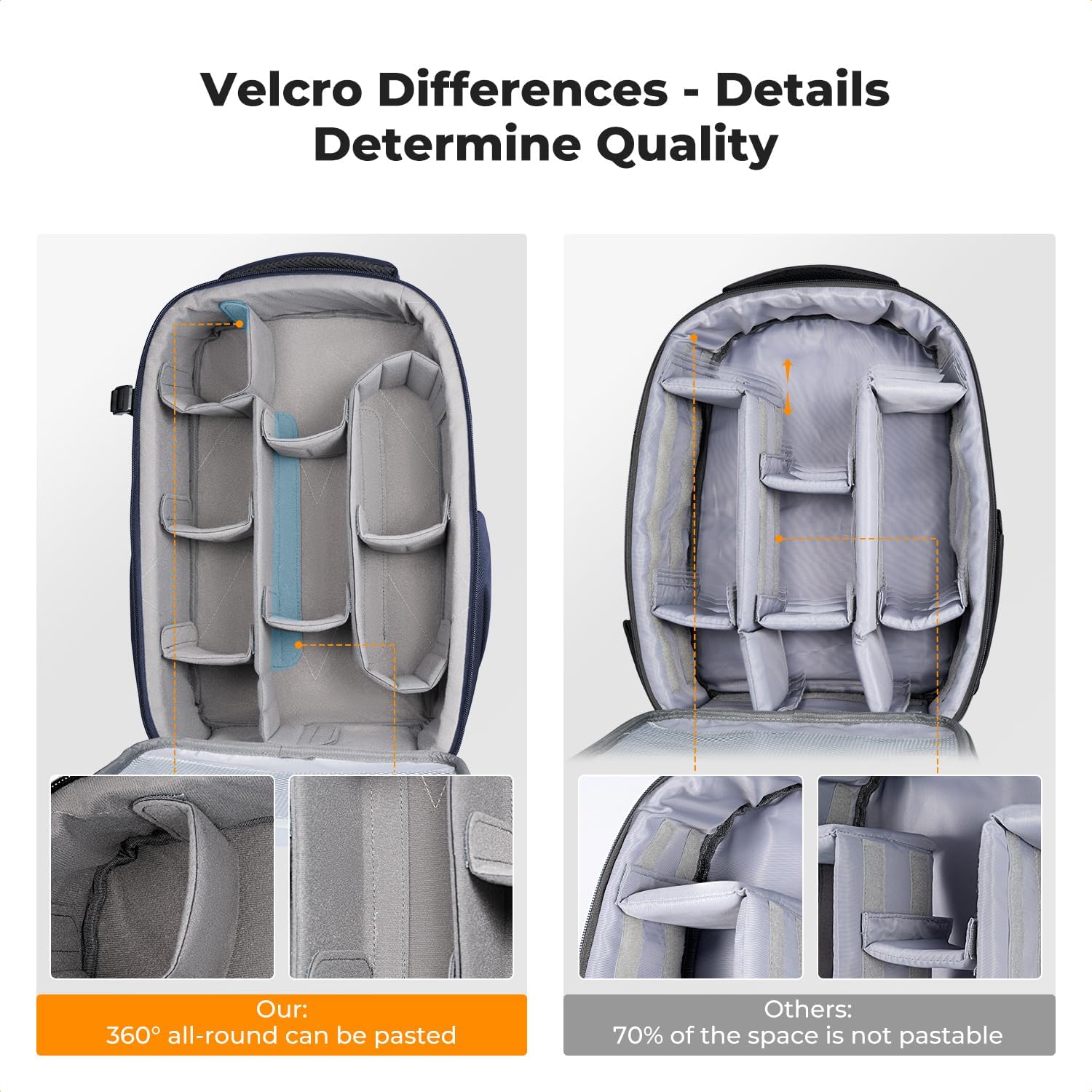
Image: Illustration of the Velcro system for securing dividers, highlighting 360° all-round paste capability.

Image: Detail of the cotton blended elastic partitions, designed for neat cutting and stitching.
4. Operating Instructions
4.1 Accessing Main Compartment
The main compartment opens fully, allowing easy access to all your gear. Simply unzip the main zipper to lay the front flap down.

Image: Wide opening design for easy organization and access to all equipment.
4.2 Using External Pockets and Straps
- Laptop Compartment: The rear laptop compartment is accessible via a zipper on the back panel. It can hold up to a 15.6-inch laptop.
- Tripod Holder: A dedicated pocket and secure strap on one side of the backpack allow you to carry a tripod or monopod.
- Water Bottle/Umbrella Pocket: An elasticated pocket on the opposite side is suitable for a water bottle or umbrella.
- Hidden Zipper Pocket: A discreet zippered pocket on the back panel provides secure storage for valuables like your phone or wallet.
- Internal Accessory Pockets: The front flap has mesh and solid zippered pockets for small items such as memory cards, batteries, and cables.

Image: Features like the breathable back system, chest buckle, luggage strap, rear laptop compartment, and multi-function pockets.

Image: Demonstrates the tripod/monopod holder strap on the side of the backpack.
4.3 Ergonomic Carrying
Adjust the shoulder straps to your preferred length. Utilize the chest buckle to distribute weight and enhance comfort, especially during long periods of wear or hiking.
5. Storage & Organization
The backpack's interior is designed for maximum flexibility. The modular dividers allow you to create custom compartments for various equipment sizes. The soft velvet interior lining protects delicate items from scratches.
5.1 Maximizing Space
- Use the long partitions for larger lenses or camera bodies.
- The straight partitions are ideal for smaller lenses, flashes, or drone accessories.
- Elastic straps can be used to further secure items in place, preventing them from shifting during transport.

Image: An example of a well-organized interior with camera bodies, lenses, and accessories.
5.2 Converting to a Daily Backpack
For general use, all internal dividers can be removed to transform the camera backpack into a regular daily backpack, offering 22L of open storage space.
6. Care & Maintenance
- Cleaning: The hardshell exterior is easy to clean. Wipe with a damp cloth and mild soap if necessary. For the interior, use a soft brush or vacuum to remove dust and debris.
- Waterproof Protection: The hardshell provides inherent water resistance. For heavy rain, ensure all zippers are fully closed.
- Storage: When not in use, store the backpack in a cool, dry place away from direct sunlight to preserve material integrity.
Video: A quick overview of the K&F Concept Camera Backpack, showcasing its features and design.
7. Troubleshooting
If you encounter any issues with your K&F Concept KF13.134 Hardshell Camera Backpack, please refer to the following general advice:
- Difficulty with Zippers: Ensure zippers are not obstructed by fabric. Apply a small amount of zipper lubricant if they are stiff.
- Equipment Shifting: Re-adjust internal dividers to create a tighter fit around your gear. Utilize elastic straps for added security.
- Discomfort while Wearing: Adjust shoulder straps and chest buckle to find a comfortable fit. Ensure weight is evenly distributed.
For further assistance, please contact K&F Concept customer support.
8. Specifications
| Feature | Detail |
|---|---|
| Model Number | KF13.134 |
| External Dimensions | 17.3 x 11 x 7 inches (44 x 28 x 18 cm) |
| Internal Dimensions | 16.1 x 9.8 x 5.5 inches (41 x 25 x 14 cm) |
| Capacity | 22 Liters |
| Item Weight | 3.94 pounds (1.79 kg) |
| Material | Polyester + EVA Hardshell |
| Laptop Compartment | Fits up to 15.6-inch laptop |
| Color | Black |

Image: Detailed product dimensions and specifications.
9. Warranty & Support
K&F Concept products are designed for quality and durability. This product is covered by a 1-year warranty from the date of purchase.
For any questions, concerns, or support needs regarding your KF13.134 Hardshell Camera Backpack, please do not hesitate to contact K&F Concept customer service. You can find contact information on the official K&F Concept website or through your retailer.
Video: Another brief demonstration of the K&F Concept Camera Backpack's features.