1. Introduction
Thank you for choosing the Yaber T2 Portable Projector. This device is designed to provide a high-quality, portable home theater experience with its native 1080P resolution, 450 ANSI lumens brightness, and integrated JBL sound system. Featuring a built-in rechargeable battery, WiFi 6, and Bluetooth connectivity, the T2 is ideal for both indoor and outdoor use. This manual provides detailed instructions for setup, operation, maintenance, and troubleshooting to ensure optimal performance and longevity of your projector.

Figure 1.1: Yaber T2 Portable Projector - Front View. This image shows the compact, cylindrical design of the projector with its integrated handle, lens, and speaker grille.
2. Product Components and Overview
Familiarize yourself with the various parts and interfaces of your Yaber T2 projector.
2.1 Package Contents
- Yaber T2 Portable Projector
- Power Adapter
- HDMI Cable
- Remote Control (not explicitly listed but implied for projectors)
- User Manual (this document)
2.2 Projector Layout

Figure 2.1: Front View. Shows the main projection lens and the JBL speaker grille.

Figure 2.2: Rear View. Displays the various input/output ports including IR receiver, Reset button, USB, HDMI (ARC), Audio Out, and Ethernet.
The projector features a robust design with a built-in handle for easy portability. The front houses the projection lens and the speaker system. The rear panel provides access to all connectivity ports.
2.3 Ports and Indicators
- IR: Infrared receiver for remote control.
- RST: Reset button.
- USB: USB 2.0 port for media playback and WPS file reading.
- HDMI (ARC): HDMI input with Audio Return Channel support for connecting external devices like laptops, gaming consoles, or streaming sticks.
- Audio Out: 3.5mm audio jack for connecting external speakers or headphones.
- Ethernet: RJ45 port for wired network connection.
- Power Input: DC power input for charging and operation.
- Battery Indicator: Indicates charging status (Blue: Fully charged, Red: Charging).
3. Setup Guide
3.1 Initial Charging
Before first use, fully charge the projector's built-in battery. Connect the power adapter to the projector's power input and plug it into a wall outlet. The battery indicator will show red during charging and turn blue when fully charged. A full charge provides up to 2.5 hours of video playback or 18 hours of audio playback.

Figure 3.1: Battery Capacity and Charging Indicator. Illustrates the 8000mAh battery and its charging status indicators.
3.2 Placement and Projection
Place the projector on a stable, flat surface. The optimal projection distance ranges from 1 meter (40 inches screen) to 6 meters (120 inches screen). The projector features a 1.25:1 projection ratio, allowing for a 100-inch screen from a shorter distance compared to conventional projectors.

Figure 3.2: Projection Distance Guide. Shows recommended distances for various screen sizes (e.g., 7.26 ft for an 80-inch screen).
3.3 Powering On/Off
- Power On: Press the power button on the projector or remote control.
- Power Off: Press the power button again. Confirm shutdown if prompted.
3.4 Automatic Screen Adjustment
The T2 projector is equipped with intelligent screen adjustment technology, including auto-focus, automatic keystone correction, intelligent screen alignment, and intelligent obstacle avoidance. These features automatically optimize the projected image for clarity and proper alignment on your screen or wall.

Figure 3.3: Smart Screen Adjustment Features. Depicts auto-focus, auto keystone correction, intelligent screen alignment, and obstacle avoidance.
Note: The T2 projector supports projection with a tilt angle of up to 15 degrees. If the angle is small, please try to control it precisely to avoid affecting the clarity of the projected image.
4. Operation
4.1 Connecting Devices
The Yaber T2 offers multiple connectivity options:
- HDMI: Connect laptops, gaming consoles, Blu-ray players, or streaming devices via the HDMI (ARC) port.
- USB: Insert a USB drive to play media files or read WPS documents.
- Ethernet: For a stable wired internet connection.
- WiFi 6: Connect wirelessly to your home network for online content and screen mirroring.
- Bluetooth:
- Two-way Bluetooth: Connect the projector to mobile devices to use it as a 16W Hi-Fi stereo speaker.
- Connect external Bluetooth speakers for enhanced audio output.
- NFC: Use NFC for quick connections with compatible smartphones, turning your phone into a remote control.
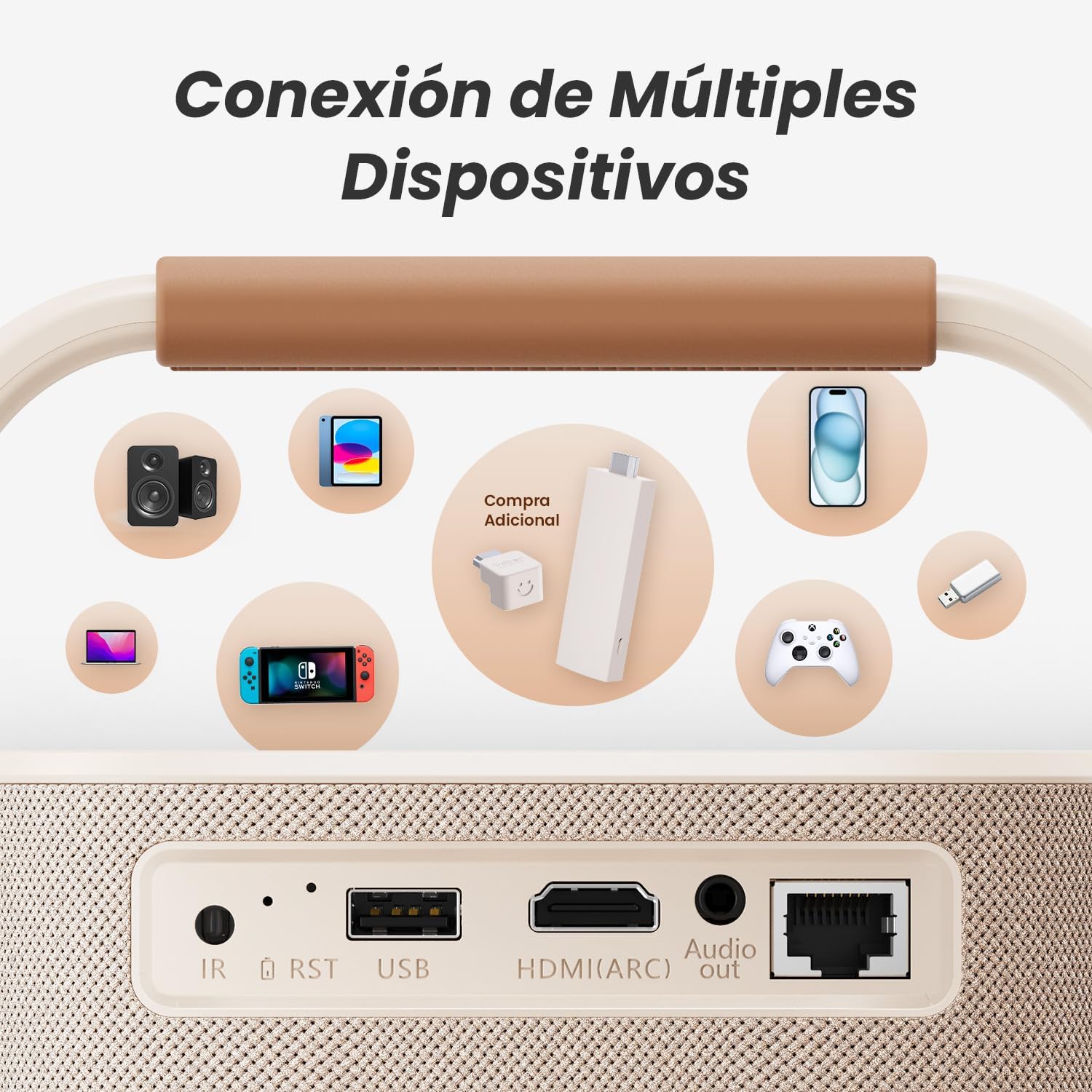
Figure 4.1: Multiple Device Connectivity. Illustrates various devices that can be connected to the projector, including phones, laptops, gaming consoles, and external speakers.
4.2 Audio Settings
The T2 projector features an integrated JBL sound system with Dolby Audio and 8W x 2 speakers, delivering detailed sound with clear trebles and rich bass. Adjust volume via the remote control or on-device buttons. For external audio, use the 3.5mm Audio Out port or connect Bluetooth speakers.

Figure 4.2: Side View with JBL Branding. This image shows the side of the projector, highlighting the JBL sound system branding.
4.3 Projection Settings
- Aspect Ratio: Supports 16:9 and 4:3 aspect ratios. Adjust in the settings menu to match your content.
- Zoom: Features 50% zoom capability to adjust screen size without moving the projector.
- Resolution: Native 1080P (Full HD) resolution for sharp and clear images.
- Refresh Rate: 60Hz for smooth motion.

Figure 4.3: Native 1080P Resolution. Demonstrates the clarity of the 1080P native resolution at 60Hz.
4.4 Streaming and Content Playback
The T2 projector offers various ways to enjoy content:
- Direct Casting: Cast content from your smartphone or tablet via WiFi.
- USB Playback: Play videos, photos, and music directly from a USB drive.
- HDMI Input: Connect external streaming devices (e.g., Fire TV Stick, Roku, Apple TV) for access to Netflix, Disney+, and other services.
- Optional Google TV Dongle: For direct access to streaming services like Netflix and Disney+, an optional T2 Google TV dongle can be purchased separately.
5. Maintenance
5.1 Cleaning
The T2 projector features a completely sealed optical device design, which significantly reduces dust collection and light extinguishing. This design minimizes the need for frequent internal cleaning.

Figure 5.1: Sealed Optical Engine. Highlights the dust-free design of the T2 projector's optical system.
- Lens: Use a soft, lint-free cloth specifically designed for optical lenses to gently wipe the projector lens. Do not use abrasive cleaners.
- Exterior: Wipe the exterior casing with a soft, dry cloth. For stubborn marks, a slightly damp cloth can be used, followed by a dry cloth.
- Vents: Ensure the ventilation openings are clear of dust and debris to prevent overheating. Use a soft brush or compressed air if necessary.
5.2 Battery Care
- Avoid fully discharging the battery frequently.
- Charge the battery regularly, even if not in use, to maintain its health.
- Store the projector in a cool, dry place when not in use for extended periods.
6. Troubleshooting
If you encounter issues with your Yaber T2 projector, refer to the following common problems and solutions:
| Problem | Possible Cause | Solution |
|---|---|---|
| No image/No signal | Incorrect input source, loose cable connection, device not powered on. |
|
| Blurred image | Out of focus, incorrect keystone correction, dirty lens. |
|
| No sound | Volume too low, mute enabled, incorrect audio output, external speaker issue. |
|
| Remote control not working | Dead batteries, IR sensor blocked. |
|
If the problem persists after trying these solutions, please contact Yaber customer support.
7. Specifications
| Feature | Detail |
|---|---|
| Brand | Yaber PROJECTOR |
| Model Name | T2 |
| Native Resolution | 1080P Full HD |
| Brightness | 450 ANSI Lumens |
| Aspect Ratio | 16:9, 4:3 |
| Refresh Rate | 60 Hz |
| Projection Ratio | 1.25:1 |
| Minimum Image Size | 40 inches |
| Maximum Image Size | 120 inches |
| Minimum Throw Distance | 1 meter |
| Maximum Throw Distance | 6 meters |
| Audio | JBL Sound, Dolby Audio, 8W x 2 Speakers |
| Connectivity | WiFi 6, Bluetooth (Two-way), HDMI (ARC), USB 2.0, 3.5mm Audio Out, Ethernet |
| Battery Type | Lithium Ion |
| Battery Life (Video) | Up to 2.5 hours |
| Battery Life (Audio) | Up to 18 hours |
| Noise Level | 35 dB |
| Voltage | 220 Volts |
| Wattage | 110 watts |
| Dimensions | 6.5 x 5.51 x 11.42 inches |
| Weight | 5.29 lbs |
| Included Components | Adapter, Battery, HDMI Cable |
8. Warranty and Support
Yaber PROJECTOR offers comprehensive support for your T2 Portable Projector:
- Customer Support: 24/7 support is available for any inquiries or assistance you may need.
- Return Policy: 6 months return period from the date of purchase.
- Repair Service: 3 years repair service for manufacturing defects.
For further assistance, please refer to the contact information provided with your product packaging or visit the official Yaber PROJECTOR website.


