
1. Introduction
Thank you for choosing the LEADZM 88-Key Semi-Weighted Digital Piano. This instrument is designed to provide a rich musical experience with its high-quality sound source and versatile features. This manual will guide you through the setup, operation, and maintenance of your new digital piano, ensuring optimal performance and longevity.
What's Included:
- LEADZM 88-Key Semi-Weighted Digital Piano
- X-shaped Double-Tube Keyboard Stand
- Sustain Pedal (plastic)
- Headphones
- Keyboard Sticker
- 420D Carry Bag
- Power Adapter
- Instruction Manual (this document)
2. Setup
2.1 Assembling the Keyboard Stand
- Unfold the X-shaped double-tube keyboard stand.
- Adjust the stand to your desired height. The stand offers 6 adjustable height levels for comfortable playing. Ensure all locking mechanisms are securely fastened.
- Carefully place the digital piano onto the stand, ensuring it is stable and centered.
2.2 Connecting Power
- Locate the DC 9V power input port on the rear panel of the piano.
- Connect the power adapter to the piano's power input.
- Plug the power adapter into a standard electrical outlet.
2.3 Connecting Accessories
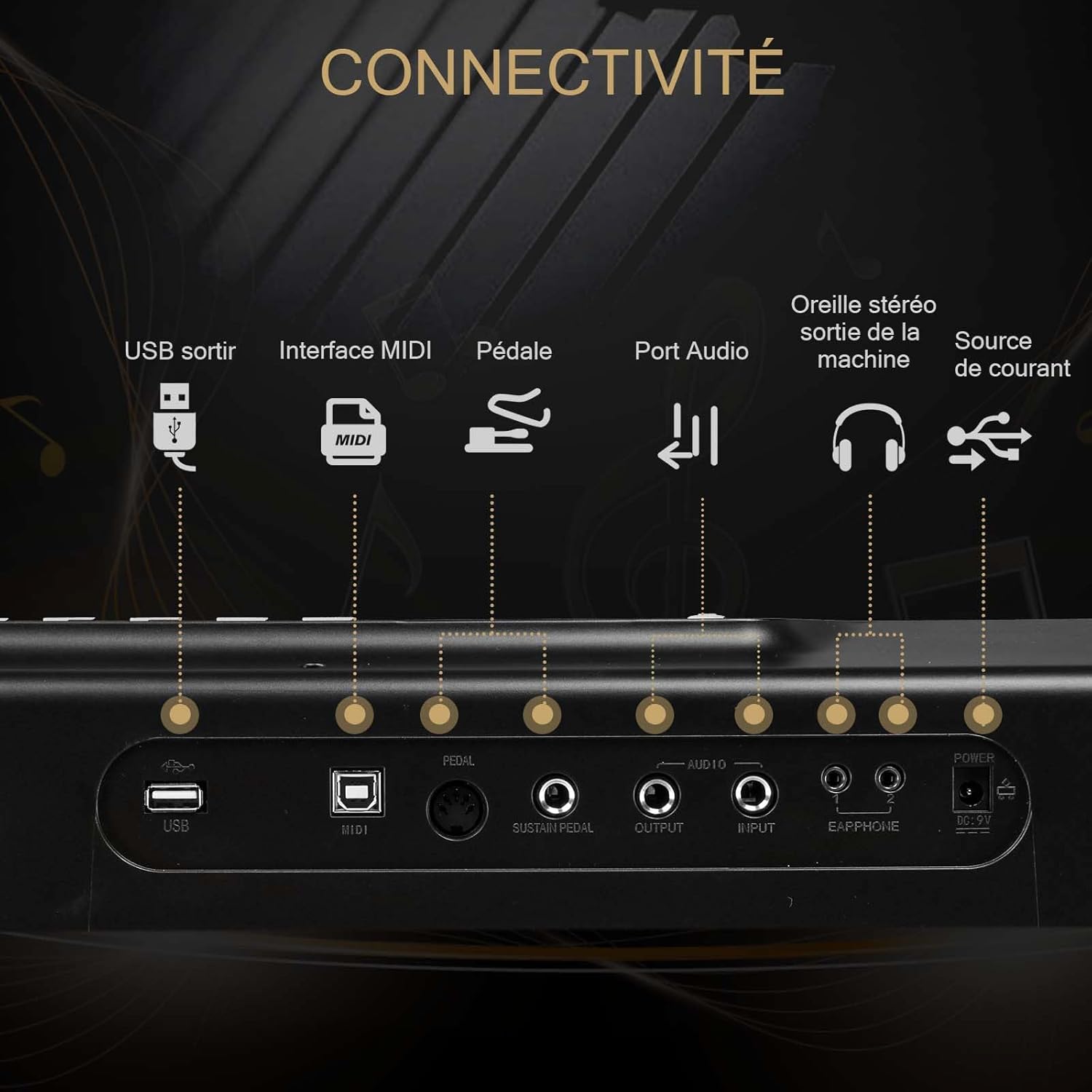
- Sustain Pedal: Connect the sustain pedal cable to the 'SUSTAIN PEDAL' port on the rear panel.
- Headphones: For private practice, plug the included headphones into the 'EARPHONE' jack (3.5mm) on the rear panel.

The LEADZM 88-Key Semi-Weighted Digital Piano, shown with its adjustable X-style stand, included sustain pedal, headphones, and power adapter, ready for assembly and use.

A view of the piano's rear panel, detailing all available connection ports including USB, MIDI, sustain pedal input, audio input/output, headphone jack, and power supply.
3. Operating Instructions
3.1 Power On/Off
Press the 'POWER' button on the control panel to turn the piano on or off. The display will illuminate when the piano is powered on.
3.2 Sound Quality and Speakers
The digital piano features a high-quality custom Dream sound source and two built-in 10W stereo speakers, delivering a rich and immersive audio experience.
3.3 Key Features
The piano keyboard offers a wide range of functions:
- Polyphony: 32-note polyphony.
- Tones: 200 different tones (timbres).
- Rhythms: 200 rhythm styles.
- Demo Songs: 70 demonstration songs.
- Recording Function: Allows users to record their performances for practice and review.
- Sustain Pedal: The included sustain pedal continuously increases the duration of notes, from short to long, adding expression to your playing.
- Split/Touch Function: Allows for splitting the keyboard or adjusting touch sensitivity.
- Transpose Function: Adjust the pitch of the keyboard.
- Dual Voice: Layer two different voices simultaneously.

This image displays the extensive features of the digital piano, such as its wide range of tones, rhythms, demonstration songs, recording capability, and MIDI functionality.
3.4 Bluetooth and MIDI Connectivity
The digital piano supports both Bluetooth audio and Bluetooth MIDI, allowing for versatile connectivity options.
- Bluetooth Audio: Connect your smartphone or tablet wirelessly to play audio through the piano's speakers.
- Bluetooth MIDI: Connect to a computer or tablet via Bluetooth for MIDI interaction with music applications.
- USB MIDI: Alternatively, connect the piano to a computer or tablet using a USB cable for MIDI functionality, compatible with learning applications and music software like Cubase.
The digital piano connected to a laptop, showcasing its MIDI functionality for integration with music production software or learning applications.

A detailed view of the piano keys, highlighting the semi-weighted hammer action designed to emulate the touch of an acoustic piano.
4. Maintenance
Proper care and maintenance will extend the life of your digital piano.
- Cleaning: Use a soft, dry cloth to wipe the surface of the piano. For stubborn dirt, slightly dampen the cloth with water. Avoid using abrasive cleaners, solvents, or waxes, as these can damage the finish.
- Key Care: Keep the keys clean. If they become dirty, wipe them gently with a soft, slightly damp cloth. Do not use excessive force or harsh chemicals.
- Storage: When not in use, store the piano in a dry, dust-free environment. Use the included 420D carry bag for protection during transport or storage. Avoid exposing the piano to direct sunlight, extreme temperatures, or high humidity.
- Handling: Always handle the piano with care. Avoid dropping it or subjecting it to strong impacts.
5. Troubleshooting
If you encounter any issues with your digital piano, please refer to the following common problems and solutions:
| Problem | Possible Cause | Solution |
|---|---|---|
| No sound from speakers or headphones. |
|
|
| Some keys do not produce sound or sound inconsistently. |
|
|
| Bluetooth connection issues. |
|
|
| MIDI connection not working. |
|
|
| Sustain pedal not working. |
|
|
If you experience a problem not listed here, or if the suggested solutions do not resolve the issue, please contact LEADZM customer support for further assistance.
6. Specifications
| Feature | Detail |
|---|---|
| Brand | LEADZM |
| Model Number | Piano0462 |
| Number of Keys | 88 |
| Key Action | Semi-Weighted |
| Dimensions (L x W x H) | 134 cm x 25 cm x 8 cm (approx. 52.7 x 9.8 x 3.1 inches) |
| Weight | 5.6 Kilograms (approx. 12.3 lbs) |
| Connectivity Technology | Bluetooth, USB |
| Connector Type | MIDI USB |
| Headphone Jack | 3.5 mm |
| Power Source | Electric Cable (Power Adapter) |
| Special Features | Real-time sampling, Built-in speaker, Headphone jack |
| Polyphony | 32 notes |
| Tones | 200 |
| Rhythms | 200 |
| Demo Songs | 70 |
| Supported Software | Cubase (via MIDI) |
7. Warranty and Support
Warranty information for your LEADZM Digital Piano is typically provided with your purchase documentation. Please refer to the warranty card or contact your retailer for details regarding coverage and duration.
For technical support, troubleshooting assistance beyond what is covered in this manual, or inquiries about replacement parts, please contact the seller or manufacturer directly. Contact information can usually be found on the product packaging or the retailer's website.