
Introduction
The Fender Bassman Reverb Pedal is designed to provide bass-tuned room and hall reverb effects, enhancing your instrument's tone with depth and space. This pedal incorporates meticulously crafted analog and digital circuits to deliver professional-grade reverb while maintaining low-end clarity. Its compact design makes it suitable for any pedalboard.
Key Features
- Bass-tuned room and hall reverb DSP algorithms with analog dry-through.
- Low cut knob and pre-delay switch to maintain signal clarity.
- Internal damp control for adjusting the high frequency content of the reverb signal.
- Soft-touch switchable true or buffered bypass with trails.
- Side-mounted pad switch to suit active basses.
Setup
Before connecting the pedal, ensure your amplifier and other effects are powered off. Use high-quality instrument cables for optimal signal integrity.
Connections
- Connect your bass guitar to the INPUT jack on the pedal.
- Connect the OUTPUT jack of the pedal to your amplifier's input.
- Connect a 9V DC power supply (center-negative) to the 9V DC IN jack.
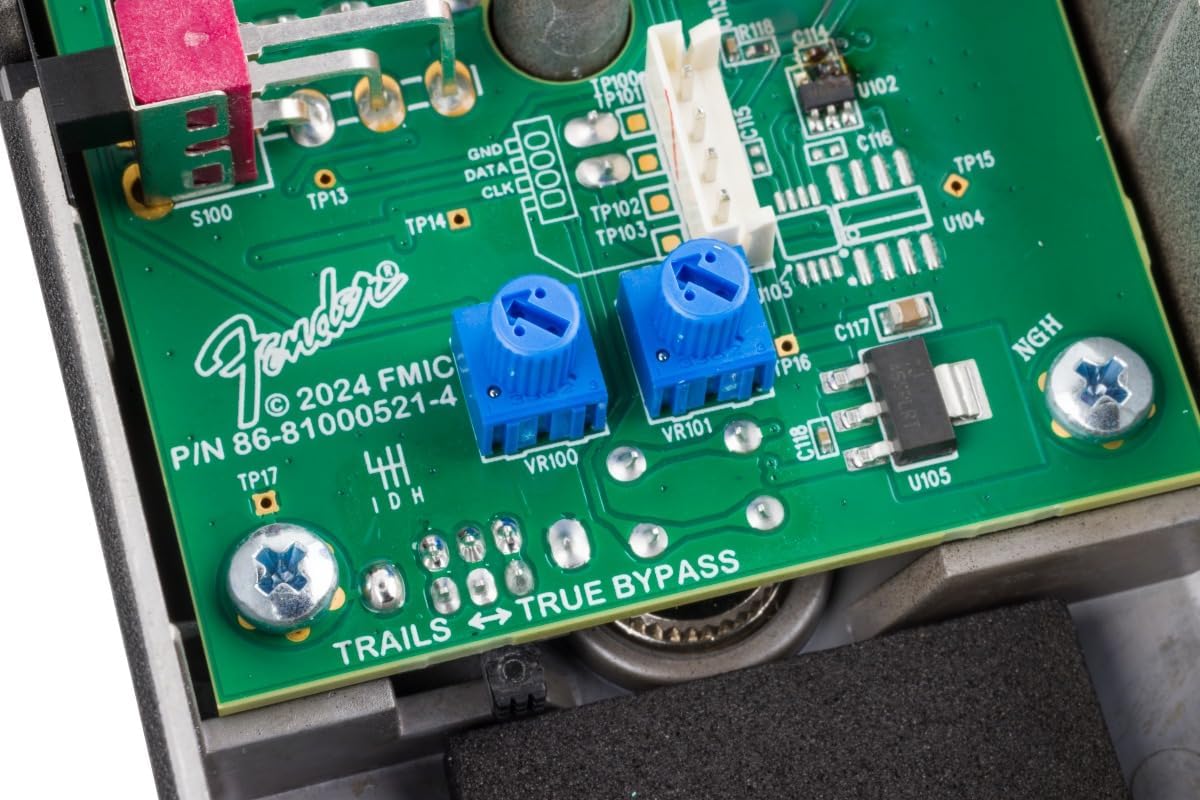
Figure 1: Rear view of the pedal with input, output, and power connections.
The rear of the pedal features clearly labeled input, output, and power jacks for easy connection to your instrument and amplifier.
Operating Controls
The Bassman Reverb Pedal features intuitive controls for shaping your desired reverb sound. Familiarize yourself with each knob and switch to unlock the pedal's full potential.

Figure 2: Top view of the pedal's control layout.
Knobs
- TIME: Adjusts the length of the reverb decay. Turn clockwise for longer, more expansive reverb tails.
- LOW CUT: Controls the amount of low frequencies removed from the reverb trails. This helps prevent muddiness and maintains bass clarity.
- LEVEL: Sets the overall output volume of the reverb effect.
Switches
- TYPE: Selects between different reverb algorithms (e.g., Room, Hall). Refer to the description for specific algorithm details.
- PRE: Engages or disengages the pre-delay function, which introduces a slight delay between the dry signal and the onset of the reverb. This can add clarity to individual notes.
Internal Controls
- DAMP Control: An internal control that adjusts the high-frequency content of the reverb signal. This allows for fine-tuning the brightness or darkness of the reverb.
- Bypass Switch (True/Buffered): The pedal offers soft-touch switchable true or buffered bypass with trails. This setting can typically be adjusted via an internal switch or specific power-up sequence. Consult the full technical manual for detailed instructions on changing bypass modes.
Side-Mounted Switch
- PAD Switch: A side-mounted switch designed to accommodate active basses by providing an input pad, preventing signal overload.
Powering the Pedal
The Bassman Reverb Pedal operates on a standard 9V DC power supply (center-negative). Ensure the power supply meets the specified voltage and polarity requirements to avoid damage to the unit.
- Voltage: 9 Volts
- Amperage: 100 Milliamps (minimum recommended)
- Power Source: Battery Powered (internal 9V battery) or external DC power supply.
Maintenance
To ensure the longevity and optimal performance of your Bassman Reverb Pedal, follow these maintenance guidelines:
- Cleaning: Use a soft, dry cloth to clean the pedal's exterior. Avoid abrasive cleaners or solvents.
- Storage: Store the pedal in a dry, cool environment away from direct sunlight and extreme temperatures.
- Battery Replacement: If using a battery, replace it when the indicator light dims or the effect performance degrades. Disconnect the input cable when not in use to conserve battery life.
- Connections: Periodically check all cable connections for tightness and wear.
Troubleshooting
If you experience issues with your pedal, try the following steps:
- No Sound: Check all cable connections, power supply, and ensure the pedal is engaged. Test with different cables and power supply if possible.
- Weak/Distorted Sound: Verify the input signal level (especially with active basses and the PAD switch). Check battery life if applicable.
- Excessive Noise: Ensure you are using a high-quality, isolated power supply. Check for ground loops in your signal chain.
- Effect Not Engaging: Ensure the footswitch is functioning correctly. If in buffered bypass mode, check the internal bypass setting.
Specifications
| Specification | Detail |
|---|---|
| Item Weight | 11.5 ounces |
| Product Dimensions | 5 x 3 x 2.5 inches |
| Item Model Number | 0234613000 |
| ASIN | B0D7FPX2LW |
| Connector Type | 1/4" Mono Phone Plug (6.35mm) |
| Hardware Interface | 1/4-inch Audio |
| Signal Format | Analog |
| Material Type | Aluminum |
| Power Source | Battery Powered |
| Voltage | 9 Volts |
| Amperage | 100 Milliamps |
| Audio Output Effects | Reverb |
Warranty and Support
For warranty information, technical support, or service inquiries, please refer to the official Fender website or contact your authorized Fender dealer. Keep your purchase receipt as proof of purchase.


