1. Introduction
This instruction manual provides essential information for the safe and effective use of the UNI-T UPO1102 100MHz 2-Channel Digital Oscilloscope. The UPO1102 is a versatile instrument designed for electronic and electrical measurements, featuring a 100MHz bandwidth, 1 GSa/s real-time sample rate, 56 Mpts memory depth, and a 7-inch display. It incorporates Ultra Phosphor technology for enhanced waveform display and analysis capabilities.
Please read this manual thoroughly before operating the device to ensure proper functionality and to prevent damage.
2. Safety Information
Always observe the following safety precautions to avoid personal injury and prevent damage to the instrument or other connected devices.
- Connect the power cord to a properly grounded outlet.
- Do not operate the oscilloscope in wet or damp conditions.
- Ensure proper ventilation to prevent overheating.
- Do not open the instrument casing; refer servicing to qualified personnel.
- Use only specified probes and accessories.
- Observe all terminal ratings to prevent fire or shock hazard.
3. Product Overview
3.1 Front Panel
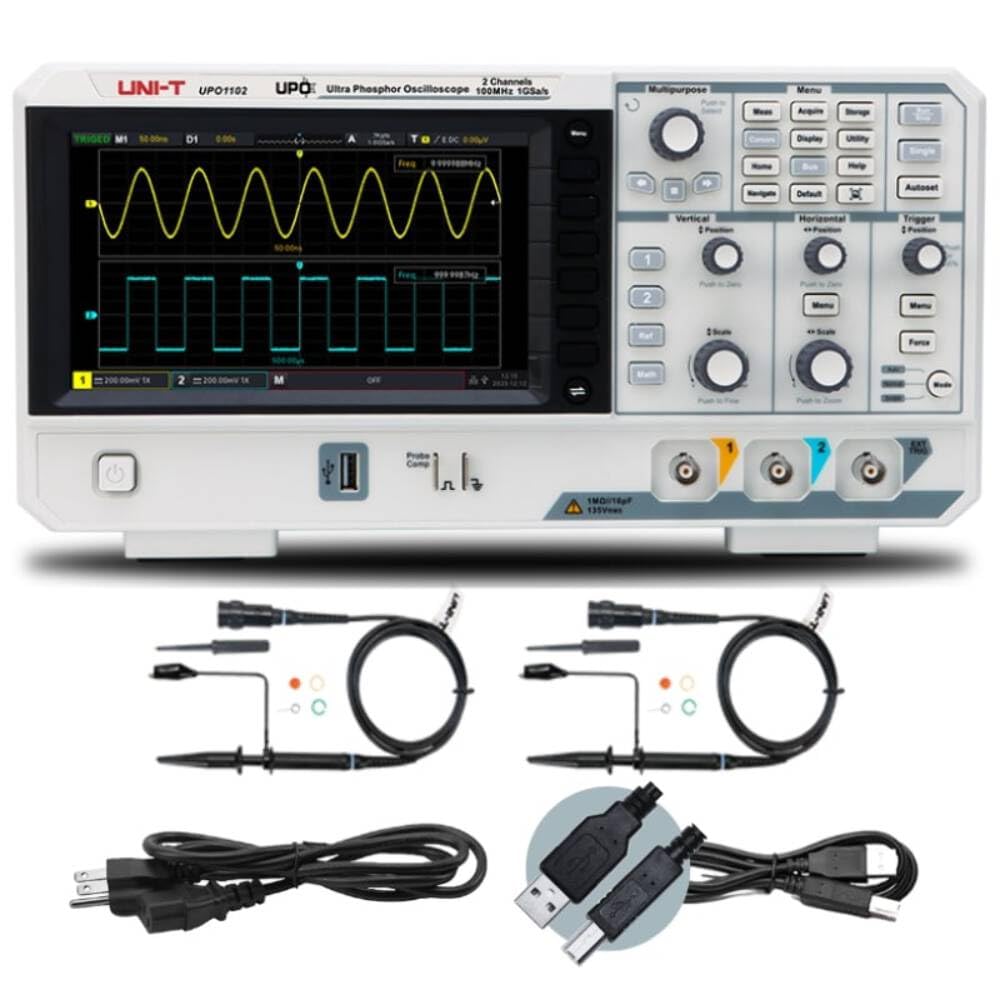
Figure 3.1: Front Panel of UPO1102 Oscilloscope
The front panel features the main display, various control knobs and buttons for waveform adjustment, trigger settings, and menu navigation. Input channels CH1 and CH2 are located at the bottom right.
3.2 Rear Panel
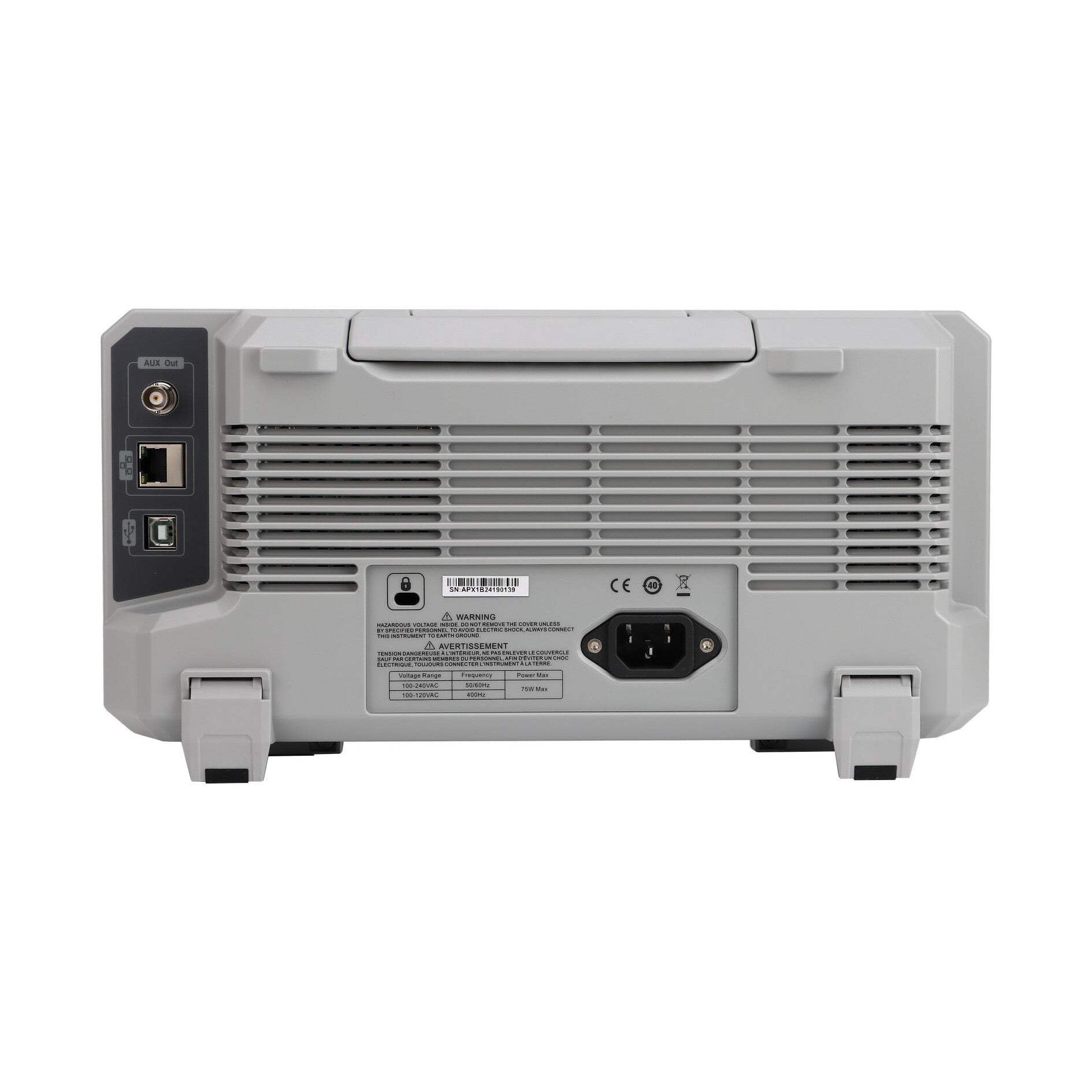
Figure 3.2: Rear Panel of UPO1102 Oscilloscope
The rear panel includes the AC power input, USB ports for data transfer and printing, and ventilation grilles to ensure proper cooling during operation.
3.3 Dimensions
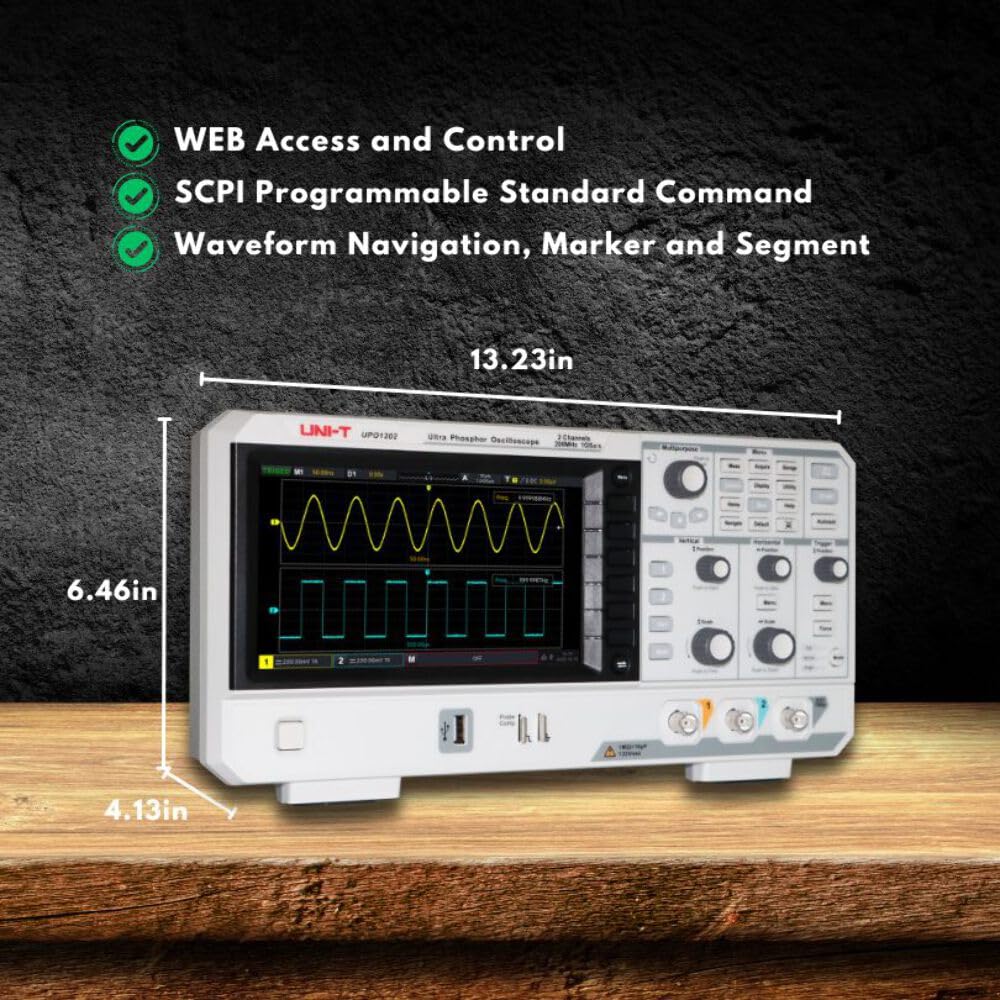
Figure 3.3: UPO1102 Oscilloscope Dimensions
The physical dimensions of the UPO1102 are approximately 13.23 inches (width) x 6.46 inches (height) x 4.13 inches (depth).
4. Setup
4.1 Unpacking and Inspection
Upon receiving your UPO1102 oscilloscope, carefully unpack all components and inspect them for any signs of damage. Retain the packaging for future transport or storage.
Standard Accessories:
- Oscilloscope Probe (UT-P04) x 2
- Power Cord
- USB2.0 Printing Cable
- English Download Guide
- Multi-language Safety Manual
- Calibration Report (COC)
4.2 Power Connection
- Ensure the oscilloscope is placed on a stable, level surface with adequate ventilation.
- Connect the provided power cord to the AC power input on the rear panel of the oscilloscope.
- Plug the other end of the power cord into a grounded AC power outlet.
- Press the power button on the front panel to turn on the oscilloscope.
4.3 Probe Connection and Compensation
Before taking measurements, it is crucial to compensate the probes to ensure accurate readings.
- Connect a probe to one of the input channels (CH1 or CH2) on the front panel.
- Connect the probe tip to the "Probe Comp" terminal and the ground clip to the ground terminal next to it.
- Press the Auto button. The oscilloscope will automatically adjust the settings to display the compensation signal.
- Observe the square wave displayed on the screen. If the waveform is not a perfect square (over-compensated or under-compensated), adjust the trimmer on the probe body using a non-metallic tool until a flat-top square wave is achieved.
- Repeat for the second probe if using both channels.

Figure 4.1: Probe Compensation Waveform
A correctly compensated probe displays a clean square wave. Adjust the probe's trimmer if the waveform shows overshoot or undershoot.
5. Operating Instructions
5.1 Basic Controls
- Power Button: Located on the front panel, used to turn the device on or off.
- Multipurpose Knob: Used for menu navigation and parameter adjustment. Press to confirm selections.
- Vertical Controls (CH1, CH2): Adjust vertical position and scale (volts/division) for each channel. "Push to Zero" resets position, "Push to Fine" enables fine adjustment.
- Horizontal Controls: Adjust horizontal position and time base (seconds/division). "Push to Zero" resets position, "Push to Zoom" enables horizontal zoom.
- Trigger Controls: Set the trigger level, mode (Auto, Normal, Single), and force a trigger event.
- Auto Button: Automatically adjusts vertical, horizontal, and trigger settings to display a stable waveform.
- Run/Stop Button: Starts or stops waveform acquisition.
5.2 Waveform Acquisition and Display
The UPO1102 features a 7-inch display and Ultra Phosphor technology for clear waveform visualization, even with complex signals.

Figure 5.1: Ultra Phosphor Display
Ultra Phosphor technology provides a gradient display, where brighter areas indicate more frequent occurrences of the waveform, helping to visualize signal anomalies and variations.

Figure 5.2: Multi-Channel Waveform Display
The UPO1102 can display and analyze two channels simultaneously, allowing for comparison of different signals.
5.3 Measurement Functions
- Cursor Measurement: Activate the "Cursor" function to measure time and voltage parameters within a specified area on CH1, CH2, MATH, or REF waveforms.
- FFT Analysis: The UPO1102 features 1Mpts FFT sampling points, enabling frequency domain analysis. Access the FFT function to set frequency range, detection mode, and spectrum marking.
- Navigation Functions: Utilize time navigation, marker navigation, and segment navigation for detailed waveform inspection.

Figure 5.3: FFT Spectrum Analysis
The FFT function transforms time-domain signals into the frequency domain, useful for analyzing harmonic content and noise.
5.4 Digital Decoding
The innovative hardware decoding feature allows for real-time decoding of serial bus protocols. With a deep storage of 56 Mpts, decoding speed is maintained at millisecond levels, preventing delays when viewing decoded data. This function does not affect the waveform refresh rate, maintaining the digital fluorescence display effect.

Figure 5.4: Digital Decoding Example
The decoding feature displays protocol information directly on the screen, simplifying debugging of serial communications.
5.5 Data Storage and Connectivity
- Memory Depth: The UPO1102 offers a 56 Mpts memory depth, allowing for capture of long signal durations at high sample rates.
- USB Connectivity: Use the provided USB2.0 printing cable to connect the oscilloscope to a computer for data transfer or direct printing.
- Web Access and Control: The device supports WEB access and control, along with SCPI (Standard Commands for Programmable Instruments) for remote operation and automation.

Figure 5.5: Memory Depth Indication
A large memory depth is crucial for capturing transient events or long sequences of data without losing detail.
6. Maintenance
6.1 General Care
- Keep the instrument clean and dry. Avoid operating in dusty or humid environments.
- Protect the display from scratches and impacts.
- Do not block the ventilation openings on the rear panel.
6.2 Cleaning
To clean the exterior of the oscilloscope:
- Disconnect the power cord and all probes/cables.
- Use a soft cloth dampened with mild detergent and water. Do not use abrasive cleaners or solvents.
- For the display, use a soft, lint-free cloth specifically designed for electronic screens.
- Ensure the instrument is completely dry before reconnecting power.
7. Troubleshooting
This section addresses common issues you might encounter with the UPO1102 oscilloscope. For problems not listed here, contact UNI-T customer support.
| Problem | Possible Cause | Solution |
|---|---|---|
| No display after power on. | Power cord not connected, power outlet faulty, instrument fault. | Check power cord connection. Test power outlet. If problem persists, contact support. |
| No waveform displayed. | Probe not connected, signal too small/large, trigger not set correctly, channel off. | Ensure probe is connected to signal source. Press Auto button. Adjust vertical scale (Volts/Div) and horizontal scale (Sec/Div). Check trigger level. Ensure channel is enabled. |
| Unstable waveform. | Trigger level incorrect, trigger mode unsuitable, signal noise. | Adjust trigger level. Try different trigger modes (e.g., Normal or Single). Reduce noise in the signal path. |
| Incorrect measurements. | Probe compensation incorrect, probe attenuation setting wrong, measurement settings incorrect. | Perform probe compensation (Section 4.3). Verify probe attenuation setting matches physical probe (e.g., 1X, 10X). Check measurement parameters. |
8. Specifications
| Parameter | Value |
|---|---|
| Bandwidth | 100 MHz |
| Channels | 2 |
| Real-time Sample Rate | 1 GSa/s |
| Memory Depth | 56 Mpts |
| Waveform Capture Rate | 500,000 wfm/s |
| Display | 7-inch |
| FFT Sampling Points | 1 Mpts |
| Product Dimensions | 13 x 4 x 6 inches (approx. 330 x 102 x 152 mm) |
| Item Weight | 8.13 pounds (approx. 3.69 kg) |
| Manufacturer | UNI-T |
| ASIN | B0D7F2D9MS |
| Date First Available | June 19, 2024 |
9. Warranty and Support
For warranty information, technical support, or service inquiries regarding your UNI-T UPO1102 oscilloscope, please refer to the official UNI-T website or contact their customer service department.
UNI-T Official Store: Visit the UNI-T Store on Amazon
Please have your product model (UPO1102) and ASIN (B0D7F2D9MS) available when contacting support.


