
1. Product Overview
The YOTON Y200 Mini DLP Projector is a compact and portable device designed for versatile projection needs. It supports 1080p HD resolution and features advanced DLP technology for enhanced image quality. With its built-in battery and quiet operation, the Y200 is suitable for various environments, from home theater setups to outdoor activities.

The YOTON Y200 Mini DLP Projector in a modern living space, showcasing its compact design.
2. Safety Information
Before using the YOTON Y200 Mini DLP Projector, please read all safety instructions carefully to ensure safe and proper operation. A detailed safety information document is available in PDF format. Please refer to the official safety document for comprehensive guidelines.
For detailed safety guidelines, please download the Safety Information (PDF).
3. Package Contents
Verify that all items are present in the package upon unboxing. The standard package for the YOTON Y200 Mini DLP Projector includes:
- YOTON Y200 Mini DLP Projector
- User Manual
- HDMI Cable
- Power Adapter
- Remote Control
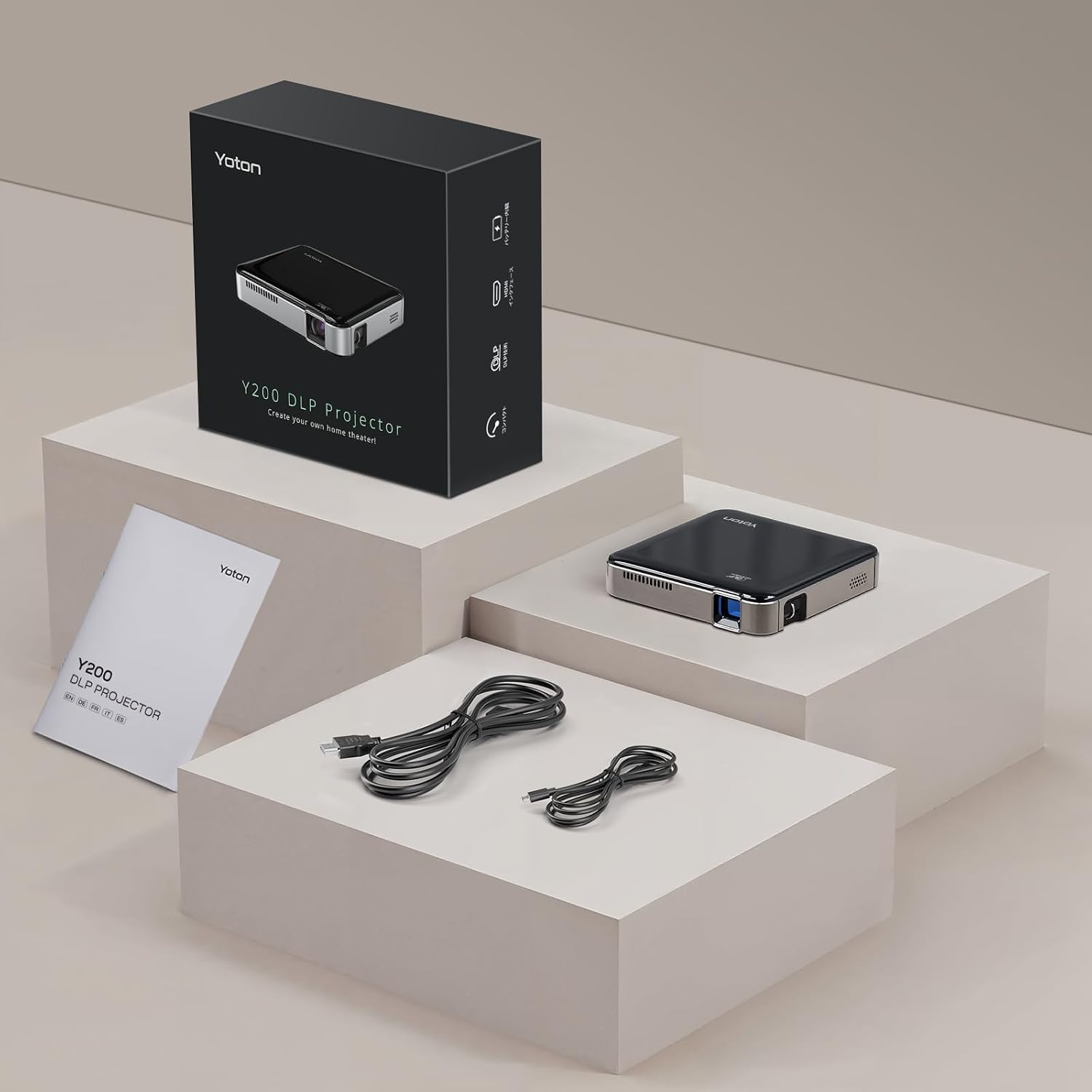
The YOTON Y200 Mini DLP Projector, its packaging, user manual, and included cables.
4. Product Features
4.1. Mini Design & Portability
The Y200 projector is designed for ultimate portability, measuring 9.8cm wide, 9.8cm deep, and 2.15cm high, with a weight of only 0.2kg. Its palm-sized form factor makes it easy to carry for various uses, including home entertainment, outdoor activities, camping, or business trips.

The YOTON Y200 projector's ultra-compact size, easily fitting into a bag.
4.2. Advanced DLP Technology
Utilizing advanced DLP (Digital Light Processing) technology, the Y200 projector delivers higher contrast, resulting in deeper blacks and brighter whites. This technology enhances image detail, particularly in dark scenes, providing richer and more layered visuals.

An exploded view of the YOTON Y200 projector, highlighting its DLP technology components.
4.3. Clear Image & Flexible Projection
The YOTON Y200 DLP projector supports 1080p HD resolution, ensuring clear and detailed images. It features a minimum projection distance of 0.15m, with a recommended range between 0.8m and 2.6m. The minimum supported projection area is approximately 5 inches, making it adaptable for various room sizes and even as a drawing tool.

The YOTON Y200 projector can achieve a maximum projection size of 200 inches, offering a large viewing experience.
4.4. Built-in High-Capacity Battery
Equipped with a 3400mAh high-capacity battery, the projector allows for extended playback without constant power connection. This feature ensures long-lasting entertainment for movie nights or outdoor gatherings.

The YOTON Y200 projector features a built-in 3400mAh battery for extended use.
4.5. Quiet Operation
The Y200 operates with minimal noise, ensuring an undisturbed viewing experience. This allows users to fully immerse themselves in movies, presentations, or games without distraction from fan noise.

The YOTON Y200 projector provides a quiet viewing environment, allowing for full immersion.
4.6. Dustproof Technology
The projector features a fully sealed enclosure that helps prevent dust from entering the device. This design minimizes the occurrence of black spots on the projection, contributing to a longer lifespan and consistent image quality.

The YOTON Y200 projector's dustproof design ensures a clear image and extended lifespan.
4.7. High Compatibility
The Y200 projector offers broad compatibility with various devices via its HDMI port. It can connect to gaming consoles like PS5 and Nintendo Switch, streaming devices such as TV sticks and TV boxes, and other media sources like tablets. The USB port is for charging only.

The YOTON Y200 projector offers high compatibility with various input devices.
5. Setup Guide
5.1. Powering On/Off
- Power On: Connect the projector to a power source using the provided adapter, or ensure the built-in battery is charged. Press and hold the power button on the projector or remote control until the indicator light turns on and the projection appears.
- Power Off: Press and hold the power button until the projector shuts down. Disconnect from the power source if not in use for an extended period.
5.2. Placement and Projection Distance
Position the projector on a stable, flat surface. For optimal image quality, ensure the projection surface is smooth and light-colored. The minimum projection distance is 0.15 meters. The recommended projection distance for a balanced image size and clarity is between 0.8 and 2.6 meters.
5.3. Focus Adjustment
Locate the focus ring or adjustment mechanism on the projector. Rotate it slowly until the projected image appears sharp and clear on the screen or wall.
5.4. Connecting External Devices
The YOTON Y200 supports HDMI input for connecting various devices:
- HDMI: Use an HDMI cable to connect your device (e.g., laptop, gaming console, TV stick) to the HDMI port on the projector. Select the HDMI input source from the projector's menu.
- USB: The USB port on the Y200 is primarily for charging purposes. It does not support direct media playback from USB drives.
6. Operating Instructions
6.1. Input Source Selection
After connecting your external device, use the remote control or the projector's control panel to navigate to the input source menu. Select the appropriate input (e.g., HDMI) to display content from your connected device.
6.2. Screen Mirroring / Casting
The YOTON Y200 supports screen mirroring or casting from compatible devices. However, due to HDCP (High-bandwidth Digital Content Protection) restrictions, streaming platforms like Netflix or Amazon Prime Video do not support direct screen mirroring from mobile phones. To watch content from these platforms, connect a streaming device (e.g., Fire Stick, Chromecast) via the HDMI port.
YouTube content is generally not affected by HDCP restrictions and can often be mirrored directly.
6.3. Audio Output
The projector has a built-in speaker for audio output. If you prefer external audio, connect external speakers or headphones to the projector's audio output port (if available, refer to specifications for port details).
7. Maintenance
7.1. Cleaning the Lens
Use a soft, lint-free cloth specifically designed for optical lenses to gently wipe the projector lens. Avoid using abrasive materials or harsh chemicals, as these can scratch or damage the lens coating.
7.2. Cleaning the Exterior
Wipe the exterior of the projector with a soft, dry cloth. For stubborn marks, a slightly damp cloth can be used, followed by a dry cloth. Ensure no liquid enters the projector's vents or ports.
7.3. Storage
When not in use, store the projector in a cool, dry place away from direct sunlight and extreme temperatures. If storing for an extended period, consider placing it in its original packaging or a protective case to prevent dust accumulation and damage.
8. Troubleshooting
8.1. No Image or "No Signal" Message
- Ensure the projector is powered on and the input source is correctly selected (e.g., HDMI).
- Check that the HDMI cable is securely connected to both the projector and the source device.
- Verify that the source device (e.g., laptop, game console) is powered on and outputting a signal.
8.2. Cannot Cast Netflix/Amazon Prime from Mobile Phone
Due to HDCP (High-bandwidth Digital Content Protection) restrictions, platforms like Netflix or Amazon Prime Video do not support direct screen mirroring from mobile devices. To view content from these services, connect a dedicated streaming device (such as a Fire TV Stick or Chromecast) to the projector via the HDMI port.
8.3. No Sound from Projector
- Check the volume level on both the projector and the source device.
- Ensure that the video content does not use Dolby Audio, as the YOTON Y200 projector may not support this format.
- If playing USB videos, verify that the file format is compatible with the projector's audio codecs.
- If external speakers are connected, ensure they are properly connected and powered on.
8.4. Image is Blurry
- Adjust the focus ring on the projector until the image becomes clear.
- Ensure the projector is placed within the recommended projection distance (0.8m to 2.6m).
- Check if the lens is clean and free from dust or smudges.
9. Specifications
| Feature | Detail |
|---|---|
| Brand | YOTON |
| Model Number | Y200 |
| Display Technology | DLP |
| Native Resolution | 1920 x 1080 (1080p HD) |
| Maximum Screen Resolution | 1920 x 1080 |
| Brightness | 150 ANSI Lumens |
| Contrast Ratio | 2000:1 |
| Product Dimensions (L x W x H) | 9.8 x 9.8 x 2.2 cm |
| Item Weight | 100 Grams |
| Battery | 3400mAh Lithium-polymer (included) |
| Connectivity Technology | HDMI |
| Compatible Devices | PS5, TV Stick, TV Box, Switch, Tablets, iPhone, Android Phone (with WiFi adapter) |
| Minimum Projection Distance | 0.15 meters |
| Recommended Projection Distance | 0.8 - 2.6 meters |
| Maximum Projection Distance | 260 Centimeters |
| Minimum Image Size | 5 inches |
| Video Encoding | H.264, H.265 |
| Special Features | DLP Technology, Dustproof, Portable |
10. Warranty and Support
10.1. Warranty Information
The YOTON Y200 Mini DLP Projector comes with a 3-year warranty. This warranty covers manufacturing defects and ensures product reliability. Please retain your proof of purchase for warranty claims.
10.2. Customer Support
YOTON is committed to optimizing product quality and continuously improving the user experience. If you encounter any issues during use, please do not hesitate to contact our customer support team. We aim to provide service within 24 hours.
For support, please contact us at: support@yoton.co
Please include your order number and a description of the issue for prompt assistance. Our team will work with you to find a solution, even beyond Amazon's 30-day return period.

YOTON offers reliable warranty, quick response, and flexible return/replacement options.