Introduction
Thank you for choosing the Kruger&Matz KM2012 1-DIN Car Radio. This manual provides essential information for the proper installation, operation, and maintenance of your new car radio. Please read this manual thoroughly before using the device to ensure optimal performance and safety.
The KM2012 is designed to enhance your in-car audio experience with its versatile multimedia playback, Bluetooth connectivity, and user-friendly interface. Its 4-inch display and customizable RGB backlight offer a modern and functional design.
Package Contents
Please check the box for the following items:
- Main Unit (Kruger&Matz KM2012 Car Radio)
- Power Harness
- Mounting Sleeve (Half Pocket)
- Mounting Accessories (Keys/Brackets)

Image: Contents of the Kruger&Matz KM2012 package, showing the main unit, power harness, mounting sleeve, and mounting keys.
Safety Information
To ensure safe operation and prevent damage, please observe the following precautions:
- Do not operate the device in a manner that distracts you from driving. Always prioritize road safety.
- Ensure proper ventilation around the unit to prevent overheating.
- Do not expose the unit to moisture, rain, or extreme temperatures.
- Only use the specified power supply (10.8 - 14.4 V DC).
- Consult a qualified technician for installation if you are unsure about the wiring or mounting process.
- Keep the volume at a level that allows you to hear external traffic sounds.
Setup and Installation
Wiring Diagram
Before installation, ensure the vehicle's battery is disconnected. Refer to the diagram below for proper wiring connections. Incorrect wiring can cause damage to the unit or vehicle's electrical system.
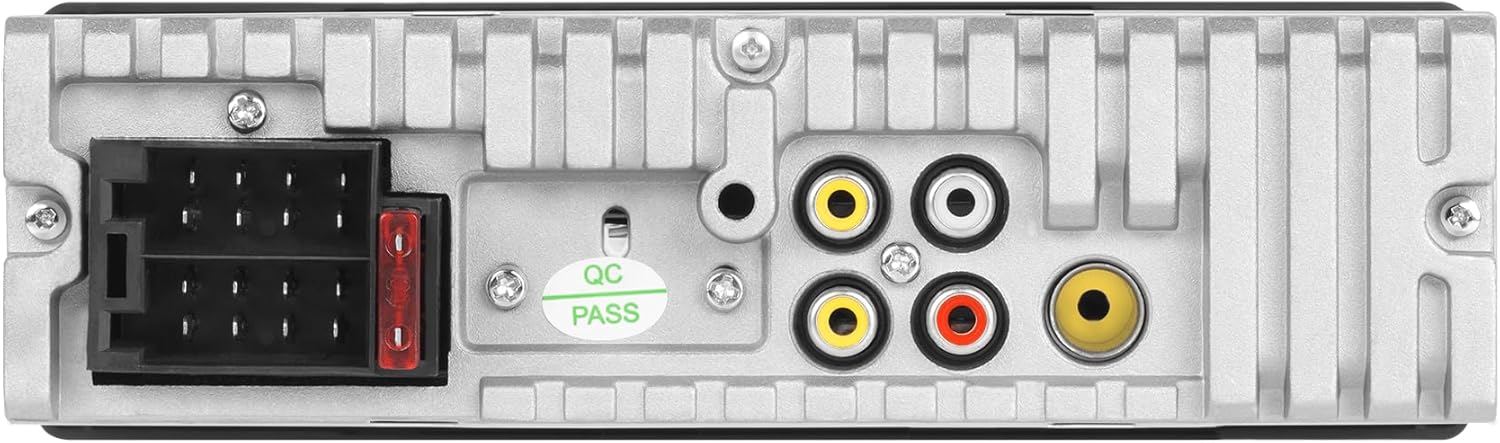
Image: Rear panel of the KM2012 car radio, illustrating the ISO power connector, RCA audio outputs, and antenna input for wiring reference.
Key Connections:
- ISO Connector: Standard connection for power (constant 12V, ignition 12V, ground) and speaker outputs.
- RCA Outputs: For connecting external amplifiers.
- Rear Camera Input: Connect a compatible rear-view camera for automatic display when reversing.
- Antenna Input: Connect your vehicle's radio antenna.
Mounting the Unit
The KM2012 is a 1-DIN size unit. Use the provided mounting sleeve and accessories for secure installation in your vehicle's dashboard.
- Insert the mounting sleeve into the dashboard opening until it locks into place.
- Connect all necessary wiring harnesses to the rear of the car radio.
- Carefully slide the car radio into the mounting sleeve until it clicks securely.
- Attach the trim frame around the unit for a finished look.
Operating Instructions
Front Panel Overview
Familiarize yourself with the buttons and controls on the front panel:

Image: Front view of the KM2012 car radio, highlighting the 4-inch display, rotary volume knob, mode button, mute button, and various function buttons for media control and radio tuning.
- Power/Volume Knob: Press to turn on/off, rotate to adjust volume.
- MODE Button: Cycles through input sources (Radio, USB, MicroSD, AUX, Bluetooth).
- MUTE Button: Mutes/unmutes audio output.
- BND/AMS Button: In radio mode, selects FM/AM bands; long press for automatic station search.
- Navigation Buttons (◀◀ / ►►): Skips tracks/stations.
- USB Port: For USB flash drives.
- MicroSD Slot: For microSD cards.
- AUX Input: 3.5mm jack for external audio devices.
Radio Tuner Operation
- Selecting Band: Press the BND/AMS button to switch between FM1, FM2, FM3, and AM1, AM2.
- Automatic Search: Long press the BND/AMS button to automatically scan and store strong stations.
- Manual Search: Use the navigation buttons (◀◀ / ►►) to manually tune frequencies.
- RDS Functions (AF/TA/PTY): Access these functions via the display menu for alternative frequencies, traffic announcements, and program type search.
Media Playback (USB, MicroSD, AUX)
- USB/MicroSD: Insert a USB drive or microSD card into the respective slot. The unit will automatically switch to USB/SD mode and begin playback of compatible audio/video/image files.
- Supported Formats: Audio (MP3, WMA, OGG, FLAC), Video (MP4, AVI, WMA), Images (JPG, PNG).
- AUX Input: Connect an external audio device (e.g., smartphone, MP3 player) to the 3.5mm AUX jack. Press the MODE button to select AUX input.
Bluetooth Connectivity
The KM2012 supports Bluetooth 4.0 for wireless audio streaming and hands-free calling.
- Pairing: Ensure Bluetooth is enabled on your mobile device. Select "KM2012" from the list of available devices. No password is typically required.
- Hands-Free Calling: Once paired, you can make and receive calls directly through the car radio. The built-in microphone ensures clear communication.
- Audio Streaming: Play music from your paired device wirelessly. Use the radio's controls to play/pause, skip tracks.
Equalizer Settings
Adjust the audio output to your preference using the equalizer settings:
- Access the equalizer menu via the display.
- Choose from preset modes: Pop, Rock, Classic, Jazz, or customize your own User settings.
Display Settings
The 4-inch display's brightness can be adjusted for optimal visibility in various lighting conditions. Navigate to the display settings menu to modify brightness levels.
Remote Control Usage
The included remote control provides convenient access to various functions from a distance.

Image: The remote control for the KM2012 car radio, featuring buttons for power, volume, mode selection, track navigation, radio presets, and equalizer settings.
Refer to the remote control's button labels for specific functions, including power, volume, mode selection, track skipping, and radio tuning.
Maintenance
To keep your KM2012 car radio in optimal condition:
- Clean the front panel and display with a soft, dry cloth. Do not use abrasive cleaners or solvents.
- Ensure no liquids enter the unit.
- Avoid exposing the unit to direct sunlight or extreme heat for prolonged periods.
Troubleshooting
If you encounter issues with your KM2012, refer to the table below for common problems and solutions:
| Problem | Possible Cause | Solution |
|---|---|---|
| No power | Incorrect wiring; Blown fuse; Vehicle battery low | Check wiring connections; Replace fuse (if applicable, <10A); Check vehicle battery. |
| No sound | Volume too low; Mute activated; Speaker wiring issue | Increase volume; Deactivate mute; Check speaker connections. |
| Bluetooth not connecting | Bluetooth not enabled on device; Device too far; Interference | Ensure Bluetooth is on; Bring device closer; Restart both devices. |
| USB/MicroSD not playing | Unsupported file format; Corrupted media; Incorrectly inserted | Check file formats; Try another USB/MicroSD; Reinsert media correctly. |
| Poor radio reception | Antenna not connected; Weak signal area; Interference | Check antenna connection; Move to an area with better signal; Check for external interference. |
If the problem persists after trying these solutions, please contact customer support.
Specifications
| Feature | Specification |
|---|---|
| Size | 1 DIN |
| Display Size | 4 inches |
| Display Resolution | 480 x 800 Pixels |
| Aspect Ratio | 16:9 |
| Backlight Color | RGB |
| Max Power Output | 4 x 25 W |
| Effective Power Output | 4 x 10 W |
| SNR (Signal-to-Noise Ratio) | 43 dB |
| Power Supply | 10.8 - 14.4 V DC |
| Impedance | 4 ohms |
| Fuse | <10 A |
| Mounting Depth | 12 cm |
| Bluetooth Version | 4.0 |
| FM Frequency Range | 87.5 - 108 MHz |
| FM Channel Memory | 18 |
| AM Channel Memory | 12 |
| Operating Temperature | -20 °C to 70 °C |
| Operating Humidity | <80% |
Warranty and Support
This product is covered by a manufacturer's warranty. Please refer to the warranty card included in your package for specific terms and conditions. For technical support, service, or warranty claims, please contact your retailer or the official Krüger&Matz customer service.
Keep your purchase receipt as proof of purchase for any warranty-related inquiries.


