
Introduction
This manual provides detailed instructions for the assembly, operation, maintenance, and troubleshooting of your Aheaplus L Shaped Gaming Desk with Power Outlets and LED Lights. Please read this manual thoroughly before assembly and use to ensure proper function and longevity of your product.
Setup and Assembly
Your Aheaplus L Shaped Gaming Desk is designed for straightforward assembly. All necessary hardware and tools are included, and all parts are clearly labeled to facilitate the process. Assembly is recommended for one person.
Assembly Steps:
- Unpack Components: Carefully remove all parts from the packaging and verify against the included parts list.
- Frame Assembly: Assemble the metal frame components according to the diagrams provided in the instruction booklet. Ensure all screws are tightened securely.
- Desktop Installation: Attach the engineered wood desktop panels to the assembled frame. Note that the L-shaped design is reversible, allowing you to configure the longer section to either the left or right side to best suit your space.
- Shelf and Hutch Attachment: Install the 4-tier open shelves and the top hutch. The monitor stand is movable and can be positioned for optimal viewing and ergonomic posture.
- Accessory Installation: Attach the storage bag and headphone hook to the desired locations on the desk frame.
- Power Outlet Unit: Secure the built-in power outlet unit to the designated area on the desktop.
- LED Light Strip: Apply the LED light strip to the underside of the hutch or desktop as instructed. Ensure the adhesive is firm, and use any provided clips for additional security.
- Final Adjustments: Adjust the leg pads to ensure stability on uneven floors.

Figure 1: The desk offers a reversible L-shape configuration, allowing the longer section to be set up on either the left or right side. Dimensions are indicated for various parts of the desk.

Figure 2: Visual representation of the desk's reversible design, illustrating how the L-shape can be assembled to face left or right.
Operating Instructions
Power Outlets and USB Charging Ports:
The desk is equipped with a built-in power strip featuring 3 standard AC outlets (120V/12A) and 2 USB charging ports (5V/2A). This allows you to conveniently power and charge up to 5 devices simultaneously, such as your computer, smartphone, and gaming accessories. The power cord is 6.5 feet long.

Figure 3: Integrated power strip with 3 AC outlets and 2 USB ports for convenient device charging and power.
Smart LED Lights:
Enhance your gaming or working environment with the integrated LED light strip. This system offers over 60,000 colors and multiple flashing modes. Control the lights via a dedicated mobile application, which also provides timing mode and music sync functionalities for an immersive experience.

Figure 4: The desk's LED lighting system creating an ambient glow, with a smartphone displaying the control app interface.
Ergonomic Monitor Stand:
The desk includes a movable monitor stand designed to elevate your display to an ergonomic height. This helps maintain proper sitting posture and supports cervical and spinal health during extended use.
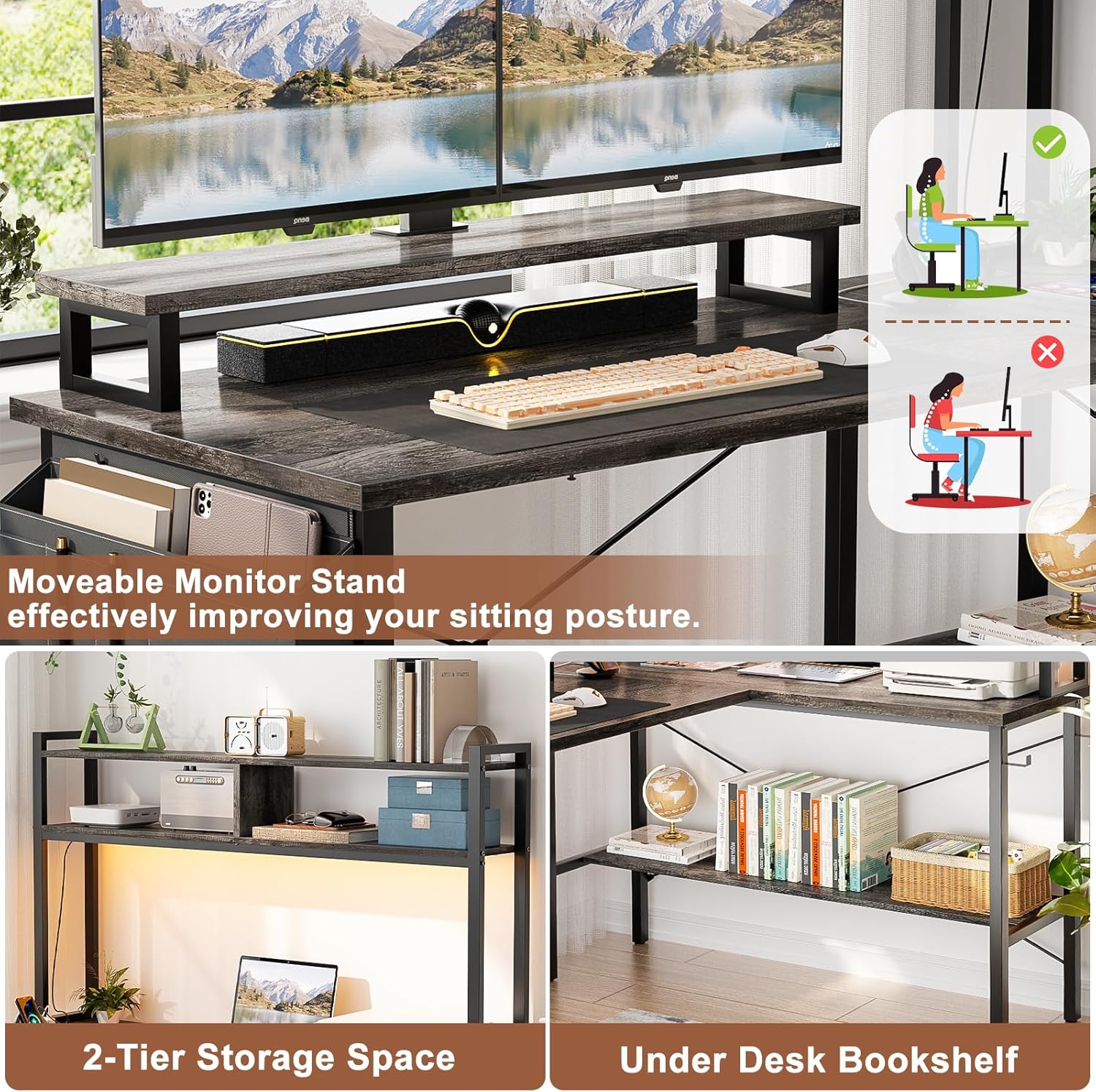
Figure 5: The movable monitor stand helps achieve an ergonomic setup, promoting better posture as illustrated.
Storage Features:
The desk provides ample storage with four tiers of open shelves, an extra storage bag, and a headphone hook. These features help keep your workspace organized and clutter-free.

Figure 6: The desk's integrated storage solutions, including adjustable shelves, a storage bag, and a headphone hook, for an organized workspace.
Maintenance
To maintain the appearance and longevity of your Aheaplus L Shaped Gaming Desk, regularly wipe all surfaces with a dry cloth. Avoid using harsh chemicals or abrasive cleaners, as these may damage the finish. Ensure all connections and screws remain tight to maintain stability.
Troubleshooting
- Desk Wobbles:
Ensure all assembly screws are fully tightened. Use the adjustable leg pads at the bottom of the desk legs to level the desk on uneven surfaces. Verify that the X-cross bars are correctly installed and secured, as they contribute to stability.
- LED Lights Not Functioning:
Check if the LED strip is properly connected to its power source and the control unit. Ensure the power outlet is active. If using the app, verify Bluetooth connectivity. If the adhesive for the LED strip is failing, re-secure it with additional clips or a stronger adhesive if necessary.
- Power Outlets/USB Ports Not Working:
Confirm the desk's main power cord is securely plugged into a functional wall outlet. Check for any tripped circuit breakers. Ensure devices are correctly plugged into the outlets/ports. If issues persist, contact customer support.
- Monitor Stand Slides:
The monitor stand is designed to be movable. If unwanted sliding occurs, consider placing anti-slip pads underneath its feet to provide additional grip on the desktop surface.
Specifications
| Brand | Aheaplus |
| Model | 49Inch L Shaped Gaming Desk |
| Shape | L-Shape |
| Product Dimensions (D x W x H) | 18.9"D x 48.82"W x 59.13"H |
| Color | Black Oak |
| Top Material Type | Engineered Wood |
| Base Material | Metal |
| Special Features | Built-In USB Outlet, LED Lights, Reversible Design, Storage Bag, Headphone Hook, Movable Monitor Stand |
| Power Outlets | 3 AC Outlets (120V/12A) |
| USB Charging Ports | 2 USB Ports (5V/2A) |
| Power Cord Length | 6.5 FT |
| Number of Shelves | 4 (Open Shelves) |
| Item Weight | 20.71 kg |
| Recommended Assembly Persons | 1 |
Warranty and Support
Your Aheaplus L Shaped Gaming Desk comes with a limited warranty. For specific details regarding the warranty coverage, please refer to the documentation included with your purchase or contact Aheaplus customer service.
Aheaplus provides lifetime customer support. Should you encounter any issues or have questions before or after your purchase, our experienced customer service team is available to assist you. We aim to respond to all inquiries within 24 hours.
For support, please visit the Aheaplus Store on Amazon or contact us through the platform where you made your purchase.