
1. Important Safety Information
Please read and understand all safety instructions before assembling or using this product. Failure to follow these instructions may result in injury or damage to the product.
- Always follow the assembly instructions carefully.
- Keep electrical components away from water and moisture.
- Do not overload the power outlet or USB ports. The power outlet features 3 AC outlets (120V/12A) and 2 USB ports (5V/2A).
- Always unplug the desk from the power source when not in use, during cleaning, or when leaving the room for extended periods.
- Ensure all connections are secure before use.
- Place the desk on a flat, stable surface to prevent wobbling or tipping.
- Keep small parts and packaging materials away from children.
2. Product Overview
The Aheaplus Computer Desk is designed for home office, gaming, and study environments, offering a blend of functionality and modern aesthetics. It features ample storage, integrated power, and customizable LED lighting.
Key Features:
- Ample Storage Space: Includes 2 fabric drawers, 1 file drawer, 2-tier under-desk storage shelves, and a printer cabinet.
- Integrated Power Outlet: Features 3 AC outlets and 2 USB ports for convenient charging of up to 5 devices. The charging station is reversible for left or right installation.
- Smart RGB LED Lights: Built-in RGB LED light strip controllable via a smart app, offering over 60,000 colors, multiple dynamic modes, music sync, and a timing function.
- Convertible Design: Reversible setup allows for left or right-corner configuration to adapt to your space.
- Spacious Desktop: Main workstation can accommodate two desktop computers and a notebook.
- Full-Size Monitor Stand: Designed to promote correct posture and reduce neck strain, while also providing additional storage.
- Durable Construction: Crafted from high-quality MDF board and a rugged metal frame.
3. Setup and Assembly
Assembly of the Aheaplus Computer Desk is designed to be straightforward and can typically be completed by one person. All necessary hardware and tools are included, and parts are clearly labeled.
3.1 Before You Begin:
- Unpack all components and verify against the parts list in your included assembly guide.
- Clear a spacious area for assembly.
- Keep the assembly guide handy for reference.
3.2 Assembly Steps:
- Frame Assembly: Begin by assembling the main metal frame components. Ensure all bolts are finger-tight before fully tightening.
- Desktop Installation: Secure the main desktop surface to the assembled frame.
- Monitor Stand Attachment: Attach the full-size monitor stand to the desktop.
- Storage Unit Assembly: Assemble the drawer units, including the fabric drawers and file drawer, and integrate them into the desk structure. The desk features a reversible design, allowing you to configure the storage and main workstation on either the left or right side to best suit your space.
- Power Outlet Installation: Install the recessed power strip. It can be placed on either the left or right side of the desk.
- LED Light Strip Application: Adhere the RGB LED light strip to the designated area, typically under the monitor stand or along the desk edges.
- Final Tightening: Once all components are in place, carefully tighten all screws and bolts. Do not overtighten.

Figure 3.2.1: Desk dimensions and illustration of reversible placement options. The desk measures 59"L x 18.5"W x 34.6"H.

Figure 3.2.2: Close-up of the storage components, including fabric drawers, a file drawer, and an open shelf suitable for a printer.
4. Operating Instructions
4.1 Power Outlet and USB Ports:
The desk includes a recessed power strip with 3 standard AC outlets (120V/12A) and 2 USB charging ports (5V/2A). This allows you to power and charge multiple devices directly from your desk.
- Plug the desk's main power cord into a wall outlet.
- Connect your devices (laptop, phone, gaming console, etc.) to the available AC outlets or USB ports.
- Ensure devices are compatible with the provided voltage and current.

Figure 4.1.1: The recessed power strip, showing 3 AC outlets and 2 USB ports for convenient device charging.
4.2 LED Lights Operation:
The integrated RGB LED light strip enhances your workspace ambiance. Control is managed via a dedicated smart application on your smartphone or tablet.
- Download App: Scan the QR code provided in the separate LED light manual or search for the specified app in your device's app store.
- Connect: Follow the in-app instructions to connect your device to the desk's LED light system via Bluetooth.
- Control Features:
- Color Selection: Choose from over 60,000 colors.
- Dynamic Modes: Select from various pre-set lighting effects.
- Music Sync: Synchronize the lights with your music's beat.
- Timing Function: Set timers for the lights to turn on or off automatically.

Figure 4.2.1: The desk illuminated by RGB LED lights, highlighting the app control, color options, dynamic modes, music sync, and timing functions.
4.3 Using the Monitor Stand:
The full-size monitor stand is designed to elevate your screen to an ergonomic viewing height, promoting better posture and reducing neck strain during long work or gaming sessions.
- Place your monitor(s) directly on the stand.
- Adjust your chair height to ensure your eyes are level with the top third of your screen.
- Utilize the space underneath the monitor stand for additional storage of small items or to keep your desktop clear.
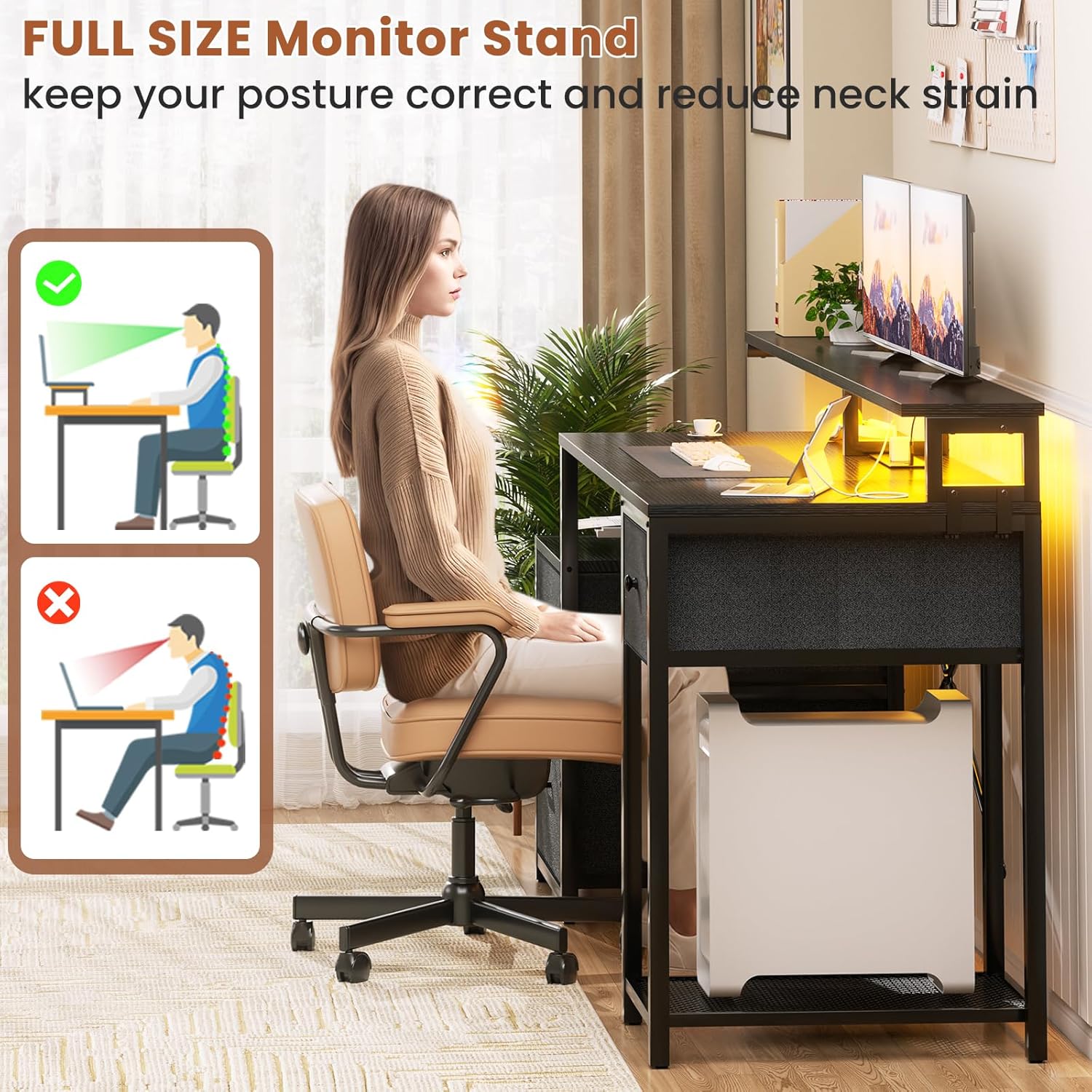
Figure 4.3.1: Illustration demonstrating correct ergonomic posture when using the monitor stand, compared to incorrect posture without it.
5. Maintenance
Proper care and maintenance will extend the life and appearance of your Aheaplus Computer Desk.
- Cleaning Surfaces: Wipe down desktop and metal frame surfaces with a soft, damp cloth. Avoid harsh chemicals or abrasive cleaners that could damage the finish.
- Fabric Drawers: For fabric drawers, spot clean with a mild detergent and water. Allow to air dry completely. Do not machine wash.
- Electrical Components: Ensure the power outlet and LED lights are unplugged before cleaning. Use a dry cloth to wipe dust from electrical components.
- Hardware Check: Periodically check all screws and bolts to ensure they remain tight. Retighten as necessary to maintain stability.
- Avoid Overloading: Do not place excessive weight on the desk or shelves beyond their intended capacity.
6. Troubleshooting
This section addresses common issues you might encounter with your Aheaplus Computer Desk.
| Problem | Possible Cause | Solution |
|---|---|---|
| Desk is wobbly after assembly. | Loose screws or uneven floor. | Ensure all assembly screws are fully tightened. Adjust the leveling feet on the desk legs if your floor is uneven. |
| Power outlets/USB ports are not working. | Desk not plugged in, power strip switch off, or overloaded circuit. | Verify the desk's main power cord is securely plugged into a functional wall outlet. Check if the power strip has an on/off switch and ensure it's on. Unplug some devices if the circuit is overloaded. |
| LED lights are not turning on or responding to the app. | Loose connection, app not connected, or power issue. | Check the power connection for the LED strip. Ensure Bluetooth is enabled on your device and the app is properly connected to the lights. Restart the app and try reconnecting. |
| Drawers do not slide smoothly. | Incorrect installation of drawer slides or obstruction. | Review assembly instructions for drawer slide orientation. Check for any obstructions in the drawer tracks. |
7. Specifications
| Feature | Detail |
|---|---|
| Brand | Aheaplus |
| Model Number | Aheaplus-3D |
| Product Dimensions (L x W x H) | 59" x 18.5" x 34.6" (18.5"D x 59"W x 34.6"H) |
| Item Weight | 20.16 Kilograms |
| Material Type | Engineered Wood (Top), Metal (Base/Frame) |
| Color | Black |
| Number of Drawers | 3 (2 fabric, 1 file) |
| Number of Shelves | 2 (under-desk storage) |
| Power Outlet | 3 AC Outlets (120V/12A), 2 USB Ports (5V/2A), 6.5ft Power Cord |
| LED Lights | RGB, App Control, 60,000+ Colors, Multiple Modes, Music Sync, Timing Function |
| Special Features | Built-In USB Outlet, LED Lights, File Drawer, Reversible Design, Monitor Shelf |
| Assembly Required | Yes (Tools included, recommended 1 person) |
| Room Type | Home, Office, Living Room, Bedroom, Gaming Room |
8. Warranty and Support
This Aheaplus product comes with a Limited Warranty. Please refer to the warranty card included in your packaging for specific terms and conditions.
If you encounter any issues during assembly or use, or if your item arrives damaged, scratched, or with missing parts, please contact Aheaplus customer support for assistance.
- Customer Support: For support inquiries, please visit the Aheaplus store on Amazon or refer to the contact information provided in your product packaging.
- Online Resources: Additional support and FAQs may be available on the official Aheaplus website.
