
1. Introduction
The Trust Gaming GXT 929 Helox is an ultralight wireless gaming mouse designed for precision and extended gaming sessions. Featuring a lightweight 75g design, up to 80 hours of battery life, adjustable DPI settings, and multicolour LED lighting, it offers a responsive and comfortable gaming experience.

Figure 1: Top view of the Trust Gaming GXT 929 Helox Wireless Gaming Mouse.
Key Features:
- Ultralight Design: Weighs only 75 grams for swift and precise movements.
- Wireless Connectivity: Low-latency 2.4 GHz micro-USB receiver for seamless gameplay.
- Extended Battery Life: Up to 80 hours of continuous use on a single charge.
- Adjustable DPI: Sensitivity settings from 800 to 4800 DPI.
- Programmable Buttons: Six customizable buttons for enhanced control.
- Multicolour LED Lighting: Customizable lighting effects to personalize your setup.
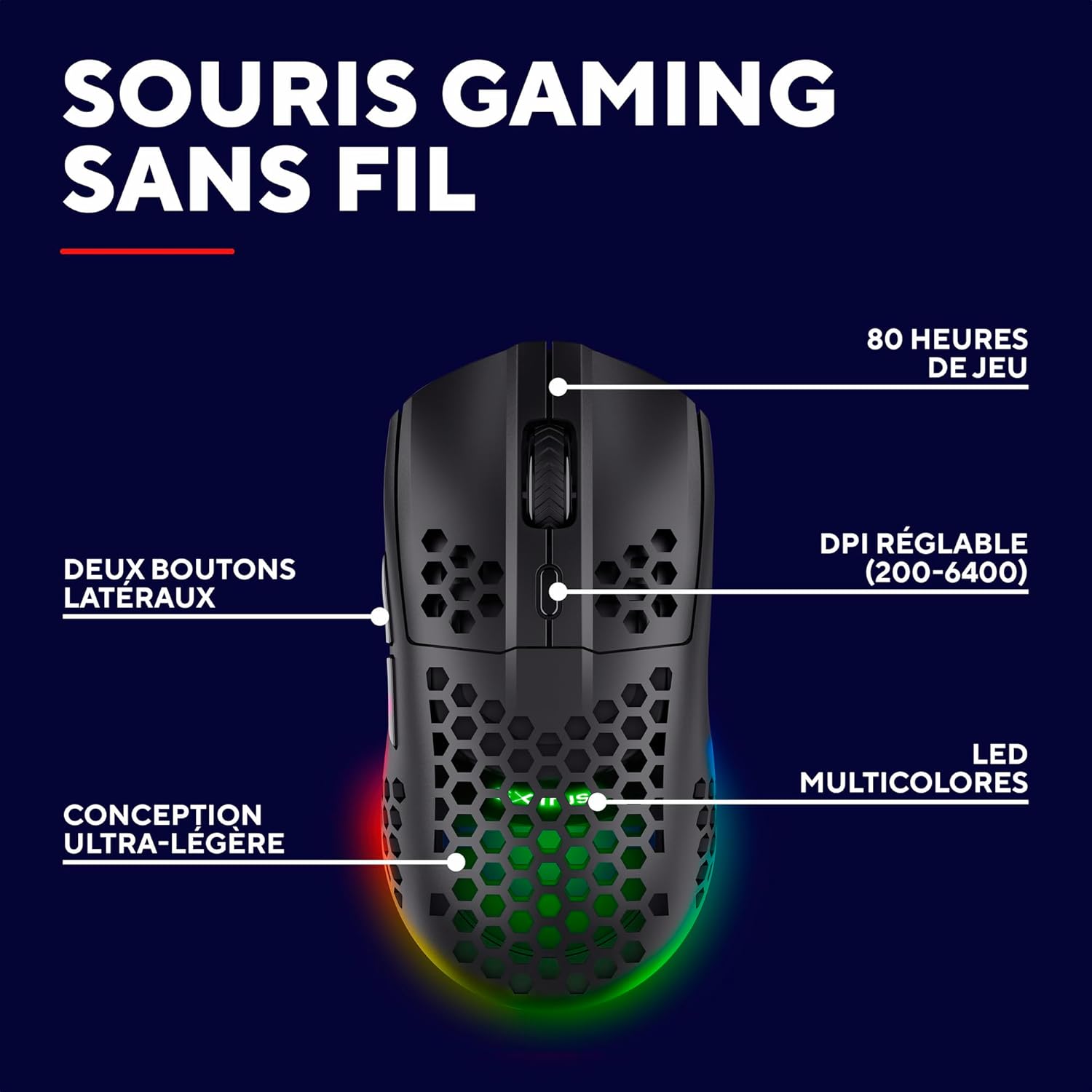
Figure 2: Overview of the mouse's key features including battery life, DPI, and LED.
2. Package Contents
Ensure all items are present in the package:
- Trust Gaming GXT 929 Helox Wireless Gaming Mouse
- 2.4 GHz Micro-USB Receiver
- USB-C Charging Cable
- User Manual (this document)
3. Setup Instructions
3.1 Connecting the Mouse
- Locate the 2.4 GHz micro-USB receiver. It is typically stored in a compartment on the underside of the mouse.
- Insert the micro-USB receiver into an available USB-A port on your computer.
- Turn on the mouse using the power switch located on the underside. The mouse should automatically connect to the receiver.
- Your computer should recognize the mouse and install necessary drivers automatically.

Figure 3: Demonstrating the wireless connection of the mouse.
3.2 Charging the Mouse
The mouse features a rechargeable battery. When the battery is low, the LED indicator may change or flash.
- Connect the supplied USB-C charging cable to the USB-C port on the front of the mouse.
- Connect the other end of the USB-C cable to a USB power source (e.g., computer USB port, USB wall adapter).
- The LED lighting on the mouse will indicate charging status. Once fully charged, the LED indicator will change or turn off.
- A full charge provides up to 80 hours of usage.

Figure 4: USB-C charging port and power switch on the mouse.
4. Operating the Mouse
4.1 DPI Adjustment
The mouse allows for on-the-fly DPI (Dots Per Inch) adjustment, enabling you to change cursor sensitivity to match your gaming style or task. The DPI range is 800-4800.
- Press the DPI button (usually located behind the scroll wheel) to cycle through the available DPI settings.
- Each DPI level may correspond to a different LED colour or flash pattern for visual feedback.
4.2 Programmable Buttons
The GXT 929 Helox features six programmable buttons. These buttons can be customized using the dedicated Trust Gaming software (available for download from the official Trust Gaming website) to assign macros, keyboard functions, or other commands.
- Install the Trust Gaming software on your PC.
- Open the software to access button customization options.
- Assign desired functions to each of the six programmable buttons.
4.3 LED Lighting
The mouse features dynamic multicolour LED lighting. You can customize the lighting effects, colours, and brightness through the Trust Gaming software.

Figure 5: The mouse showcasing its multicolour LED lighting.
5. Maintenance
5.1 Cleaning
To maintain optimal performance and appearance, clean your mouse regularly.
- Disconnect the mouse from your computer before cleaning.
- Use a soft, dry, lint-free cloth to wipe the surface of the mouse.
- For stubborn dirt, slightly dampen the cloth with water or a mild cleaning solution. Avoid harsh chemicals.
- Use compressed air to clear dust from crevices and the optical sensor.
5.2 Battery Care
To prolong the life of the integrated Lithium-ion battery:
- Avoid fully discharging the battery frequently.
- Store the mouse in a cool, dry place when not in use for extended periods.
- Do not expose the mouse to extreme temperatures.
6. Troubleshooting
6.1 Connectivity Issues
- Mouse not responding: Ensure the mouse is turned on and the USB receiver is securely plugged into a working USB port. Try a different USB port.
- Intermittent connection: Ensure there are no significant obstructions between the mouse and the receiver. Keep the receiver within a 10-meter range. Other 2.4 GHz devices might cause interference; try moving them further away.
- Lag or delay: Ensure the mouse is fully charged. Low battery can affect performance.
6.2 Charging Problems
- Mouse not charging: Verify that the USB-C cable is properly connected to both the mouse and the power source. Try a different USB-C cable or power source.
- LED indicator not showing charge: Ensure the mouse is powered on while charging, or refer to the software for battery status.
6.3 Performance Issues
- Inaccurate tracking: Clean the optical sensor on the underside of the mouse. Ensure you are using the mouse on a suitable surface (a mouse pad is recommended).
- Buttons not working: Check the button assignments in the Trust Gaming software. Ensure no software conflicts are present.
7. Technical Specifications
| Feature | Specification |
|---|---|
| Model Name | GXT 929 Helox |
| Model Number | 25307 |
| Connectivity | 2.4 GHz Wireless (Radio-frequency), USB (for charging) |
| DPI Range | 800 - 4800 DPI (Adjustable) |
| Number of Buttons | 6 (Programmable) |
| Weight | 75g (Ultralight Design) |
| Battery Life | Up to 80 hours |
| Battery Type | Lithium-ion (Lithium-cobalt composition) |
| LED Lighting | Multicolour LED |
| Compatible Operating Systems | Windows 10, Windows 11 |
| Recommended Use | Gaming |
| Hand Orientation | Right |
| Manufacturer | Trust |
| Country of Origin | China |
8. Warranty and Support
8.1 Warranty Information
The Trust Gaming GXT 929 Helox Wireless Gaming Mouse comes with a 2-year manufacturer's warranty. This warranty covers defects in materials and workmanship under normal use. Please retain your proof of purchase for warranty claims.
8.2 Customer Support
For technical assistance, troubleshooting, or warranty inquiries, please visit the official Trust Gaming support website or contact their customer service. You can find more information and contact details at www.trust.com/support.