
1. Introduction
This manual provides essential instructions for setting up, operating, and maintaining your FOSSiBOT F109 rugged smartphone. Please read this manual carefully before using your device to ensure proper function and longevity.
The FOSSiBOT F109 is designed for durability and performance, featuring a powerful 5G MTK Dimensity 6300+ processor, a large 10600mAh battery, and a robust construction with IP68, IP69K, and MIL-STD-810H ratings for water, dust, and drop resistance.
2. Device Overview
Familiarize yourself with the physical components of your FOSSiBOT F109 smartphone.
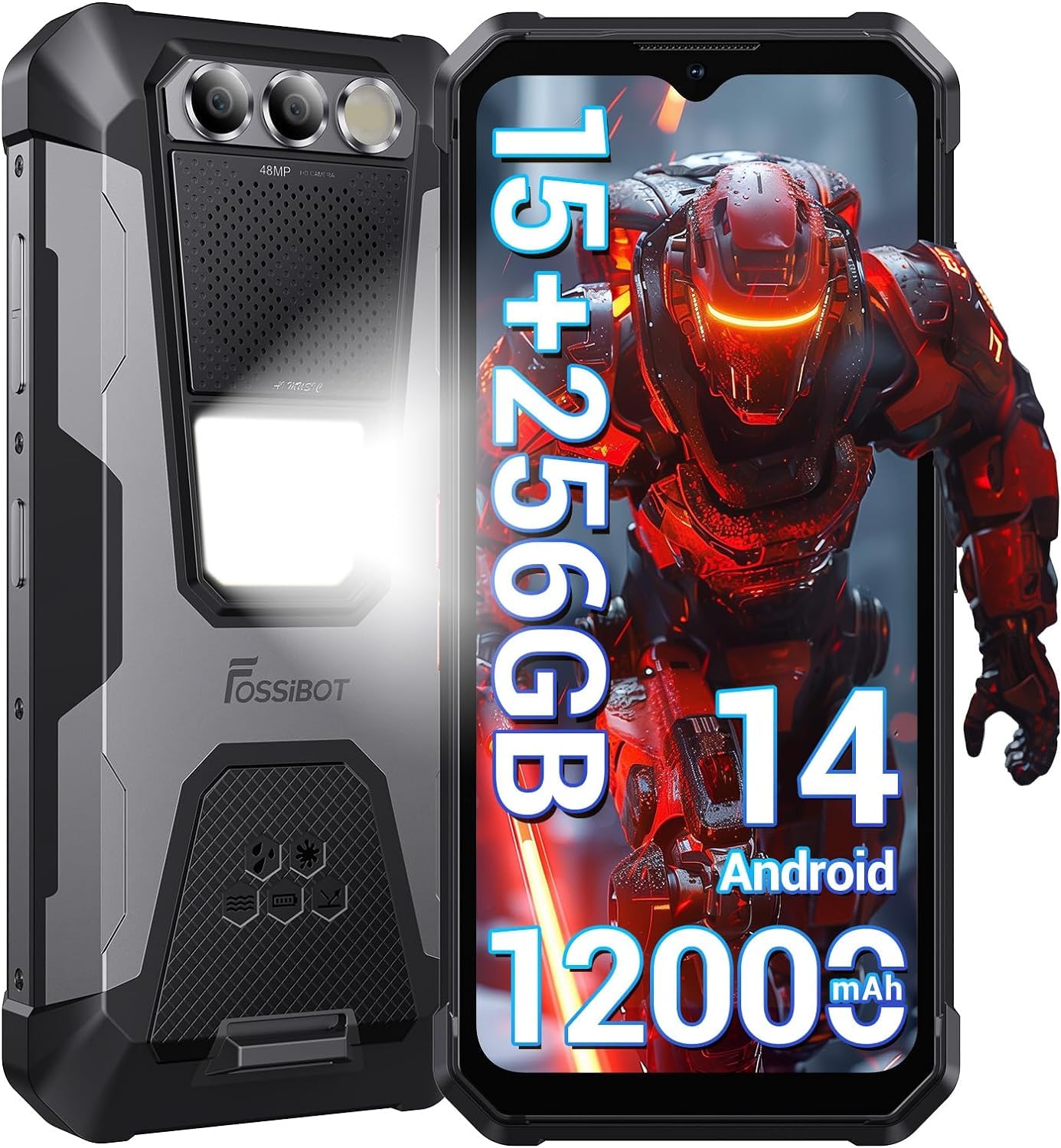
Figure 2.1: Front and back view of the FOSSiBOT F109 rugged smartphone, highlighting its robust design.

Figure 2.2: Side view of the FOSSiBOT F109, showing power button, volume rocker, and USB-C port.
3. Setup
3.1. Inserting SIM Cards and MicroSD Card
The FOSSiBOT F109 supports Dual SIM cards and expandable storage via a MicroSD card (up to 2TB).
- Locate the SIM card tray on the side of the device.
- Use the provided SIM ejector tool to open the tray.
- Carefully place your Nano SIM cards and/or MicroSD card into the designated slots. Ensure the gold contacts face downwards.
- Gently push the tray back into the device until it clicks into place. Ensure the tray is fully sealed to maintain water and dust resistance.
3.2. Initial Power On and Basic Setup
- Press and hold the Power button until the FOSSiBOT logo appears.
- Follow the on-screen prompts to select your language, connect to a Wi-Fi network, and set up your Google account.
3.3. Charging the Device
The FOSSiBOT F109 is equipped with a 10600mAh battery and supports 18W fast charging.
- Connect the USB Type-C cable to the phone's charging port.
- Connect the other end of the cable to the provided power adapter and plug it into a wall outlet.
- The charging indicator will appear on the screen.

Figure 3.1: Illustration of the FOSSiBOT F109's large battery capacity and fast charging capability. Note: Product specifications state 10600mAh battery and 18W charging.

Figure 3.2: Visual representation of battery life for various activities and OTG reverse charging feature.
3.4. Security Features (Fingerprint & Face ID)
Enhance your device security with fingerprint and face recognition.
- Go to Settings > Security & privacy.
- Select Fingerprint Unlock or Face Unlock and follow the on-screen instructions to register your fingerprint or face.

Figure 3.3: Depiction of the FOSSiBOT F109's advanced GPS navigation, Face ID, and fingerprint unlock features.
4. Operating Your Smartphone
4.1. Android 14 Operating System
Your FOSSiBOT F109 runs on Android 14, offering enhanced privacy protection, better personalization options, and full access to Google Play services.

Figure 4.1: Overview of the Android 14 operating system interface on the FOSSiBOT F109, highlighting privacy, personalization, and Google Play.
4.2. Display Features
The device features a 6.74-inch FHD+ main display and a 1.32-inch mini display for quick access to notifications and time.
- Main Display: 6.74-inch FHD+ (1080x2400 resolution, 394 PPI).
- Mini Display: 1.32-inch for quick information.

Figure 4.2: Detailed view of the FOSSiBOT F109's large FHD+ display, showing resolution, pixel density, aspect ratio, and brightness. Note: Product specifications state a 6.74-inch display.
4.3. Camera Functions
Capture high-quality photos and videos with the FOSSiBOT F109's versatile camera system.
- Rear Camera: 50MP main sensor.
- Front Camera: 16MP sensor.
- Night Vision Camera: 20MP for clear images in low-light conditions.
- Modes: Automatic, Scene, Panorama, Portrait, Macro, Beauty, Night Scene, Professional.

Figure 4.3: Illustration of the FOSSiBOT F109's camera capabilities, including 16MP front, 48MP rear, and 20MP night camera. Note: Product feature bullets state a 50MP main rear camera.

Figure 4.4: Exploded view of the FOSSiBOT F109 camera module, detailing the 16MP front camera, 48MP main camera, 20MP night vision camera, and LED flash.

Figure 4.5: Examples of images captured in low-light conditions using the FOSSiBOT F109's night vision camera.

Figure 4.6: Various camera shooting modes available on the FOSSiBOT F109, including HDR, Panorama, Portrait, Night Scene, and Professional.
4.4. Connectivity and Navigation
The FOSSiBOT F109 supports 5G cellular technology, Wi-Fi, Bluetooth, NFC, and multiple global navigation satellite systems.
- 5G Connectivity: Enjoy faster download and upload speeds.
- NFC: For contactless payments and quick pairing with other devices.
- GPS: Integrated GPS, GLONASS, Galileo, and BEIDOU for precise navigation.
4.5. Loudspeaker and Camping Light
The device features a powerful 110dB loudspeaker and a 512 Lumens camping light.
- Loudspeaker: Ideal for outdoor use or noisy environments.
- Camping Light: Provides bright illumination for various outdoor activities.

Figure 4.7: Visual of the FOSSiBOT F109's loud speaker and integrated camping light.

Figure 4.8: Detailed view of the 110dB loudspeaker and 512 Lumens camping light, showing their utility in various scenarios.

Figure 4.9: Examples of how the FOSSiBOT F109's camping light can be used for maintenance, night adventures, and general illumination.
4.6. OTG Functionality (Power Bank)
The FOSSiBOT F109 can act as a power bank to charge other devices using the included USB OTG adapter.
- Connect the USB OTG adapter to your F109's USB-C port.
- Connect the charging cable of the device you wish to charge to the OTG adapter.
- Ensure the OTG function is enabled in your phone's settings if it doesn't activate automatically.

Figure 4.10: Illustration of the FOSSiBOT F109's ability to charge other devices like headphones, other phones, smartwatches, and digital cameras.
5. Maintenance
To ensure the longevity and optimal performance of your FOSSiBOT F109, follow these maintenance guidelines:
5.1. Durability Features
Your FOSSiBOT F109 is built to withstand harsh environments:
- IP68 Waterproof: Submersible up to 1.5 meters for 30 minutes. Ensure all ports are securely closed.
- IP69K Dustproof: Provides complete protection against dust and high-pressure water jets.
- MIL-STD-810H Dropproof: Designed to withstand drops from up to 1.5 meters.

Figure 5.1: Visual representation of the FOSSiBOT F109's waterproof, dustproof, and drop-resistant capabilities.

Figure 5.2: Detailed explanation of IP68, IP69K, and MIL-STD-810H ratings for the FOSSiBOT F109.
5.2. Cleaning
- Wipe the device with a soft, damp cloth. Avoid harsh chemicals or abrasive materials.
- Ensure all ports are dry before charging or connecting accessories after exposure to water.
5.3. Battery Care
- Avoid exposing the device to extreme temperatures (below 0°C or above 45°C).
- Do not fully discharge the battery frequently. Charge it before it drops below 20%.
- Use only the original charger and cable provided with the device.
6. Troubleshooting
This section addresses common issues you might encounter with your FOSSiBOT F109.
6.1. Device Not Powering On
- Ensure the battery is charged. Connect the charger and wait a few minutes before attempting to power on.
- Press and hold the Power button for at least 10-15 seconds to perform a forced restart.
6.2. Charging Issues
- Verify that the charger and cable are securely connected to both the phone and the power outlet.
- Try using a different compatible charger and cable to rule out accessory issues.
- Check the charging port for any debris or damage.
6.3. Network Connectivity Problems (5G/Wi-Fi)
- For 5G: Ensure your SIM card is active, you are in a 5G coverage area, and mobile data is enabled in settings.
- For Wi-Fi: Restart your Wi-Fi router. Forget the network on your phone and reconnect.
- Toggle Airplane Mode on and off.
6.4. Camera Not Working
- Restart the phone.
- Clear the cache and data of the Camera app (Settings > Apps > Camera > Storage > Clear Cache/Data).
- Ensure no physical obstruction is blocking the camera lenses.
6.5. Overheating
- Close background applications that consume a lot of resources.
- Avoid using the phone while charging, especially during heavy tasks.
- Reduce screen brightness and disable unnecessary features like GPS or Bluetooth if not in use.
7. Specifications
Detailed technical specifications for the FOSSiBOT F109 smartphone.
| Feature | Specification |
|---|---|
| Brand | FOSSiBOT |
| Model Name | FOSSiBOT F109 |
| Operating System | Android 14 |
| Processor | MediaTek Dimensity 6300+ (8-core) |
| RAM | 24 GB (8 GB physical + 16 GB virtual) |
| Internal Storage | 256 GB |
| Expandable Storage | Up to 2 TB (MicroSD) |
| Main Screen Size | 6.74 inches |
| Main Screen Resolution | 1080x2400 FHD+ |
| Pixel Density | 394 PPI |
| Rear Camera | 50 MP (main) + 20 MP (night vision) |
| Front Camera | 16 MP |
| Battery Capacity | 10600 mAh |
| Charging Power | 18W |
| Standby Time | Up to 540 hours |
| Cellular Technology | 5G |
| SIM Card Slots | Dual SIM (Nano) |
| Connectivity | Wi-Fi, Bluetooth, NFC |
| Navigation | GPS, GLONASS, Galileo, BEIDOU |
| Biometric Security | Fingerprint Recognition, Face ID |
| Water Resistance | IP68 (Waterproof) |
| Dust Resistance | IP69K (Dustproof) |
| Drop Resistance | MIL-STD-810H (Dropproof up to 1.5m) |
| Loudspeaker | 110 dB |
| Camping Light | 512 Lumens |
| Included Accessories | USB OTG Adapter |
8. Warranty and Support
8.1. Warranty Information
The FOSSiBOT F109 smartphone comes with a 2-year warranty from the date of purchase. This warranty covers manufacturing defects and malfunctions under normal use. It does not cover damage caused by misuse, accidents, unauthorized repairs, or normal wear and tear beyond the specified durability ratings.
Please retain your proof of purchase for warranty claims.
8.2. Customer Support
For technical assistance, warranty claims, or further inquiries, please contact FOSSiBOT customer support through their official website or the retailer where you purchased the device.
You can find more information and support resources on the official FOSSiBOT website: www.fossibot.com

Figure 8.1: FOSSiBOT brand logo.